Akea Animated Battle System 2

● ARCHIVED · READ-ONLY
Started by Raizen 129 posts Page 5 of 7 View original ↗
  1. ATT_Turan said:
    I don't understand - that's what it does. You said in your first post that you're not using standard sprite sheets, you drew your own custom larger ones. You don't need to know any coding to make the plugin work very nicely unless you're also modifying the artwork.
    From the start it creates an error you have to work your way with the parameters for it to work, or maybe i copied an outdated plugin. I took it from Raizen's website.

    It took me 3 hours to make it stop having errors. then i couldn't make it do what i wanted it to do (jump to the enemy to attack) it's too complicated. im sorry i sound stupid in coding. I decided to change to Visustella battle plugin, it works from the start. I'm sorry if it sounds like a rant. it was just my opinion. I respect all scripters so much and Raizen's work is amazing, the demo he created with his plugin is awesome. Thx For the help
  2. This is a really nice plugin, but (in my opinion) it would be better if it had some pre-configured values for the default MZ spritesheet since most people won't be using a custom one from the start. This way, the json error messages wouldn't pop-up unless the user do something.

    That being said, once you understand what you are doing, it's really easy and fun to use, so thanks for creating this.
  3. I've started creating a guide for using this with my Animated Battlers format, and for someone like me who doesn't know anything about plug-ins or how to use them I've found this to be a nice process to get some fantastic varied results.
    RM MZ – Akea 2
  4. solved
  5. Hello! My English is not very good, I just want to know, how to solve the problem of enemy mirror image? I just want to make the game with the default enemy.
  6. Raizen said:
    bVFRNzi.png

    Introduction

    Welcome to the Akea Battle System!
    (Easy enough for a child, poweful enough for a developer)

    This will give you a completely different, easy and powerful battle system.

    It was made to optimize compatibility with other battle add-ons! Do not hesitate to add new features to this battle even if from different authors!
    AABS will give you full freedom on your battles! Without any coding knowledge you can easily make something like this:
    Spoiler
    5f278575b0ca2ef6f9b802bd_Project5%202020_06_29%2013_05_36.png
    Become something like this:
    Spoiler
    View attachment 158891

    Or like Phantasy Star frontal battle system, or some other differente Side-View, or any other!, You choose.

    You can link up actions to create amazing animation, check out the video below just to see a slight bit of what it can do.

    You can use custom spritesheets! There is no limit, very easy to use default and easy to import and configure new spritesheets.
    I used Vibrato on the video, link is in the credits.


    How to Use

    You can find full documentation on the Battle System Here:
    Full Akea Animated Battle System Documentation

    It is very well explained, with many images to help you get deep into the system!

    Video:


    Add-ons coming up? Yeah!


    Games Using the Akea system:
    If you wish send me a link to your game using the Akea Battle System and we will post it here and other media :)

    Plugin

    Akea Animated Battle System 2 by Raizen

    FAQ

    Can I use this commercially?


    Yes this plugin is available for commercial usage, check out zlib license that this plugin is under to know more about.

    Credit and Thanks

    - Raizen
    - Vibrato for the battlers, check out his website for more information!: http://p3x774.web.fc2.com/

    Have these add-ons already come up?
  7. This is a great plugin so far, though I've run into a couple issues that I'd like help with.

    The first (which I'll ask about now) is that I want to switch the position of the enemy and the actor. I want to change them so that the actor is on the left and the enemy is on right, like in the vast majority of RPGs not made in RPG Maker. However, I'm not able to get the actor very far past center (despite trying all sorts of coordinates) and the enemy isn't moving at all no matter how I change the coordinates. Could someone suggest the ideal coordinates for having the actor on the left and the enemy on the right? My game is made in 1280 x 720 resolution, which I believe is standard.
  8. Magenta-Fantasies said:
    I want to change them so that the actor is on the left and the enemy is on right, like in the vast majority of RPGs not made in RPG Maker.
    So it certainly doesn't matter, you can design your game absolutely however you like. But I'm curious...like what?

    The whole Final Fantasy series, characters on the right. Suikoden, characters on the right. Breath of Fire, characters on the right. The other significant JRPGs series I can think of have a front-view or entirely different battle arrangement.

    What are the vast majority that have the characters on the left? :wink:

    That aside:
    Magenta-Fantasies said:
    I'm not able to get the actor very far past center (despite trying all sorts of coordinates)
    Like what? It's hard to offer any corrections if you don't show us what you've tried.

    An X of 0 is the left edge of the screen, so you're going for values less than 640 if you want to be on the left half. If the default Home X parameter is 600 + index * 32, try changing that to, say, 144 - index * 32

    That should make your actors slanted to the left, with the leftmost one against the left edge.

    Magenta-Fantasies said:
    and the enemy isn't moving at all no matter how I change the coordinates.
    The enemy placement has nothing to do with plugin parameters. You position your enemies graphically in the Troop section of your database.

    (the plugin instructions even specifically mention it: "with enemies, since their positions are fixed on the database, you can ignore the homeX/homeY configuration")
  9. ATT_Turan said:
    So it certainly doesn't matter, you can design your game absolutely however you like. But I'm curious...like what?

    The whole Final Fantasy series, characters on the right. Suikoden, characters on the right. Breath of Fire, characters on the right. The other significant JRPGs series I can think of have a front-view or entirely different battle arrangement.

    What are the vast majority that have the characters on the left? :wink:
    I’ve played and watched Let’s Plays of dozens of RPGs, and all the combat systems I’ve seen either have the playable characters on the left or in the foreground facing towards the enemy in the background. I never had much interest in Final Fantasy, or honestly anything by Square Enix other than Kingdom Hearts, which I’m lukewarm about.
    ATT_Turan said:
    That aside:


    Like what? It's hard to offer any corrections if you don't show us what you've tried.

    An X of 0 is the left edge of the screen, so you're going for values less than 640 if you want to be on the left half. If the default Home X parameter is 600 + index * 32, try changing that to, say, 144 - index * 32

    That should make your actors slanted to the left, with the leftmost one against the left edge.


    The enemy placement has nothing to do with plugin parameters. You position your enemies graphically in the Troop section of your database.

    (the plugin instructions even specifically mention it: "with enemies, since their positions are fixed on the database, you can ignore the homeX/homeY configuration")
    I’m testing Akea Animated Battle System with two different battle systems on two different projects. One is a test project for plugins and assets I’ve created that uses the default combat system. Here what you suggested works to some degree. The actor displays on the left side of the screen, and the enemy moves to the right side of the screen (although no matter how I move the enemy in Troops, it only appears about 2/3 of the way on the right. It doesn't look terrible, but it could still be improved.)

    Where this becomes more complicated is when I test it with a project that uses SRPG Core, a strategy RPG plugin that is a pivotal part of my main project. SRPG Core doesn’t use Troops at all, which is why I was wondering in my first post if I could move enemy sprites around by using Entry Enemies with Home X/Home Y. Nothing changes when I use either method. The enemy remains in exactly the same positions.

    It’s nice to know that having the characters on the right and the enemies on the left is definitely a thing outside of RPG Maker RPGs, because I might have to settle for that. I’ll ask on the SRPG Core topic if anyone knows a way to have combat with the actors on the left and the enemies on the right. Also, I'll look into a plugin that places the enemies on the right and the characters on the left. I'm sure I'm not the first person to want that in a RPG Maker game.

    Thanks for your help, and thank you for responding so quickly!
  10. Magenta-Fantasies said:
    I’ve played and watched Let’s Plays of dozens of RPGs, and all the combat systems I’ve seen
    I mean, that's cool, but it's not a super effective answer :wink: Like, what's one name? Are these just indie games you're watching? Because it's entirely possible they're using some creation engine that just does it that way.

    Magenta-Fantasies said:
    Here what you suggested works to some degree. The actor displays on the left side of the screen, and the enemy moves to the right side of the screen (although no matter how I move the enemy in Troops, it only appears about 2/3 of the way on the right. It doesn't look terrible, but it could still be improved.)
    Right, because the engine isn't designed to allow you to position troops on top of where the actors will be standing. Try the Enemy Placement plugin here:
    LadyBaskerville's Miscellaneous Javascript Snippets
    You could also do it with troop events set up to go at the beginning of battle and change the enemy positions in the troop via script calls.

    Magenta-Fantasies said:
    Where this becomes more complicated is when I test it with a project that uses SRPG Core, a strategy RPG plugin that is a pivotal part of my main project. SRPG Core doesn’t use Troops at all, which is why I was wondering in my first post if I could move enemy sprites around by using Entry Enemies with Home X/Home Y.
    How does this even work? If you're doing it SRPG-style, isn't everything on the map? Where does the battle screen come into play? Does it do Shining Force cutins for the attacks?

    If you're trying to finagle stuff with one specific plugin that drastically changes the behavior of the engine, you kinda have to attack the issue from that end. Hopefully there's a plugin parameter in the SRPG Core that defines this, or you'll have to find it in the code.

    Magenta-Fantasies said:
    It’s nice to know that having the characters on the right and the enemies on the left is definitely a thing outside of RPG Maker RPGs, because I might have to settle for that.
    It is, in my experience, the standard in the genre of professionally-published JRPGs.

    Magenta-Fantasies said:
    Also, I'll look into a plugin that places the enemies on the right and the characters on the left. I'm sure I'm not the first person to want that in a RPG Maker game.
    You're definitely not, but throwing that SRPG plugin into the mix is the monkey wrench here.
  11. ATT_Turan said:
    I mean, that's cool, but it's not a super effective answer :wink: Like, what's one name? Are these just indie games you're watching? Because it's entirely possible they're using some creation engine that just does it that way.
    Offhand, pretty much every RPG made by Nintendo or Bioware either has the player's characters on the left or in the front facing back at the enemy. The only games I've personally played or watched Let's Plays of that have combat where the player's characters on the right were made in RPG Maker, so that's probably why I have that association.
    ATT_Turan said:
    Right, because the engine isn't designed to allow you to position troops on top of where the actors will be standing. Try the Enemy Placement plugin here:
    LadyBaskerville's Miscellaneous Javascript Snippets
    You could also do it with troop events set up to go at the beginning of battle and change the enemy positions in the troop via script calls.
    I tested Lady Baskerville's plugin for positioning troops. It works with FOSSIL (which I also use to run SRPG Core), but otherwise doesn't work in MZ.
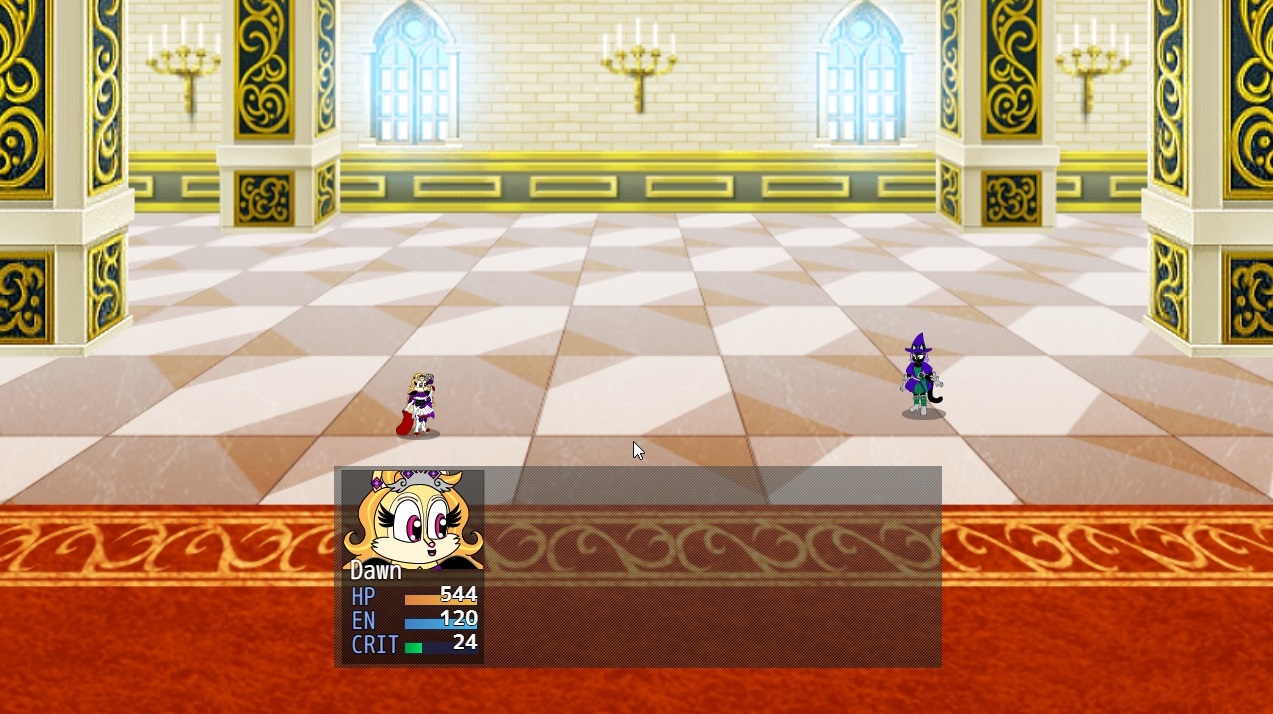
    Actor and Enemy Position Test SRPG Core.jpg

    However, I experimented with Theo Allen's Resolution Based Placement plugin in my file for plugin testing and was able to position enemies on the right. They look too far apart now, I think, but I can make them closer with relative ease.
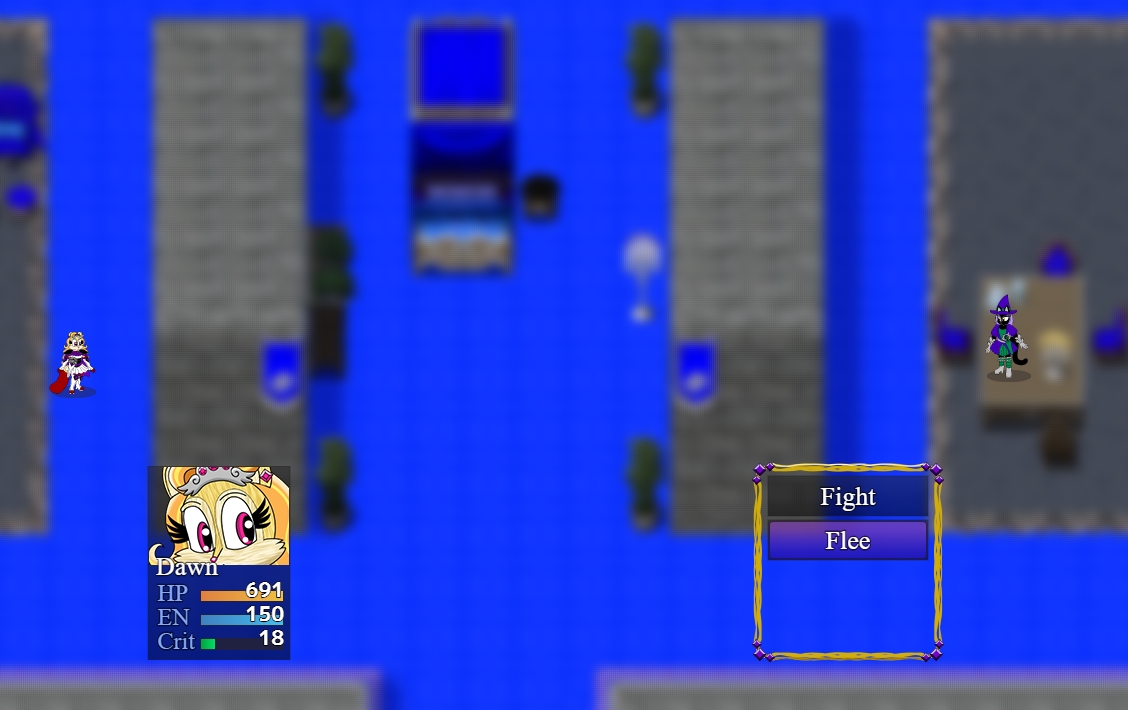
    Actor and Enemy Position Test.jpg

    In both cases the alignment of the player character and the enemy are slightly off, but that's something I can refine by tinkering with coordinates.

    ATT_Turan said:
    How does this even work? If you're doing it SRPG-style, isn't everything on the map? Where does the battle screen come into play? Does it do Shining Force cutins for the attacks?
    Everything is on a map, but the combat is shown closer up, like in Fire Emblem. Here's a video example.

    (set to start just before an example)

    It's similar in my game, except you approach an enemy and then can select from the attacks your character knows. In Fire Emblem, your character attacks with whatever weapon you equipped it with earlier.
    ATT_Turan said:
    If you're trying to finagle stuff with one specific plugin that drastically changes the behavior of the engine, you kinda have to attack the issue from that end. Hopefully there's a plugin parameter in the SRPG Core that defines this, or you'll have to find it in the code.


    It is, in my experience, the standard in the genre of professionally-published JRPGs.


    You're definitely not, but throwing that SRPG plugin into the mix is the monkey wrench here.
    It took a couple hours of tinkering and searching for plugins, but I've created something I'm fairly satisfied with based on the plugins I mentioned above. Now I have options regardless of whether I can break free from FOSSIL (supposedly somebody is working on porting SRPG Core to MZ, but I haven't heard anything from them in several months) or not.
  12. Magenta-Fantasies said:
    Offhand, pretty much every RPG made by Nintendo or Bioware either has the player's characters on the left or in the front facing back at the enemy.
    ...what? Aside from BioWare having made zero games I'd categorize as JRPGs (which is what RPG Maker is intended to emulate), I can also think of zero games where that description fits :guffaw:

    All BioWare games have their combat taking place on the map, and have either an isometric or third-person view. Which BioWare game have you watched that has a separate battle screen with people arranged on the left and right?

    I mean, feel free not to answer as this is kind of derailing the thread, but it seems like every time you explain what you're talking about I feel more lost :biggrin:

    Magenta-Fantasies said:
    I tested Lady Baskerville's plugin for positioning troops. It works with FOSSIL (which I also use to run SRPG Core), but otherwise doesn't work in MZ.
    If you're already using FOSSIL for the one, then I'd consider that to be working for your use scenario. But it's good to know for future recommendations. If it really mattered, it should be a very quick edit - it's probably just changing the format MZ reads notetags in.

    Magenta-Fantasies said:
    It took a couple hours of tinkering and searching for plugins, but I've created something I'm fairly satisfied with based on the plugins I mentioned above.
    Awesome! Good luck with your project.
  13. Mario RPG
    Paper Mario/Mario & Luigi
    Battle Chasers
    Pokemon
    Sonic Chronicles (a Bioware game!)
    Indivisible

    Of course, no this isn't the standard, but it's also not 100% true that games like Final Fantasy don't ever do this. They do, depending on the title, for certain battles, either because it's a boss fight and the map has the boss on the right side of the screen, or because it's a surprise attack. Sometimes, enemies will be on both sides of the player, in a pincer attack.

    It also seems to be a fairly common ask regarding RM.
  14. I'm stumped. I'm getting a JSON error but I can't figure out what it still needs. I've configured all the spritesheets, poses and actions, the only empty parameter is Script Calls. I've also put in the action to call for user and target and the animation call in the skill database, but I'm still getting a JSON error. If I need to attach an example of my set up please tell me what to send, because I don't really know which page would help
  15. SamCherry said:
    I'm stumped. I'm getting a JSON error but I can't figure out what it still needs. I've configured all the spritesheets, poses and actions, the only empty parameter is Script Calls. I've also put in the action to call for user and target and the animation call in the skill database, but I'm still getting a JSON error. If I need to attach an example of my set up please tell me what to send, because I don't really know which page would help
    Is there not a graphic missing?
  16. Holder said:
    Is there not a graphic missing?
    A graphic missing?
  17. SamCherry said:
    A graphic missing?
    Yeah something that the plug in is trying to load when it starts and the files not there.
  18. Holder said:
    Yeah something that the plug in is trying to load when it starts and the files not there.
    I don't believe so, the relevant svBattler sheet is plugged into that configuration and the actor's sheet is loaded into the database.
    • How do I get the enemy to use the SV weapon instead of empty handed?