Zeus Lights & Shadows

● ARCHIVED · READ-ONLY
Started by Zeus81 20 posts View original ↗
  1. Zeus Lights & Shadows
    by Zeus81
     
    This script allows you to display lights effects and shadows.
    There are already a lot of scripts to do that, but my goal with this one is to do something different.
    Thus lights illuminate the night, ie you can set the screen tone to whole black (-255) and lights will act like holes in a mask and will allow us to see the map clearly.
    The shadows on the other hand are not dynamic, lights generate no shadow, shadows must be placed manually, much like on VXace, we can consider that they are all shadows of the sun.
    The shadows are not superposed (which is absurd), but merged.
    The shadows are not above but below all, you can have the head passes in front of a shadow, however characters darken when they walk in the shade.
    The opacity of shadows declines with the brightness of the map, ie no shade from the sun at night.
    Auto shadows of VX and VXace are managed by this script.
    There's also an option to disable them at the very beginning of the script.

    Script
    http://pastebin.com/raw.php?i=VpHHBuaW

    How to Use
    http://pastebin.com/raw.php?i=9bnzSHCw

    Demo
    https://www.dropbox.com/sh/cajvk3wf6ue0ivf/QA9zgrm2Vx


    We can do much more effects than what I shown by using several at the same time or just by changing settings.
  2. I love the initiative on having multi-version support for having one script. I noticed you made duplicate threads for this in each of our scripting subforums so I went ahead and changed them to links that all point here so they can still be visible and you only have one thread to manage.
  3. I may have to change out my light effects now.
  4. After fiddlin with the demo, i was really shocked how good this light effects are. 

    I may have to change out my light effects now.
    No kidding right! I am using khas lighting effects which limits me so bad. Khas lighting effects is pretty much incompatible with a lot of good scripts but i do love how the walls cover the lighting though in khas lighting effects. Any plans in implementing the same idea on how lights gives out shadow effects on tagged terrain ID like in khas effects? 
  5. Yes Khas script has a very good effect with square walls but I don't plan doing something like that.

    I love the initiative on having multi-version support for having one script. I noticed you made duplicate threads for this in each of our scripting subforums so I went ahead and changed them to links that all point here so they can still be visible and you only have one thread to manage.
    Cool, thanks, I have some other duplicates threads like that if you don't mind.

    Or is there a way I can do it myself (eventually for future scripts) ?
  6. If the threads don't have any other posts, just report or PM me and I can put up a link for you. It might actually be better to just have a thread with a permalink, so if you want you can just replace the post with a link to your 'main' thread and request it to be closed, eg.


    This script has multi-version support, see my main thread here:


    http://forums.rpgmakerweb.com/index.php?/topic/16040-zeus-lights-shadows/


    Or you can just leave them as is, there is no problem having duplicate threads for different maker versions as the discussions within them would differ (support etc). I just thought this would be easier in the event you needed to make a revision to the initial thread (eg. to update links or description in the event of a major revision) that it would be easier to have one thread.
  7. Looks like your script is not compatible with Neon Black's terrain tags.

    http://cphouseset.wordpress.com/scripts/cp_terrain/

    There seems to be a problem when I put a terrain tag which makes the player walk below tiles.

    Your script blocks the passage.

    Would be great if you could make them compatible!
  8. Thanks a lot!
  9. I assume the shadow blending and the way shadows only appear above the characters correctly works with overlay pictures?  I'm using ModernAlgerba's Fixed Picture script or overlays, but whenever I place a shadow map on top, well, it becomes annoying because if the head of the character passes by it, the shadow covers them, even though it doesn't make sense in a real world setting.

    Right, so I assume it does indeed work with picture overlays?
  10. I've not tested but I guess it should work.
  11. Out of curiosity, what are the usage terms on this? 
  12. That's written in the first lines of the script :

    Code:
    # Free for non commercial use# Licence : [URL="http://creativecommons.org/licenses/by-nc-nd/3.0/"]http://creativecommons.org/licenses/by-nc-nd/3.0/[/URL]
  13. Fair enough. Nice script man!
  14. Zeus81 said:
    I've not tested but I guess it should work.
    I'll look into this then.  I'd really like it if it did since realistic shadowing is something that'd be nice in a 2D RPG. :D

    Oh, by the way, fantastic script!
  15. Fantastic Work. Is there a fee for commercial games. I looked everywhere for your terms... Also Noobishly though I've read your directions, I can only emit light from one (candle or latern) on a map cause I don't understand how to call the lighting on events... Can you tell me what to do?
  16. Have you tried looking at the demo ?

    There's some concrete example on it.

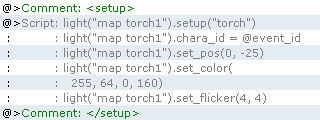
    To setup a new light inside an event you can do things like that :

    0-4005074.png

    About commercial I send you a pm.
  17. New version with a fix for rmxp.

    Code:
      Log Change :    1.2 :      - fixed bug on XP      - added quick overview of functions in documentation
  18. very very nice  :rock-left:   BD   :rock-right:   i like it very much, this is probably the best light system i know.

    is there a way though to make the light not being able to pass certain terrain? (on xp) or make it cut on impassable object?.
  19. is it possible to shut off the shadow portion of this script? I want the lighting system but due to compatibility issues it does a weird thing to certain tileset tiles. Can you tell me whats string and how to modify it?