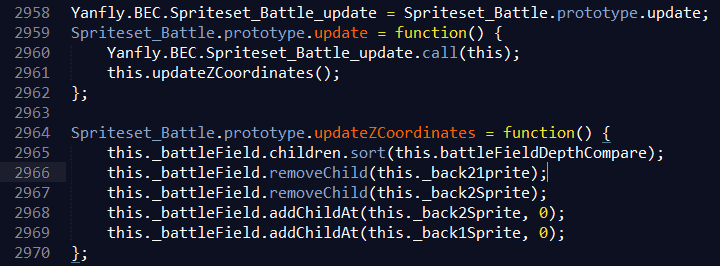
Same issue here. (I got it there instead.)
Issue report.
Plugin Name: YEP_SmartJump
Bug Explanation: Equal Regions are not working. I can jump on a tile from an Equal Region despite starting the jump from outside of said equal region.
Error Report: No error report. The game simply moves on.
Exact Steps on How to Replicate Bug: Move above one of the pillars from the map.
Face down and then use the Jump skill from Harold's skillset (had to do it this way to not bring the ButtonCommonEvents plugin in that). You will jump on the pillar even though it's on region 1 and you're not.
This does not work in the left, right, or up directions, only when facing downwards. (For some reason.)
Sample Project (REQUIRED): Download here
Issue report.
Plugin Name: YEP_SmartJump
Bug Explanation: Equal Regions are not working. I can jump on a tile from an Equal Region despite starting the jump from outside of said equal region.
Error Report: No error report. The game simply moves on.
Exact Steps on How to Replicate Bug: Move above one of the pillars from the map.
Face down and then use the Jump skill from Harold's skillset (had to do it this way to not bring the ButtonCommonEvents plugin in that). You will jump on the pillar even though it's on region 1 and you're not.
This does not work in the left, right, or up directions, only when facing downwards. (For some reason.)
Sample Project (REQUIRED): Download here
Please follow ALL of the instructions.
Follow these Instructions. All steps MUST be followed or I will require you to redo it.
1. Download all the newest updates of the plugin.2. Create a new project. Do NOT just copy over your game project folders. This should be just a stock, empty, new RPG Maker MV project. If I do not see an empty project with Harold, Therese, Marsha, and Lucius, I will not look any further.3. If the project's file size is above 200 MB, remove unnecessary audio and image files until you reach that size. Usehttp://forums.rpgmakerweb.com/index.php?/topic/47985-mvstripper-remove-unused-assets-from-your-mv-project/ if you need some help doing so.4. Install -only- the affected plugins. If you're using non-YEP plugins, do NOT include them. That said, both ATB and CTB are no longer supported by Yanfly, so if you're using them, please remove them from the project used for the bug report.5. Do -NOT- rename the plugins' filenames. They cease to work if you do so.6. Make sure they're in the EXACT order listed on http://yanfly.moe/yep/. The ordering of plugins is important.7. Recreate the error in the sample project. MAKE SURE you are using notetags in the right place and haven't misspelled anything. DO NOT USE SAVES. I need to know exactly how to recreate the problem from start to finish. Simply giving me a save file tells me nothing.8. Archive the project with WinZip or WinRAR. Do not archive it multiple times. It does not compress it further.9. Do -NOT- deploy the project through File > Deployment. Upload the project online to a website like MediaFire.com or or Dropbox. Please do not use a website that involves timers like 4shared, RapidShare, etc. If I am time-gated from downloading the project, I will ask you to reupload it to somewhere else.10. Post the link here and I'll take a look at it.
---
Ouch stupid mistake. no idea how this happened, but it's fixed now.
Thanks! Now it's my turn to fix it!
---
On Yanfly.moe, Visual State Effects is listed between HP Visual Gauges and Absorption Barrier. When placed in that spot, it did not work. However, upon moving the plugin down below Buff and State Core, it began working fine. Is the listed order on Yanfly.moe not the order to place the plugins? I've always used that list as my go to guide on where to place everything, I am not working in a purely vanilla project, so it is possible that the error is somewhere on my end, but I am still wondering if anyone else had a similar issue.
That was my bad, I'll get it updated! :)
---
Plugin Name: YEP_X_VisualStateFX, YEP_X_ActSeqPack2, YEP_BattleEngineCore
Bug Explanation: Using OPACITY on someone with a state animation causes the animation to still linger.
Error Report: None
Exact Steps on How to Replicate Bug:
1.Start up the game.
2.Enter battle with the slime.
3.Have Harold use Super Saiyan in his Magic skills.
4.Have Lucius use Dramatic Battle in his Magic skills.
5.Despite fading everyone except Lucius and the target, Harold's state animation is still around.
Sample Project (REQUIRED): http://www.mediafire.com/download/23dkjod4xhmylmp/Test_Sample3.rar
Bug Explanation: Using OPACITY on someone with a state animation causes the animation to still linger.
Error Report: None
Exact Steps on How to Replicate Bug:
1.Start up the game.
2.Enter battle with the slime.
3.Have Harold use Super Saiyan in his Magic skills.
4.Have Lucius use Dramatic Battle in his Magic skills.
5.Despite fading everyone except Lucius and the target, Harold's state animation is still around.
Sample Project (REQUIRED): http://www.mediafire.com/download/23dkjod4xhmylmp/Test_Sample3.rar
Thanks! I'll get this fixed!