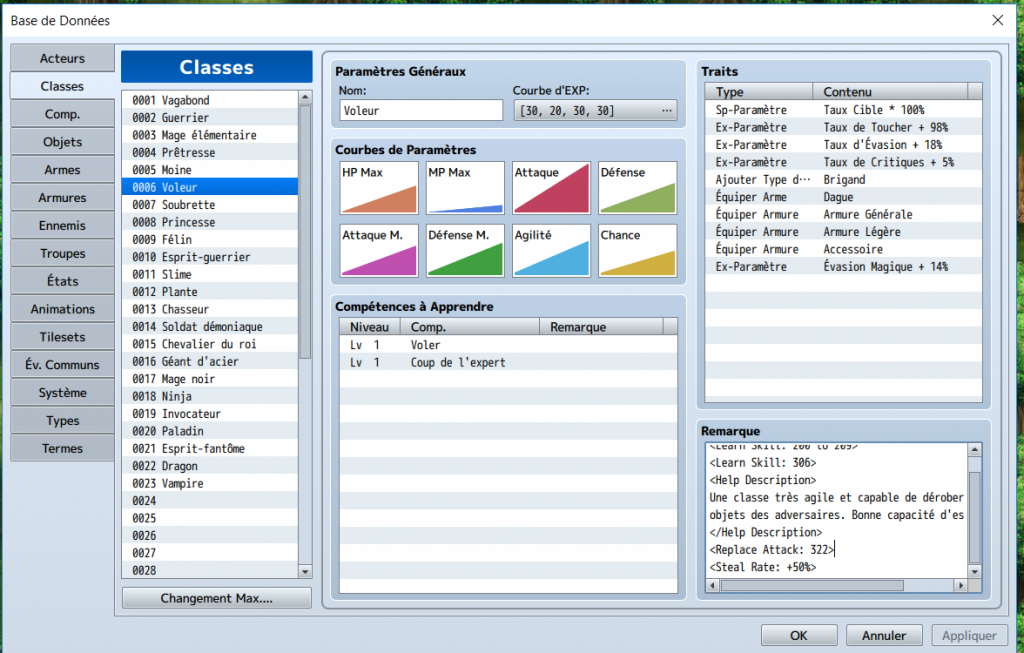
Bug report : stealsnatch plugin. When I put <Steal Rate: +50%> in the class's notebox and then I launch in test mode (or test battle), the screen stays black and never changes. I can't even close the game by clicking on the cross.
The <Steal Rate: +50%> does work when it is on a weapon, the bug only seems to happen when it is in the class's notebox.
I only have yanfly plugins.
Here is a pic :
Thanks, I'll get this fixed by tonight. Good catch!
:)
Just a quick one here, I just started using the aftermath plugin, but i found an issue that the first time any player beats a mob they gain no experience, but it's only the first one... like I start a new game and my main character fights one monster, wins, he gains no XP but every fight thereafter he does... i then later add a second member to the party, they fight a monster, the main character gets XP but the new party member doesn't get any until the next fight... does that make sense?
***Cannot Reproduce Error
Since I cannot reproduce the error, I'm going to ask you to do the following.
1. Download all the newest updates of the plugin.
2. Create a new project. Do NOT just copy over your game project folders. This should be just a stock, empty, new RPG Maker MV project.
3. If the project's file size is above 200 MB, remove unnecessary audio and image files until you reach that size. Use
http://forums.rpgmakerweb.com/index.php?/topic/47985-mvstripper-remove-unused-assets-from-your-mv-project/ if you need some help doing so.
4. Install -only- the affected plugins. If you're using non-YEP plugins, do NOT include them.
5. Do -NOT- rename the plugins' filenames. They cease to work if you do so.
6. Make sure they're in the right order listed on
http://yanfly.moe/yep/
7. Recreate the error.
8. Archive the project with WinZip or WinRAR. Do not archive it multiple times. It does not compress it further.
9. Upload the project online (do -not- deploy it) to a website like MediaFire.com or Mega.co.nz or Dropbox.
10. Post the link here and I'll take a look at it.
Thanks for helping!