Why I will never go back to MV - MZ Editor mapping

● ARCHIVED · READ-ONLY
Started by Avery 28 posts Page 1 of 2 View original ↗
  1. So, without trying to throw shade at anyone, a pet peeve of mine is when it comes to the question “Should I buy MV or MZ?” that there are quite some people who say there is no major difference and so sticking to the cheaper MV is the way to go.

    (If anyone cares: my take is that getting both is the best option anyways, since buying MV in addition basically gives you a GIANT resource pack of nor only the default MV resources but everything the community made editing wise, too).

    For me the defining factor is mapping, period.
    I come from a time when XP was the newest maker and I loved mapping and with VX up until MV the system was not only changed, but limited in a way that had me resent making maps, feeling like the only ways to make really good maps without throwing my PC out of the window was to parallax/overlay map or make tons of custom tiles, which makes mapping a chore.

    There are bits and pieces in my other mapping tutorials about why I prefer MZ mapping, but I wanted to put it all in one place so whenever the question comes up, here is my sorted and thought through universal answer to: “If you want to make pretty maps without too much stress, get MZ”

    Disclaimer: To get to a point where you get the most out of MZ’s mapping system, you will have to invest the time and understand the tilesets, their structure and all that. The help file helps a lot and testing and trying will do you a great favor.

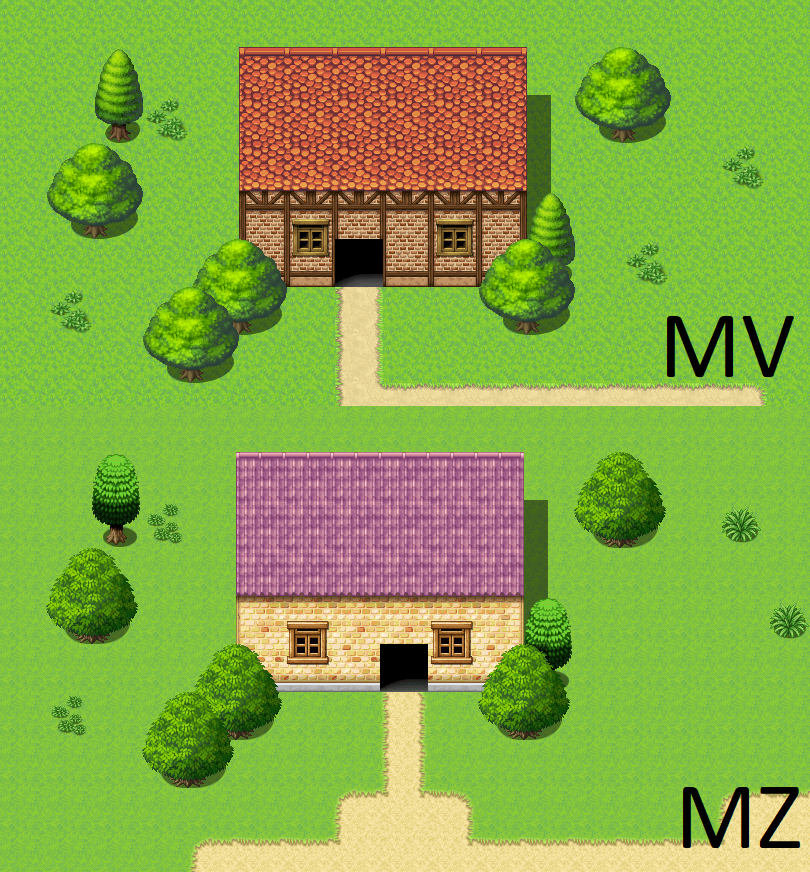
    Let me try to illustrate that on a test map with editor resources first.
    7zS53JT6vXqLXtVMg2iA8VzBTXyBsKrFjKOBhoGtNhrJSiHWh9t05gAg2bsD4WVqyV3xEwZAI3pzz-UgyUSK2fBhTn-Ksz_nrW2PzAiTja4azWZ3q_IL6LP9dggsHTnnpS2Fipe53uHXdCVvts3vtrc
    At this point we could say: yeahhh, that looks pretty close and MV has prettier and more consistent trees, so we are good to go, just stick with MV.

    Well, let me elaborate.
    Let us say I realise that I need a different wall autotile be used for this house for whatever reason.
    Here is what I do in MZ:
    EsSC6ozNhVZ7rKBDpTkbYXD51Yjg4xsDTaVa-uH1a1hOn19naaR8DHZcVWT2EciVft3X2ecQZIH_h-R2yrGiEqWrrENJti69kp75RDdVxZv16De52tNclsZmacKcWIzr6iMcgknLMf_UhwVw3gIQDFM
    MZ allows you to pick the exact of the four mapping layers, and here my house wall is on the lowest layer, as you can see. The slightly transparent items from other layers stay so I know those are on a different layer and I know which tiles I can alter when I work where I am.
    m-erkn1A7hOb0RUE-_gs9o_ZqDaSJD-ncDzNPh_99XnfuN6Wk64xfVQ3q9rWpVBYLUG4fWgmN_P0nYK036T2Gf8dGeH-_dp0Q5xWd6Dw5ThI6OvrPOMxTO27NU5CzQIFaszC-fQZoxGC92Pn9xbjueA
    Filling in the new wall tile might change the surrounding autotiles that were shiftmapped, in out example case it is the one path tile that we’d now have to edit as well, and done.
    Easy enough!
    KxY68MAW6VurJqfxKwHY-0h0_gNow0cdkiYXxea_LeHRP_EEj0czq3ZuC8xeatI5pj0MHpKEiAcThlkdQeFyde-qfzw5zjNMhxc7UNg9OI-kxL2iABWpugNk5YmR1qM5ztWeUr4gfckrCi96CnrnlYo

    For MV, things go differently. We only have 2 layers we can pick manually, the autotile and the B/C/D/E-tile layer. That happens by choosing the according tab on the side:
    sy2yv94NNhaW_qthjEnzGz2wrp0w9J-ArS7nJrKmAf3TxZdlHU0lMlR-3slHCwaMhJMKyYUaxmMzvF1sGumV8uFGNgAQMqUCSKL9KbhxHdnZPhvkl5679mAEFH64Vu0HLKJUzrCEb2tKgxNk4emuFIc
    This means, we have no chance to layer autotiles, something we’ll come back to later.
    But for now, a new wall for our house!

    Easy, right, we select the wall, and use fill in…
    cYlDvCLUuxGKR_HRyNMjDIvG9OS0hdfLqOcxbAfsHk_wCodTujJR62_XtIeJYYkwx2CnU8TuTkXsgyLd_9Dha1TFbPvlhWlp9tPmVvUzhY2f_5F3BErIzYoosxIJxZX_AXmp_VSTX2afnfjwqqQfZAM
    and this happens:
    S_x47vwe-cc8s3wSHshFARmnfJmZ3NiMGZPT64hSTMjkSbnyAaioF4Nc0NH5tSnUfsxyOd6MKzhdtbBB4AXr3kGpIsl6mGBM_1-dyXBjaUcAJAUVdFvjFYn1cIZu2pNoKbXJgbu72_UwKQw3TaFeDf0

    Even though we are editing the autotile layer, the layers are connected, and so it only recognizes the three connected all empty tiles as the same. And here we are at the first BIG thing I HATE about MV. What we need to to change the wall of the house is:
    1. Add the whole new wall as once and loose everything you mapped on top
    EeWlsnA1j9xsqooGDqJqxPtdaeUAL14A7QCDXg1MD2ek0YBWGhUme0sikfnvm4MTrx7l-Bhh4nrzvnrR52WyThg3NlNdYksiHPDke1vy2u-4SZBeriGKbMZUfAJHJzf4V9eBkEW07-iz_ciNrLeR1Q4
    1. Carefully readd every single B/C/D/E piece where it was before… AND also do the shiftmap thing.
    QCbsWlC7zBxbk0iVGtKc0QG-rYqRyUd1J6jBQhmuC-fRA5es41HY1v66-sPq72JgTx6NWXofm3WBECt73sLDz5wFvT8GALeUwUOM49wB6qViG5A_E4MdQ5C5ZvnDp2E3bkftGGMd_zsGPDc595I9GSM
    Now this was a little boxy house… imagine you mapped something more… elaborate.
    This means: any added gound variation kills everything you already mapped. Adding in a new grass variant autotile below the trees? Haha you wish!
    Trying out which wall works best for a house by quickly swapping it out? You rather edit the tileset than remapping the same house over and over again… while the same thing in MZ is just a few comfortable clicks.

    A second example on the same map.
    I wanna cut down this tree here:
    fVJppgOKaUvue2UdflqtJJqRjG2RnAtAbpOemFcRo9hvYDY8k5oXrgSxEvixe6QkfWCodtkrCf0UDyciUsnR2V8EntZiz5vZkGULMxlX7FHZ5WxmD1nW8bmeYWd1YiRHL_aEj9QbwE8oXddjN1yybvg
    For MZ, it is as I showed before:
    4nxRQMk80jtuWvER7Dg6Utmd5fHCCUWYKeSXOoEAi7Hos3VPIUfQY49WCWz21RKoRaEAMZuTXIQXODTKCMa8DHz4Zg2muYvGMs2hUAE-XTj6HEoHFERnGrhC383hMEQMdeMKJd1qluR-kff0ziNeZp0
    I pick the right layer - here two, and can erase it easily.
    1WvKd0MHM6faR2guPaUPzY5i8DEqX_6H_x71KtJXeISp7YWO-bxMQBOY_30rx1BQhIbbiFmWaz0_smnMw_4PgtUqW-XUNbGuIpwWV82VlY9wQqp001DGob2uEeCHhQnvt1zZ49T3sn9DzvOTdfWApzc
    One rectangle with an empty tile drawn and it is gone forever… until I readd it with the same ease.

    Now MV:
    KAZdNBaZwezNxyRxxfRLrHlTy1U4_t1PqabiwzdxXmYE0hX0xOBDB0Mp0vRqogc8ZgibzPzOlB2DCTB4HNrKphhhAXeOOFvpIAFMx3q4COsCrD3ypsftPMdgYq9UMwSm7xBR7ShsvhpYvCWTyjzvYTo
    I can use the empty tile on B to remove everything that is on this B/C/D/E layer, but it cuts the chunk out of the other tree, too, which I will have to search on my B sheet and readd.
    On this scale it might not look too bad, but imagine you have mapped a varied forest and need to move a bunch of trees for passability reasons. A NIGHTMARE.
    Why MZ is superior to MV #1:
    It is a lot more flexible than MV when it comes to swap out tiles you might want to change. Changing a tile does not affect the layers above or below and makes mapping a lot more intuitive and less frustrating.

    We talked about the different layers now, but there are more, well, layers to it.

    First of all, the numbers, MV has 3:
    • the Autotile layer
    • two B/C/D/E layers that cannot be addressed individually, so basically what you map first goes to the bottom, if you add a third thing on top, the lowest vanishes

    Here an example from MV:
    ahxcIXf0g1DO0K21npOpPeZhd3H8mNsvQ2H0v2TPuQM4WYGstgLzSR1EOcLKE0TPdbsWFeBa5_DfjDCc9bWqkWDtTpmxo58GBFilfBF-wVv89WD_CUtDFa0VWtMNvLLbLIhchDiqJTFZPTNEDMGfrS0
    The desk is mapped first, the book second. If I wanna add clutter on top, the desk is lost.

    This adds to the frustration of my first problem, since if I want now my desk back, I first have to place the desk again and then the book. And again, those are default tileset examples. Maybe you have more complicated individualized tilesets and you are also kinda forces to, because for this little cluttered desk example, I would either have to place the last layer as event on top or make an individual tile that has two of the layers merged into one for it.
    This leads to my sheet filling up quickly or me avoiding certain things I would love to have, because I have to jump through hoops to make them happen.

    Because this was an easy hoop, let us get into the “fun” hoops.

    So if it is somewhat annoying to place stuff on the B/C/D/E Layers in MV, the Autotile layers are the ones that break me.
    Because if we are very particular about it, we actually have 4 layers in MV, because we have transparent autotiles in dedicated slots that we can layer over the other autotiles.
    bH45qrOEMFhjJNJs4KHaels8d0odGEO9My7Rgi64BEYtVSXLQaoZ-M3oTbG2dk2ooB97nnY2Uvz0oIr75JezHgOEDEkCu4fv1206NrmI9L8VgY96j8qAw0LJU5nPnYHTz8lSimL780ivmfvL4ImZ2Vc
    Here is an example: the road is not transparent and has the grass around it, so those two are on the bottom autotile layer and the two other grass variations have a transparent edge and can be layered on top.
    My issues:
    1. You cannot layer those transparent autotiles over another, so when you try to marble a more realistic ground together on the map it can be very annoying: to get a transition between those two grass variants on top we would need to make several extra A5 tiles that are exactly what we would need or make a new autotile and shiftmap extensively… plus likely a few extra edge case tiles. And while this might not be the case where you really want these transitions, there are many applications where you will want them, I promise. At least, if you wanna make interesting maps ;3
    2. Water autotiles cannot be transparent, neither the waterfalls nor the water itself. I have a WHOLE tutorial about it, so I’ll just link it and leave an example image here.
    wJH61Mg-xVGdKTn4mXJdl9HxXvOT2ad1dznNLXeMsyx9jsTWnCFPcS271njokgYCr_3QN15UyKnsA8niekeCSe9mmBgX2Zur7IT7N5QBDyc6WGrFzSy2pucAMHFDi9S6V0Q8ozMHKf73iKUPAF1awh0
    While the left is with MZ tiles, it is about all that is possible with MV cause the things I do in my tutorial don’t work with MV’s mapping system.
    -CSVPI7EfLD_8T1cT392HP4tnZuXvIQ81emb4eXvPytsBwSmCMVIZ0XrqGDBxAVDW7SVoRIiFLaa0rhnjciRxyk__sR3XABsBLOlHXX1bOsM8KnmV4RIkEtaip4Z0vqVt2wUsqfUKRQJ-aOrtBqiTkM
    Here is an example from an editor map of mine: you can see how I layered the autotiles to my liking, here I was able to layer rock, path, grass and water in that order without even running into the slightest issue.
    This also affects cave tops, that can now be round and have ground below them that is just mapped on its own layer!
    lnr9xQIJwlR1bgNCxE3FObFGAw36Fet7TyRGPQ19IPfckQUJcHB4XCFQvIUeLTTfIMv8VKsgwPR8kS4evvA7mhQ2x0T2MRdkjseQg6gUpmrOAaNLLxkg9D3YoR706xLrgueyOn_rCWDCViYfGEGCm8M
    For this sight you would have had the round edges have to be placed on B/C/D/E and not be part of a cave top autotile.


    1. Autotiles can only be below the B/C/D/E Layer.
    Let me give you an example:
    9DVSl6eYz0qKydJUlh8VRhMPy4LJm-v6VI3xF9dQGV6SZ1Y4fK__5cixD01eEbphOQ7_sR_Mmj_5zPCVQt0wZDwwfZFD1Ui7k3KFiTjVTagrpem2wLcmP8ZUlI_kMDcpq2FrQ8h3VGwbwbB7d3mL7Xk
    This does not work in MV, since you cannot place an autotile (here the vines which were turned into an autotile to save a lot of tileset space and allow for any shape), again forcing you to set up more and more specific.
    Other uses would be an animated water top with objects below, tileable spiderwebs,....


    Why MZ is superior to MV #2:
    Autotiles are a lot more flexible and allow for dynamic and intuitive mapping. A lot of things you can do with slightly edited tiles in MZ are only possible with tons of very specific tile edits that will quickly fill your sheets or with overlay/parallax mapping.

    And my whole conclusion:
    MV has a mapping system that is a lot less intuitive and limiting, if you want the same map quality, you will
    1. spend tons of time in graphic programs to make the one tile you need that the engine does not allow you to map that way
    2. have to remap things over and over if you are changing things.

    It is just not fun.

    To end it, pulled from my tutorials, those are MZ editor maps that would have me try to jump out of the window if I tried to recreate them in MV... transparent autotiles, using all the layers to their fullest extent and a lot less stress when trying to adjust or change things cause I can change them without ruining the layers above and below them.
    AnFvfJzfNWfMKiePBP9ecZhS2YczMAAhEW9BvkdxvX4001iBRacnoWKBj6RVqWsl9DVhA7WTKITuKu5VgxU3l3pzEiuFNQ6uQbXB0zFwMl1td6MV8AfDxm0p4WCtyNLqqfWkvujI0iBzlFQjfScEgAI
    jQCIduH_2ELUnk9RUtIJQ1prSG01pL_rb9k4v1-DGr8Fxa4n9ixTDDQf0C3cygUQ4gi07A1Q9RfFOrX93WqKycLGpx-nM5gfZlLmzOy67ddhHqAMZ6KZzCs2fWt3hCQshsUZH1cuQRvkju6SXmHn7xc
    sLXI5llitgGcpudXvPJy9CM-LHnW_PIdSb1zmq6sqstW8eTfO-TQwYNKN6fJy8BvH3OK7xdk5W6aZdWdCqMp0qo_xRR3Tm2SnUwx2GS5EjdKUU9UMcBqEElTCj8Ix71JWuYX5Akf_MhBmFOKiyspltc6v9hHufgzuRO6O0MaG6IS4jRidBc6m-w77vpurkKGNSBQPPHixTiEWSZZRM8-Vq3n3Nsm4LiY_BgwvZ43Kv9VNaQMOufWvJxpbvgidWPgzGcKZomVAqxvbvTk3BBwfTg5hc1_cwo9_aujhE1ageE7n8

    Did I miss something? Let me know!
  2. Solid post. I'll stick to MV for mostly plugin reasons. (I despise Action Sequencing in MZ).

    MV Mapping is a little more inconvenient, but I dunno... Works well for me. The manual layers are of course great, but to me it's just a minor inconvenience tbh.
  3. Thanks for this! I had a suspicion that if I asked you about it on your status you might run with it, and you've met my expectations :biggrin:

    However, I think an important thing to add:
    Avery said:
    (If anyone cares: my take is that getting both is the best option anyways, since buying MV in addition basically gives you a GIANT resource pack of nor only the default MV resources but everything the community made editing wise, too).

    If you have both, you can open your MV project in MZ and just use it as a map editor while preserving your use of MV plugins or whatever else you might like about it.
  4. I guess one of the reasons Avery was able to feel the difference between mapping with MV and MZ is that she used XP at some point in time. Having those 3 separate layers plus the event layer made a huge difference for devs. If people got used to VX or VX Ace before jumping to MV but never went through XP, I think they won't mind using MV. It's the only thing they know so why would they complain about it?

    I also suspect there is a chance of meeting people that are terrible mapping stuff with XP or MZ, or they just end up hating it, but feel at home using VX Ace or MV. Probably this happens because not all brains are wired the same way, so to say.
  5. I do love MZ layering system, as well for the effeskeer animation to make
    cooler things than MV animations, but while they both allow parallax, it
    doesn't make much difference, if you go editor tiling, I understand.

    I stick in MV because of the plugin reasons like SGHarlekin said, but also
    I'm more familair with the coding for MV, and don't know how to port some
    over to MZ as I dont own it.

    I think everyone has their own opinion on it, but all of them are true,
    layering is a better mapping wise choice than MV auto layering.
  6. For me it is the fact that MZ allows me to do really good maps without parallaxing, while in MV I personally feel like you can get a lot less close to what parallax can do with editor.
    No shame if you are okay with that limit and you still can good stuff in MV, but those extra few percent of beauty that can lift a map so much get really annoying to get if you try to make them in MV with just the editor - plus the inconvenience when it comes to fixes and changes.
    And while I can parallax, being able to create maps that are (nearly) as good in the editor is for me the much more convenient path.

    And mapping - again, for me - is such a huge part of making a game, and something that I'll have to do so much over the course of a game that I personally rather work with/around the plugin difference than to endure MV mapping for the whole project ;3
  7. I'm surprised by how a lot of you are freestyling maps and dungeons on the fly.
    some of the originals are still paper outlining the old style D&D dungeon crawlers.

    I prefer the mapping style (especially with custom materials) with the older makers engines.
  8. MZ is a pretty good map editor for MV projects, that's for sure.
  9. I once made a game in MV and hated every second of it due to this issue (as well as some other inconveniences). You don't know I happy I was that MZ went back to the good old manual layering.
  10. 100% agree. I had hard time to go from MV to MZ mostly because of the plugins I bought, but now I would not change that decision to jump to MZ. MZ is better in almost every way, the only thing where MZ sucked was tilesets for me, but @Avery fixed them so they're not ugly and I can finally use them! Also, we can use MV's tileset as well, so... Yeah, MZ all the way.
  11. I could never go back to MV for the exact same reason. Adding the manual layer buttons was a game-changing update for me. The newer features like picture placement preview are invaluable too.
  12. Trihan said:
    I could never go back to MV for the exact same reason. Adding the manual layer buttons was a game-changing update for me. The newer features like picture placement preview are invaluable too.
    I'll add movement route preview to that too.
  13. Sword_of_Dusk said:
    I'll add movement route preview to that too.
    There's this plugin for MV
    Visual Move Route - Utility for RPG MAKER MV by BlueMoon
    Personally I don't see myself ever moving on to MZ. I have multiple plugins that only have MV versions like diagonal pathfinding, ZE free jump, and Mighty Mouse. Also most SRD, Moghunter, and Galv plugins didn't get ported to MZ. To migrate my project would cost me close to $200 in the cost of MZ and plugins, and with MZ getting older too I'd rather just move on to Godot if no good new replacement comes out in a few years.

    If I really feel like I need MZ's map editor I'll buy it for that to use for a MV project as other people have said.

    Another thing is I regularly dig into and make patches for the plugins I use and since I can't do that with VisuStella that's a big strike against MZ.
  14. AquaEcho said:
    There's this plugin for MV
    I know of that one, but it doesn't beat having the functionality baked in.
  15. Hey new game makers out there.. pay attention. @Avery is giving some very solid advice here. :)

    -MIA
  16. I don’t use MV anymore because the layering is much harder to work with.

    Edit: I changed my mind. Lol
  17. I'm glad MZ brought back XP best feature. that made a huge different with making good maps three layers plus the event layer.
  18. My first experience with RPG maker was MV. In my humble, very novice, experience: MZ is what MV should've been. It's essentially MV 2.0 and is superior in every way, unless you prefer the plugin library of MV. Even then, I prefer how plugins work in MZ and the plugin library is ever expanding so I personally would never use MV again. MZ is just better for me. Stressing that "for me". And apparently Avery too! :biggrin:
    That said, I prefer the sprites/tilesets from MV way more. Though MZ has some nice stuff too, especially that Trinity pack...
  19. The excellent trinity pack is actually a dlc made of a bunch of extra assets made for the console version of MV, but that was somehow used for the marketing of MZ.
  20. Fortunastreet said:
    The excellent trinity pack is actually a dlc made of a bunch of extra assets made for the console version of MV, but that was somehow used for the marketing of MZ.
    I know that the trinity pack is MV assets, the pack itself says so. It was used to market MZ because the assets are good and MZ/MV are stylistically interchangeable. That pack was the main reason why I got the... whatever the largest bundle steam had at the time for MZ. Why would they not use it to market MZ, when it's already been marketed for MV, and people that don't have the assets already (like me) benefited in getting it with MZ.