What happened to iOS export option?

● ARCHIVED · READ-ONLY
Started by MiltonSSR 65 posts Page 2 of 4 View original ↗
  1. mvstone said:
    Something is not quite working for MZ.
    I have created a vanilla MZ project to my iPhone 11 Pro (using steps above)

    It builds with no errors, and I can open the app in iPhone, but it stays blank (black screen) forever.

    I then have tried this plugin suggested here to see if it would work, but same blank screen (XCode's debug navigator shows about 5% CPU usage and 33.4MB memory usage)

    I find it unstable as well. Most of the time I have to tap the iPhone screen then It starts to work. And slow loading problem seems to persist sometimes even with the fix above. I haven’t tried with any iPhone higher than 8+ so maybe it is also related with model
  2. mvstone said:
    Something is not quite working for MZ.
    I have created a vanilla MZ project to my iPhone 11 Pro (using steps above)

    It builds with no errors, and I can open the app in iPhone, but it stays blank (black screen) forever.

    I then have tried this plugin suggested here to see if it would work, but same blank screen (XCode's debug navigator shows about 5% CPU usage and 33.4MB memory usage)
    What version of iOS are you using?
  3. HoofedEar said:
    What version of iOS are you using?
    My iPhone 11 Pro is running 13.6.1

    Maybe its something to do with WKWebView and WebGL? I can run the game just fine if I host it on a web server and play it over Safari.


    Memo to myself:
    Try inline media playback setting
    WKWebView WebGL performance is lower than Safari
  4. Hey I got it working mostly, but I still need to "tap" the iphone before it gets loaded (but loading is super fast on my iphone)

    Just add this line after webViewCofig declaration
    webViewCofig.mediaTypesRequiringUserActionForPlayback = []
  5. mvstone said:
    Hey I got it working mostly, but I still need to "tap" the iphone before it gets loaded (but loading is super fast on my iphone)

    Just add this line after webViewCofig declaration
    webViewCofig.mediaTypesRequiringUserActionForPlayback = []
    Is this for MZ or MV?
    I'm still getting the "Can't find variable: WebAssembly" error when running it
    Okay got the app installed, running, but the screen is blank, but music is playing!
  6. MiltonSSR said:
    Looks like MZ doesn't come with Andrios/iOS export option in deployment menu.
    I tried to export to Web and use Cordova to build into an iOS app but that doesn't really work.

    Still trying to figure out how to make this work for iOS. Any input will be appreciated!

    edit: the old method that used to work with MV:

    edit 2: a more up-to-date iOS exporting workflow in Japanese:
    https://kurotsushirou.com/2019/12/10/rpgツクールmv-スマートフォンアプリ iosアプリ/

    edit 3: still no luck. I have tried the following 2 ways to get around the XHR issue but game stucks at black screen after loading sign with BGM music being played:

    1. Using cordova-ios@6.1.0, and plugin @globules-io/cordova-plugin-ios-xhr

    2. Using cordova-ios@5.1.1, and plugin @cordova-plugin-wkwebview-engine, along with the XHR fix at https://github.com/TheMattRay/cordova-plugin-wkwebviewxhrfix

    edit 4: looks like this is less of a RMMZ issue but Cordova/iOS one. More context: https://stackoverflow.com/questions...va-ios-with-cordova-plugin-ionic-webview-or-c

    Also, this issue on Apple side prevents testing on iOS simulator: https://bugs.webkit.org/show_bug.cgi?id=191064
    Any more luck on this? I'm having the same issue you are (black screen with BMG) but using native Swift/not Cordova. So this may still be a RMMZ issue
  7. Hey guys. I tried exporting my MZ project to android with this old altimit method here
    Exporting to Android (MV Android Client)
    It still works but it has same blackscreen problem. I need to tap the left side of the screen to make the screen appear. otherwise it is just black screen with music playing.
    Is there a working fix currently?
    I also tried cordova CLI method but fail miserable because at the end it says the directory is not a cordova project, probably because there is no config.json in the MZ deployed folder.
  8. DigitalWF said:
    Hey guys. I tried exporting my MZ project to android with this old altimit method here
    Exporting to Android (MV Android Client)
    It still works but it has same blackscreen problem. I need to tap the left side of the screen to make the screen appear. otherwise it is just black screen with music playing.
    I wonder what is causing this blackscreen problem?
    I tried testing with other versions of PixiJS and it still produced the blackscreen with BGM playing
    This is super frustrating, especially since it seemed that RMMZ was being pushed for mobile-friendliness

    EDIT: Also I'd like to point out how many views this thread has compared to others. This is definitely something people care about, I hope we can all work together to discover a solution :)
  9. HoofedEar said:
    I wonder what is causing this blackscreen problem?
    I tried testing with other versions of PixiJS and it still produced the blackscreen with BGM playing
    This is super frustrating, especially since it seemed that RMMZ was being pushed for mobile-friendliness

    EDIT: Also I'd like to point out how many views this thread has compared to others. This is definitely something people care about, I hope we can all work together to discover a solution :)

    maybe it's just bug from the MZ itself? Maybe it should be reported to the developers so they can fix it.
  10. DigitalWF said:
    Does this also have black screen issue?
    No, i have ported some test projects of RMMZ with it
  11. Krimer said:
    No, i have ported some test projects of RMMZ with it
    It's a bit complicated with my lack of understanding of java. In altimit I just copy paste the www folder to the asset folder. Can I just do the same with your method?
  12. DigitalWF said:
    It's a bit complicated with my lack of understanding of java. In altimit I just copy paste the www folder to the asset folder. Can I just do the same with your method?
    Yes, usage is the same as altimit. Here, try it if its work for you :)
    link google drive
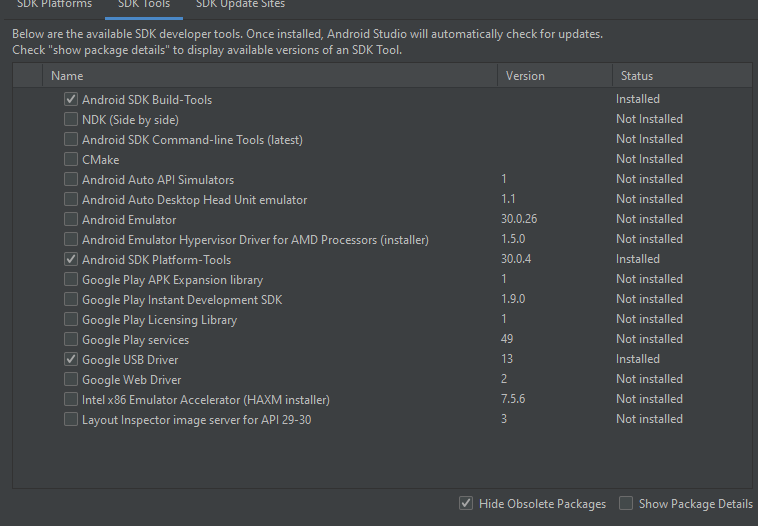
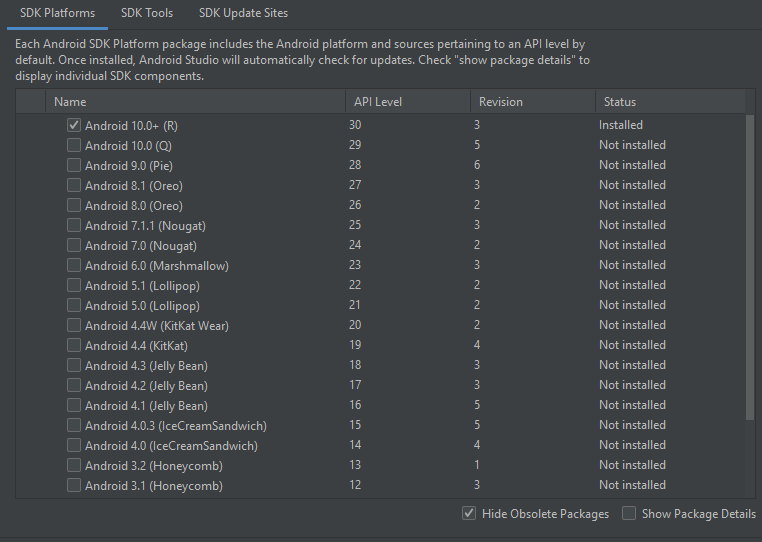
    used with latest android studio, settings for SDK manager was like this:
    screenshots
    e51833e6eedcaafd88382f16039c9f8e.png
    a0a45d736a4007da726fa5e082b778aa.png
  13. DigitalWF said:
    Hey guys. I tried exporting my MZ project to android with this old altimit method here
    Exporting to Android (MV Android Client) I need to tap the left side of the screen to make the screen appear. otherwise it is just black screen with music playing.
    Ok so I was able to get to this point on iOS using a completely blank project with no plugins.
    It runs, but you need to touch the left side of the screen for the picture to come up.
    Perhaps there is some way to simulate touch on that side of the screen at startup to "trick" it into working?

    EDIT: can someone test using this JavaScript in RMMZ to run at the start of the game?
    Code:
    document.getElementById('elementID').click();
  14. HoofedEar said:
    I'm still getting the "Can't find variable: WebAssembly" error when running it
    As you figured it out, XCode simulator doesn't work well with MZ (MV works but slow). Needs to test this on actual device.

    HoofedEar said:
    EDIT: can someone test using this JavaScript in RMMZ to run at the start of the game?
    I tried super simple version, but didn't quite work. Since the canvas is created by JavaScript, it needs to be triggered AFTER everything is loaded.
    I haven't had time to dig further but will try to find some time next week...
  15. I just tried cordova CLI build which is not easy to do at all(thankfully someone from group helped me) and it does not have blackscreen problem. Krimer also made export template that he said doesn't have this problem. But I haven't got time to test it
  16. mvstone said:
    I tried super simple version, but didn't quite work. Since the canvas is created by JavaScript, it needs to be triggered AFTER everything is loaded.
    I haven't had time to dig further but will try to find some time next week...
    Ah that makes sense, because I noticed that the black screen only goes away if you tap outside the game window itself. So either the left or right side of a basic RMMZ project, so it’s definitely something we will have to tweak within the app itself. I’ll look into trying to simulate touch when I get home on Sunday.
    Thanks for testing that out for me! And for your guide on how to get an app working haha we will get this figured out for a proper app experience!
  17. Okay so I just wanted to respond to this thread with a better description/example of what we are stuck on, in case anyone wants to jump in with ideas about what could be causing it.

    So to help test my theory about having to tap outside of the game itself to get it to display graphics, I changed this part of the index.html:
    1599443323995.png'
    background-color from "black" to "white"

    This allows me to see the bounds outside of the game itself, to prove that it must be touched in any area that isn't in the game window itself.

    Here is a video to illustrate this:


    Once the game comes up, it runs just fine!
  18. HoofedEar said:
    Okay so I just wanted to respond to this thread with a better description/example of what we are stuck on, in case anyone wants to jump in with ideas about what could be causing it.

    So to help test my theory about having to tap outside of the game itself to get it to display graphics, I changed this part of the index.html:
    View attachment 159618'
    background-color from "black" to "white"

    This allows me to see the bounds outside of the game itself, to prove that it must be touched in any area that isn't in the game window itself.

    Here is a video to illustrate this:


    Once the game comes up, it runs just fine!

    I've try using other method and it does not have the blackscreen tap problem.
    I guess its not MZ, but your method to export your game to mobile.
    you can use crodova too for IOS, but I have no tutorial for it.