Say, V, do you think you could help me out? I'm interested in a script to show non-romantic relationships (friends, brothers-in-arms, family, etc.) Is it just a matter of changing the terms set down in the script, or would such a thing be more complicated?
V's Relationship/Bio Window v2.4
● ARCHIVED · READ-ONLY
-
-
No it would not be hard at all. This script currently has options for that. Check the module at the top of the script.
And actually SpaceManFive has commissioned me to rewrite the entire thing, the new version will be available for public use by the end of the week as long as there are no set backs. -
All right, I can certainly wait a week. Especially as I think I could use your script in several projects. :thumbsup-left:
-
How can I make a conditional statement in this script? for example I want to know if it's location is correct so that I can teleport to it's location
-
That is not an easy question. So there is no easy way to answer it.(As presented)
By you asking what your asking, I know you do not have the know how to make it work properly, even if I did tell you where to put it. Besides that, if you had read my terms(like you should have if your going to use/abuse someone script) you are not allowed to edit my scripts without permission, and that sounded more like a "how to..." than a "can I..." However I am currently rewriting this script and plan to make it a lot more functional and Dev friendly. -
oh sorry wrong question what i mean is , how can I use it in a conditional branch? like this:
Conditional branch: current_relationship_location( "Eric" , "home" )
@>Transfer Player
Else
@> -
Yeah as of right now, there is no script call to get that. But I will be adding in a lot more.
The new system is going to be so much better, thanks to SpaceManFive for funding, thus allowing me to expand it closer to the way it should be. -
I love this script, but I am having some trouble using it.
I got this error (attached) when I tried it by myself, and then got it again when I simply copied and pasted your dragon girl one for testing. After comparing our scripts where the error occurred, I noticed we both had the same one. Why is this happening?
-
Just wanted to know, if you have now a new version of the script made? Still looking for a way that you can have the same background as the main menu.
-
Guessing there were setbacks or the person who commissioned V decided not to have it made public or V simply just forgot about this. Shame.
-
I was working on a game with him just before his disappearance. Last I heard, he had a baby then his router broke. I wish i had a way to get a hold of him, maybe id be able to help him out.
-
I'm the person who commissioned, and I wanted it to be public. :\Guessing there were setbacks or the person who commissioned V decided not to have it made public or V simply just forgot about this. Shame.
He certainly didn't forget, as like JoePro said, he had a kid and then got hit with all kinds of problems like internet breaking.
I hope he's alright, as I haven't heard back from him in a while. -
I'm having this exact issue too. Does anyone know what causes it?I love this script, but I am having some trouble using it.
I got this error (attached) when I tried it by myself, and then got it again when I simply copied and pasted your dragon girl one for testing. After comparing our scripts where the error occurred, I noticed we both had the same one. Why is this happening? -
I know V is away, but I am hoping someone else that uses this script can help.
I am not using the leveling function. I would like to know the range of numbers and how they show on the gauge.
For instance does it go from 0-100 with 100 being max? I ask because I am making the starting relationship number with that character depend on what zodiac sign the player chose. So I need to know what range of values I can use for the base score. Can set the variable to negative? What's the highest value I can set?
And If I'm dumb and just missed it somewhere in the code, please forgive me. I'm a noob to programming.
Thanks! Screenshot of the code in question behind spoiler
Spoiler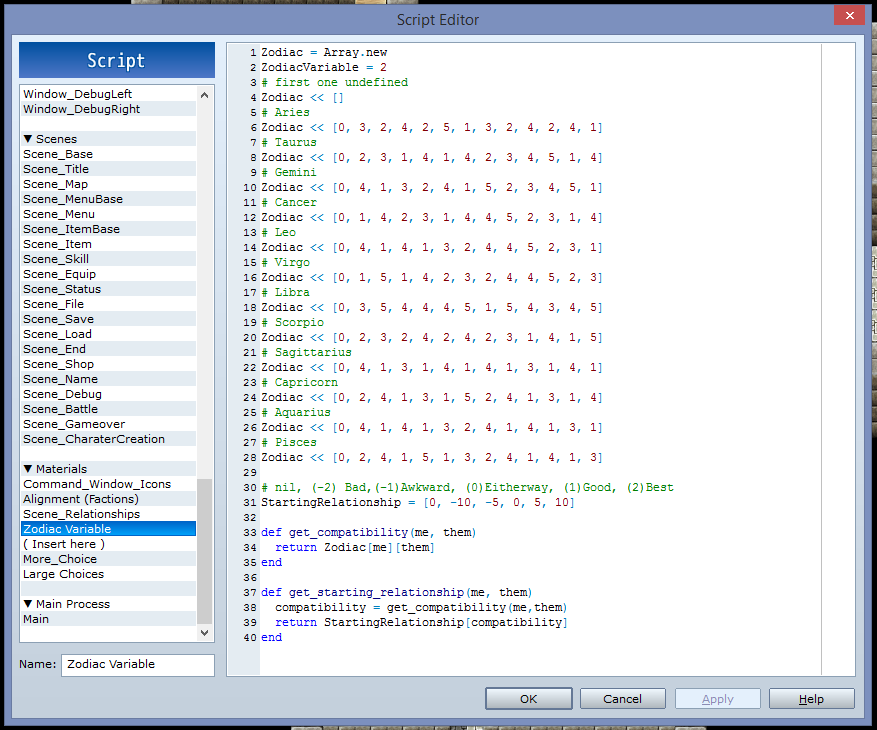
-
Well i guess i can try to help, he would do it for me.
The error problems are because the demo set up is different then the updated scripts set up. Try looking over the set up in the script.
As for the max number you can always just add to the corresponding var until you reach it. But at a quick scan though the script, i think its 100 i could be wrong though. If not just try adding to it like i said first. -
@KataiKit
There are two variants for the gauge displayed.
1. If the 'Use_Polarities' is set to true:
- If the variable's value is 50 for the relationship, then the gauge will have a small white part in the middle.
- If it is higher than 50, then the gauge will start to fill toward the right side with red color.
- If it is lower than 50, then the gauge will start to fill toward the left side with blue color.
*You could use this to show "negative values" if you need.
2. If the 'Use_Polarities' is set to false:
- It directly takes the value of the set up variable for the relationship, meaning 0 is the left-most side and 100 is the right-most side of the gauge.
In both cases 0 is the minimum and 100 is the maximum value for the gauge. -
This script is amazing! Totally what I've been looking for, thanks a lot for the good work!
I was wondering, can you use portraits instead of facesets? -
Awesome, thanks a bunch! I had found out 50 was neutral, but hadn't figured out the min/maxes yet.@KataiKit
There are two variants for the gauge displayed.
1. If the 'Use_Polarities' is set to true:
- If the variable's value is 50 for the relationship, then the gauge will have a small white part in the middle.
- If it is higher than 50, then the gauge will start to fill toward the right side with red color.
- If it is lower than 50, then the gauge will start to fill toward the left side with blue color.
*You could use this to show "negative values" if you need.
2. If the 'Use_Polarities' is set to false:
- It directly takes the value of the set up variable for the relationship, meaning 0 is the left-most side and 100 is the right-most side of the gauge.
In both cases 0 is the minimum and 100 is the maximum value for the gauge. -
Amazing script easy to use.. Only issue is the instructions are very unclear.. Besides that its real simple.
-
Hello everyone. Thanks for all the concerns. Im sorry for the absence. I have looked over all of the issues and plan to fix these along with releasing a the new upgraded version very soon. Thats again for your continued support.