Virtual Buttons and DPad

● ARCHIVED · READ-ONLY
Started by Aloe Guvner 229 posts Page 4 of 12 View original ↗
  1. Yes, I already tried in an empty project, using only these 2 plugins and I get the same error, even reversing the order.
    Another curiosity, I just tried to paste the script of the scene in your plugin, inserting:

    Code:
    function Scene_PretitleMap() {
        this.initialize.apply(this, arguments);
      }
     
      Scene_PretitleMap.prototype = Object.create(Scene_Map.prototype);
      Scene_PretitleMap.prototype.constructor = Scene_PretitleMap;
     
      Scene_PretitleMap.prototype.initialize = function() {
        Scene_Map.prototype.initialize.call(this);       
        DataManager.setupNewGame();
        $gamePlayer.reserveTransfer($.MapID, 0, 0);
      }

    and I do not get any more error, it seems that the scene at least apparently is declared, only that I still do not display the keys ...
    I think that does not depend on other plugins being that I receive errors even without those, do you want the same list of my plugins?
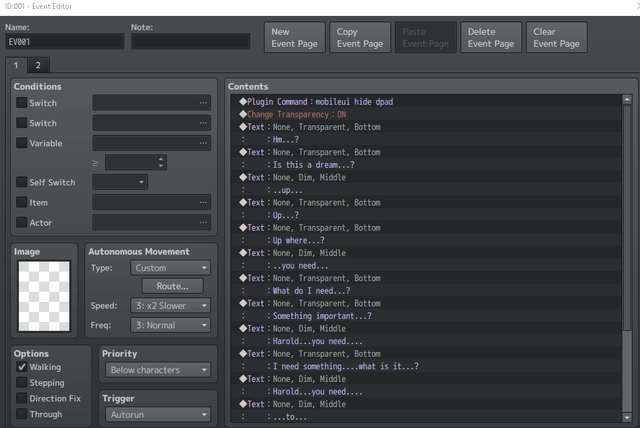
  2. @Jenova I got around to testing your issue, and I actually don't see the same behavior. My event is below, which is an event on the map that the player starts on (tested both Autorun and Parallel). For me, the controls stay hidden during the entire dialogue, and only appear at the end. My "fade duration" was set to the default of 20 frames.

    Spoiler
    2018-11-15 22_06_22-ID_001 - Event Editor.png

    However, if the fade duration is set to lower, then it's possible you may see it pop up (because a lower number means a faster fade-in which can become noticeable). I created new plugin commands for this exact scenario, please see this comment. You can use these plugin commands to instantly hide the UI on the first command of your autorun event and then show it afterwards.

    (as a side note, don't set the fade duration to null or 0. positive integers only :) )

    @ArtikDart All of your troubleshooting was good, thank you for the effort. I have found the issue, and actually it is only due to how the HIME plugin is written, your setup is correct.

    The HIME plugin hides the variables inside a closure, so the variables cannot be accessed from outside, this includes the `Scene_PretitleMap`. In order to allow this, you must make the following edits to the HIME plugin:

    1. Replace every `$` with `TH.PreTitleEvents`
    2. Remove the line which looks like `(function ($) {` it is near line 103
    3. Remove the last line of the plugin which looks like `})(TH.PreTitleEvents);`
    I did these 3 steps and it worked fine for me afterwards.
  3. Aloe Guvner said:
    @Jenova I got around to testing your issue, and I actually don't see the same behavior. My event is below, which is an event on the map that the player starts on (tested both Autorun and Parallel). For me, the controls stay hidden during the entire dialogue, and only appear at the end. My "fade duration" was set to the default of 20 frames.

    Spoiler
    View attachment 102634

    However, if the fade duration is set to lower, then it's possible you may see it pop up (because a lower number means a faster fade-in which can become noticeable). I created new plugin commands for this exact scenario, please see this comment. You can use these plugin commands to instantly hide the UI on the first command of your autorun event and then show it afterwards.

    (as a side note, don't set the fade duration to null or 0. positive integers only :) )

    Here is a video of what is happening:


    Here is my setup:
    Setup (Plugin and events)


    Could it be that I am testplaying the exe and not on my mobile device?

    Thanks!
  4. My friend, you were fantastic!!! I really appreciate your help and I thank you so much.
    Now it works perfectly. You were very kind to help me :)
  5. So far my only problem with this has been remembering to set specific scenes, and hiding in cutscenes. Is there an easier way than re-entering the plugin command after every dialog? I entered the hide command at the beginning, but it seems to reset every time there is a message box.
  6. @Jenova Sorry I missed your reply! I got unsubscribed somehow from notifications on this thread.

    I can't access your images of the configuration, can you try reuploading them?

    @4nzkiwi it was a difficult design decision, because having the UI open on a message box can be ugly especially because the windowskins are somewhat transparent. So by default, the UI is hidden during dialogue and reappears after (no plugin command needed). That new plugin command comes into play if you need to hide the UI immediately as opposed to the duration set in the plugin parameters.
  7. Oh ok! Still a really great plugin :D
  8. Aloe Guvner said:
    @Jenova Sorry I missed your reply! I got unsubscribed somehow from notifications on this thread.

    I can't access your images of the configuration, can you try reuploading them?

    @4nzkiwi it was a difficult design decision, because having the UI open on a message box can be ugly especially because the windowskins are somewhat transparent. So by default, the UI is hidden during dialogue and reappears after (no plugin command needed). That new plugin command comes into play if you need to hide the UI immediately as opposed to the duration set in the plugin parameters.

    I actually had the images hosted on my personal website and I moved hosts and had to make the tough decision of getting rid of Cheverato. With this being said, I did not have a physical copy, so I just uploaded what I remember doing.

    As for now, this isn't a real #1 priority for me, so its ok if you are busy or take your time looking into it. :)
  9. hello guys, I have a problem with this plug in, I have version 1.40 of the plug in, I created the mobileUI folder with images but then I do not know how to go on

    hel me pls :)
  10. @nzell717 What configuration have you done so far? (plugin parameters)
    Please show a screenshot of your issue
  11. hello, i don't know if this is an error, it is often stuck with the up button and the solution to fix it is to press it again ... every time you go to another map, it will repeat that error once again
  12. Someone else reported this too, so it must be a real issue. I was never able to replicate it, so can you do the following:
    1. Confirm you have the latest version of this plugin
    2. Confirm the issue happens if only this plugin is on
    3. Share a screenshot of your configuration (plugin parameters)
  13. I have two-thirds of what you said, even on iOS and Android, the same error, screen capture can't help you understand the problem better. I think you should check on a mobile device
    That problem is located in the D-pad button
  14. I'm facing the exact same issue as TenTranVN. The D-Pad often get stuck in an arrow key if I pressed it long enough.
  15. There has been no news since the day I reported the error :v
  16. @TenTranVN @pedrohp3 I never fixed it because I wasn't able to re-create it on my side, if I can't re-create then it's very difficult to find the root cause. Do you have any suggestions for how to re-create the issue?

    Nothing in programming is random, there's always a cause, so what specific steps do you take when the issue happens?
    Like:
    1. Walk right 5 steps
    2. Hold up for 2 seconds
    3. Transfer to another map
    4. Talk to NPC
    ... steps like this, if you can provide the exact steps to re-create the issue then I should be able to find it and fix it :LZSsmile:


    @miani Maybe, but what would the analog stick actually do? RPG Maker MV by default only considers if a button is on or off, it doesn't have any function for analog.
  17. Aloe Guvner said:
    @TenTranVN @pedrohp3 I never fixed it because I wasn't able to re-create it on my side, if I can't re-create then it's very difficult to find the root cause. Do you have any suggestions for how to re-create the issue?

    Nothing in programming is random, there's always a cause, so what specific steps do you take when the issue happens?
    Like:
    1. Walk right 5 steps
    2. Hold up for 2 seconds
    3. Transfer to another map
    4. Talk to NPC
    ... steps like this, if you can provide the exact steps to re-create the issue then I should be able to find it and fix it :LZSsmile:


    @miani Maybe, but what would the analog stick actually do? RPG Maker MV by default only considers if a button is on or off, it doesn't have any function for analog.

    I think it would act like a "fake" analog, when it's in the diagonal it's the same that if you're pressing 2 keyboard arrows at the same time. Simulating 8 directions.
  18. @miani It already works like that, here's the information from the help section in case you didn't see it:

    * //=============================================================================
    * Diagonal Movement Parameter
    * //=============================================================================
    *
    * There is a parameter that controls whether diagonal input is recorded from the
    * D-Pad. This is not a diagonal movement plugin! This parameter merely controls
    * whether touching on the top left will add the input values of both "top" and
    * "left" to the input state. Other diagonal movement plugins would consume these
    * input values to move the character diagonally.
    *
    * If your game uses diagonal movement, this parameter must be on. If your game
    * does not use diagonal movement, it is recommended to turn this parameter off.
  19. Hi @Aloe Guvner
    Thinking about the issue, i uploaded an APK for you to see the problem.
    As soon as the game start, you only have to enter in the door above and out, and repeat the process.
    You will see that the player will keep going up. When you press other directions, they will return Up again. It only stops when you press UP again.
    Same thing when you exit the room, but instead going Up, it will going down.
    https://www.dropbox.com/s/po6ma59tui9r7nf/Aloe Issue.apk?dl=0

    Also, i have been thinking if you can implement two things:
    - Change the opacity of the buttons image inside the game;
    - Add an animation to the button when it is pressed (it can be a dark or light flash).
    Like this video for example: