Virtual Buttons and DPad

● ARCHIVED · READ-ONLY
Started by Aloe Guvner 229 posts Page 10 of 12 View original ↗
  1. Hello @Aloe Guvner

    I just Installed your plugin, and thank you so much for great Plugin

    I made 4 buttons in scene_map :
    1. DPAD
    2. Action (Key Button to speak with NPC etc)
    3. Escape/ Back Button (Key button to open Scene_menu)
    4. Control button to hide/Show button.
    They are worked fine for now but I noticed 3 bugs
    1. Control Button triggered Back button (go to Scene_menu) when I wanted to show all hidden buttons.
    2. In second trial to hide and show all buttons of bug 1 , this issues also triggered "stuck Up button" bug where Main character walk to up/ North and never stop till we touch DPad Up
    3. To solve both bugs above, I tried to only hide/show Action and DPad button and keep Back Button appears. both bugs above are solved, but if I hide buttons and tried to open dialog, the Back Button disappear after the dialog finished. To make Back button appear, I must go to scene_menu by double finger tap the screen
    do you any idea for solving the bugs?
  2. Is everyone using their own dirpad images? or is there provided ones?
  3. no demo for test?
  4. CropseFather said:
    Is everyone using their own dirpad images? or is there provided ones?
    Collected pictures
    001.jpg
    MEGA
  5. Anyone using this plugin has problem with show/hide button commands?
    I defined 2 Key Buttons, each with its own unique name ("Lamp" and "Tool"), and hide them all from the beginning of the game. However, when I use plugin command
    Code:
    virtualbuttons show Lamp
    or
    Code:
    virtualbuttons show Tool
    All two buttons are shown instead of one. I just want to show a certain key button at a time, not all.
  6. When hidden and visible, it will not be 100% hidden, it will only hide 90%
  7. Aloe Guvner said:
    Virtual Buttons and DPad
    by Aloe Guvner
    Download Link
    (Instructions: right-click the "Raw" button and click "Save Link As...")​

    Note: If you installed this plugin prior to v2.0.0, it had a different name (ALOE_MobileUI). If you download the new one (ALOE_VirtualButtons), install it and playtest before removing the old one. It will copy the plugin parameters for you automatically. The playtest will automatically open the Console with further information and instructions.

    Background:
    This plugin focuses on improving the user interface for mobile games created in RPG Maker MV, by allowing the developer to have virtual buttons on the screen that interact with touch input.

    The emphasis is on maximum flexibility for the developer, you can add as many or as few buttons as you want to the screen, and you can add these buttons on whichever screens you would like (i.e. map, menu, credits, title, etc.).


    Functionality:
    This plugin can create 3 different types of buttons:

    1.) Directional Pad
    • A single picture which is used for up, left, right, and down movement (also support diagonal movement when combined with a Diagonal Movement plugin).
    • You control what scenes the DPad appears in.
    • This button is optional.
    2.) Key buttons
    • These buttons can be used to represent any key. Common keys to use would be "ok" , "escape", "pagedown", "pageup".
    • These can be any key, and there can be as many or as few as the developer would like, and you control what scenes they appear in.
    • Buttons can run Common Events.
    • You can also write custom code that will be run when the button is pressed!
    • You may specify the type of input this button responds to:
      • Triggered: Execute once when pressed (default)
      • Pressed: Execute every frame while pressed
      • Repeated: After 24 frames, execute every 6 frames while pressed
      • Long Pressed: After 24 frames, execute every frame while pressed
      • Released: Execute once when button is released
    3.) Control button
    • The control button, if pressed, will collapse and hide all other buttons on the screen.
    • If pressed again, it will expand and show all other buttons on the screen.
    • This allows the player to decide between using the virtual buttons or the standard touch input.
    • The scenes that this button appears in can be defined.
    • This button is optional.
    Use Cases and Screenshots:

    {clearly placeholder art below :D }
    Use Case example #1
    This example uses the DPad and two Key Buttons ("ok" and "escape") to put simple keyboard controls as virtual buttons on the map screen (Scene_Map).
    View attachment 87593

    Use Case example #2
    This example uses buttons with the functionality of "pageup" and "pagedown" in the status screen. These buttons can be put in whichever screen you like. Page Up and Page Down move between actors in the menu, so this would make sense to go in the Status, Equip, and Skill screens (Scene_Status, Scene_Equip, Scene_Skill).
    View attachment 87594

    Use Case example #3
    A virtual button can call custom Javascript code. If you are familiar with the engine, this can be extremely flexible and powerful.
    In this simple use case, the item screen is opened by pressing the button.

    View attachment 89999

    Setup:
    The setup requires a new folder to be created within the img folder of the project. This folder must be named "VirtualButtons".

    Put all virtual button images in this folder, and then they may be accessed in the plugin parameters.

    Plugin Commands:
    * All plugin commands begin with VirtualButtons (MobileUI is also valid, for backwards-compatibility).
    * All plugin commands are not case sensitive (i.e. "DPad" is the same as "dpad")
    • hide
      • Description: hides the specified button
      • Allowed arguments:
        • DPad
        • Any key button defined by you
        • Control
        • All
      • Examples:
        • VirtualButtons hide DPad
        • virtualbuttons hide Ok
        • MobileUI hide PageDown
    • show
      • Description: shows the specified button
      • Allowed arguments:
        • DPad
        • Any key button defined by you
        • Control
        • All
      • Examples:
        • VirtualButtons show DPad
        • virtualbuttons show Ok
        • MobileUI show PageDown
    • opacity
      • Description: change the opacity of a button
      • Allowed arguments:
        • DPad
        • Any key button defined by you
        • Control
        • All
      • Examples:
        • VirtualButtons opacity dpad 100
        • VirtualButtons opacity all 50

    Terms of Use:

    Free for use in commercial or non-commercial projects.
    Credits required to: Aloe Guvner

    Version History:
    • v2.0.1 (May 13 2019)
      • Fix bug where DPad input wasn't cleared in menus
    • v2.0.0 (May 4 2019)
      • Clears input state on transfer to mitigate stuck DPad input bug
      • Improves clearing of input state each frame to mitigate bug
      • Buttons hidden via plugin command will stay hidden until the show plugin command
      • Key buttons can trigger common events
      • Option to use a "hot" image that shows when the button is pressed
      • Delay parameter to fade-in
      • Plugin command option to show all buttons
      • Plugin command option to hide all buttons
      • Plugin command to change button opacity
      • Add plugin parameter to toggle whether the buttons are hidden during dialogue
      • Fix bug where the DPad would not clear the direction after a parallel event checking for a input direction triggered a Show Choices event command
    • v1.4.0 (December 13 2018)
      • Added ability to configure which buttons are affected by the "control" button
      • Can be used to create dynamic menus
    • v1.3.1 (October 30 2018)
      • Added a parameter to control whether diagonal movement is detected as a possible fix for a hard to reproduce movement bug.
    • v1.3.0 (September 27 2018)
      • Added a parameter to choose to disable the normal touch input on any chosen scene. The only touch input enabled on these scenes is the virtual buttons.
    • v1.2.3 (September 27 2018)
      • Fixed a bug where buttons that the player had chosen to hide would reappear after a game message
    • v1.2.2 (September 27 2018)
      • Fixed a bug where buttons could be pressed before they were fully visible
    • v1.2.1 (September 27 2018)
      • Added an "instant" feature to hide/show for smoother cutscene transitions
    • v1.2.0 (August 26 2018)
      • Added ability to vibrate when button is pressed
    • v1.1.0 (June 27 2018)
      • Fixed bug with awkward player movement on the DPad
      • Added ability to specify the type of touch input on key buttons
    • v1.0.3 (May 14 2018)
      • Added ability to execute custom Javascript code when a key button is pressed
    • v1.0.2 (May 9 2018)
      • Added ability to play a sound effect when a button is pressed.
      • Fixed a bug where the parameters weren't read correctly due to plugin name change
      • Fixed a bug where the control button didn't hide the dpad properly
    • v1.0.1 (May 8 2018)
      • Added a version compatible with MV earlier than 1.6.0 using Babel.js
    • v1.0.0 (April 17 2018)
      • Initial release

    Download Link
    (Instructions: right-click the "Raw" button and click "Save Link As...")​
    Can i change the page up button to the escape button?
  8. I have issue when the plugin is activated the touch screen does not work on the menu screen
  9. Does it work on the battle screen?
  10. luizfcr said:
    Does it work on the battle screen?
    Yes :)
  11. Great plugin!Request migration to MZ!
  12. There's a bug while using MV3D:

    During FPS Camera Mode, press Right or Left Buttons make thecharacter turn 180º, not 90º.
  13. Hi, I keep getting this error every time I try to run the plug-in.


    Capture3.PNG

    All I had was YEP Core Engine and the Community Basic plug-in on. I changed none of the settings and ran it as is.

    Capture4.PNG


    After, I made an entirely new project just to test if maybe a plug-in corrupted messed up the files.


    Capture1.PNG


    I altered none of the settings and removed all the plug-ins just ran it as is.

    Capture2.PNG


    I'm completely lost here. Can anyone please help? Thanks.
    (I also turned off the Community Basic plug-in, but still no dice...)
  14. Kalluno said:
    Hi, I keep getting this error every time I try to run the plug-in.


    View attachment 160760

    All I had was YEP Core Engine and the Community Basic plug-in on. I changed none of the settings and ran it as is.

    View attachment 160761


    After, I made an entirely new project just to test if maybe a plug-in corrupted messed up the files.


    View attachment 160759


    I altered none of the settings and removed all the plug-ins just ran it as is.

    View attachment 160762


    I'm completely lost here. Can anyone please help? Thanks.
    (I also turned off the Community Basic plug-in, but still no dice...)
    Hi!
    This plugin is not plug and play. You have to set up some parameters.
    After you finished, of you still got an error, show us how you set your parameters.
  15. Eliaquim said:
    Hi!
    This plugin is not plug and play. You have to set up some parameters.
    After you finished, of you still got an error, show us how you set your parameters.

    Sorry about my lack of experience. So, I created an entirely new game project, added some parameters, and only added the Virtual Buttons Plug-in.

    My goal is to add a single button on-screen to access the menu screen.
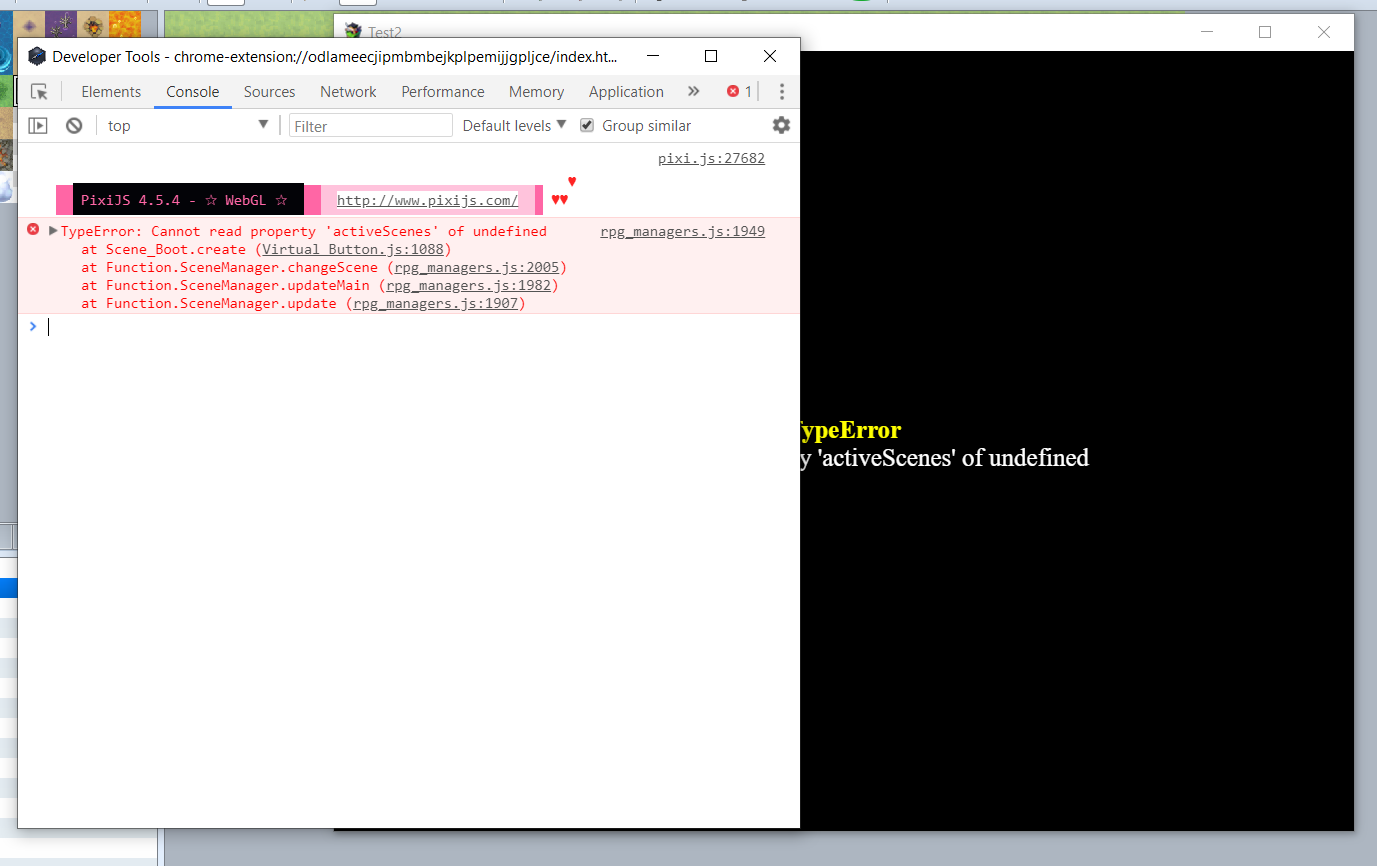
    Capture1.PNG


    Still getting the same error at start-up ;_;.
    I added these parameters:
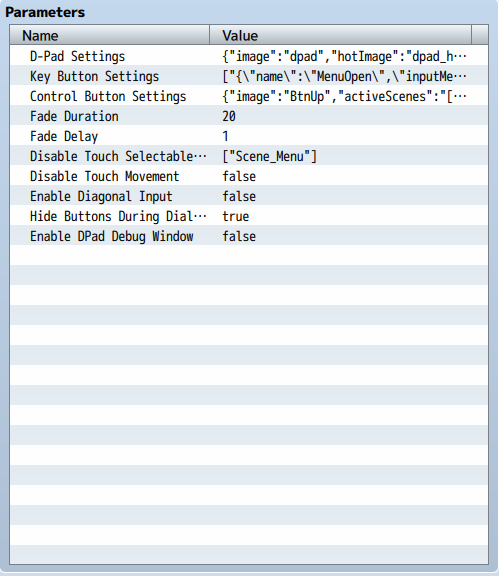
    Capture2.PNG


    D-PAD SETTINGS(not really planning on using this, but I attempted to fill it in):
    {"image":"dpad","hotImage":"dpad_hot","activeScenes":"[\"Scene_Map\"]","x":"70","y":"40","soundEffect":""}
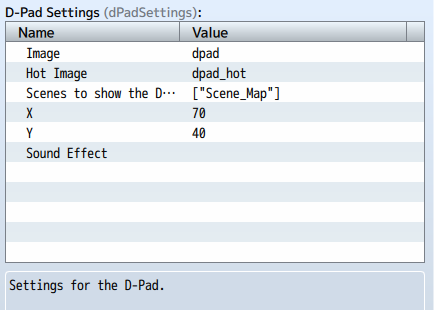
    Capture3.PNG


    KEY BUTTON SETTINGS(I'm aiming for a single virtual button to access the Menu. No other buttons):
    {"name":"MenuOpen","inputMethod":"0","inputTrigger":"pageup","image":"BtnOk","hotImage":"BtnCancel","activeScenes":"[\"Scene_Title\",\"Scene_Map\"]","x":"100","y":"100","soundEffect":"","commonEvent":"","customCode":"\"SceneManager.push(Scene_Menu)\"","vibratePattern":"0"}
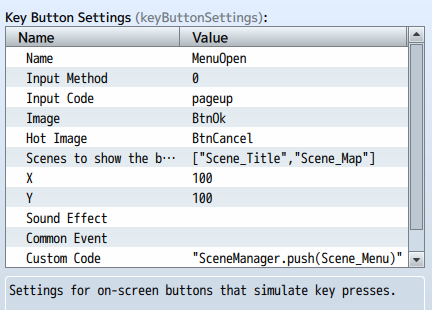
    Capture4.PNG


    CONTROL BUTTON SETTINGS(Might use this... not sure yet. Tried to fill it in):
    {"image":"BtnUp","activeScenes":"[\"Scene_Map\"]","x":"121","y":"130","soundEffect":"","buttonsToHide":"[]","hideDPad":"true"}
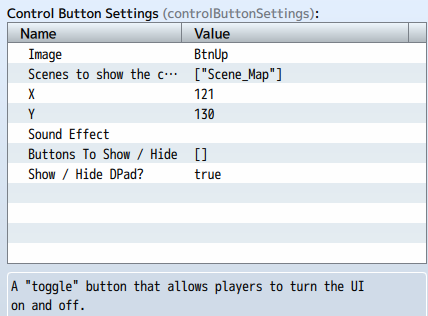
    Capture5.PNG


    It feels like I just don't know how to add parameter settings. Removed SRD SuperToolsEngine for the time-being as it was having errors too.
    Though, it's kinda important for me that I can use it too.

    Also added the area with SRD SuperToolsEngine where it was indicating, but I can't make much sense of it. :unsure:
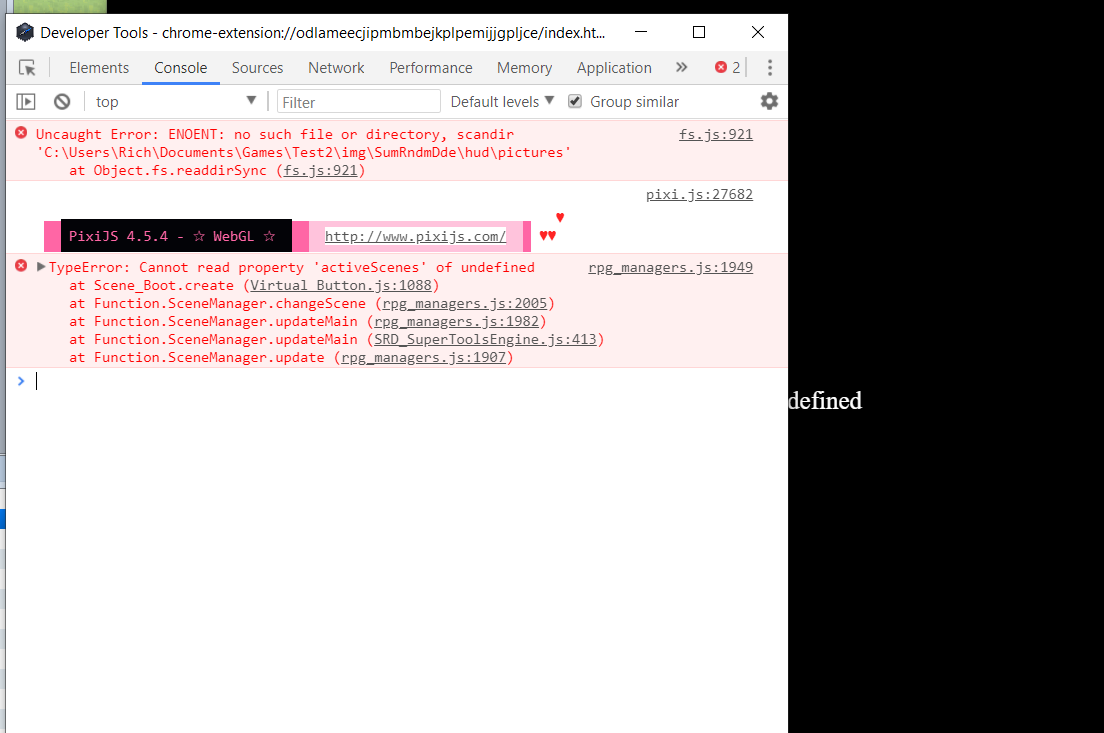
    Capture7.PNG

    Capture8.PNG


    Umm, also, the version I'm using is 1.6.2.
    Can anyone help me out? Or maybe a demo reference so I can see what I'm doing wrong?

    Thanks in advance.
  16. Hi!
    @Kalluno I don't know about the srd dude error.
    But it seems that the virtual pad is trying to access the property "activeScenes" of a button, that is undefined. So, if you tried to config this in a clean project and this error still happens, I think that is really a problem with how you are setting up the parameters =/
    Maybe you have a blank button configured?
    The fact that is 1.6.2 is not a problem, that I can affirm.
  17. Capture9.PNG


    I only have one button configured... Sigh. Anyway, thanks for the input. I'll just have to manage without this plug-in.
    I wanted to touch pad options in the battle scene (like attacks with a single button press), but since YEP Custom Pictures doesn't work in battle scenes, I tried this one.

    And the incompatibility with SRD plug-in really a deal-breaker unfortunately. (maybe the HUD images are messing with it?)

    Hopefully, Himeworks recent twitter post that showed touch buttons during battle becomes a thing soon. :|
    (Can't find the post now lol...)
  18. suoma said:
    Great plugin!Request migration to MZ!
    ・ PluginCommonBase
    ・ EventCommandByCode
    ・ MVJoint
    トリアコンタン様
    PluginCommonBase,EventCommandByCode

    C:\ Program Files文件\ KADOKAWA \ RPGMZ \ dlc \ BasicResources \ plugins \ Official
    Steam版
    C:\SteamLibrary\steamapps\common\RPG Maker MZ\dlc\BasicResources\plugins\official


    MVJoint
    http://tm.lucky-duet.com/viewtopic.php?f=114&t=9943


    擷取.JPG擷取1.JPG
  19. Anyone know scene name for dialog/conversation and scene choice ? I want put D-Pad setting on that Scene but i dont know the name
    Already check on file rpg_scenes.js, but still no idea what the scene name, also already tried put Scene_Dialog and Scene_Choice but nothing happen

  20. Hunters12 said:
    Anyone know scene name for dialog/conversation and scene choice ? I want put D-Pad setting on that Scene but i dont know the name
    Already check on file rpg_scenes.js, but still no idea what the scene name, also already tried put Scene_Dialog and Scene_Choice but nothing happen


    Hi!
    The message and choice window are both on Scene_Map.
    But the character's name is on Scene_Name.