If it affects even the demo project most likely the NW.js might be out of date.
Ultra Mode 7 [RMMV & RMMZ]
● ARCHIVED · READ-ONLY
-
-
-REDACTED-
-
I think it's thisHow do I go about getting the newest version of that?
NW.js @Dev_With_Coffee correct me if I'm wrong -
-REDACTED-
-
-
-REDACTED-
-
-REDACTED-
-
What do you mean "Steam Version", are you using the Japanese version or the unlicensed version?That's only for the steam version
-
-REDACTED-What do you mean "Steam Version", are you using the Japanese version or the unlicensed version?
-
You say you updated, but from what I understand in the error displayed by the console, the UltraMode7 Object does not get to be started:
Line 1949:rpg_managers.js:1949 ReferenceError: UltraMode7 is not defined
If the error happens even in the demo version without any editing, it is evident that the problem is in your computer or in your version of Rpg Maker. I know it's kind of annoying but the only way is to isolate the problem.
I need you to package the Rpg Maker Mode 7 DEMO project in the menu:
Rpg Maker ---> File ---> Deployment
Then go to the package folder and compare the file sizes with the following capture:
(Since so far I haven't been able to guess your engine)
If RMMV:
If RMMZ:
-
Sorry for an absolute noob question. How do you get event images to take up more than 1 tile? I can only manage to get half a tree to be upright and 1 tile high walls
-
Ultra Mode 7 v2.1.1
Blizzard
Introduction
Ultra Mode 7 simulates the Mode 7 rendering mode from the SNES by using 3D rendering (hence the "Ultra"). Sprites are scaled appropriately and use additional code to determine whether they are visible, because of cut-off distance. The view of a Mode 7 map is defined by the following parameters:
- camera distance
- camera Y position
- field of view
- pitch rotation angle
- yaw rotation angle
- maximum Z coordinate
This work is licensed under BSD License 2.0:
You may use this script for both non-commercial and commercial products without limitations as long as you fulfill the conditions presented by the above license. The "complete" way to give credit is to include the license somewhere in your product (e.g. in the credits screen), but a "simple" way is also acceptable. The "simple" way to give credit is as follows:
Alternatively, if your font doesn't support diacritic characters, you may use this variant:
In general other similar variants are allowed as long as it is clear who the creator is (e.g. "Ultra Mode 7 created by Blizzard" is acceptable). But if possible, prefer to use one of the two variants listed above.
If you fail to give credit and/or claim that this work was created by you, this may result in legal action and/or payment of damages even though this work is free of charge to use normally.
Features
- render map in 3D
- control rendering with various parameters and even change them on the fly
- supports white fading of horizon
- supports auto-scaling for sprites depending on distance from camera
- high performance
- easy to use
v2.1.1
- fixed issues with fade color setter
- fixed issues with fade begin setter
- fixed issues with fade end setter
v2.1.0
- refactored some code to improve general compatibility
v2.0.9
- fixed bug with invisible looped maps
v2.0.8
- fixed some new issues with Yanfly's Grid-Free Doodads
v2.0.7
- changed NEAR_CLIP_Z to DEFAULT_NEAR_CLIP_Z
- changed FAR_CLIP_Z to DEFAULT_FAR_CLIP_Z
- added map parameters for Near Clip Z and Far Clip Z
- updated custom Terrax Plugins - Lighting system compatibility code
v2.0.6
- fixed issues with MZ v1.5.0 core scripts
v2.0.5
- added CHARACTERS_SHIFT_Y option
v2.0.4
- fixed some more issues with compatbility for several other plugins
v2.0.3
- fixed a minor issues with compatbility for several other plugins
v2.0.2
- fixed roll-rotation issue with ZephAM_YEPDoodadExt
- fixed performance issues on larger maps in RPG Maker MZ
- fixed issue with looping maps in RPG Maker MZ
- fixed minor offset issue with map display in RPG Maker MZ
- enabled CHARACTERS_USE_FADE_Z again by default (RPG Maker MZ has no performance issues)
v2.0.1
- fixed a minor rendering issue
- improved unified shader code structure
v2.0.0
- implemented compatibility with RPG Maker MZ
v1.7.6
- fixed a minor issues with compatbility for Galv Map Projectiles
v1.7.5
- added compatbility for Galv Map Projectiles
v1.7.4
- added compatbility for SAN_AnalogMove when PLAYER_ADJUST_MOVE_DIRECTION is turned on
- added roll angle support
v1.7.3
- fixed loading issues with OcRam_Lights
v1.7.2
- fixed issues with Yanfly's Grid-Free Doodads in deployed builds
- fixed issues with terrain tag lights in OcRam_Lights
- added safeguards to prevent faulty compatibility code to affect other compatibility code
- limited NEAR_CLIP_Z to a minimum of 1 due to issues with rendering for values of 0 or less
- disabled CHARACTERS_USE_FADE_Z by default due to performance issues
v1.7.1
- fixed some issues in compatibility code for OcRam_Lights
v1.7.0
- added compatibility code for OcRam_Lights
- improved compatibility code for KhasUltraLighting
v1.6.5
- updated some instructions
v1.6.4
- fixed a const assignment errors
v1.6.3
- refactored positioning in looped maps
- fixed sprite positioning in looped maps for Yanfly's Grid-Free Doodads
- added CHARACTERS_USE_FADE_Z option
- removed some left-over debug code
v1.6.2
- attempted fix in Yanfly's Grid-Free Doodads for sprite positioning in looped maps
v1.6.1
- improved code that handles sprite positioning in looped maps
v1.6.0
- implemented improved scaling of sprites on map which doesn't get messed up by near and far clipping planes
- changed some of the default parameters to accommodate the fixed scaling issues
- added LEGACY_SCALING parameter for backwards compatibility
v1.5.4
- fixed bug with screen-to-map calculations when using orthogonal projection
v1.5.3
- improved compatibility code for KhasUltraLighting
v1.5.2
- added camera Y position
v1.5.1
- added color fade begin to map parameters
- added color fade end to map parameters
v1.5.0
- added map parameters for map borders
v1.4.6
- added compatibility for newer pixi-tilemap versions
v1.4.5
- added compatibility with Quasi Simple Shadows
v1.4.4
- added compatibility with Thomas Edison MV
- fixed issue with fixed-coordinate parallax not working
v1.4.3
- changed NEAR_CLIP_Z from constant to plugin parameter
v1.4.2
- added new parameter FADE_Z_COLOR
- added option to setup custom fade colors for specific maps
- added option to change fade color at any time
v1.4.1
- added compatibility with Yanfly's Grid-Free Doodads
- added compatibility with MOG's Character Motion
v1.4.0
- added new license
- added usage and crediting instructions
v1.3.8
- added script call to enable/disable pixelated rendering during runtime
- reduced WEBGL_MAX_VERTICES to reduce possibility of glitched rendering
v1.3.7
- added experimental compatibility for BattleLighting plugin
v1.3.6
- added experimental compatibility for BattleLighting plugin
v1.3.5
- corrected some minor positioning and scaling calculation errors
- improved compatibility code for KhasUltraLighting
v1.3.4
- added compatibility code for KhasUltraLighting
- added compatibility instructions for Terrax Plugins - Lighting system
v1.3.3
- fixed issue with event visibility on map borders when using looping maps
v1.3.2
- added coordinate rounding for X and Y coordinates
- improved code that handles sprite visibility when outside of the view frustum
- removed some leftover debug prints
v1.3.1
- fixed a crash with event testing
v1.3.0
- implemented map looping functionality
- added workaround for PIXI bug where a lag spike would occur about every 10 seconds
- fixed issue where sprite direction didn't display properly at certain yaw angles
- fixed issue where movement controls didn't adjust to yaw angle
- added CHARACTERS_ADJUST_SPRITE_DIRECTION option
- fixed coordinate offset when using yaw angle
v1.2.4
- fixed accidental removal of animateCameraDistance function
v1.2.3
- added parallax distance parameter in maps for parallax movement with yaw and pitch
- renamed "Camera" functions to "CameraDistance"
- fixed bug with parallax scrolling on non-Mode 7 maps
- fixed bug with shaking the screen
- removed FOV limit and implemented orthogonal projection with FOV of 0°
v1.2.2
- fixed a syntax error that was caused by code cleanup
v1.2.1
- fixed save data issue
v1.2.0
- fixed FPS drop problem while moving
v1.1.0
- added animation function for parameters
- renamed RENDER_PIXELATED option to TILEMAP_PIXELATED
- added CHARACTERS_PIXELATED option
- fixed issue with floating characters
- fixed issue with normal maps not working anymore
- added some code to prevent compatibility issues with some map scripts
Screenshots
Spoiler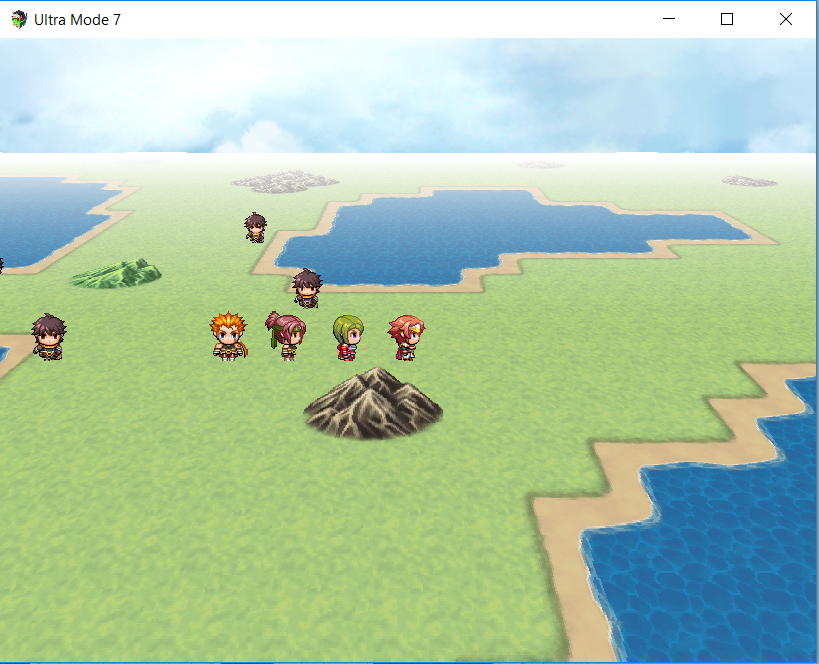 https://i.gyazo.com/9c7d3250509a967665e978ea608f46afSpoiler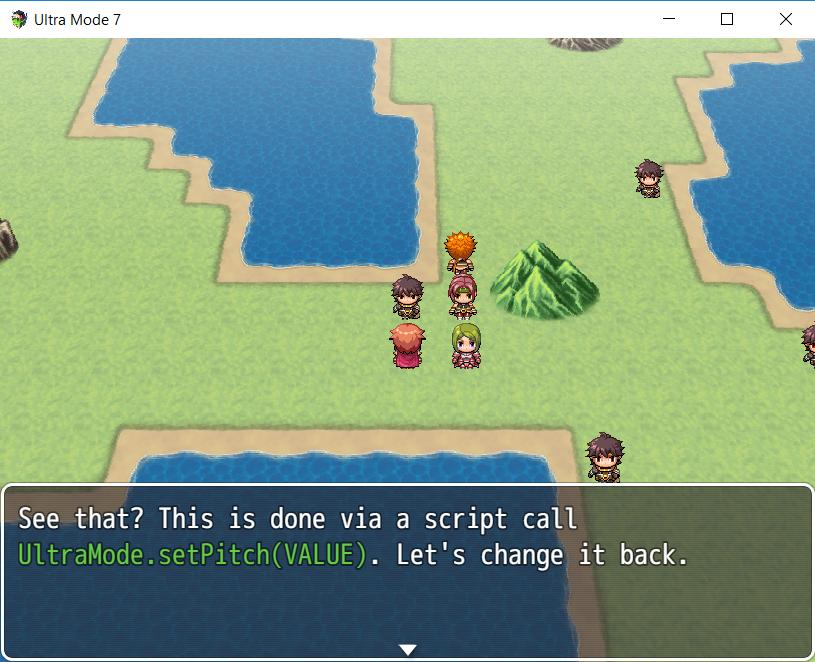
How to Use
All instructions are inside the script in the first comment.
Demo
Ultra Mode 7 Demo for RPG Maker MZ
Ultra Mode 7 Demo for RPG Maker MV
Plugin
Plugin Download
FAQ
Q: Why does the script not work with canvas?
A: The script was written with the 3D capabilities that WebGL offers. Any implementation ported to work with canvas would be too slow anyway.
Q: Can I change map parameters on the fly?
A: Yes, there are instructions in the script how the script calls are used. There are also examples in the demo.
Q: I updated the plugin to a newer version and it crashes now!
A: After replacing the actual file, you should open up the plugin settings and confirm/close them again. Sometimes new features and options are added and this ensures that the newer version of the plugin doesn't crash by adding the new options to your project's system settings.
Credit and Thanks
- Boris "Blizzard" Mikić
Compatibility:
- Requires WebGL. Does not work with canvas and due to how canvas works, it can never support canvas.
- If you update from an earlier version, after replacing the actual file, you should open up the plugin settings and confirm/close them again. Sometimes new features and options are added and this ensures that the newer version of the plugin doesn't crash by adding the new options to your project's system settings.
- Because the tilemap is rendered entirely flat, tile priority isn't used.
- Scaling has been optimized for usage of an FOV of 60°. Using different values will cause some weird scales being used for characters.
- Due to yaw rotation requiring turning of characters, 8-directional characters sprites might have only limited support.
You might find this utility script useful that let's you manipulate the anchor point for the sprites: https://forums.rpgmakerweb.com/index.php?threads/character-anchors.105599/
If I'm not active here at some point, you can contact me at my forum about the script: http://forum.chaos-project.com/index.php/topic,15899.0
My friend, first of all, congratulations on your work. No doubt it is an excellent plugin. However, as I am new to the RPG Maker universe (user of the MZ version), I am encountering some difficulties.
I created a standard RPG Maker simple world map, and put the following parameters:
<UltraMode7_Pitch:15>
<UltraMode7_Yaw:360>
<UltraMode7_FOV:100>
The result looked like this:
Ultra Mode 7 activated issue
Although it worked, this changed the positioning of the map and I don't know how to fix it, since on the map without the feature turned on, it looks like this:
Non Ultra Mode 7 activated
Would you help me? -
That looks like an error that I had some while ago. Have you tested using the latest version of this plugin?My friend, first of all, congratulations on your work. No doubt it is an excellent plugin. However, as I am new to the RPG Maker universe (user of the MZ version), I am encountering some difficulties.
I created a standard RPG Maker simple world map, and put the following parameters:
<UltraMode7_Pitch:15>
<UltraMode7_Yaw:360>
<UltraMode7_FOV:100>
The result looked like this:
Ultra Mode 7 activated issue
Although it worked, this changed the positioning of the map and I don't know how to fix it, since on the map without the feature turned on, it looks like this:
Non Ultra Mode 7 activated
Would you help me? -
That looks like an error that I had some while ago. Have you tested using the latest version of this plugin?
I am using Version: 2.1.1. Would this be the latest version of the plugin? -
Before I go to some lengths to work around a potential limitation, I wanted to ask something here.
When using UltraMode7, the camera follows the player character (as is normal in RPGMMV).
However, I use SRD's CameraCore in-game to do many things, mainly panning around, zooming and fixating the camera on an event which is not the player to allow for cutscene direction.
I know that CameraCore doesn't fully work with UltraMode7 and I wouldn't expect it to.
However, is it possible to change which event/character the camera is "focused upon"?
I tried doing this with Camera Core and although it loses focus from the player, the camera itself doesn't move to the new location.
This would be useful as often, on a Mode7 map, you'll want to move the camera to another location where something is happening, then back to the player.
My alternative right now is to fade-to-black, turn the player invisible, then have the player "jump" to position. Then you do the cutscene, and fade to black, before having the player "jump" back and making them visible again. But obviously this is a little clunky. -
qCamera Focus (EventID without the ()'s)
I had the EXACT issue for almost a full year. Saved my game, and incidently his other plugins (Qsprite etc) fixed all my issues with Pixel Movement plugins, as well as YEP pathfinding issues. I hope this helps you as much as it did me. All camera functions from both Ultra Mode 7 and qCamera seem to work to replace Galv's cam (what my game used), SRD and any other camera plugin functions I was after. qCamera also comes with a delay to locking onto the character which replaces a Smooth Camera effect as well in case you were using that before also!
Before I go to some lengths to work around a potential limitation, I wanted to ask something here.
When using UltraMode7, the camera follows the player character (as is normal in RPGMMV).
However, I use SRD's CameraCore in-game to do many things, mainly panning around, zooming and fixating the camera on an event which is not the player to allow for cutscene direction.
I know that CameraCore doesn't fully work with UltraMode7 and I wouldn't expect it to.
However, is it possible to change which event/character the camera is "focused upon"?
I tried doing this with Camera Core and although it loses focus from the player, the camera itself doesn't move to the new location.
This would be useful as often, on a Mode7 map, you'll want to move the camera to another location where something is happening, then back to the player.
My alternative right now is to fade-to-black, turn the player invisible, then have the player "jump" to position. Then you do the cutscene, and fade to black, before having the player "jump" back and making them visible again. But obviously this is a little clunky. -
Thanks for the suggestion!
qCamera Focus (EventID without the ()'s)
I had the EXACT issue for almost a full year. Saved my game, and incidently his other plugins (Qsprite etc) fixed all my issues with Pixel Movement plugins, as well as YEP pathfinding issues. I hope this helps you as much as it did me. All camera functions from both Ultra Mode 7 and qCamera seem to work to replace Galv's cam (what my game used), SRD and any other camera plugin functions I was after. qCamera also comes with a delay to locking onto the character which replaces a Smooth Camera effect as well in case you were using that before also!
Unfortunately this doesn't work for me. When I have QCamera installed (with QPlus, which it needs) the camera doesn't follow the player at all (like I can just walk off the screen); it only works if I disable my analog movement plugin (and potentially use Q's), but that comes with too many technical concerns that I don't want to take on.
I might have to stick with my present approach. But if bblizzard sees this; it would be really useful to be able to say, in a plugin command:
FocusMode7Camera player
FocusMode7Camera 11
Where the former would cause the camera to snap to, then follow the player (like it does already) and the latter would cause the camera to snap to and follow event 11. -
It won't be much to go by I'm afraid, but the camera moves as expected, in Ultra Mode 7, Pitch in the 60's, and the Y value raises, etc.... all with the pre-programmed calls from Bblizzard's Script. The only thing Qcamera is doing right now is shifting focus to the event of the statue. The player can move around offscreen, etc while the camera doesn't go back to them til I tell it to. This USED to be how Galv's Camera worked for me, but Ultra Mode 7 and Galv's didn't gel together, so I ended up with a weird looping effect where the Yaw would spin out of control.
If you do simply "plugin command: qCamera Focus 0"
(0 being player). It snaps right back immediately and follows player in perfect Mode 7 mode below per normal. If your plugins didn't let the camera follow them at first, my Plugin order needed
Yanfly Doodads
Ultra Mode 7
QMovement
QSprite
QCamera
Hope the order helps you to solve your issue. Like I said before, I was considering having to cancel my game because of the camera issues completely destroying all previous work, but QPlugins saved me. Only issues I'm working out now is how I switch from 2D sidescrolling segments like my underwater to having the levitation effect of going "up and down" in Ultra Mode 7 mode. I assume that's .screenY() manipulations but not that far yet. Best of luck!
-
Thanks for the suggestions regardless.It won't be much to go by I'm afraid...
In my case it's not so bad as I only use Mode7 sparingly, so I'm just going to design around the limitations. -
In the MV demo for 2.1.1, whenever I speak to a test npc, I get the message that 'UltraMode7 is not defined'. This is despite the fact that it's all set up correctly. Why is this?