@Necrojoker00 As I already said, make sure you are using WebGL and not Canvas. If you are using the Community_Basic plugin (which should be installed by default the moment you create a new project), you can force WebGL mode: https://gyazo.com/0f3310c1b2963af72aebd05352262471
Now that I think about it, I'll actually add it to the demo so that this problem doesn't repeat.
If it still won't work, maybe there are issues with WebGL on Mac, I'm not sure. Best you ask the MV dev team then.
EDIT: I added it in the demo. You can try downloading the new demo and see if it works now.
Ultra Mode 7 [RMMV & RMMZ]
● ARCHIVED · READ-ONLY
-
-
Alas ultramode7, i barely knew ye.
-
Safari really doesn't support WebGL? :/ That's just sad.
-
SafariAlas ultramode7, i barely knew ye.
Safari 8 and later:
- From the menu bar, click Safari and then select Preferences.
- Click Security.
- Check Allow WebGL.
- From the menu bar, click Safari and then select Preferences.
- Click Advanced.
- Check Show Develop menu in menu bar at the bottom of the window.
- From the menu bar, click Safari and then select Develop.
- Select Enable WebGL.
-
welp i clicked and it still not running, also when i clicked the dev tools, somehow i think it's not running on safari but chrome, do i need to download an extension or the pixijs thing?.
-
Welp i found what i needed, this little fella made the thing to work, just added it on the json "chromium-args": "--ignore-gpu-blacklist", it's looks awesome.
-
Apologies if this has been answered but the thread's at 37 pages.
Has anyone experienced an issue with this where sometimes the sorting is not correct, i.e. sometimes distant objects render on top of nearer objects? Like this:

-
That's the priority (same as / below / above characters). You can kind of solve it by using same as and through or by using MOG Event Sensor.
-
Is there a way to let the camera not scroll any further than the sides of a map?
-
You could do it with some simple edits, but depending on the perspective, the map will still look cut off.
-
Hey, I've noticed that only on the mode 7 map, there is a delay/lag when pressing esc for the menu and then exiting. Is there something I can adjust to remove this delay? There are little to none events on the Map and zero parallel processes to slow it down.
Thanks! -
Any help? i forgot to mention i'm also using it on mac, does it change anything?.
Actually that is going to be your problem long term. Apple has announced that all GL support is officially depreciated which means they will post no more updates for it with their OS's. So if scripts and such start depending on newer features it will stop working. As it is, RPGMaker uses OpenGL and with that no longer being updated by Apple odds are you will run into a problem somewhere anyways.
As it is right now dev on a Mac unless you use Apple's special rending software is now very risky. -
Hey, I've noticed that only on the mode 7 map, there is a delay/lag when pressing esc for the menu and then exiting. Is there something I can adjust to remove this delay? There are little to none events on the Map and zero parallel processes to slow it down.
Thanks!
You mean when you exit the menu? It simply takes a moment to load and generate all the vertices for rendering. It's a bit odd since there's not that many more vertices than when rendering a normal map (if any more at all).
The only way this could be mitigated in that specific case is to not delete the spriteset object when leaving the map scene and then reusing it upon re-entering. This is generic code that is independent from UM7 so you can ask anybody to make a simple plugin for you. -
Actually that is going to be your problem long term. Apple has announced that all GL support is officially depreciated which means they will post no more updates for it with their OS's. So if scripts and such start depending on newer features it will stop working. As it is, RPGMaker uses OpenGL and with that no longer being updated by Apple odds are you will run into a problem somewhere anyways.
As it is right now dev on a Mac unless you use Apple's special rending software is now very risky.
Considering they made such moves with their app policies to the point of it now risking antitrust complaints I can believe this is a typical dick move from a force of dictatorial leadership, only in this case it's a matter of old-school corporate greed instead of the next Stalin or Castro. With a situation like that (not to mention the Supreme Court opening up a possible case against this) I'm probably going to have to take the drastic step of canceling the macOS version of my project and removing iPhone as a stretch goal.
On an unrelated note, I also have a question about event definitions literally disappearing from the map if they're within a certain distance of each other as you travel (in this case using airship mode, though to a lesser degree with a truckload of the same type of event definition with the same asset for the same purpose). Obviously when you get back to their positions they show up again, but it gets annoying if they're close together like that for design/plot reasons. -
I don't think Apple will remove OpenGLES support on iPhones. iPhones make 70% of their hardware revenue and losing out on big name games on the platform, because they stopped supporting the base API they were made with doesn't seem like a plausable business decision. Mac OS itself is somewhat different there, especially since gaming is basically non-existent on Mac OS.
That being said, I do agree that this is a pure anti-trust move and basically trying to force exclusivity of apps. Devs are less likely to port their game to other platforms if they were made in Metal first and require complete rewriting in OpenGL, OpenGLES or DirectX. I mean I understand it when you make new tech and make your own API or something and it lingers around far longer than it actually should even though multi-platform solutions become readily available. But going backwards is just a dick move and I agree that it should be punished by law.
Can you make a video or at least some screenshots of the issue? There is an issue with events disappearing at the border of looping maps that is present in MV itself (IIRC somebody posted about this before in the topic, but obviously no one of us is going to go through almost 40 pages to find that post xD). Maybe you're just having issues with drawing distance. -
Not necessarily a border issue in my case from what I can tell, but here you go.
VIEWER ADVISORY: This is basically from the post-game phase for which I just finished primary testing, and certain structures don't start like they appear in the video clip (and in some cases they don't even show up at all until they're actually built over the course of plot development). And needless to say, that means spoilers.
-
I don't think Apple will remove OpenGLES support on iPhones. iPhones make 70% of their hardware revenue and losing out on big name games on the platform, because they stopped supporting the base API they were made with doesn't seem like a plausable business decision. Mac OS itself is somewhat different there, especially since gaming is basically non-existent on Mac OS.
Yes. WebGL is doing great, better than yesterday but not as good as tomorrow. :) I think it'll remain on iOS too.
And even for Mac OS, here's what the lead WebGL dev at Apple has to say:
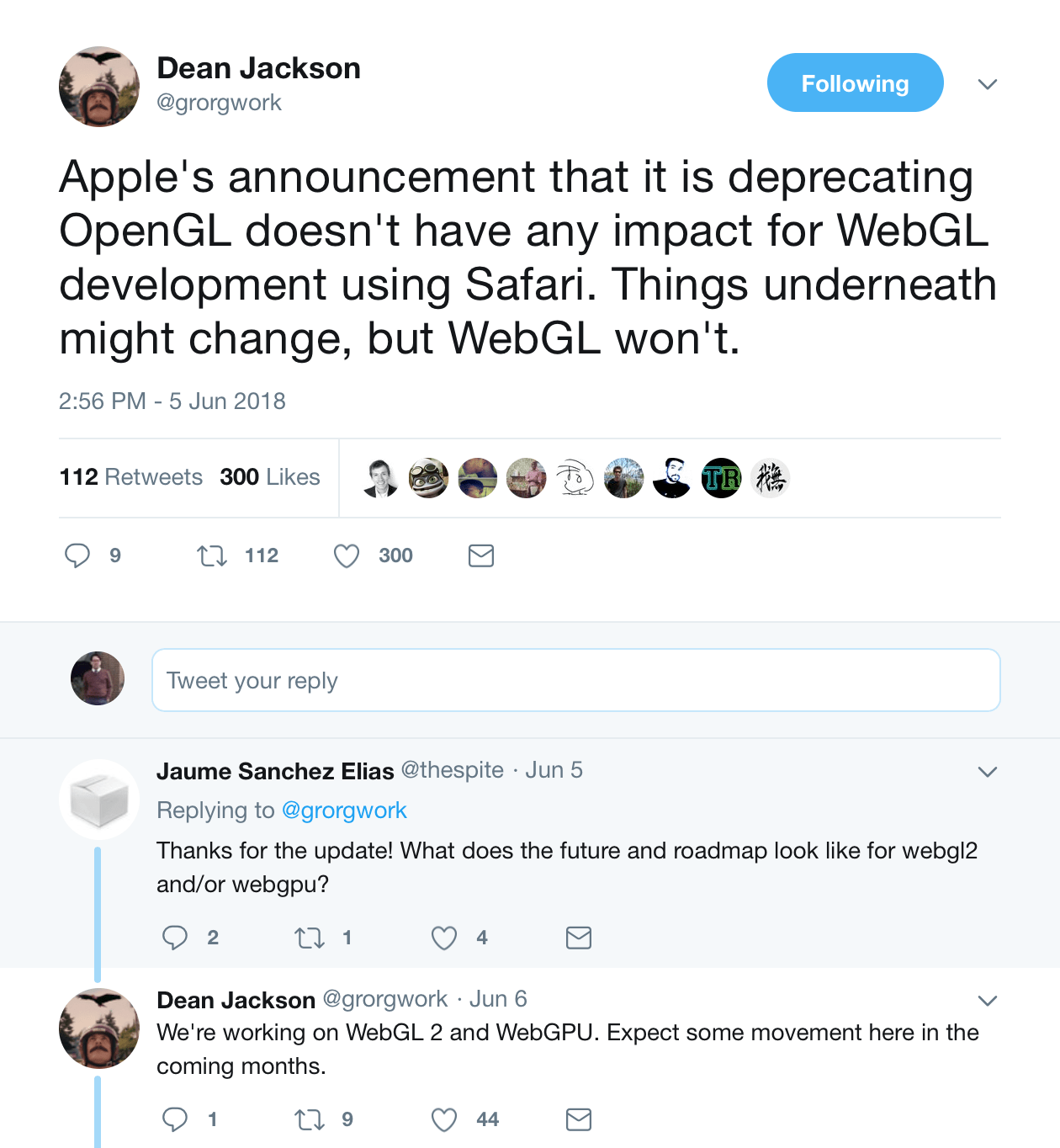
We can sleep well tonight.. Or stay awake because of other gamedev bs >_< haha. But what I learned over time is to be confident about the future. I mean, today we can emulate the 3Dfx voodoo² card I played on as a kid (using Glide, remember that?) on modern hardware, so now I'm less anxious about all that compatibility masquerade, it's more politics than tech generally (especially coming from Apple) and we have a lot on our plates already. -
@KaYsEr : Except we've already got reports of people who can't run RPGMaker games on Mac due to it using OpenGL. So it's not as nice as that report makes it sounds.
-
I hope things will improve.
Wonder if those people have another type of problem though, because normally an RPG Maker MV game on a machine that doesn’t support WebGL would fallback to the canvas renderer and they’d still be able to play (with poorer performances and in the case of that Plugin here, simply not being able to see the 3D effect), but yes there’re so many different configurations, some people on Windows PC probably have similar problems with a lot of possible causes.
Here for example Necrojoker has one of those old blacklisted GPU and wasn’t able to see the UltraMode7 effect in action because he was in Canvas mode (from what I understand) and not because the browser/software wasn’t compatible. I heard a similar problem exist(ed) on Android with older phones too.
But still, it’s worrisome to know that some Mac users have problems with MV, I heard that too and always understood (assumed?) it was the editor itself that was the problem for them, and not the games. Updating NW.JS is worth a try, I did it for my Windows deployment/playtests and the performance boost is quite impressive. (Might fix some compatibility problems too? Worth a try imo.)
I think the version we have in MV 1.6x is from 2017.
In time we can also expect (dream?) NW.JS to have some kind of specific “Apple stuff” version of the framework (ok it’s already the case, but even more “specific” I mean) using Metal instead of WebGL, who knows.
WebGL is not the same thing as OpenGL and we should keep in mind that a huge amount of popular “web apps” use WebGL, it wouldn’t be wise for them to drop it (especially on iOS) like bblizzard already said. -
I wonder if a finished game using Ultra Mode 7 will still play on a non-GL-compatible machine if the game is played via a container in Unity.