@PitjePitjePitje that's because you are putting 4 events. You'll have to make a single graphic through a characters sheet.
Ultra Mode 7 [RMMV & RMMZ]
● ARCHIVED · READ-ONLY
-
-
@PitjePitjePitje Weird, I was pretty sure I updated all script calls in the demo and in the script. o_O I'll fix this ASAP.
-
@Waterguy THANKYOU!!!! I knew the solution was something I really should have thought of myself, but I've been sick and tired which is not a great state of mind to learn new things. (I can't believe I didn't think of this myself. I should go sleep, lol) Thanks again!
-
@PitjePitjePitje Fixed the call, v1.2.4 is up.
-
@bblizzard Dude, you're fast ^_^
-
Boy have i been afk here for a while, and i know it seems to be fixed now but as to your issue how were your events set up?@bblizzard Dude, you're fast ^_^
How i set up the treesBecause im lazy and won't use the doo dads thing that makes it so you can have many trees without a performance drop i've had to make a compromise. what did i do? i decided less events on the map. but that means less trees right? not exactly. to make up for the less individual trees that will be there i made a group of four trees instead of just one for each event:
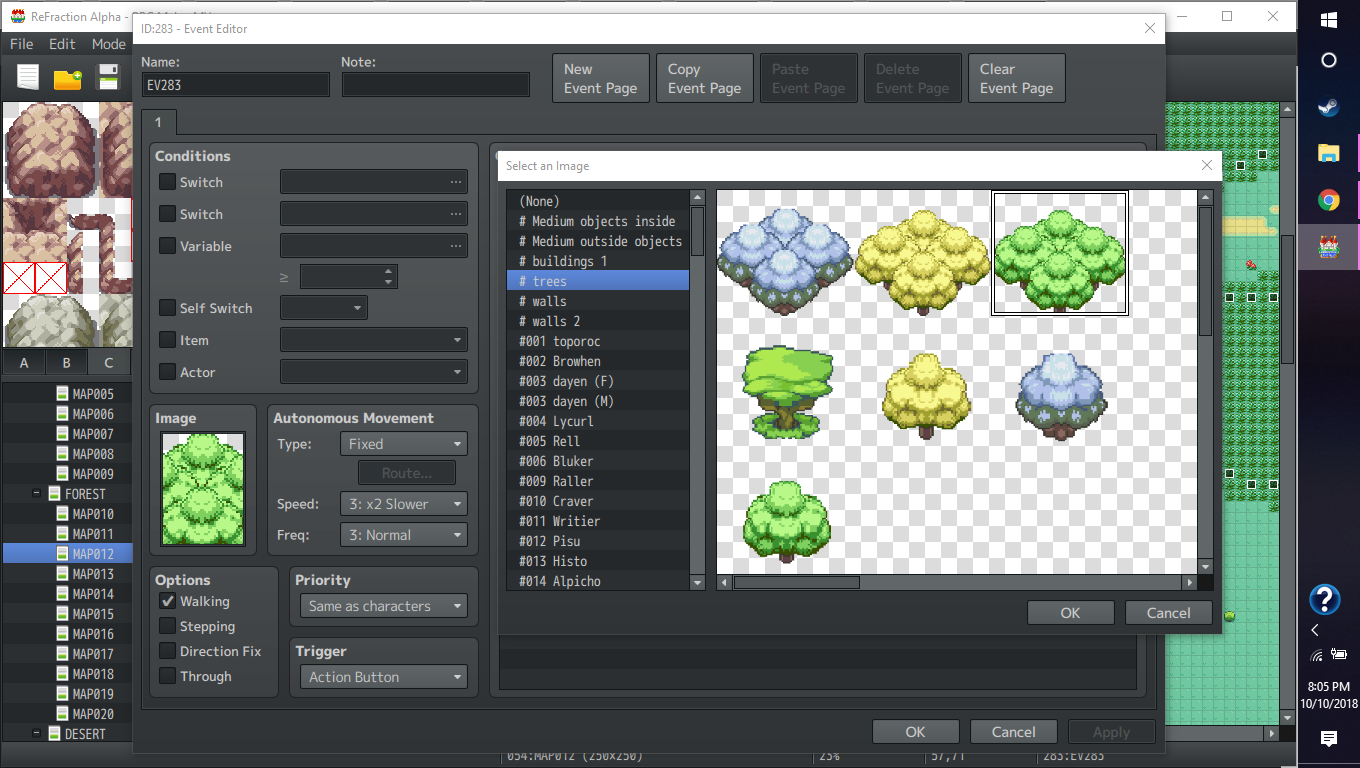
and this is the result:
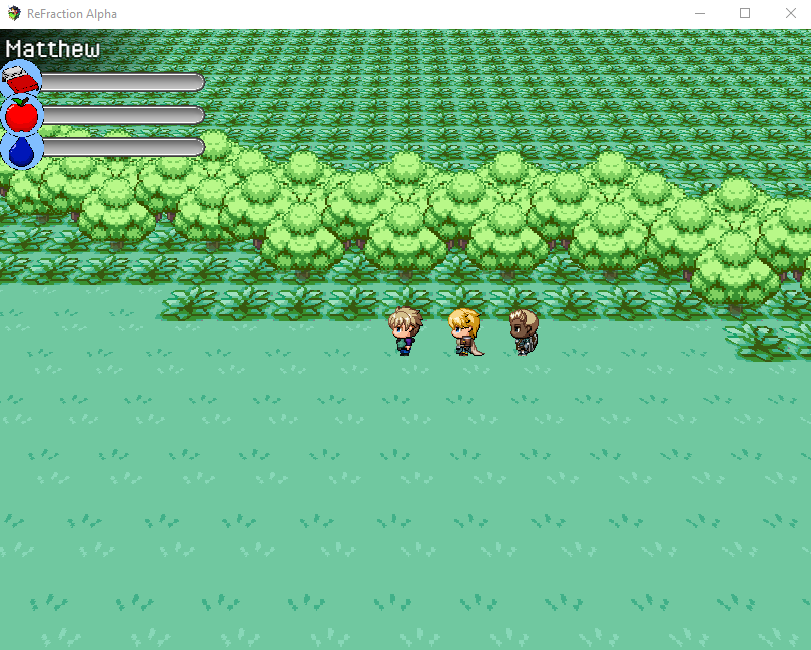
-
@Poppie360 thanks for the tips! Clumping the trees together seems like a nifty way of doing this :)
-
I did all the math on looping maps today. Let's see how strong my hangover will be tomorrow and whether I will implement looping maps or not. :D
-
Legal double post. :D
v1.3.0 is up! What's new:
- implemented map looping functionality
- added workaround for PIXI bug where a lag spike would occur about every 10 seconds
- fixed issue where sprite direction didn't display properly at certain yaw angles
- fixed issue where movement controls didn't adjust to yaw angle
- added CHARACTERS_ADJUST_SPRITE_DIRECTION option
- fixed coordinate offset when using yaw angle
EDIT: BTW, the weird CPU spike that you kept experiencing, that's the pixi-tilemap bug I mentioned in the changelog. I added this workaround until the MV team fixes it on their end. -
@bblizzard Guess what doesn't work anymore xd
Yes, now UltaMode7 v1.3.0 doesn't even render the maps in 3D.
I didn't change any settings from the default btw -
@Arend Galenkamp Make sure to open the plugin manager and the plugin there at least once. I added new configuration variables to the script and the plugin manager only updates them if you actually open it there.
-
@bblizzard yeah I saw and did that. But it doesn't seem to work.
EDIT: but if it works on your end, maybe the wrong file got uploaded to the forum.
EDIT2: Apparently the plugin you get by ONLY downloading the single file doesn't work. The version that's in the demo works! Thank you :D -
o_O I'll double check that I copied the script right.
-
Thank you, this is great to have all those things optimized/fixed, can't wait to go back working on the mode7 maps in my game to check all the new stuff! :)
EDIT: BTW, the weird CPU spike that you kept experiencing, that's the pixi-tilemap bug I mentioned in the changelog. I added this workaround until the MV team fixes it on their end.
Did you tell them? I mean I hope they are aware of it so we can get a fix in a next update. Amazing work again! -
Yeah, I posted a bug report topic in "RPG Maker MV Improvement Boards", but it's still awaiting approval from a mod.
-
Hi, @bblizzard, is there any possibility you could give compatibility support to your plugin with MBS - Map Zoom? I'm using this plugin to resize the maps x2, since my sprites are in 32x32 (the size for VX/Ace), instead of 48x48 (the default sprite size for MV), but it seems that it breaks the way the map is drawn, and the position of the sprites. Look at this picture:
As you can see, the map size is multiplied x2, but the seems to be misplaced with the real 'x' and 'y' position. The main character looks to be in the right 'x' and 'y' position of the map, but the followers are drawn in the wrong position too, along with the rest of the map.
I don't know if you could help me with this, but I would be very grateful if there is a way to have compatibility with the Map Zoom plugin.
Thanks in advance! -
I had simmilar problems with SRD's Camera plugin whenever I used zoom.
I tried to fix it, but to no avail. I tink it is the way MV, and thus the plugins that use it, does zoom. -
Yeah, classic zoom doesn't work, but you can just change the camera distance in UM7 and get the same effect.
-
I had simmilar problems with SRD's Camera plugin whenever I used zoom.
I tried to fix it, but to no avail. I tink it is the way MV, and thus the plugins that use it, does zoom.
Yeah, classic zoom doesn't work, but you can just change the camera distance in UM7 and get the same effect.
It seems that I've 'fixed' this issue. I've disabled the MBS Map Zoom only on the World Map (through Plugin Commands) just before the transition to enter that map, with a few waiting frames, to give some time to load the new map zoom; then, if I enter another map, I just need to do the same, but adjusting the x2 zoom. That way, I can use the x2 zoom for all the maps, and the zoom parameters from your Ultra Mode 7 plugin for the World Map.
Well... not a fix at all, but a solution for this problem. -
Thank you for creating this plugin.