TV Screen/CRT Monitor script/shader?

● ARCHIVED · READ-ONLY
Started by Firgof 20 posts View original ↗
  1. I'd love to have a shader which goes after all my scripts, etc., and is rendered on top of the whole game screen to make the game look as if its being run on an old, very-large-pixel, CRT monitor.

    I've looked around the internet and have seen folks pull it off -- but I haven't seen anyone attempt it for VX Ace.

    iqq.png

    This is a GM:S script/shader, available here: http://gmc.yoyogames.com/index.php?showtopic=598227 .  The author goes into lots of detail on how they pulled it off (it was a request to convert an existing script into GML format)

    The best fulfillment of this request would be a script which does something similar to the effect I'm using in my (currently incomplete) trailer.  1:04 is about what I'm looking for if this video effect script was running in-game.
  2. now I have the mario theme stuck in my head... that's a neat idea and could see other uses for it as in representing the player playing through a memory sequence.
  3. CRT Lines are not to complicated to pull off. Here is a basic one I had wiped up for you. Also, if you want to enhance it further, have a common event running on a parallel process that changes the opacity of the image very subtly (but quickly) to simulate crt flicker.

    CTRLines.png
  4. boldpaste2 said:
    CRT Lines are not to complicated to pull off. Here is a basic one I had wiped up for you. Also, if you want to enhance it further, have a common event running on a parallel process that changes the opacity of the image very subtly (but quickly) to simulate crt flicker.

    Spoiler
    CTRLines.png
    I'm afraid I'm looking for a more complex solution than that.  See the trailer I posted above: I'm looking for a phosphor grid which I can light up individual cells randomly with.

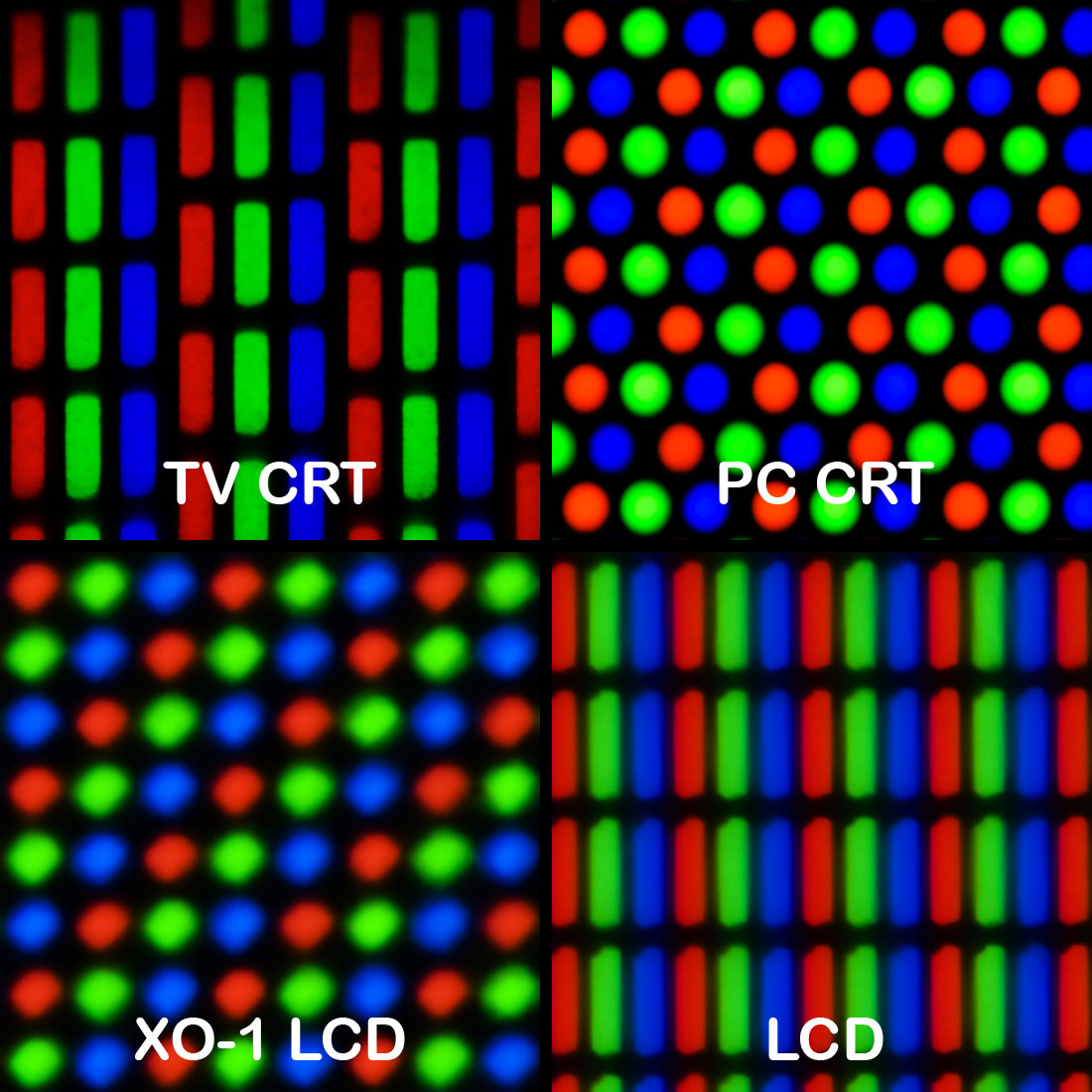
    Examples of phosphor grids (I'm looking for the LCD one, but with super-big "pixels".  Most LCDs have these things so small that you can't see them unless you put your nose up against your monitor.)

    Spoiler
     Pixel_geometry_01_Pengo.jpg
    The grid, when applied to an image:

    Spoiler
    crt-pixel-layout.png
    And here's how it works, mechanically speaking:

    Spoiler
    rgbScreenComp.jpg
    I'm not sure what I'm looking for can be accomplished outside of a coded solution.
  5. For the phosphor grid, you can use an overlaying image with additive pallete. Same for the CRT scanlines. Both things would be easy to do, not even needing a common event, you can use a very basic script to display these images over ALL things in the game.

    #Something like this at main.$crt_overlay1 = Sprite.new$crt_overlay2 = Sprite.new$crt_overlay1.bitmap = Cache.pictures("crt_overlay_lines")$crt_overlay2.bitmap = Cache.pictures("crt_overlay_grid")$crt_overlay1.z = $crt_overlay2.z = 1000000000$crt_overlay1.opacity = 128$crt_overlay2.blend_type = 1Now, all it needs is some updating, I often commit the horror of aliasing something at Input and adding a few updates there to things I want there at all times.

    module Input  class << self    alias crtupdate_update update    def update      crtupdate_update      if($crt_overlay1 != nil && $crt_overlay2 != nil)        $crt_overlay1.update; $crt_overlay2.update      end    end  endend
    Just know ALL THIS CODE IS HORRIBLE, terrible, ugly... But use it if you want. Just don't show it to anyone.

    Now the screen deforming is the part that it's hard to do. Thing is, in RGSS you can't access to the game screen for, like, apply effects, deform something drawn on screen, or anything. You would need to apply to each sprite, plane, whatever else, the effect by sepparate (you could manually deform some graphics, like static backgrounds and such). And you would need to write your own algorithm anyway, and I ignore how to start with it xD.

    Soyeahgoodluck!
  6. I would go with a solution like that -- however the static underneath it would not be interpreted correctly.  Rather than adding noise to individual Red, Green, or Blue LEDs it would add noise 'within' those LEDs which isn't how LEDs work! :p

    Edit: Still, if this is the best I can get outside of paying someone for a custom script then I suppose I might settle for it.
  7. I don't understand why even in this modern time and day someone would like to have their game with this kind of effect.
  8. Milena said:
    I don't understand why even in this modern time and day someone would like to have their game with this kind of effect.
    Slenderman, Outlast, Fatal Frame, Republique, etc. are games which are played 'mainly through a device'.

    Dim is also a game being played through a device -- I want the person playing the game to see what the person you're playing as sees and what they see is an old CRT monitor displaying footage whose native resolution is much higher than what the screen was intended for.
  9. It isn't about paying someone for a custom script. The only way this can be achieved is by literally recreating the RGS***,dll, or at best rewriting a bunch of it, which is essentially recreating RPG Maker. Do you know how much that'll cost ya? The overlay will have to do for now :p
  10. Firgof said:
    Slenderman, Outlast, Fatal Frame, Republique, etc. are games which are played 'mainly through a device'.

    Dim is also a game being played through a device -- I want the person playing the game to see what the person you're playing as sees and what they see is an old CRT monitor displaying footage whose native resolution is much higher than what the screen was intended for.
    Well the games you've mentioned are not using the ones you were talking about. It is simply an effect they achieved through some videographics / cinematics effect. In Unity, there's a bunch of effect that lets you do this, which, in RPG Maker has a way to be done also. Get that picture boldpaste2 posted, make a show picture command and that's just it. I don't think there's such complex scripting made in those games as mentioned though, as to I can assert they're videographics.
  11. If my memory serves me right, there was a somewhat similar effect for the computer device in Fallout 3 (and New Vegas subsequently).

    There was a dev blog where they explained they got this effect by actually sending light rays to a 3D "screen" object, much like the real world monitor device.

    That's something that cannot be done in RPGMaker of course, so that's not very useful, sorry.

    The topic just reminded me this story.
  12. Get that picture boldpaste2 posted, make a show picture command and that's just it.
    The show picture method doesn't blend well as my only options are a difference blend, an additive blend, or an opacity (normal/alpha) blend.  The blending portion of this is the important bit and it can't be done sloppily -- if it is, then the screen becomes unreadable.

    Throwing a phosphor grid into the show picture command doesn't work well with any of the default blending modes: see the below images.

    Spoiler
    Normal (100% opacity)

    doesntworkwell.PNG

    Additive (100% Opacity)

    doesntworkwell-overlay.PNG

    Subtractive (100% Opacity)

    doesntworkwell-negative.PNG

    What I'm looking for:

    what_im_looking_for.PNG


    The only way this can be achieved is by literally recreating the RGS***,dll, or at best rewriting a bunch of it
    You're mistaken.  If I wanted to have a sound's volume vary depending on the distance I was from the emitting object I wouldn't have to go in to the core engine and rewrite the Audio module or 'literally recreate it'.  The tools that I would need are already in the engine.  The tools a coder would need to accomplish this effect are also already in the engine.  I'm not explicitly asking for shaders and FBOs - I'm asking for an approximation of a visual effect accomplished by overlaying an image with particular, custom, blend settings.  It'd probably run the fastest and be more flexible if done in a shader, sure, but I recognize that binding OGL/DirectShow functions and/or capturing the frame and messing with it and reinjecting it is something that's not trivial enough that somebody'd just do it for the heck of it as a request fulfilment.

    It's not necessary to bind OGL functions into the game executable, hack up a new DLL to call OGL functions to/from, or even modify the core rendering system to accomplish advanced graphical effects in RGSS3.  There are plenty of scripts which don't require or use custom DLLs/EXEs but still replicate effects that would normally be done through a shader because what we've got in-engine is plenty powerful enough to achieve them (if a bit slow).

    http://forums.rpgmakerweb.com/index.php?/topic/13941-map-effects/

    Even most realtime lighting scripts don't require particular DLLs -- though they would likely gain an immense speed boost from doing so as that would move the processing from software rendering to hardware rendering -- but this topic is not about that.  There are many ways this could be achieved that I could think of that work decently, can't be done through events alone (or at least could but would require very particular and specific images), and also wouldn't require rewriting parts of the engine and/or binding/intercepting OGL/DirectShow stuff.

    It is simply an effect they achieved through some videographics / cinematics effect.
    Which is also what I'm looking for here.  I don't need a physically-accurate CRT shader (e.g. Fallout 3, Alien: Isolation).  I just need a decent visual approximation.
  13. FenixFyreX said:
    It isn't about paying someone for a custom script. The only way this can be achieved is by literally recreating the RGS***,dll, or at best rewriting a bunch of it, which is essentially recreating RPG Maker. Do you know how much that'll cost ya? The overlay will have to do for now :p
    Overlays do the job just fine.


    zeus81 used images for all sorts of effects
  14. Hmm, now that I think of it, I guess I'm kind of a hypocrite. After all, I did make this:


    Heat Effect Tutorial


    So yeah, what Tsukihime said; overlays will work, you just have to do it right. A bit of tweaking (or a lot, depends on how accurate of a representation you want).


    I think the problem with your overlay now is that the RGB is separated; blur/blend it into a semi-blue-green transparent overlay (because you don't have a shader that will do this for you), and then overlay it.


    Also, don't forget that you can set the map's tone, and also the overlay's color (as it's a Sprite object), so you can lighten / wash out the overlay and map as well to complete the effect in your last example pic.
  15. crt-effect-final.PNG

    crt_result2.PNG

    Thanks for all the tips and so forth.  I'm still struggling to get it to look just right, but it's getting there.

    Marking this as solved thanks to Muramasa's script snippet up there, the rest of y'all's encouragement/tips, and the some 6 hours I put in today to try and make assets which approximate what I wanted.
  16. GameMaker and Unity have access to shaders (or something like that), in RPG Maker I think it would need some heavy workarounds (I am... pretty curious about zeus81's overlays though -he applies rotation, blending, colour and other built-in sprite properties, but still... performance is so sexy <3-).

    Well, I think it looks really nice C:. I dig a lot the style in your menues, and the contrast between the back and the character seems pretty good too. Although I feel the effect seems better at the background and HUD (maybe because of the strength of the colours on it) than at the sprite (the black rips away the overlay effects, for example).
  17. Although I feel the effect seems better at the background and HUD (maybe because of the strength of the colours on it) than at the sprite (the black rips away the overlay effects, for example).
    Aye, I agree.  I can't find a way to make it all blend uniformly without alpha/normal blending though.  When I do blend it that way, makes the game a little hard to read.  This would be one of those things that a shader would be good at! :p
  18. I literally just made an account to reply to this.


    I tried to use @muramasa's script. I pasted it in at the bottom of main. Nothing happened. (One time I got an error message, which I tried to recreate, but couldn't.) I don't know what the problem is, but I think it is that it pastes as one long line instead of multiple lines. I tried to fix that by pressing enter where I found it logical. (See below.) Am I doing something wrong?


    Edit: I used the first script they posted, and not the second. This is how I arranged it:

    Code:
    #Something like this at main.
    $crt_overlay1 = Sprite.new
    $crt_overlay2 = Sprite.new
    $crt_overlay1.bitmap = Cache.pictures("crt_overlay_lines")
    $crt_overlay2.bitmap = Cache.pictures("crt_overlay_grid")
    $crt_overlay1.z = 
    $crt_overlay2.z = 1000000000
    $crt_overlay1.opacity = 128
    $crt_overlay2.blend_type = 1
  19. Yeah, for some reason the forum removed all linebreaks or something, I know it's not my fault. Really!


    From what I can guess, you can try adding a number after $crt_overlay1.z =, like 1000000001 or 999999999. It's the only missing thing I can see.


    Hope you fix it.
  20. Anything pasted below the Main script will only run AFTER the game has been shut down with the default "Shutdown" command.


    You have to put that code before the Main script runs.


    And yeah, that Z value is missing too.