Tooltip on Text

● ARCHIVED · READ-ONLY
Started by jerseyware 15 posts View original ↗
  1. Hello! My request is for a tooltip on certain words in dialogues, in a manner similar to the recently-released Tyranny by Obsidian. WSLgyOC.jpg

    In the dialogue box here, if you hold your mouse over any of the orange text, a small tooltip will appear that presents relevant information on the fly. As I'm presenting a game in a new world with all kinds of new lore to dump, this method allows me to write in-world dialogues without clunky exposition. However, a method to do so does not seem to exist for RMMV. If someone could make this possible, I'd be hugely grateful. Thank you for your time.
  2. I second that :D
  3. How would you want such a plugin to determine what text should be tooltipped and what tooltip it should show?
  4. Awesome idea! If no one else makes this I totally will.
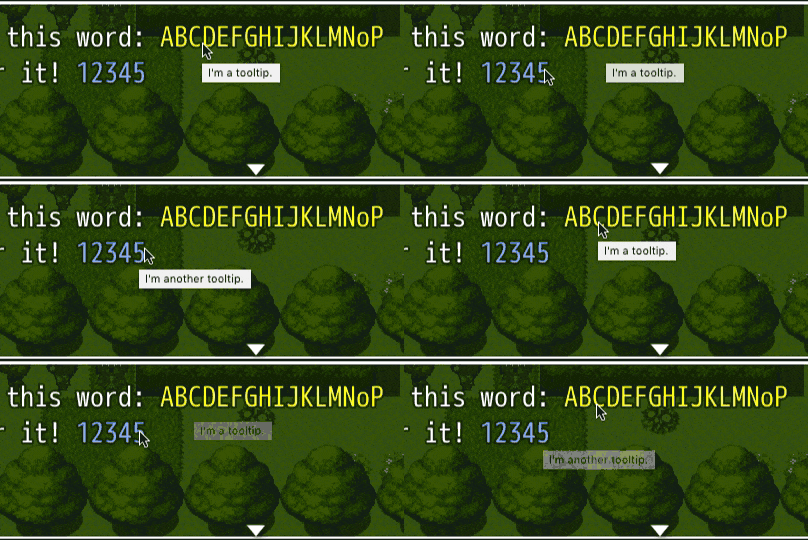
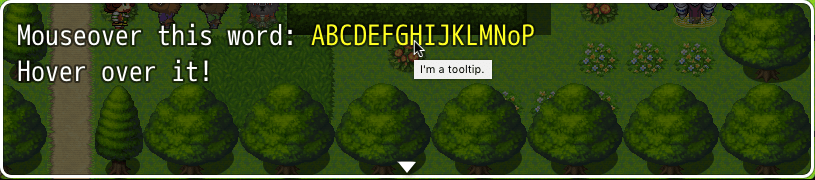
  5. Here is a quick and gross way to do it, using basic browser element title tool-tips (hover for a second and then you see the tool-tip).
    Screen%20Shot%202017-03-27%20at%202.21.06%20PM.png

    Use like this, from the example...
    Code:
    Mouseover this word:\c[17] \[TITLE:I'm a tooltip.TEXT:ABCDEFGHIJKLMNoP]
    \c[0]Hover over it!
    This is just a quick version; it doesn't handle any format characters or newlines inside the \[TITLE:blaTEXT:bla]
    It will probably totally conflict with other message plugins, so your best bet is to modify this for your situation (that is if you even want an HTML tool-tip).

    plugin
    PHP:
    Bitmap.prototype._drawTextOdd = Bitmap.prototype._drawTextBody;
    Bitmap.prototype._drawTextBody = function(text, tx, ty, maxWidth) {
       if(text === "\x99"){
           arguments[0] = "";
           $gameMessage._addingTitles = true;
       }
       if(text === "\x98"){
           arguments[0] = "";
           $gameMessage._addingTitles = false;
           $gameMessage._currentToolTip++;
       }
       if($gameMessage._addingTitles){
           var y = SceneManager._scene._windowLayer.children[0].y;
           var padding = SceneManager._scene._windowLayer.children[0]._padding;
           var tt = document.createElement("div");
           tt.className = "tooltip";
           tt.innerHTML = " ";
           tt.style.position = "absolute";
           tt.style.left = Math.round(tx + padding) + "px";
           tt.style.top = Math.round(ty + y - padding / 2) + "px";
           tt.style.width = Math.round(this.measureTextWidth(text)) + "px";
           var height = parseInt((this.fontSize+"").replace(/\D+/g,"")) + 5;
           tt.style.height = height + "px";
           tt.style.zIndex = "999";
           //tt.style.backgroundColor = "red"; // to debug title position
           tt.setAttribute("title", $gameMessage._toolTips[$gameMessage._currentToolTip]);
           document.body.appendChild(tt);
       }
       this._drawTextOdd.apply(this, arguments);
    };
    Game_Message.prototype.clearOdd = Game_Message.prototype.clear;
    Game_Message.prototype.clear = function() {
       this.clearOdd.call(this, arguments);
        this._toolTips = [];
        this._currentToolTip = 0;
        this._addingTitles = false;
        var tt = document.getElementsByClassName("tooltip");
        while(tt.length > 0)
           tt[0].parentNode.removeChild(tt[0]);
    };
    Game_Message.prototype.add = function(text) {
       var tt = this._toolTips;
       text = text.replace(/\\\[TITLE:([^\]]+?)TEXT:([^\]]+?)\]/g, function(m, title, text){
           tt.push(title);
           return "\x99" + text + "\x98";
       });
        this._texts.push(text);
    };
  6. Trihan said:
    How would you want such a plugin to determine what text should be tooltipped and what tooltip it should show?

    Mogwai's solution looks pretty solid, where I would identify what goes into the tooltip and what word is presented. I could set the tooltip word color by RGB hex in the plugin configuration, or on the fly using text codes. Ideally, the tooltip text would be presented in a message window with the same appearance as all others, and would be configurable for position (x,y,width,height). Thanks!

    EDIT: Actually, if it was possible to have both functionalities, where either Hover would trigger a small text popup that disappears on unhover, or on click could spawn a new text message window (content from a lore codex) that has its own close button, that would be amazing.
  7. Oh trust me, it's not very solid. There are so many factors to consider like font size, padding, word wrap, and other message plugins... Like I mentioned, it's just a quick version.


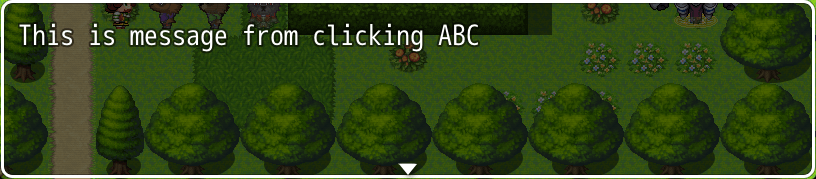
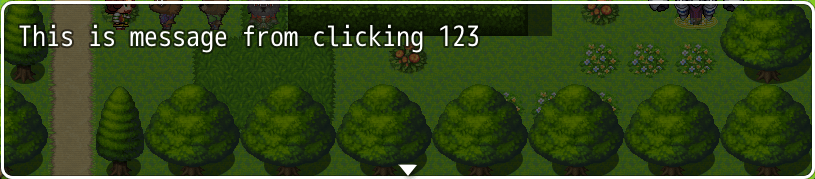
    EDIT: I've added a click message to the tooltips, but I feel like this quick plugin is a rickety structure to begin with and click messages is adding on extra stress it can't handle.

    use like \[TITLE:blaTEXT:blaCLICK:bla]

    Code:
    Mouseover this word:\c[17] \[TITLE:I'm a tooltip.TEXT:ABCDEFGHIJKLMNoPCLICK:This is message from clicking ABC]
    \c[0]Hover over it!\c[16] \[TITLE:I'm another tooltip.TEXT:12345CLICK:This is message from clicking 123]
    will become...
    tooltips-o.gif
    Screen%20Shot%202017-03-27%20at%205.35.28%20PM.png
    Screen%20Shot%202017-03-27%20at%205.35.37%20PM.png

    The way I have it set up to show a message on click, makes the current message lose its spot in line. I don't know how to get around it without further tinkering.
    plugin click messages version
    PHP:
    Bitmap.prototype._drawTextOdd = Bitmap.prototype._drawTextBody;
    Bitmap.prototype._drawTextBody = function(text, tx, ty, maxWidth) {
       if(text === "\x99"){
           arguments[0] = "";
           $gameMessage._addingTitles = true;
       }
       if(text === "\x98"){
           arguments[0] = "";
           $gameMessage._addingTitles = false;
           $gameMessage._currentToolTip++;
       }
       if($gameMessage._addingTitles){
           var y = SceneManager._scene._windowLayer.children[0].y;
           var padding = SceneManager._scene._windowLayer.children[0]._padding;
           var tt = document.createElement("div");
           tt.className = "tooltip";
           tt.innerHTML = " ";
           tt.style.position = "absolute";
           tt.style.left = Math.round(tx + padding) + "px";
           tt.style.top = Math.round(ty + y - padding / 2) + "px";
           tt.style.width = Math.round(this.measureTextWidth(text)) + "px";
           var height = parseInt((this.fontSize+"").replace(/\D+/g,"")) + 5;
           tt.style.height = height + "px";
           tt.style.zIndex = "999";
           //tt.style.backgroundColor = "red"; // to debug title position
           tt.setAttribute("title", $gameMessage._toolTips[$gameMessage._currentToolTip]);
           tt.setAttribute("value",$gameMessage._currentToolTip);
           tt.addEventListener("mousedown", function(e){
               var value = parseInt(tt.getAttribute("value"));
               var message = $gameMessage._toolMessages[value];
               var prevMessage = $gameMessage._previousMessage.join("\n");
               setTimeout(function(){
                   $gameMessage.add(message, true);
                   $gameMessage.newPage();
                   $gameMessage.add(prevMessage);
               }, 200);
               e.preventDefault();
           });
           document.body.appendChild(tt);
       }
       this._drawTextOdd.apply(this, arguments);
    };
    Game_Message.prototype.clearOdd = Game_Message.prototype.clear;
    Game_Message.prototype.clear = function() {
       this.clearOdd.call(this, arguments);
        this._toolTips = [];
        this._toolMessages = [];
        this._previousMessage = [];
        this._currentToolTip = 0;
        this._addingTitles = false;
        var tt = document.getElementsByClassName("tooltip");
        while(tt.length > 0)
           tt[0].parentNode.removeChild(tt[0]);
    };
    Game_Message.prototype.add = function(text, toolMessage) {
       if(toolMessage === undefined){
           this._previousMessage.push(text);
           var tt = this._toolTips;
           var tm = this._toolMessages;
           text = text.replace(/\\\[TITLE:([^\]]+?)TEXT:([^\]]+?)CLICK:([^\]]+?)\]/g,
           function(m, title, text, click){
               tt.push(title);
               tm.push(click);
               return "\x99" + text + "\x98";
           });
       }
        this._texts.push(text);
    };
  8. Yeah its really important to set the tooltips only once. I know a plugin but there you have to set up the tooltip every time before you use it
  9. @styx92 So you mean to say you want a list of keywords with pre-defined tool-tips, rather than setting it by message tags? I can do this too.
    I also want to do away with the overlapping hidden element, and just do a canvas title dynamic of text/mouse position, because I know this way is going to break so easily.
  10. Exciting developments! A pre-defined keyword list would allow users to keep text boxes less cluttered, and I know for certain there are many of the same words I will be highlighting. In fact, I intend for my text boxes to have word-for-word text of the same information that can be found in the game Journal. Could it be possible to link with an existing and popular journal/codex solution that would facilitate keywords?
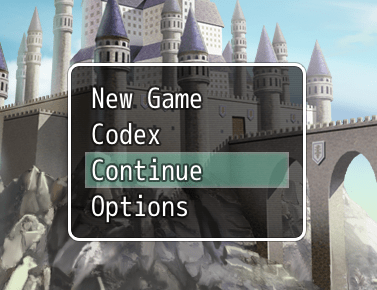
  11. Yes! A codex menu!

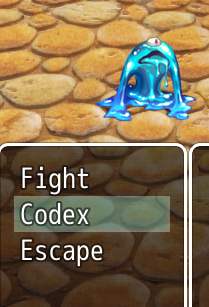
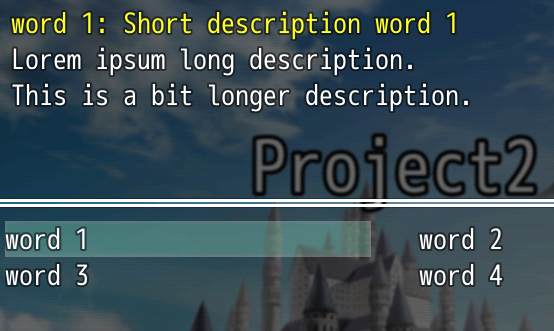
    If we make the words open a codex/dictionary then I don't have to fiddle with a poorly spliced index $gameMessage like I was having trouble with. I added a codex and now you don't have to fumble with those giant messy message codes; just add words to the dictionary and they will link to their definition.

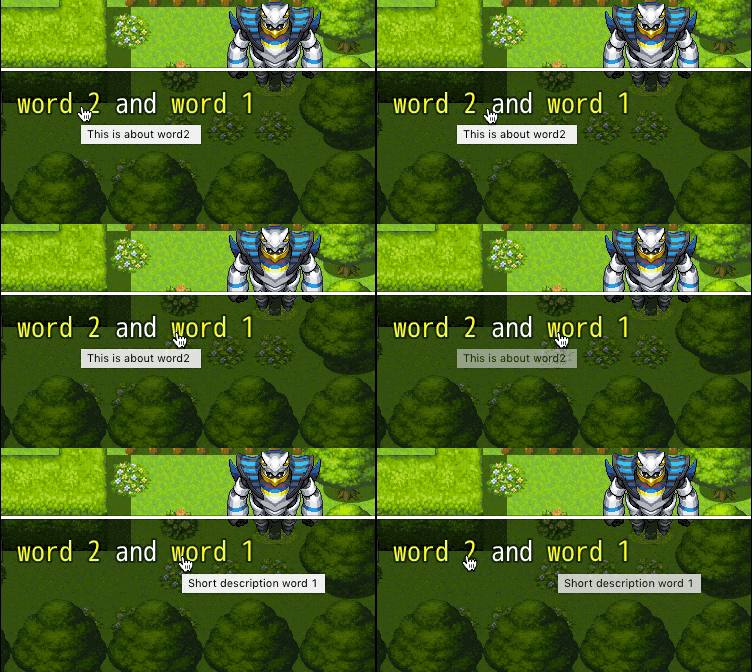
    I made a plugin for this ToolTip, Codex and all (case-insensitive) all dictionary words will be highlighted and linked to the codex.

    This part is all you need to edit. Add as many words as you want. (the plugin is attached; this is just part of it)
    PHP:
    var itemCodex = itemCodex || {};
    
    // STUFF YOU NEED TO MODIFY
    itemCodex.highlightColor = "\\c[17]"; // highlighted word color
    itemCodex.menuName = "Codex"; // the name in your menus
    itemCodex.dictionary = {
       "word 1" : [
           "Short description word 1", // short description / tooltip
           "Lorem ipsum long description.\nThis is a bit longer description.", // long description
           0 // game switch ON to show, 0 if none
       ],
       "word 2" : [
           "This is about word2 ",
           "A little bit of a summary if you will.\nThis is a newline \\\\n",
           0
       ],
       "word 3" : [
           "Hi! I'm word 3!",
           "This is about bunch of stuff.\nYes it is",
           0
       ],
       "word 4" : [
           "Flumaadsfsaas!!!",
           "Hi! I'm word 4!",
           0
       ]
    };

    screenshots
    Screen%20Shot%202017-03-29%20at%203.37.16%20PM.png
    Screen%20Shot%202017-03-29%20at%204.36.48%20PM.png
    tooltip2-o.gif
    Screen%20Shot%202017-03-29%20at%203.37.22%20PM.png

    This is my first menu plugin so it's probably not perfect and will conflict with other menu plugins. I only tested with a default game, no other plugins. Custom font size and padding might throw the mouseover zones off. If it's missing, take the \\ off of this (un-comment line:58) and it will show where my poor judgement is placing the zones.
    PHP:
    // tt.style.backgroundColor = "rgba(255,255,0,0.5)"; // to debug title position
  12. This looks terrific. I'm going to install it and test it shortly. Thank you so much!
  13. Alright, I've been testing this for a few days now. It appears there are some interactions with other plugins (I'm running probably 2 dozen plugins) that will just always be. I can't click on the highlighted text to open the codex and ever get back to the conversation, for example, with it failing to address a bitmap object. I suspect interaction with Yanfly message core.

    This is ok as the tooltip is more than helpful, however, there is an issue I can't seem to overcome. No matter how I arrange the codex dictionary, the words are not properly referenced. The first word will end up with the definition of the last dictionary item, and every other object will showup as 'undefined.' I wonder what could be causing this?
  14. Aren't there any plugin commands for this?
    I downloaded it but I couldn't find any. The idea is awesome but I don't seem to be able to use this plugin.
    Is there an instruction manual somewhere?
  15. Apr 11, 2017
    [necro]@You Clod [/necro]
    Be careful with dates. :)
    Open a new thread request and make a link to this instead.
    [mod]Closing this.[/mod]