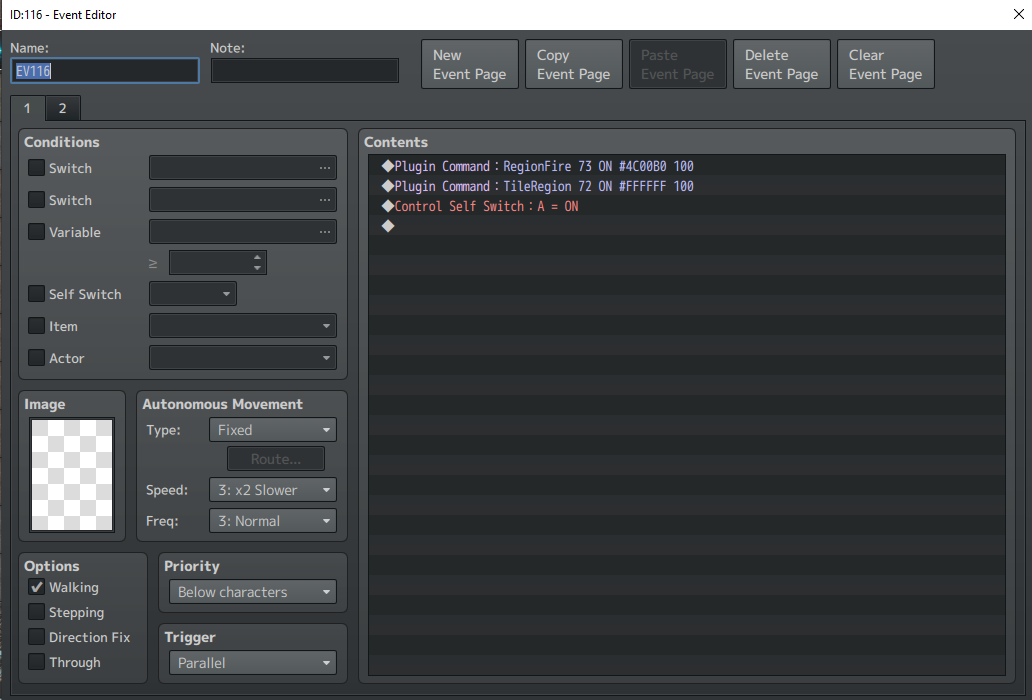
Hi, I have an issue with the region light. When I use the plugin command "TileRegion [X] ON #FFFFFF 150" it doesn't work, but other commands such as "RegionGlow" and "RegionFire" work fine. I tried to use "RegionTile" but it won't work either. Do I miss something or I'm doing something wrong? Thanks.
Terrax Lighting system
● ARCHIVED · READ-ONLY
-
-
@Kingslayer in your screen shot is TileRegion, not RegionTile.
as there are some issues with the plugin, you can look into Community Lighting
that has many fixes of this plugin.
is page set switch A is on?
depending on your needs, you can look in Shora's Lightning too, as it has many
features that you might like. -
@ShadowDragon yes because the plugin tutorial says it must be this way. I tried with "RegionTile" but it did not work.
Yes, the page set is switched to A.
I don't want to switch to another lightning plugin because to avoid messing up with other plugins. -
@Kingslayer there is no TileRegion or RegionTile as all.
available plugin commands for the base:
- tileblock
- regionblock
- tilelight
- regionlight
- tilefire
- regionfire
- tileglow
- regionglow
those are available, so where did you find "TileRegion" or "RegionTile"?
dont you mean "RegionBlock" instead?
as it does says RegionTile 1 ON #FFFFFF, but I think it's RegionBlock
as RegionFire and RegionGlow are connected, same for TileBlock part.
hope this helps ;) it's probably a typo in the helpfile. -
@ShadowDragon This is what is written in the plugin commands:
Am I missing something? Or is this plugin outdated?
EDIT: It's written wrong. It's "RegionLight" I tried it this way and it worked. Thanks. Now I must remember it. -
@Kingslayer remember or write down the plugin main commands I said.
as it has different effect based on its type. so its a oversight in the helpfile.
glad you find it out. good luck with your project :) -
I would like to ask a question that I don't believe I saw anyone asking. Can you assign a flashlight event to an object and turn it on and off with a switch? I am trying to make a cone effect for a television in a dark room. So far from what I have seen once you set the flashlight command on the note of the event the light just works. How can I turn it on and off????