Terrax Lighting system

● ARCHIVED · READ-ONLY
Started by Terrax 1467 posts Page 40 of 74 View original ↗
  1. New version (1.4.0) now available


    http://mvplugins.com/plugin/Terrax/Terrax%20Lighting%20System


    or


    https://github.com/Terraxz/TerraxLighting


    Fix: Added a little more glow to the Region and Tile glow


    Fix: Bug with looping area's


    Fix: Tileblock no longer worked in browsers, fixed with new filter.

    UltimusLight said:
    Hello! I've installed the plugin on a project I'm using, but when I make the plugin call via note the default setting from the plugin menu appears to be overriding the plugin call.


    Example:


    I've got in the Note entry: "Light radius 85 #AAAA77", but the Player radius is still at its default radius of 300 and color of pure white.


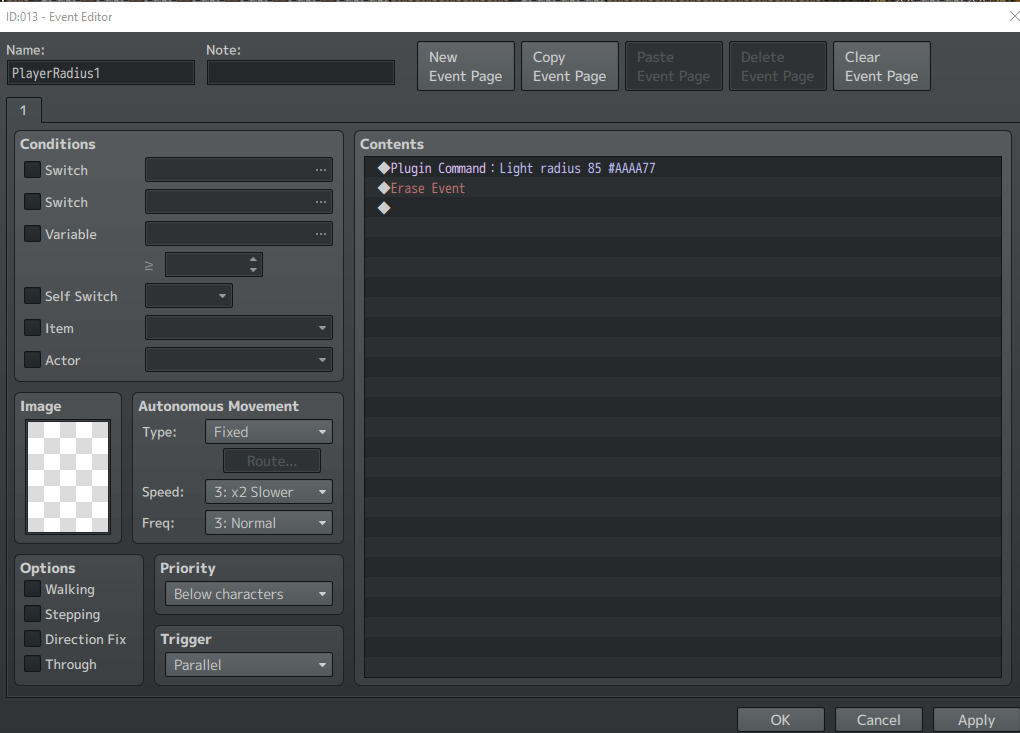
    You have to use Plugin command : Light radius 85 #AAAA77, instead of putting it in a tag of some event.


    Create an event..


    Put in :


    Plugin command : Light radius 85 #AAAA77


    Erase Event

    DarkSearinox92 said:
    Hi Terrax, thank you very much for all of your improvement. New things are fantastic and i'm very hyped.


    I've only one question: When i try to play the game on pc that aren't powerfull like mine, fps down to 30 when i walk. This problem is caused by cpu or GPU?


    I talk with ignorance: is it possible to clean the code, improve it to avoid the lag of under-performing PC?


    I repeat: i'm talking with ignorance.


    Thank you very much for all ^^

    Drawing globes on a canvas in Javascript is CPU intensive. The more globes you include in the map, the slower it becomes.


    Some tips:


    - Give players an option to turn the script off completly (less atmosphere, but playable on low end machines)


    - Don't build huge maps with lots of events and lightsources, keep area's a little smaller.


    - Give players a setting that only shows vital lightsources (medium graphic settings) and include a setting for all lightsources (high graphic settings).
  2. Thank you kindly for your reply!
  3. When i start my game, i just get the message "TypError: Cannot read property "addChild" of undefined". So far i just added the Script (v.1.4.0) and gave one event the Note "Light 250 #FFFFFF" .


    What is wrong with my children? :/
  4. I did what you suggested and it still doesn't seem to be working?


    896c737e5d43cb5a1caa031c9778f201.png
  5. Thats strange, looks like you got it perfectly...


    Btw. You can also set the radius in the plugin settings.
  6. It doesn't seem to activate now even when I change the default setting. The only thing that makes defaults appear is the previous note tag item I mentioned.
  7. Halokey said:
    When i start my game, i just get the message "TypError: Cannot read property "addChild" of undefined". So far i just added the Script (v.1.4.0) and gave one event the Note "Light 250 #FFFFFF" .


    What is wrong with my children? :/

    Sounds like a conflict between 2 plugins, try to move terraxlighting to the bottom of the plugin list or deactivate some other addons and see if the problem persists. If you find a addon with a conflict please tell me and ill take a look at the other plugin.

    UltimusLight said:
    It doesn't seem to activate now even when I change the default setting. The only thing that makes defaults appear is the previous note tag item I mentioned.

    To activate the script you need at least one event with a note-tag on the map.


    After that you can change the radius of the player with another event like above.


    But first you need at least one lightsource from event with notetag.
  8. Just a quick heads up Terrax, if I have alot of light sources running on one map the game runs fine, but than if I open and close the menu a few times my fps drops to 2 or 3.  Kind of like the parralax memory leak problem with MV.  Not sure how better to explain.  I can try and make a video if you like.
  9. padr81 said:
    Just a quick heads up Terrax, if I have alot of light sources running on one map the game runs fine, but than if I open and close the menu a few times my fps drops to 2 or 3.  Kind of like the parralax memory leak problem with MV.  Not sure how better to explain.  I can try and make a video if you like.

    Just a few questions about that.


    - Are the lightsources mainly on moving events?


    - Are the lightsources configured to be turned on an off?


    - Can you test if the framerate jumps up again if you turn off the script with plugin call : Light deactivate?
  10. Terrax said:
    To activate the script you need at least one event with a note-tag on the map.


    After that you can change the radius of the player with another event like above.


    But first you need at least one lightsource from event with notetag.

    Ooh, okay. Gotcha. Thanks for the apt replies.
  11. DarkSearinox92 said:
    When i try to play the game on pc that aren't powerfull like mine, fps down to 30 when i walk

    Hi @DarkSearinox92, just out of curiosity, can you give the hardware specs of that machine? (at least the CPU type+clock, GPU would be nice too)


    If you don't know about those stuff can you tell how old the PC is (or laptop PC maybe?). Thanks in advance and good luck.
  12. Hey Terrax, wonderful plugin you've made, and thanks so much for keeping it up to date for so long.


    I was wondering if there are any plans for handling walls or other objects blocking the light source's path.  I saw in the demo map that you can have certain regions toggled so that they'll darken up instead of get brighter, which is a great touch until you get to some goofy usage cases like the attached image.  I'm fine with hacking my own solution out or just structuring my maps around that limitation if it's something you're not interested in doing.


    Just to make sure, I browsed through this thread (albeit pretty quickly) to see if this had been addressed or not.  If I missed something, please let me know.  Thanks!

    Game_2016-11-15_22-00-48.png
  13. KaYsEr said:
    Hi @DarkSearinox92, just out of curiosity, can you give the hardware specs of that machine? (at least the CPU type+clock, GPU would be nice too)


    If you don't know about those stuff can you tell how old the PC is (or laptop PC maybe?). Thanks in advance and good luck.


    Terrax said:
    Drawing globes on a canvas in Javascript is CPU intensive. The more globes you include in the map, the slower it becomes.


    Some tips:


    - Give players an option to turn the script off completly (less atmosphere, but playable on low end machines)


    - Don't build huge maps with lots of events and lightsources, keep area's a little smaller.


    - Give players a setting that only shows vital lightsources (medium graphic settings) and include a setting for all lightsources (high graphic settings).


    Hi guys, thank you for your reply.


    So: My pc is powerfull and run perfectly the game. I've 58-60 fps standard with a lot of lightsources. I've an i5-2500k (year 2011), 8gb RAM and a NVIDIA 570.


    BUT on other pc, like Intel Core 2duo it's a xD


    However, Terrax, there is a way to implement a workaround that... disable lights when you'r not very near of it? For example:


    Hey game, enable light when player away 15 tiles.


    So, lights very far are not enabled and game run better...


    Do you think it's a good thing?
  14. DarkSearinox92 said:
    Hi guys, thank you for your reply.


    So: My pc is powerfull and run perfectly the game. I've 58-60 fps standard with a lot of lightsources. I've an i5-2500k (year 2011), 8gb RAM and a NVIDIA 570.


    BUT on other pc, like Intel Core 2duo it's a xD


    However, Terrax, there is a way to implement a workaround that... disable lights when you'r not very near of it? For example:


    Hey game, enable light when player away 15 tiles.


    So, lights very far are not enabled and game run better...


    Do you think it's a good thing?

    Yeh, not a bad plan to check the drawing before i draw then to let the gdi do the clipping, ill take a look
  15. Terrax said:
    Yeh, not a bad plan to check the drawing before i draw then to let the gdi do the clipping, ill take a look


    :wub:
  16. I have this error in the console


    t.png


    The game work, but what is this how can i fix it?

    I'm using Project Core 1.2


    TerraxLighing 1.4.0
  17. Lakaroth said:
    I have this error in the console


    t.png


    The game work, but what is this how can i fix it?

    I'm using Project Core 1.2


    TerraxLighing 1.4.0

    Yep, forgot to init something, it wont cause problems and it will be fixed next update.

    chasingfoxlights said:
    Hey Terrax, wonderful plugin you've made, and thanks so much for keeping it up to date for so long.


    I was wondering if there are any plans for handling walls or other objects blocking the light source's path.  I saw in the demo map that you can have certain regions toggled so that they'll darken up instead of get brighter, which is a great touch until you get to some goofy usage cases like the attached image.  I'm fine with hacking my own solution out or just structuring my maps around that limitation if it's something you're not interested in doing.


    Just to make sure, I browsed through this thread (albeit pretty quickly) to see if this had been addressed or not.  If I missed something, please let me know.  Thanks!

    No, raytracing will not be made.


    And the strange behavior of the tileblocks is something i can't fix, if you want to use tileblocked regions make sure the regions are larger then the radius of the lights used. No way around it i'm afraid.
  18. Terrax said:
    No, raytracing will not be made.


    And the strange behavior of the tileblocks is something i can't fix, if you want to use tileblocked regions make sure the regions are larger then the radius of the lights used. No way around it i'm afraid.


    Got it, thanks for the quick response (and vocab lesson)!
  19. Man, I REALLY love how you take the time to try to get to answer everyone. Even in redundancy. (I've read about half of this thread) Well, I haven't tried it yet, but I'm about to! :) I'm one of those with a computer that has an aneurysm with parallax maps, so I'm sure I can't push it. Well, let's give this a try.


    Edit: Wow, I'm amazed! so simple. The demo pushed me about 70% ram, but with only a few lights in my own game, it worked flawlessly at 530 mb. That's all I really need it for. A few torches here and there. Light up a dark cave. Your awesome man. The way the lights blend together is very neat too! It's sorcery! lol


    Edit2: I don't really care to do this, but I'm very curious. Can you code it to get the real time from the computer and display that time of day? So if it's dark irl, it's dark in game? There was a gba game that did that as it's main gimmick I believe.
  20. Hey Terrax your plug-in is unbelievable! It's just what I needed! I used it in the newest update to our game 99 (v2.4), which if interested you can check out here:


    You are of course credited. Originally I wanted to do TileBlock on 20 regions but that seems to slow the game way down, so I had to settle with 10. Besides that everything else is fantastic. Thanks!