MV - SRPG Engine MV - Plugins for creating Tactical Battle System

● ARCHIVED · READ-ONLY
Started by RyanBram 3313 posts Page 160 of 166 View original ↗
  1. NoobieMcNoobs said:
    this works for active events X and Y position in the console logs
    JavaScript:
    var activeEvent = $gameTemp.activeEvent();
    var activeUnitId = activeEvent.eventId();
    var activeX = $gameMap.event(activeUnitId).x;
    var activeY = $gameMap.event(activeUnitId).y;
    var activeXandYcords = [activeX, activeY];//just for testing
    activeXandYcords;//for testing

    and the same works for target events
    JavaScript:
    var targetEvent = $gameTemp.targetEvent();
    var targetUnitId = targetEvent.eventId();
    var targetX = $gameMap.event(targetUnitId).x;
    var targetY = $gameMap.event(targetUnitId).y;
    var targetXandYcords = [targetX, targetY];//just for testing
    targetXandYcords;//for testing
    hope it helps
    Thanks! This is super helpful.


    AngelYuko said:
    It's honnestly excellent and i'm really interrested !
    Do you think it's possible to had the MP under HP and the skill / weapon name above units name ?

    I also saw you share your predictive windows battle screenshot a long ago. It's possible to share it too ?
    Definitely possible. I just don't use MP personally, I remade it to be an extra stat essentially.

    As for my prediction window, I think xabileug shared their code for theirs? I can also share mine, but their prediction window if I recall correctly is based off my code
  2. gsc said:
    Definitely possible. I just don't use MP personally, I remade it to be an extra stat essentially.

    As for my prediction window, I think xabileug shared their code for theirs? I can also share mine, but their prediction window if I recall correctly is based off my code
    Thanks !

    Yeah I remember. But I had some problems with it and they didn't explain how to delete the statuts Windows (with batlers stats) and how to move the command Windows (the window to confirm the fight or cancel it)

    Also, cri wasn't well displayed (0% cri in the prédiction but sometimes units could crit during battle)


    AngelYuko said:
    What about the ally target skills problem I found ?

    I tested it and :
    -> When player use a skill that target an ally (healing / buff stats etc) it works
    -> When an enemy use the same skill on another ennemy, the game launch the battle but nothing happens (no healing / no buff etc)
    -> Even weirder, when an ennemy use thoses skill on itself, it works.

    It only happens when I use the SRPG Gear core MV V.1.21 Q (and later updates).

    EDIT : I didn't succeed to solve my healing skill problem.
    Here a video of what happens.

    On player phase, I used the skill and it works.
    On enemy phase, the priest may use the exact same skill and this happened.


    EDIT : I tried to disable all plugins that are not essential to run SRPG Gear (all my Yanfly engine plugins essentially) and the problem persist.
  3. Encountering a weird thing where enemies don't know how to use a buffing skill?
    I have a skill that only raises the Agility parameter though a buff
    When I give it to an enemy, they just skip their turn, despite having all the means to use that skill

    I also confirmed this by giving the enemy an attacking skill. When the only thing in range is a player unit, they move in to attack. But if another enemy unit is in range that they can buff, they just skip their turn.
  4. how i can erasde this window? im using mz version 1737435055939.png
  5. Percarus said:
    Encountering a weird thing where enemies don't know how to use a buffing skill?
    I have a skill that only raises the Agility parameter though a buff
    When I give it to an enemy, they just skip their turn, despite having all the means to use that skill

    I also confirmed this by giving the enemy an attacking skill. When the only thing in range is a player unit, they move in to attack. But if another enemy unit is in range that they can buff, they just skip their turn.
    You have the exact same problem as me.
    It's not only buff skills.
    It's with any non player target skill (healing too)
  6. AngelYuko said:
    You have the exact same problem as me.
    It's not only buff skills.
    It's with any non player target skill (healing too)
    I've double checked, both Shoukang and 1.32Q demo
    Healing worked fine in both. I'm going to do a bit more testing, but some stuff I've noted down:
    • 1.32Q - healing works, but was weird. I've made the "Dark Priest" enemy be capable of only healing. It works, but they started healing allies who are full health even while the user is damaged. Probably fixable with AIcontrol though.
    • Shoukang's Demo - AI is capable of applying a buff to itself, but through the form of a state. I will start testing if they can still think of buffing itself if the buff was a param increase and not a state.
    • Shoukang's Demo - AI is capable of healing, but this seems specialized specifically for the cool battle game it has where you spawn units? Just gotta decipher what the formulas are.
    On my game's end, I also tried disabling all plugins besides the core ones and nothing worked. I'll see if there's any other quirks I've missed.

    EDIT: Did some quick tests on my game.
    • Enemies started buffing and healing each other, as long as they were on <mode: normal>. If they were on <mode: stand> they would skip their turn if all they could do was heal or buff an ally. If they were on <mode: stand> and were damaged, they would heal only themselves.
    I have a feeling that stand mode only accounts for actors being in range of their skills, and does not check if allies who could benefit from their skills are in range.
  7. Percarus said:
    I've double checked, both Shoukang and 1.32Q demo
    Healing worked fine in both. I'm going to do a bit more testing, but some stuff I've noted down:
    • 1.32Q - healing works, but was weird. I've made the "Dark Priest" enemy be capable of only healing. It works, but they started healing allies who are full health even while the user is damaged. Probably fixable with AIcontrol though.
    • Shoukang's Demo - AI is capable of applying a buff to itself, but through the form of a state. I will start testing if they can still think of buffing itself if the buff was a param increase and not a state.
    • Shoukang's Demo - AI is capable of healing, but this seems specialized specifically for the cool battle game it has where you spawn units? Just gotta decipher what the formulas are.
    On my game's end, I also tried disabling all plugins besides the core ones and nothing worked. I'll see if there's any other quirks I've missed.

    EDIT: Did some quick tests on my game.
    • Enemies started buffing and healing each other, as long as they were on <mode: normal>. If they were on <mode: stand> they would skip their turn if all they could do was heal or buff an ally. If they were on <mode: stand> and were damaged, they would heal only themselves.
    I have a feeling that stand mode only accounts for actors being in range of their skills, and does not check if allies who could benefit from their skills are in range.
    I personnaly use the SRPG Gear 1.22Q (mv version) and even if it's <mode:stand > or normal the turn is completly skipped
  8. AngelYuko said:
    I personnaly use the SRPG Gear 1.22Q (mv version) and even if it's <mode:stand > or normal the turn is completly skipped
    Unfortunately I can't help with that, as it turns out my issue was something else entirely, and I'm not using SRPG Gear 1.22Q :(
    Some suggestions on how to help fix it though:
    • Maybe you can try taking a look at a demo and comparing what's different between them, if healing skills work there?
    • You can open the console using F8 or F12 and check if it throws any errors or warnings? If so, you can send them here.
    • If you want to dive into the code, maybe you can check if anything messes with the Game_Action class- that might be the root of it, but I am not too sure. I welcome any corrections if anything I said was wrong!
  9. 1738519778433.png

    Does anyone know how to remove this? I've been able to edit a bit of it and can set it up to look how I want, but for the life of me I cannot figure out where this part is in the code to get rid of it.

    I'm using 1.23 Q
  10. Hey there,

    I'm making a game on MV 1.6.3 using the SRPG engine. I've had a good time getting it to work as I've wanted so far, but I recently went to add the move after action plugin to my set up and this is causing a crash when the an actor performs an action before moving. The crash occurs specifically after the actor performs the action, just before the move after action option is given to the player. I'm sure it's got to be a plugin conflict, but so far I haven't been able to figure out where the conflict is happening and was hoping for some help or a point in the right direction. I'll attach the error, console log, and my plugin set up. Thank you so much for any help you can provide, I really appreciate it!
  11. SnapSnap said:
    View attachment 330501

    Does anyone know how to remove this? I've been able to edit a bit of it and can set it up to look how I want, but for the life of me I cannot figure out where this part is in the code to get rid of it.

    I'm using 1.23 Q

    This is a Window_SrpgBattleStatus. It has its own whole section in SRPG_core.
    You can overwrite the functions that draw/refresh it to make it display nothing. You can also mess around with the Scene_Battle.prototype.createSprgBattleStatusWindow function, which draw two of these, one for the actor and one for the target.

    I can try and create a simple plugin that removes it, if you want. You seem to have something specific in mind on how you want it to look though, so I’d encourage you to mess around with it yourself : )
  12. Percarus said:
    This is a Window_SrpgBattleStatus. It has its own whole section in SRPG_core.
    You can overwrite the functions that draw/refresh it to make it display nothing. You can also mess around with the Scene_Battle.prototype.createSprgBattleStatusWindow function, which draw two of these, one for the actor and one for the target.

    I can try and create a simple plugin that removes it, if you want. You seem to have something specific in mind on how you want it to look though, so I’d encourage you to mess around with it yourself : )

    Thank you for the help, but despite how much I messed around with those none of it worked. I did manage to remove it by commenting out this._mapSrpgStatusWindow.setBattler(flag[1], false);
    this._mapSrpgStatusWindow.open();

    1738587282935.png
    However, this also has the side effect of removing information when you click on the enemy outside of battle.


    I wouldn't mind trying out that plugin to remove it. I'm sure a lot of people would benefit from it as well considering it takes up a majority of the battle prediction screen haha.
  13. SnapSnap said:
    Thank you for the help, but despite how much I messed around with those none of it worked. I did manage to remove it by commenting out this._mapSrpgStatusWindow.setBattler(flag[1], false);
    this._mapSrpgStatusWindow.open();

    View attachment 330556
    However, this also has the side effect of removing information when you click on the enemy outside of battle.


    I wouldn't mind trying out that plugin to remove it. I'm sure a lot of people would benefit from it as well considering it takes up a majority of the battle prediction screen haha.
    I've created a plugin that should remove that window without removing the enemy information window.
    However, it requires a tiny bit of tinkering with SRPG_core.js;
    In this section of code:1738726563697.png
    Replace the (flag[0])
    into (flag[0] && flag[1][0] == 'enemy')
    That's all!

    I've attached the plugin; just put it in your project.
    If you have any questions or noticed any bugs, just lemme know.
  14. Percarus said:
    I've created a plugin that should remove that window without removing the enemy information window.
    However, it requires a tiny bit of tinkering with SRPG_core.js;
    In this section of code:View attachment 330659
    Replace the (flag[0])
    into (flag[0] && flag[1][0] == 'enemy')
    That's all!

    I've attached the plugin; just put it in your project.
    If you have any questions or noticed any bugs, just lemme know.
    Thank you so much this worked wonderfully!

    However, I do have one last issue. It's not the fault of your plugin or anything I made sure to check so don't worry haha.

    As I was getting ready to setup my Battle Prediction I noticed that whenever I try to draw text at higher parts of the screen it gets cut off.

    Here is Crit text at Y = 20
    1738779859233.png

    Here is Crit text at Y = -20
    1738779976682.png

    I assume this is some layering issue? Although I'm not sure how to fix it...

    SnapSnap said:
    Thank you so much this worked wonderfully!

    However, I do have one last issue. It's not the fault of your plugin or anything I made sure to check so don't worry haha.

    As I was getting ready to setup my Battle Prediction I noticed that whenever I try to draw text at higher parts of the screen it gets cut off.

    Here is Crit text at Y = 20
    1738779859233.png

    Here is Crit text at Y = -20
    1738779976682.png

    I assume this is some layering issue? Although I'm not sure how to fix it...
    Thankfully, this should be easier to fix. This is because the text you're trying to render is inside the Prediction Window- you should be able to find the predictionWindow in SRPG_Core.

    All you have to do here is either make the Prediction Window higher, or render the text lower.
  15. Hi! I’d love to create a Fire Emblem styled game, but I’m a complete beginner. Is there any kind soul willing to teach me the absolute basics or directing me towards a fool proof guide? Mostly, I need help setting up the strategic battle system. I’ve tried messing around with TacticsSystem, but I can't figure out how to make it work. Also I’m not sure if there are better plugin options. Thanks for your patience
  16. Percarus said:
    Thankfully, this should be easier to fix. This is because the text you're trying to render is inside the Prediction Window- you should be able to find the predictionWindow in SRPG_Core.

    All you have to do here is either make the Prediction Window higher, or render the text lower.
    Thank you for all the help so far!
    I messed around for a bit, but I have no clue how to make the Prediction Window higher unfortunately. I figured out how to stretch it out and move it left and right, but raising it up and down nope.
    It's not the biggest deal I can just have the text lower, but I still think it'd be useful to know how to raise the Prediction Window.
  17. EDIT:
    I was finally able to get things working. It turns out that unitmapinfo requires the community version of the RPGMaker MV core .js files. They can be found here or a more recent and modified version here. When used together, the save function works again. However, it DRASTICALLY inflates the save file size, to around 220kb.


    Okay, I was able to fix my earlier issue with a different version of the move after action plugin and some general plugin reordering. So, if anyone has the same problem, they can look at the attached plugin order.

    I have a new issue, however. I added the unit map info plugin and now the game crashes when you attempt to save. The flow to recreate the issue is new game > have a battle > battle completes > save from pause menu > click any slot to try to save. From there, the save does not create, and if you try to leave the save menu you get the attached error. I'll once again attach the console log as well.

    Thanks in advance for any help that can be provided!pluginlist1.pngpluginlist2.pngcrasherror.png

    Okay, so I've boiled my troubleshooting down to the bare minimum plugin list and I'm still getting the save issue. I'm on MV 1.6.3. Does anyone know if unitmapinfo has a dependency other than srpg_core? Does it not work with MV 1.6.3?
  18. SnapSnap said:
    Thank you for all the help so far!
    I messed around for a bit, but I have no clue how to make the Prediction Window higher unfortunately. I figured out how to stretch it out and move it left and right, but raising it up and down nope.
    It's not the biggest deal I can just have the text lower, but I still think it'd be useful to know how to raise the Prediction Window.
    In order to make it taller, you can edit the part of this code:
    JavaScript:
        Window_SrpgPrediction.prototype.windowHeight = function() {
            if (_srpgPredictionWindowMode === 2) {
                return this.fittingHeight(1);
            } else {
                return this.fittingHeight(3);
            }
        };
    And change fittingHeight(x) to a higher number.

    To move it up, you'll have to edit this part of the code.
    JavaScript:
    Scene_Map.prototype.createSrpgPredictionWindow = function() {
            this._mapSrpgPredictionWindow = new Window_SrpgPrediction(0, 0);
            this._mapSrpgPredictionWindow.y = this._mapSrpgStatusWindow.windowHeight();
            this._mapSrpgPredictionWindow.openness = 0;
            this.addWindow(this._mapSrpgPredictionWindow);
        };
    The .y is set to "this._mapSrpgStatusWindow.windowHeight();" which means the preidiction window is always set to the y of the Status Window. You can change this to.. like, 200 for example, which makes it look like this:
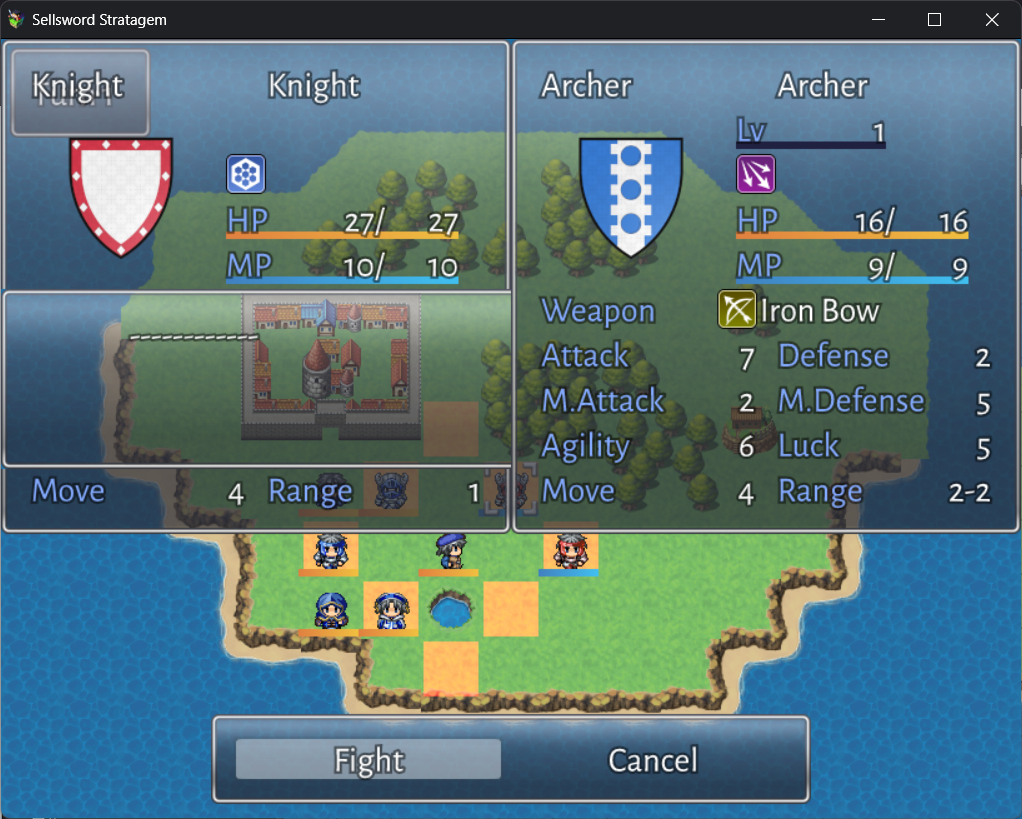
    1738941488813.png
    If editing SRPG_core does not allow your prediction window to move, that means it's being overwritten by another plugin- most likely SRPG_BattleUI, which also has the same function in it.

    BeKindReWind said:
    EDIT:
    I was finally able to get things working. It turns out that unitmapinfo requires the community version of the RPGMaker MV core .js files. They can be found here or a more recent and modified version here. When used together, the save function works again. However, it DRASTICALLY inflates the save file size, to around 220kb.


    Okay, I was able to fix my earlier issue with a different version of the move after action plugin and some general plugin reordering. So, if anyone has the same problem, they can look at the attached plugin order.

    I have a new issue, however. I added the unit map info plugin and now the game crashes when you attempt to save. The flow to recreate the issue is new game > have a battle > battle completes > save from pause menu > click any slot to try to save. From there, the save does not create, and if you try to leave the save menu you get the attached error. I'll once again attach the console log as well.

    Thanks in advance for any help that can be provided!View attachment 330794View attachment 330795View attachment 330796

    Okay, so I've boiled my troubleshooting down to the bare minimum plugin list and I'm still getting the save issue. I'm on MV 1.6.3. Does anyone know if unitmapinfo has a dependency other than srpg_core? Does it not work with MV 1.6.3?
    hi! I'd love to help, but unfortunately I can't figure out what the exact problem is? From the error and its path, it seems to say that it's not finding any actors to use a function on?? I definitely might be wrong though, and welcome any corrections. If I get the time to, I might test this out myself.

    What I can tell you though, is 2 things; the plugins should definitely work on MV 1.6.3, and that SRPG_UnitMapInfo only has SRPG_core as a dependency.

    Edit: I just read the edit, I'm glad you found a solution!

    Loikk said:
    Hi! I’d love to create a Fire Emblem styled game, but I’m a complete beginner. Is there any kind soul willing to teach me the absolute basics or directing me towards a fool proof guide? Mostly, I need help setting up the strategic battle system. I’ve tried messing around with TacticsSystem, but I can't figure out how to make it work. Also I’m not sure if there are better plugin options. Thanks for your patience
    It's super cool that you wanna create a Fire Emblem style game! Go for it!
    I can't teach you the absolute basics, and there's no fool proof guide, but there are a couple things I can advice you to do;
    1. Use the Demos! The 1.32Q demo and the Shoukang Demos are excellent starting points, inspect them well! Tinker around with them! My own Fire Emblem style game that I'm working on right now is built on top of Shoukang's Demo :)
    2. If you're trying to make a Weapon Triangle system like in Fire Emblem, I'd direct you to this post. It's super helpful in my own implementation of the system.
    3. If you're still learning the ropes, I'd recommend not putting in any external plugins just yet, until you're entirely comfortable with the engine. The SRPG engine is extremely compatible with a lot of stuff, but adding more also increases the risk that stuff just breaks, and if you have a lot of plugins it gets a little difficult to track down errors and stuff.
    4. If you have any more questions, make sure to search around the forums! Feel free to ask in this thread as well, or you can message me directly, if ever!
    Good luck and godspeed :)
  19. Percarus said:
    In order to make it taller, you can edit the part of this code:
    JavaScript:
        Window_SrpgPrediction.prototype.windowHeight = function() {
            if (_srpgPredictionWindowMode === 2) {
                return this.fittingHeight(1);
            } else {
                return this.fittingHeight(3);
            }
        };
    And change fittingHeight(x) to a higher number.

    To move it up, you'll have to edit this part of the code.
    JavaScript:
    Scene_Map.prototype.createSrpgPredictionWindow = function() {
            this._mapSrpgPredictionWindow = new Window_SrpgPrediction(0, 0);
            this._mapSrpgPredictionWindow.y = this._mapSrpgStatusWindow.windowHeight();
            this._mapSrpgPredictionWindow.openness = 0;
            this.addWindow(this._mapSrpgPredictionWindow);
        };
    The .y is set to "this._mapSrpgStatusWindow.windowHeight();" which means the preidiction window is always set to the y of the Status Window. You can change this to.. like, 200 for example, which makes it look like this:
    View attachment 330868
    If editing SRPG_core does not allow your prediction window to move, that means it's being overwritten by another plugin- most likely SRPG_BattleUI, which also has the same function in it.


    hi! I'd love to help, but unfortunately I can't figure out what the exact problem is? From the error and its path, it seems to say that it's not finding any actors to use a function on?? I definitely might be wrong though, and welcome any corrections. If I get the time to, I might test this out myself.

    What I can tell you though, is 2 things; the plugins should definitely work on MV 1.6.3, and that SRPG_UnitMapInfo only has SRPG_core as a dependency.

    Edit: I just read the edit, I'm glad you found a solution!


    It's super cool that you wanna create a Fire Emblem style game! Go for it!
    I can't teach you the absolute basics, and there's no fool proof guide, but there are a couple things I can advice you to do;
    1. Use the Demos! The 1.32Q demo and the Shoukang Demos are excellent starting points, inspect them well! Tinker around with them! My own Fire Emblem style game that I'm working on right now is built on top of Shoukang's Demo :)
    2. If you're trying to make a Weapon Triangle system like in Fire Emblem, I'd direct you to this post. It's super helpful in my own implementation of the system.
    3. If you're still learning the ropes, I'd recommend not putting in any external plugins just yet, until you're entirely comfortable with the engine. The SRPG engine is extremely compatible with a lot of stuff, but adding more also increases the risk that stuff just breaks, and if you have a lot of plugins it gets a little difficult to track down errors and stuff.
    4. If you have any more questions, make sure to search around the forums! Feel free to ask in this thread as well, or you can message me directly, if ever!
    Good luck and godspeed :)
    I'm using Dopan's UnitMapInfo.js and I can tell you, unless I'm doing something HORRIBLY wrong, it requires the community version of the core MV .js files (thought this does not appear to be documented). Have you tested this plugin before? It's very possible I am, in fact, doing something wrong, but even in a fresh project with dopan's core, the YEP core engine (I cannot get dopan's srpg_core to work without this), and unitmapinfo, and nothing else, I get the save bug. Do you reccommend a different version of unitmapinfo?

    And thank you so much for responding!
  20. Percarus said:
    In order to make it taller, you can edit the part of this code:
    JavaScript:
        Window_SrpgPrediction.prototype.windowHeight = function() {
            if (_srpgPredictionWindowMode === 2) {
                return this.fittingHeight(1);
            } else {
                return this.fittingHeight(3);
            }
        };
    And change fittingHeight(x) to a higher number.

    To move it up, you'll have to edit this part of the code.
    JavaScript:
    Scene_Map.prototype.createSrpgPredictionWindow = function() {
            this._mapSrpgPredictionWindow = new Window_SrpgPrediction(0, 0);
            this._mapSrpgPredictionWindow.y = this._mapSrpgStatusWindow.windowHeight();
            this._mapSrpgPredictionWindow.openness = 0;
            this.addWindow(this._mapSrpgPredictionWindow);
        };
    The .y is set to "this._mapSrpgStatusWindow.windowHeight();" which means the preidiction window is always set to the y of the Status Window. You can change this to.. like, 200 for example, which makes it look like this:
    View attachment 330868
    If editing SRPG_core does not allow your prediction window to move, that means it's being overwritten by another plugin- most likely SRPG_BattleUI, which also has the same function in it.


    hi! I'd love to help, but unfortunately I can't figure out what the exact problem is? From the error and its path, it seems to say that it's not finding any actors to use a function on?? I definitely might be wrong though, and welcome any corrections. If I get the time to, I might test this out myself.

    What I can tell you though, is 2 things; the plugins should definitely work on MV 1.6.3, and that SRPG_UnitMapInfo only has SRPG_core as a dependency.

    Edit: I just read the edit, I'm glad you found a solution!


    It's super cool that you wanna create a Fire Emblem style game! Go for it!
    I can't teach you the absolute basics, and there's no fool proof guide, but there are a couple things I can advice you to do;
    1. Use the Demos! The 1.32Q demo and the Shoukang Demos are excellent starting points, inspect them well! Tinker around with them! My own Fire Emblem style game that I'm working on right now is built on top of Shoukang's Demo :)
    2. If you're trying to make a Weapon Triangle system like in Fire Emblem, I'd direct you to this post. It's super helpful in my own implementation of the system.
    3. If you're still learning the ropes, I'd recommend not putting in any external plugins just yet, until you're entirely comfortable with the engine. The SRPG engine is extremely compatible with a lot of stuff, but adding more also increases the risk that stuff just breaks, and if you have a lot of plugins it gets a little difficult to track down errors and stuff.
    4. If you have any more questions, make sure to search around the forums! Feel free to ask in this thread as well, or you can message me directly, if ever!
    Good luck and godspeed :)
    Thank you so much! It was the Battle UI plugin haha. I messed with those earlier too and nothing was happening until I checked the plugin! Thank you, everything is working great now.