Screenshot Thread (PVGames)

● ARCHIVED · READ-ONLY
Started by toasttoasttoast 240 posts Page 1 of 12 View original ↗
  1. I realize there's already a huge thread for map screenshots in General Discussion, but that's precisely the problem; there's so many posts with(excellent) work involving so many different tilesets, the few PVGames resource users get drowned out. The style is also far less popular around here, and it would be great to have our own thread here to showcase what those of us that use these excellent assets have done with them. I hope the mods are okay with a thread like this being here.


    I've been learning to parallax map in GIMP as of late. I had some minor trials with Photoshop but eventually I grew weary of my outdated toolset(it was CS4) coupled with the lack of decent brushes for painting terrain. I know there's plenty to download out there, but  GIMP actually has the acrylic brushes built in, which make painting and blending terrain a breeze. Here are my first two attempts at it. Note that these are just practice maps, nothing I'll be using in an actual project, so any errors or a general lack of purpose for the map may be apparent. 

    Spoiler
    First attempt at some cliff stairs. I realize there's some repeating vegetation on them that I didn't address, and the shadow painting is pretty shoddy. 
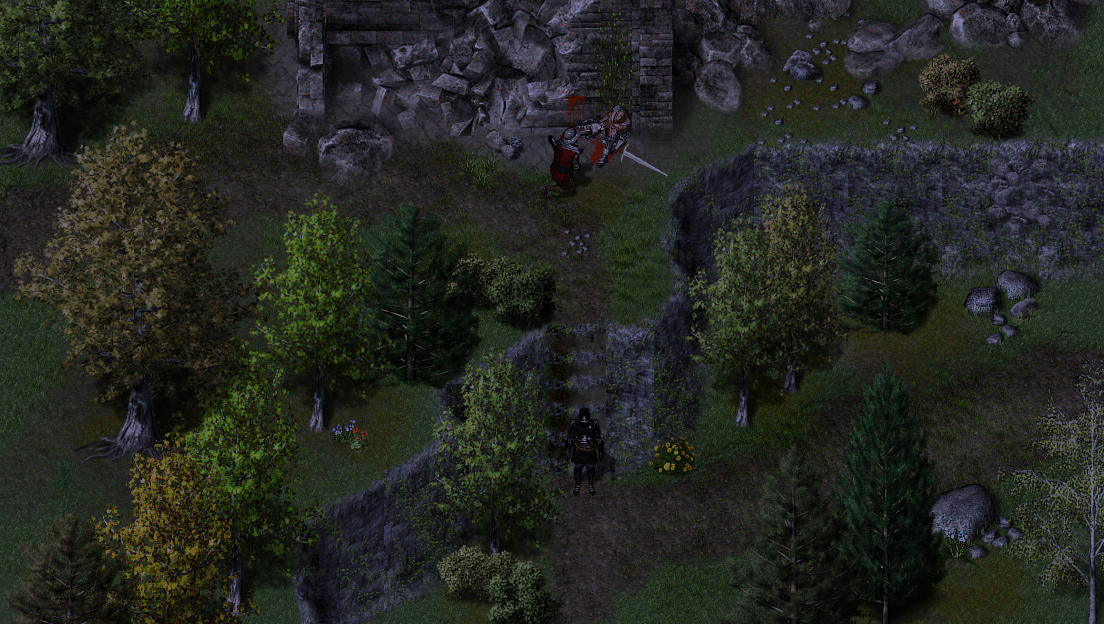

    test map.png


    Spoiler
    mRUMSL4.jpg
  2. I see that you're using the decals. I'm interested in knowing ow you use them. Also, what plugins did you use for the map?
  3. Since I'm parallax mapping, I converted all of the ground tiles to patterns that I can paint with, including the grass decal from Outside_5 in the T&C pack. Some of the decals don't paint well on certain brushes, so you just have to play around with it. I mainly use the acrylic 1-5 brushes to paint patterns. 


    In terms of plugins, absolutely none. I haven't actually loaded this as an in-game map since it was just a practice attempt, nothing more. Still a lot of writing and designing to do before I begin seriously working on the actual maps. The sort of "beaten path" look is achieved via the bump mapping filter, which I found a tutorial on here:http://forums.rpgmakerweb.com/index.php?/topic/47272-parallax-mapping-custom-maps-for-beginners-step-by-step-walkthrough/


    and


    http://forums.rpgmakerweb.com/index.php?/topic/44605-texture-lecture-1-lets-get-it-bumpin/


    Dymdez has three great tutorials. The third is http://forums.rpgmakerweb.com/index.php?/topic/44632-texture-lecture-2-what-hue-and-i-can-do/


    Pretty fantastic stuff. Parallax mapping is a lot of work, but it's pretty fun once you start to get the hang of things. I did this one earlier in about two hours of trial and error with trying to make a hilly type look:

    Spoiler
    hilltest.png


    I really need to lower the saturation on the vegetation. It just looks way too bright with the amount of ground tile blending I'm doing.
  4. Beautiful work!


    I really do encourage people to give parallax mapping a try. It can be difficult at first, but with a little time, a little practice, you will achieve much, MUCH better results than using the editor. 
  5. @Jesse - PVGames


    Thanks : D I found myself wanting for super tall grass during that last one. Tried to convert some High Fantasy stuff (HF2_Outside_1) and recolor it because it has some taller grass, but it didn't mesh at all. Maybe you can do a  T&C vegetation expansion lol. I started playing your game Aleph last night, and the amount of different trees and plants is staggering. I've very much enjoyed it so far, and it's inspiring. The music is beautiful, the dialogue is well-written, it's all wonderful. The dog is OP as hell though. Haha.


    For anyone that needs help, even though I am still learning, I would be glad to give some tips. I'm no good at video editing, so I can't do videos unless you want a completely unedited clip, but I'll do some screenshots if need be. 
  6. @PsychicToaster: That looks awesome! Since you want to create a full game, have you already considered that going with parallax instead of doodads will increase your game file size? Or aren't these maps that big in filesize as I always think?


    I am still unsure if I should go for parallax or doodads. The first one gives you total control and the ability to really get creative and maybe add unique own stuff with brushes and so on, but the other option will keep your file size extremely small, making it perfect for mobile games.
  7. Considering the size of most modern games, I think I'll be okay. I've gone with strictly parallaxing. It is more time-consuming, but the results are worth it. Doodads take up a lot of time, switching between the game and the editor, going back into the game, making sure passability for every object is working as intended, not to mention grid based tiles aren't my favorite aesthetic. Blending patterns in GIMP makes much more unique maps. Plus on the fly tile editing to suit your needs. 


    The filesize of my screenshots wasn't over 4mb each. Not to bad for small maps. I have no personal plans for a mobile game but doodads would probably be thr better option there. Big maps do have larger file sizes. 
  8. For the doodads, I'd use grid mode and find the coordinates by dividing the x and y coordinates by 48.
  9. I'm just not a fan of the amount of effort I have to put into it to make doodads work. I'd much rather just do the maps in GIMP instead. It may take a lot of time but dragging and dropping stuff into the program makes the workflow easy. Plus I can make my own object clumps and just use those. I even save cliff formations I'd like to use again later.


    I'm confident that anyone can learn to parallax map. I linked the tutorials that got me started up above, and another thing you might want to do is make the patterns seamless as well. It helps with avoiding weird edges that don't quite line up. I can maybe do a video on how I map at some point, if you don't mind it being unedited. 
  10. remember folks, there's always tinypng.com too. Really helps reducing the size of those parallaxed files.
  11. I'm glad someone else fell in love with using the bump mapping filter in GIMP. You can make awesome terrain effects using it. I stopped using auto-tiled water in favour of parallaxed river beds created using the bump mapping filter.
  12. @The Stranger


    How do you do the water though? Lol. That's something I've been wanting to figure out. No auto-tile water, but still animated. 


    Also screenshot! I must see lol. 
  13. @PsychicToaster I don't bother with animated water. It'd be a problem if there was ever a scene set near rapids - fortunately, due to the setting no such water exists. All of my water sources look like the pond tiles included in the Medieval packs.


    I'll be sure to upload a screenshot at some point. Haven't gotten around to taking any, yet.
  14. As strange as it sounds, I have never used the bump map filter - I should look into that :)
  15. It's pretty fantastic for making beaten paths and such. 


    @The Stranger I've been trying to make a series of water parallaxes that I can just set to scroll in a given direction, but it's a pain in the tail. I'm not worried about animated water either, really. If worst comes to worst, I can just do some transparent water and set a sky parallax to move across it so it looks like it is moving a little, but it's just the sky. 


    I'm trying to build a stacked stone wall along the road with these tiles. I'll post a screenshot later. I don't want to bug Jesse about making one : P  If he does update T&C I'd request the hell out of one though. Something along these lines 


    images


    It'll take a lot of work stacking small stones but we'll see how it goes.
  16. @PsychicToaster Another way you could do it, if you really wanted animated water, is to simply shape the body of water with parallax mapping then fill in the centre with water tiles in the editor. That way, the player sees moving water whilst also getting a nicely shaped lake or river.


    For me, however, it's just not worth the extra work. I neither want nor need animated water. I also enjoy submerging objects with parallaxed water too much to bother animating it. xD
  17. Eh. I have your mindset really. I'm not too worried about animated water. Until a plugin allows for extra frames for animated tiles, I'm not using them because they just don't blend well with everything else I'm doing. It's not @Jesse - PVGames tiles, it's the editor. The three frame limit is annoying and I'm surprised Degica didn't take care of that already. Saving memory I suppose.
  18. This is a great thread. I have just got the packs myself (the older High fantasy ones.....)


    I already know how to parallax map using Paint.net but it does not support a custom brush set. You mention GIMP; any useful links/tutorials? Most on these forums link to Photoshop.


    For the time being I am working with VX ACE and the Sapphire ABS system. I am making some tweaks here and there to get an ABS system working with the high fantasy set. I will post a video shortly of what i have managed to get going (its a fair bit of work)
  19. A video would be awesome. An update for an earlier post, I didn't have any luck trying to make a roadside stone wall like you'd see along village roads in England. The angles of the stones just don't work out for it. It's also incredibly tedious since GIMP makes new layers for every pasted object. The amount of input required slows the process down drastically.


    The High Fantasy packs are great. I like the aesthetic of them, and I've been using them to prototype certain things for my game that I can't do yet since Medieval is still in the works. I really should download the updated tiles, I still have the old versions of High Fantasy on my hard drive from years ago lmao. 
  20. PsychicToaster said:
    A video would be awesome. I didn't have any luck trying to make a roadside stonewall like you'd see along village roads in England. The angles of the stones just don't work out for it.

    No worries!  Here it is.


    Please ignore the tile set being used. I made the changes directly into the DEMO that comes with the Sapphire ABS system; just so I could 100% confirm that it all works.


    What you are seeing in the video thats important:


    1) Changing from a walk to a run


    2) A basic attack animation change


    3) The spells coming from the body and not the feet (due to the standard sprite size of VX ACE characters)


    4) Implementation of High Fantasy Monsters. (I used some of the free resources from here, their free resources page)


    These changes were a combination of Common events, editing the sprites directly and making new ones and edits to the main script to change the positions of the spells.


    As you can see its turned out pretty well and I am tempted to make a diablo/dungeon siege/never winter nights style game.