RPG Maker MV Games Graphics Will Freeze, but Sound Keeps Playing: The Problem & The Solution

● ARCHIVED · READ-ONLY
Started by TheAM-Dol 33 posts Page 1 of 2 View original ↗
  1. This is really something EVERY RPG Maker MV dev should do, even if you aren't experiencing the problem yourself!


    First an explanation. If you don't care and just want to get right to the fix, scroll down.

    What's the Problem?

    For a long time I had been having a strange type of crash. This crash is not your typical RPG Maker crash where the screen dims and some text pops up. Nor is this like when there is a missing file. This type of crash seems to be a graphical crash. The result would be that the rendered image would be frozen, as in, no more frames are being drawn on screen you're just stuck with a still image. However, the actual logic of the game is still running fine. You can press up/down/left/right, open menus, and even interact with the game (though, you'd have to do it entirely by ear since the graphics are no longer being drawn).
    This crash would happen randomly and unpredictably, so it was hard to determine the source.

    What Causes this Problem?

    It took awhile for me to narrow down the cause, but thanks to another user reporting this problem in this thread it occurred to me that we have something in common: a high refresh rate monitor.

    What's the difference between Refresh Rate and FPS?
    For the uninitiated, there are 2 important factors when it comes to drawing a game's frame for you - the player (or dev) to see: 1) How fast can your graphics hardware render the frame? This would be your frame rate.
    2) How fast can your display hardware (computer monitor/screen/TV) show the rendered frame? This would be your refresh rate.

    RPG Maker's Render Logic
    Originally, RPG Maker had it's engine logic tied to the output frame rate. This means any engine calculation were done whenever the game drew a frame. The problem with this is that frame rate can be variable. Some users hardware might struggle to draw 60 frames per second, and therefore the game would feel slow. On the other hand, some users hardware may run the game faster than 60 frames per second, therefore the game would run faster than intended.
    Somewhere during the lifecycle of RPG Maker MV, engine logic was separated from the render logic. So the engine logic will always try to run at 60 frames per second while the rendered frame can run below or above the engine logic, creating more consistency in game play.

    The problem is that if someone has both the graphics hardware to output hundreds of frames per second and display hardware to support all of the the rendered frames, the game will run above 60fps.

    So the solution is to just limit the frame rate, right? Just use Yanfly's video synch.
    Rant about Yanfly FPS Synch
    No, that's not going to work.
    To start, Yanfly's plugin actually allows returning the engine and renderer logic back to before the update where the logic and renderer were tied together...it's beyond me why anyone would want to do that, but regardless: it's not true v-sync.
    (Side note: if you are using Yanfly's video synch plugin, the option it adds to the options menu is misleading and could confuse players - especially players whom are not familiar with RPG Maker plugins. Please rename this option to prevent confusing players. I've renamed it to "Fluid Time Step" because that's exactly how Yanfly refers to it in the description (no idea why they didn't just call the option that to begin with since even they refer to it as that))


    How to Fix The Problem:

    There are 2 solutions. 1 solution is really more intended for players whom might be playing RPG Maker MV games that have not implemented the engine fix, however, I suppose devs can use this solution just to test it's validity. This solution will only fix the problem on YOUR local machine, so obviously compiling the game and distributing it will not have the fix therefore the problem may persist on other's computers (which is why devs need to implement option 2)

    Frame Limiting:
    Do this if you're a player
    Do this if you are a PLAYER
    If the problem is high frame rates, then the solution is to stop rendering so many frames. It's that simple.
    Most dedicated graphics hardware should have the ability to limit the output frame rate of specific games. Unfortunately I don't have an AMD or Intel graphics card to give you step by step instructions on how to do this, however, for Nvidia users I will give a step-by-step guide below. For AMD or Intel, try searching your favorite search engine for how to set a frame limiter on your card.

    Nvidia Users:
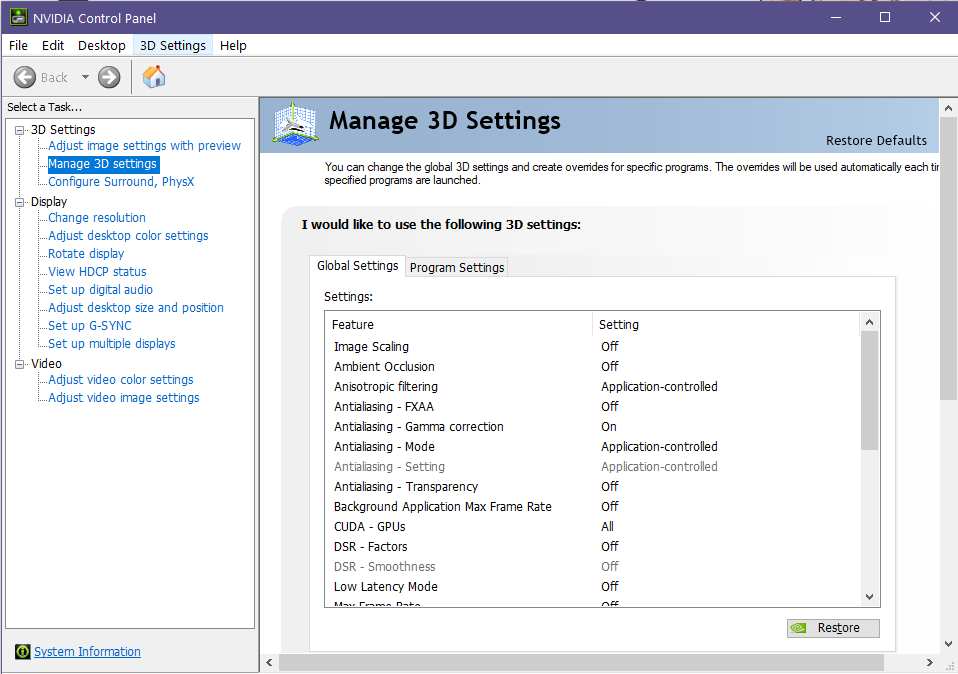
    You can turn on frame limiting in your Nvidia Control Panel
    ControlPanel.png

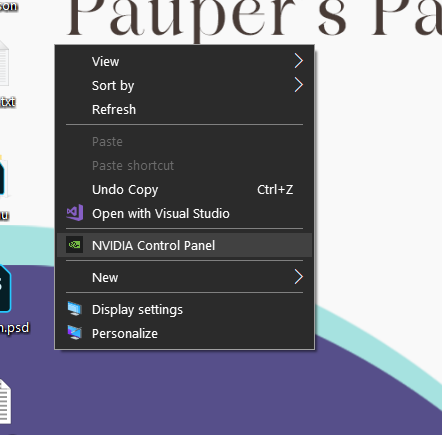
    To access this, right click on your desktop and select "Nvidia Control Panel"
    Right Click.PNG

    This will bring up the picture I showed in the start of this section.
    Inside the Nvidia Control panel, you will want to navigate to the item "Manage 3D settings" found is the left hand column, below the "3D Settings" tree.

    The tab that will be opened after clicking on this will be your global settings. You can change these if you want, but it's better if your don't since these are global, any changes made here will be applied to EVERY game you play.
    Instead click the tab that says "Program Settings". This will manage your graphics card settings for individual games (It's also useful to use these settings for other games if a game is performing poorly or you want to make some slight graphical improvements to the game if your hardware can support it)

    Now, to quickly add the game to the list of programs, first launch the game. If you are just a player, launch the Game.exe found in the game's folder (or if it is on Steam, just click "play"). Once the game opens, close the game. If you are a dev, open RPG Maker and play test your game. Wait for the play test to open, then close the play test and RPG Maker.

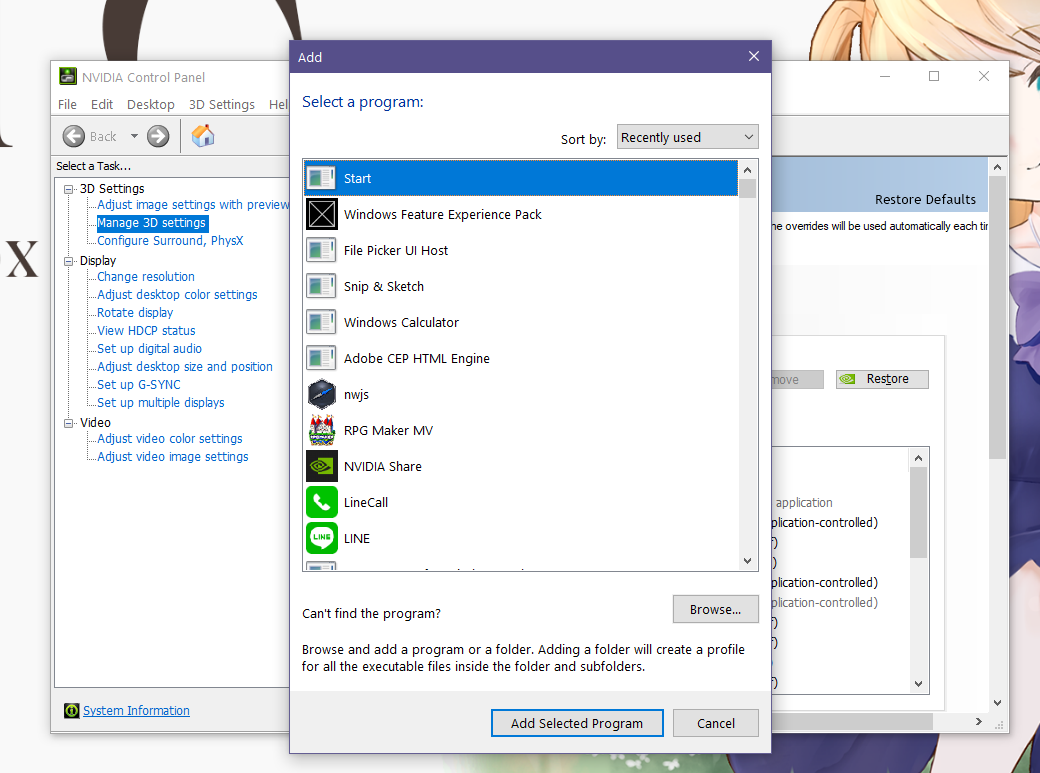
    In the "Program Settings" tab, at "1. Select a program to customize:" there is a drop down list of recognized, supported, or previously added programs. Your game is likely not here, so to the right; click "Add" - sometimes it's slow to bring up this dialogue box, so please be patient.
    Once the dialogue box opens, there is a list of recently launched .exe files. Since you just launched your game and/or play test, it should be at the top of the list.
    AddProgram.png
    For players, your file will be called "Game" or "Game.exe", and for devs, your file is "nwjs"
    Select the program, and click "Add Selected Program"
    (If it's not in the list of recent programs, you can click the "Browse..." button and navigate to the .exe file)

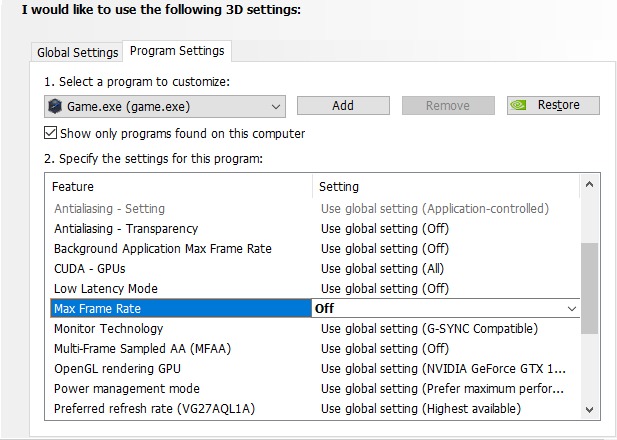
    Once it is added, scroll down the list of options and look for "Max Frame Rate"
    maxFPSoption.png
    Select the option, click on, then set the max FPS to 60
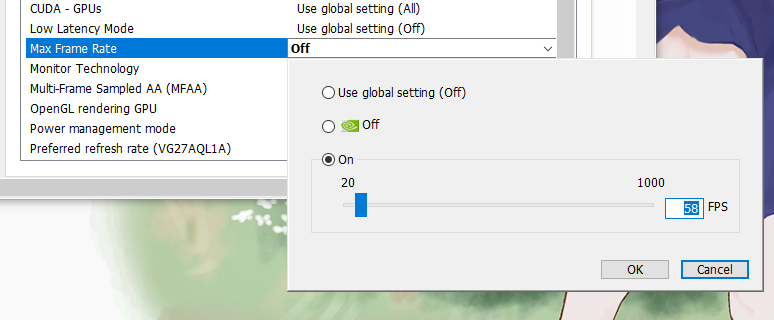
    FPSSetting.png

    Once any changes have been made inside the Nvidia control panel, it will show an "Apply" or "Cancel" option at the bottom of the control panel. Make sure to click "Apply" to save the changes. Once that is done, you have now limited the maximum frame rate and will stop the renderer from crashing!

    One warning about this: I experienced gross frame timing problems with this setting enabled. In short: FPS is just an average number of frames over a span of time, but frame timing is the exact amount of time between each individual frame. So theoretically you could have 1 frame that is drawn super fast, but then the next frame is really slow. The average of the 2 is 60 FPS, but the feeling (and look) of the game might not be very smooth. Some might call this "micro stutters". Your experience may differ, but for me it was borderline unpleasant. Just barely tolerable. This will always vary based on the game and the complexity of it, and your hardware. Hopefully you have a more pleasant experience! Regardless, at least this fix allows you to play the game. You should also consider reaching out to the developer and share this thread with them so that they can implement the fix into the game.


    FIX THE ENGINE
    Do this if you're an RM dev.


    Thanks to @Mac15001900 he rolled this fix into a plugin that also fixes other problems related to high refresh rate monitors, such as reducing CPU utilization when the game is running above 60hz.
    You can find his fix here, and I recommend using this over Kido's solution:
    MAC_High_Hz_Fixes - Fixes for various problems with >60Hz monitors
    Before Mac created his "High Hz Fix" plugin, a plugin created by author Kido was the main fix for fixing graphical freezes. This plugin can be found here:
    GraphicsRenderFix.js
    (click the link above, once it is open press ctrl+s or right click "save as..." to download the plugin)
    This plugin was developed by Kido (not me) and only fixes this graphics render problem. This was the old solution, however Mac's solution is more robust.

    Technically speaking, it seems itch user and plugin dev Tamschi discovered this error a few months before I made this post. While I still recommend Mac's solution above anyone else's, here is yet another alternative plugin to the fix:
    Freeze Fix by Tamschi

    Implement it like any normal plugin - it's just overriding an error in the base core script of RPG Maker.

    I should mention, I would have never found this plugin had it not been brought up by Steam user ozwvip found in this Steam discussion thread on the same matter this tutorial is about.

    So why should EVERY Dev Implement this fix?

    Well, I think I already made the point clear, but if not: This is an error within the engine itself. So just because you yourself don't experience the problem doesn't mean others won't. Wouldn't it just be terrible that you worked so hard on a game for years, you release it, and then suddenly you start receiving negative reviews because the game is having a strange graphical crash? The solution is easy to implement and has very little overhead to it, so there is no reason not to implement it.

    Unsure if you face the problem?
    User @I_LIKE_BREAD7 shared this simple test for debug purposes to see if the bug persists/affects your hardware (this only works for developers)
    Link to his post is here.


    Wrap Up:
    I've seen in a few places people crediting me for this fix.
    To clarify: I did not make this fix.
    I simply dug up the source of the problem and found someone who had made a patch for it, and made this patch more accessible and easier to find.
    Credit is appreciated, but I didn't make the fix, so make sure to credit the people who actually made the patch.

    Does this problem persist in MZ?

    According to @caethyril this problem has been patched in MZ.


    edit 2024/09/24
    Added @Mac15001900 's plugin as a fix for high refresh rate monitors.
    Edit 2025/12/08
    Added Tamschi's fix, since it seems he discovered this error long before I did (but I didn't find his fix until just now)


    banner
    GraphicCrash.png
  2. This sounds really interesting. Do you happen to know how this fix was found? Reading the code there doesn't seem to be any way for _skipCount to ever become negative.

    I've added the fix, since all it does is prevent a seemingly impossible state, and clearly if _skipCount became negative the renderer would indeed stop producing new frames, but I'm curious as to how this was discovered.
  3. Mac15001900 said:
    This sounds really interesting. Do you happen to know how this fix was found? Reading the code there doesn't seem to be any way for _skipCount to ever become negative.

    I've added the fix, since all it does is prevent a seemingly impossible state, and clearly if _skipCount became negative the renderer would indeed stop producing new frames, but I'm curious as to how this was discovered.
    Unfortunately, I'm really just the messenger of this problem and the fix. My understanding of the core scripts begins and ends with .js
    All of the real leg work was done by Kido who made the patch and ozwvip who posted Kido's patch in a steam post. Neither of these folks do I have any contact with, I just sourced it after extensive googling.
    Since it was tough for me to find this information, I decided to make this tutorial so that the fix can be more accessibly found (including a very deliberate description for the thread title so hopefully it comes up easily in Google searches)
  4. That would explain why I hit that freeze up issue on my newer gaming PC but not my older one. The newer one has a 144 Hz monitor too, which is probably the cause. Also playtime is often way off on games played on those monitors too, as I've seen it say I've played 2.5 hours when I've played 1 hour in reality due this.

    I do think MZ does not have this issue though. So far on my newer computer no MZ game has hit this, and playtimes are recorded correctly on the same PC so it looks like for MZ they did test and implement fixes for higher refresh rate monitors. At least that's held so far in my (very limited) testing.
  5. I had a quick look at MV's Graphics.render method and my guess would be that it's related to the anti-fingerprinting security precautions in place for Date.now:
    To offer protection against timing attacks and fingerprinting, the precision of Date.now() might get rounded depending on browser settings.
    If a render pass completes in less than about 2 times this precision, it may be possible that the difference between the start and end Date.now calls ends up negative. Perhaps PIXI or whatever can recognise that nothing's changed since last render and skip when appropriate; that would explain why the problem is only reported at higher refresh rates.

    MZ is better organised in this regard: it renders every tick, and updates the game loop using a system that explicitly mentions it accounts for high refresh rates:

    // [Note] We consider environments where the refresh rate is higher than // 60Hz, but ignore sudden irregular deltaTime.

    @bgillisp - in case you're interested, I wrote a small fix for MV's inaccurate playtime a while back. (Apparently it worked, I don't have a high refresh rate monitor to test it on.)
  6. Ah, that's something I didn't know about, it's really interesting. I assumed that in two calls of Date.now() that latter could never be smaller (and I suppose so did the corescript writers). Learning something new every day xD
  7. Mac15001900 said:
    I assumed that in two calls of Date.now() that latter could never be smaller (and I suppose so did the corescript writers).
    Science, am I right? That said, I might be wrong...my expertise is not on this level. I just don't see any other way to end up with a negative _skipCount there. :kaoslp:

    (It would also depend on how the browser implements it: rounding, random variance, from reading around a little there seem to be various approaches. A quick search didn't turn up any details on how Date.now is coded in Chromium, which is used for playtest & standalone deployment.)
  8. caethyril said:
    Science, am I right? That said, I might be wrong...my expertise is not on this level. I just don't see any other way to end up with a negative _skipCount there. :kaoslp:

    (It would also depend on how the browser implements it: rounding, random variance, from reading around a little there seem to be various approaches. A quick search didn't turn up any details on how Date.now is coded in Chromium, which is used for playtest & standalone deployment.)
    Thanks for all the information caethyril. I can always count on you to be informative and helpful :LZSproud:

    I've adjusted the original post now, clarifying that this problem is only in MV. I've also cut some redundant information out of the post to hopefully make it slightly less of a wall of text.
  9. I have a skipcount fix for a long time, as I know, the origal was something
    like, if skipcount = 0, so it could be a negative if it skips that, so if you
    check the skipcount <= 0 or just < 0, than return 0, so even if it become
    negative number, it is 0.

    I didn't experience it on my own system, at least not yet, but good to know,
    as I could keep the fix anyway.
  10. Is there any solution that won't affect the performance negatively which I can do as a player for this issue? Like solution 1 but without the lesser smoothness?


    Its actually incredible that RPGMV has such a huge flaw built into its engine. Your pc can literally be too strong to play it smh
  11. I'm sorry, but I'm not aware of any other fixes for games that have already been published.
    Did you already try limiting the frame rate?
    I reported awful frame timing problems, however that may just be hardware specific to me. I have a Gsync monitor and sometimes it goes funny if you don't just let it do its thing. So in all likelihood, my frame timing problems likely resulted from my monitor (though this is unconfirmed)
    As for cutting the frame rate in half by limiting it to 60 down from 120 or 144, I can asure you that you won't feel a difference. All of the logic of the engine is intended to run at 60, so even if you could run the game at 120, it's still going to feel like 60. And considering most RM games are turn based, low-latency input is not a necessity for the games.
  12. Bless you for this post, there's nothing better than the feeling of googling a very specific, niche, baffling problem and immediately finding a detailed description of how to fix it.
  13. Thanks for the info! So glad your signature linked to this post.
  14. TheAM-Dol said:
    This is really something EVERY RPG Maker MV dev should do, even if you aren't experiencing the problem yourself!


    First an explanation. If you don't care and just want to get right to the fix, scroll down.

    What's the Problem?

    For a long time I had been having a strange type of crash. This crash is not your typical RPG Maker crash where the screen dims and some text pops up. Nor is this like when there is a missing file. This type of crash seems to be a graphical crash. The result would be that the rendered image would be frozen, as in, no more frames are being drawn on screen you're just stuck with a still image. However, the actual logic of the game is still running fine. You can press up/down/left/right, open menus, and even interact with the game (though, you'd have to do it entirely by ear since the graphics are no longer being drawn).
    This crash would happen randomly and unpredictably, so it was hard to determine the source.

    What Causes this Problem?

    It took awhile for me to narrow down the cause, but thanks to another user reporting this problem in this thread it occurred to me that we have something in common: a high refresh rate monitor.

    What's the difference between Refresh Rate and FPS?
    For the uninitiated, there are 2 important factors when it comes to drawing a game's frame for you - the player (or dev) to see: 1) How fast can your graphics hardware render the frame? This would be your frame rate.
    2) How fast can your display hardware (computer monitor/screen/TV) show the rendered frame? This would be your refresh rate.

    RPG Maker's Render Logic
    Originally, RPG Maker had it's engine logic tied to the output frame rate. This means any engine calculation were done whenever the game drew a frame. The problem with this is that frame rate can be variable. Some users hardware might struggle to draw 60 frames per second, and therefore the game would feel slow. On the other hand, some users hardware may run the game faster than 60 frames per second, therefore the game would run faster than intended.
    Somewhere during the lifecycle of RPG Maker MV, engine logic was separated from the render logic. So the engine logic will always try to run at 60 frames per second while the rendered frame can run below or above the engine logic, creating more consistency in game play.

    The problem is that if someone has both the graphics hardware to output hundreds of frames per second and display hardware to support all of the the rendered frames, the game will run above 60fps.

    So the solution is to just limit the frame rate, right? Just use Yanfly's video synch.
    No, that's not going to work. For 1: Yanfly's plugin actually allows returning the engine and renderer logic back to before the update where the logic and renderer were tied together...it's beyond me why anyone would want to do that, but regardless: it's not true v-sync. True v-sync means that your graphics hardware will wait until your display hardware is ready to receive a new image. So basically: if your graphics card is rendering more frames than your display hardware can show (say you are using a 60hz monitor but your graphics card is outputing 120 frames), then rather than constantly feeding your display hardware with rendered frames that can't be displayed, your graphics card will be a gentleman and wait patiently before feeding a new frame to your display hardware.
    Regardless; true video sync wouldn't fix the problem with high frame rates that crash the renderer because it would just synchronize the rendered frames of your graphics card with the display refresh rate of your monitor.
    (Side note: if you are using Yanfly's video synch plugin, the option it adds to the options menu is misleading and could confuse players - especially players whom are not familiar with RPG Maker plugins. Please rename this option to prevent confusing players. I've renamed it to "Fluid Time Step" because that's exactly how Yanfly refers to it in the description (no idea why they didn't just call the option that to begin with since even they refer to it as that))

    This brings me to...


    How to Fix The Problem:

    There are 2 solutions. 1 solution is really more intended for players whom might be playing RPG Maker MV games that have not implemented the engine fix, however, I suppose devs can use this solution just to test it's validity. This solution will only fix the problem on YOUR local machine, so obviously compiling the game and distributing it will not have the fix therefore the problem may persist on other's computers (which is why devs need to implement option 2)

    Frame Limiting:
    If the problem is high frame rates, then the solution is to stop rendering so many frames. It's that simple.
    Most dedicated graphics hardware should have the ability to limit the output frame rate of specific games. Unfortunately I don't have an AMD or Intel graphics card to give you step by step instructions on how to do this, however, for Nvidia users I will give a step-by-step guide below. For AMD or Intel, try searching your favorite search engine for how to set a frame limiter on your card.

    Nvidia Users:
    You can turn on frame limiting in your Nvidia Control Panel
    View attachment 242384

    To access this, right click on your desktop and select "Nvidia Control Panel"
    View attachment 242385

    This will bring up the picture I showed in the start of this section.
    Inside the Nvidia Control panel, you will want to navigate to the item "Manage 3D settings" found is the left hand column, below the "3D Settings" tree.

    The tab that will be opened after clicking on this will be your global settings. You can change these if you want, but it's better if your don't since these are global, any changes made here will be applied to EVERY game you play.
    Instead click the tab that says "Program Settings". This will manage your graphics card settings for individual games (It's also useful to use these settings for other games if a game is performing poorly or you want to make some slight graphical improvements to the game if your hardware can support it)

    Now, to quickly add the game to the list of programs, first launch the game. If you are just a player, launch the Game.exe found in the game's folder (or if it is on Steam, just click "play"). Once the game opens, close the game. If you are a dev, open RPG Maker and play test your game. Wait for the play test to open, then close the play test and RPG Maker.

    In the "Program Settings" tab, at "1. Select a program to customize:" there is a drop down list of recognized, supported, or previously added programs. Your game is likely not here, so to the right; click "Add" - sometimes it's slow to bring up this dialogue box, so please be patient.
    Once the dialogue box opens, there is a list of recently launched .exe files. Since you just launched your game and/or play test, it should be at the top of the list.
    View attachment 242386
    For players, your file will be called "Game" or "Game.exe", and for devs, your file is "nwjs"
    Select the program, and click "Add Selected Program"
    (If it's not in the list of recent programs, you can click the "Browse..." button and navigate to the .exe file)

    Once it is added, scroll down the list of options and look for "Max Frame Rate"
    View attachment 242387
    Select the option, click on, then set the max FPS to 60
    View attachment 242388

    Once any changes have been made inside the Nvidia control panel, it will show an "Apply" or "Cancel" option at the bottom of the control panel. Make sure to click "Apply" to save the changes. Once that is done, you have now limited the maximum frame rate and will stop the renderer from crashing!

    One warning about this: I experienced gross frame timing problems with this setting enabled. In short: FPS is just an average number of frames over a span of time, but frame timing is the exact amount of time between each individual frame. So theoretically you could have 1 frame that is drawn super fast, but then the next frame is really slow. The average of the 2 is 60 FPS, but the feeling (and look) of the game might not be very smooth. Some might call this "micro stutters". Your experience may differ, but for me it was borderline unpleasant. Just barely tolerable. This will always vary based on the game and the complexity of it, and your hardware. Hopefully you have a more pleasant experience! Regardless, at least this fix allows you to play the game. You should also consider reaching out to the developer and share this thread with them so that they can implement the fix into the game.


    How do you fix this problem at an engine level?

    Fortunately it's much quicker to implement, which is good because I am quite hungry and want to go eat instead of writing and taking screenshots for this tutorial.

    A plugin solution was created by author Kido, which can be found here:
    GraphicsRenderFix.js
    (click the link above, once it is open press ctrl+s or right click "save as..." to download the plugin)

    Implement it like any normal plugin - it's just overriding an error in the base core script of RPG Maker.

    I should mention, I would have never found this plugin had it not been brought up by Steam user ozwvip found in this Steam discussion thread on the same matter this tutorial is about.

    So why should EVERY Dev Implement this fix?

    Well, I think I already made the point clear, but if not: This is an error within the engine itself. So just because you yourself don't experience the problem doesn't mean others won't. Wouldn't it just be terrible that you worked so hard on a game for years, you release it, and then suddenly you start receiving negative reviews because the game is having a strange graphical crash? The solution is easy to implement and has very little overhead to it, so there is no reason not to implement it.


    Wrap Up:
    I've had a few other devs contact me with the fix implemented and so far through all the testing of other folks games and on other people's hardware, it seems this has fixed the problem. However, tech-gremlins just exist, so this may not be the end-all-be-all to the problem. So if you continue to experience the problem, please report it below. Please make sure to include all necessary hardware and software information (display hardware, computer hardware, version of RM you are using, and any plugins and/or alterations that have been made to the Engine or project.)

    Does this problem persist in MZ?

    According to @caethyril this problem has been patched in MZ. As far as we are aware the extend of this oversight is only within MV, though if you experience a similar problem please report it with all necessary hardware and software information (display hardware, computer hardware, version of RM you are using, and any plugins and/or alterations that have been made to the Engine or project.)

    If you came to this thread experiencing this crash, a great way to say thank you would be to report the hardware you were using during the crash prior to the fix. Though I am confident this has been fixed, I would still like to collect some data on what type of hardware/software was being used that resulted in this problem. It may provide further insight.

    If you are still experiencing the crash, just like above: please share all relevant hardware and software information so we can track the source of the problem.

    With that, thanks for taking the time to read this. I'm going to go eat lunch now.
    I will be sure to do that, thank you !
  15. Thanks for this, too bad this software is "legacy" now and the developers OF MV WON'T fix it but they'll fix it for the next gen engine?

    I mean correct me if I'm wrong, is there reason why they WON'T fix this? I've had this problem with my current game that I recently published some folks experience this error and others do not.
  16. Ultimacj said:
    they'll fix it for the next gen engine?
    As confirmed by Caethyril, this has already been patched in RPG Maker MZ, so it has already been fixed.
    Ultimacj said:
    is there reason why they WON'T fix this?
    Yes, MV is legacy. Unless there were some type of security risk that was found that could leave them liable for damages, they wouldn't return to patching the old engine. Fortunately, this community is quite resourceful and has created numerous patches for any sort of problems with the engine as well as optimizing the source script.
    This is the nature of legacy software. Understand that their focus is currently on developing and supporting current editions of the engine, that being MZ and Unite.
  17. That's shame about it being Legacy find and error and won't patch it. At a customer point of view, it shows me that dev's don't care enough, MV isn't THAT old. If they easily address it to MZ which is similar to MV, they could easily patch it. Again thanks of this post. I will have to patch my project so it doesn't goof up and show others what to do if the engine crashes.

    It seems to do it on Nvidia Machines more than AMD Machines from what I've seen.
  18. I wouldn't frame it in such a negative way. We should realize that it is a commercial product, and the fact they still allow customers to buy and use their older engines instead of forcing them to upgrade is definitely appreciated. You can still find a few folks supporting RM engines that are 2 decades old at this point thanks to great users like @kyonides . In an ideal world, of course everything would get support forever, but since they are a commercial product, they need to make sure they support the livelihoods of their employees. If the company takes a hit in revenue, the employees and their families may feel the impact from it. It's important for them to focus on the things that are currently profitable for the company, and I imagine they are stretched pretty thin; let's not forget the other spin off "Maker" engines, such as Visual Novel Maker, the console ports of RPG Maker, and I think they also do Pixel Game Maker, right? So they need to support Unite, MZ, VNM, PGM.

    It's very fortunate that they allow the community to support, sort of like an open-source community (sort of) meaning even though the company itself isn't directly supporting it, community members may continue to support it under the graces of the original developer.

    It's also worth baring in mind that at this point, serious updates to the source code could cause more problems than it fixes. I think the MZ users just felt this with the 1.7 update where some are reporting plugins having bugs. Now if they update MV (which by the way is just a couple years shy of a decade - so it is actually pretty old) many plugin developers may no longer be supporting their plugins (since plugin developers don't do it as a job and have likely moved on to other engines or just changed their focus in life) and the new update could break their plugins, which could possibly break on-going projects in development. However, they do still issue small updates to MV as just a few months ago we got a tiny little update from 1.6.1 to 1.6.2, but as far as I am aware, it just changed a typo in a foreign language version of the software.

    That said, they could just be unaware of the problem. I'll tell you what, I don't think anyone has contacted them directly about this problem, so they may not even be aware of it. I'll take some time during this coming week to contact them about this problem. No guarantee that they will fix it, but at least we have brought it to their attention. No harm in trying, right?
  19. Ultimacj said:
    That's shame about it being Legacy find and error and won't patch it. At a customer point of view, it shows me that dev's don't care enough, MV isn't THAT old.
    That's a pretty negative attitude...this practice is completely standard in the software industry.

    Once Microsoft declares that, say, Windows 7 is legacy and unsupported, they mean it. They don't fix anything, even if you think it's trivial.

    Adobe won't change anything in Photoshop 2021 now that 2023 is out.

    You may not like it because it's software you use and you think it's easy for them to do, but you choosing to frame it as "the devs don't care enough" is not objectively reasonable.
  20. Guys, If I implement this fix in my game, Will I need Yanfly's FPS Sync plugin? I using a basic 60hz 1080p monitor so I cant test my game with higher refresh rates.