RPG Maker MV 1.3.0 Update!

● ARCHIVED · READ-ONLY
Started by Archeia 181 posts Page 4 of 10 View original ↗
  1. Tsukihime said:
    You need to copy the index.html as well since there are new libraries available (pixi-tilemap and pixi-picture)
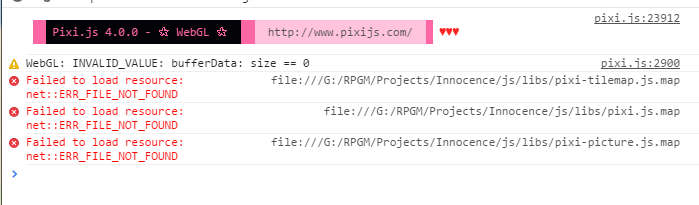
    That fixed it, thank you!
  2. any idea why it says file not found when they are already there?


    293bf520823b5b6d2c9367e6698cad01.png


    -EDIT 


    I don't see the errors anymore after adding .map to the files.
  3. Line 305 of rpg_core.js: the key variable doesn't exist:


    /**
    * frees the resource
    */
    CacheEntry.prototype.free = function (byTTL) {
    this.freedByTTL = byTTL || false;
    if (this.cached) {
    this.cached = false;
    delete this.cache._inner[key];
    }
    };


    This causes the game to crash every time ImageManager.clear() is called. Maybe you meant this?

    Code:
    delete this.cache._inner[this.key];
  4. [@people with "plugin incompatibility"] Don't forget to copy/replace ALL the files needed, so far all the plugins I use are compatible with 1.3.


    A good news you guys forgot to put in the "fixed" list is that now parallaxes are not blurry anymore, we no longer need a plugin to fix the problem. :)


    Edit: but the "EGT_Auto_Fullscreen" does a strange blurry result when you come back to windowed mode with F4 if your game doesn't use the default 4/3 resolution, that's fine another plugin will do the trick later...
  5. Is nobody going to answer my questions?
  6. Little Adventurer said:
    Is nobody going to answer my questions?


    Due to the increadible amount of post here, maybe should you wait more or ask it again.
  7. Little Adventurer said:
    Is nobody going to answer my questions?


    Fantasy Data are new examples that are now added by default in your database like: Items/Skills..etc can be found on this folder NewData_FantasyEN which is located at the software folder. 
  8. What is pixi ?


    Do you recommend I install this update now , or wait for the fixes ?


    Has this update stopped any of you from making your game for now ?
  9. liamx2000 said:
    What is pixi ?


    Do you recommend I install this update now , or wait for the fixes ?


    Has this update stopped any of you from making your game for now ?

    Well, Pixie is for WebGL, aka, your graphics and the their handle (I'm not an expert, so anyone is free to correct my answer).


    For the update part, aside from the "splash screen" that lag only on my main project (actually, I'm using MOG splash screen, works better, with more option), nothing to worry about.


    Juste take the time replace the files as explained and you should be fine.


    My main project count more than ... 50 differents plugins, from more than 4 scripters. And no bug so far. Sidenote : place them in the right order.


    For the generator, I hadn't any issue either, my new files are still in place.


    For the Fantasy Data, you have to copy/past them from their folder to the "NewProject" folder (make a backup of the old one first), then make a new project and enjoy the new stuff, like new actor pre-made, new item, new skill, new state, and so forth.


    Finally, I'm on Win.8.1, with a Steam version of RPG Maker MV v1.3.0
  10. Finally, PIXI 4 :o Time to learn some more GLSL and continue working on that Lighting plugin i wanted to do for so long :)
  11. For those of you who had my issue of "Cannot Read Property of WEBGL Undefined", I was unaware I had to also copy things from the libs folder. That was my mistake. Everything seems to be working now.
  12. Either no one else is having this issue, I'm not reading carefully enough, or not many developers use custom music with looping metadata.  No one has complained about looping being broken for custom music.


    I have yet to test with the default audio files added , but if it helps diagnose, I have only used .ogg files for the music in my game.
  13. I *think* I might have solved my problem from earlier! I didn't copy over the libs folder.
  14. So much lag building now on my parralax maps now that wasn't there before.  Anyone else with a problem like this?

    • You can change the "Object Selector" in [Tool]/[Option], with Extended/ Smart for better support of huge lists of objects.

    • Now possible to copy the Event Editor content either as text or HTML


    Both of these things make me super happy.
  15. This update fixed the longstanding issue I had with periodic / random stuttering in RPG Maker using hardware that runs modern games on high / ultra.


    Very smooth now.  Good update.
  16. Great update, but there are new bugs to fix now... I've talked about that in the Support threats.


    After this update, it will be possible to continue with the work of re-translation?
  17. Oscar92player said:
    Great update, but there are new bugs to fix now... I've talked about that in the Support threats.


    After this update, it will be possible to continue with the work of re-translation?

    It would be hard to go to fix the translation yet at this point in time.


    We are aware of some problems and fixing bugs. I only say not to worry because yes we're going to fix it just give us some time to recover. Having constant deadlines to pull updates and constant nagging from some people makes it hard to focus.
  18. Archeia said:
    It would be hard to go to fix the translation yet at this point in time.

     Yeah, I know that, there are many lines to translate. But if it's possible, I want to help again with that (or at last with the spanish version, that has many mistranslations).