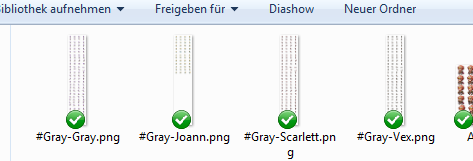
That's why. Your spritesheets are named as #Gray-
Therefore, all of them will use the sprite animation you've set for #Gray. Damage, which is the case, would be 32 to 35.
Try to rename #Gray-Scarlett to #Scarlett-Scarlett and see if that solves it.
Yes, one frame works. It was a mistake in the database. The reason why i take one frame is, that the animation always loops. But in my motion the actor always breath or fall to the ground and this in a loop looks really wierd :D
I dont think so. I tried to make a new projekt and copy the skill and the guard state into my projekt, but it always looks like before. But in the new project the skill works.
I also look into yanflys battlecore but no parameter that could be changed the guard skill into this laggy 'thing' :unsure:
Do you have the console enabled? I use it to keep track of my plugins. Quasi does that as well. See if it changes to "guard" in the console when you activate the guard skill.
That's normal. That's supposed to mean that the animation is repeating itself, which is intended. But it is changing to idle1 afterwards.
Check if you set the guard animations as you intended.
Check if the Guard skill adds the Guard State and if the Guard State has no restriction, Normal motion, no overlay and the adds the special flag Guard
Is there any chance that inside your editor you've named the guard animation as Guard instead of guard? Capital letters do interfer in how the plugin interprets the animations.
Or maybe a duplicate?
I have checked all. I have changed the rounds from 1 to 222. Now he is holding the animation, but its a loop. When i activate the skill, than he make (like before) ~2Frames and start again. He do this ~5times and than he loops the whole animation from 4 frames, but now the whole time. Better but still not perfect :D
I have checked all. I have changed the rounds from 1 to 222. Now he is holding the animation, but its a loop. When i activate the skill, than he make (like before) ~2Frames and start again. He do this ~5times and than he loops the whole animation from 4 frames, but now the whole time. Better but still not perfect :D
What plugin did you use for the round selection during battle?
@Quasi Does this work with Yanflys action sequences or does it use it's own system?