@jobar Ah I just took a look and seems I forgot to add that in. Will add it in the next update!
On a side note there will be quite a few updates released tomorrow, as well as an updated master demo.
QPlugins - Latest: QABS
● ARCHIVED · READ-ONLY
-
-
UpdatesThere's quite a bit of updates. But since it landed on a Friday which is when I post updates on patreon, I'll link to the patreons update post:
Update Log
The master demo was also updated. Fixed the QSight.json not found error. Added QImport and QSight examples
NewQSight
Was patreon only for about a month, but finally got around to releasing it publicly! This is similar to QuasiSight, but can work with and without QMovement. -
Wow! Exciting new updates. Looking forward to trying out the new features. But.... I have another problem sorry.
If I call the players X and Y position variables, using Qmovement, it seems to minus 1 from the Y position.
Left and right screenshot with and without Qmovement on. -
@ZcheK yeah I noticed that as well when I was updating the MV Master demo. It's not really a bug or any issue since it is showing the correct coordinates. You can reference this image:
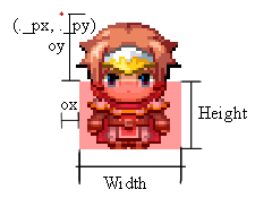
The characters x and y values are the floored value of the ._px and ._py value. So from your screenshot the ._py is off the screen, so it's in the negative y's.
I'm not sure if there's a good solution for that, since using the a players coordinates is a bad approach for collision checking (checking if x/y is at x2/y2 is a type of collision check) when using QMovement since it's collider based. I could make it so when you get the player x/y values in the variable, you actually get the grid position of the center of the players collider, which would look a lot more correct in most cases.
On other note, I'll have an update to the QSprite Editor and QMap Editor sometime tomorrow. QSprite one will actually be uploaded later tonight, but I'll post the log/details tomorrow along with the QMap editor changes. -
Hi Quxios/Quasi. I've been playing around with your plugins, they are pretty interesting! I was actually thinking about using them for a small game of mine.
So I was testing out the QSprite and QYScale while in the master demo, I did some prerenders since I was going to use that as characters. I set them up, and it seemed to work fine, but after trying out the YScale I stumbled upon this little problem. The collision mask doesn't seem to keep correctly aligned when it traverses the map. It's probably easy to solve but hey, here is it as a bug report.
I attached some images to show the issue. It's just a matter of vertical offset so I hope it's easy to fix. I also attached the spritesheet along with the config file, in case you wanna try with it.
These are things I changed, aside from making my own qsprite configuration.
Player collision settings are circle, 36, 24, 6, 0
Map yscale settings are <scale:0.5,1.5>
I think the rest of things are pretty much vanilla, from the Master demo I mean.
Thanks for all! I love your plugins. :^) -
Hello, I just installed the QPlus and QAudio plugins and they seem to work fine for what I need them for.
They only problem I am having is figuring out to set them up so that I can use one event as an AudioHandler. Effectively the one event would do all the plugin commands necessary for all the sounds. If I set it up as an Autorun and then erase the event after, I lose those sounds after a random encounter or a forced encounter. But if I set it up as a parallel process, the sounds only repeated the beginnings of the BGS like a broken record.
Screenshot -
Just realized today how powerful your Qmap editor is.
I had many maps with picture overlays that the player can walk in-front of and behind, using the BindPicturestoMap plugin, the problem was it required a lot of events to make it work and didn't work for NPCs and player at the same time.
With the Qmap it's really easy (once I realized how anchors work, duh...).
If only it could also handle animations, that would be just wonderful. :) -
@muramasa Ah yeah I was confused at first cause you said collision mask but thanks to the images I see you mean the colliders. The issue is the pivot position for scaling is in different positions for the sprite and the collider. Might be able to fix it by scaling the colliders offsets as well.
@ragnorak6608 Thanks for the report, I'll add in some sort of "remember" feature for when going into/exiting battles it starts them again.
@ZcheK Thanks! I honestly thought the QMap would pick up a lot faster, since imo it seems like its a lot better/easier then most parallax mapping solutions since it's a visual editor. And I still do plan on adding more to QMap (Animations is one of them!). I was going to release an update for the editor soon but I had an idea few a new feature for the editor so maybe it'll be out next week. Though the current one should run fine with no issues in windows. But if anyone wants access to the current one that should work for other os's feel free to pm me for a link to a branched repo (You'll have to build it yourself).
Also, new update for the QSprite Editor was released last night but I was going to wait until I finished the QMap editor update until I posted the links. But since I'm going to work on the QMap Editor some more, here's the link for the updated QSprite Editor!
https://github.com/quxios/QSpriteEditor/releases
New version fixes some errors that would sometimes occur when opening an old QSprite.json that was made in the previous 2.x editor. -
I made a YouTube video showing just what Qmap can do with multiple anchored picture layers.
For my fan remake game "Quest For Glory: Extended Edition"
-
@ZcheK nice!
Updates
QPlus 1.2.2
- Change to QPlus.stringToAry ( for upcoming plugins )
- Added support for animated type
- Added support for QSprites
- Added saving / restoring QAudios
- Fixed bug where QAudios didnt play again after a battle
- QMap objs should now cast shadows
Plugins can be found here
Also the new QMap Editor is out!
QMap Editor 2.0.0
- Rewrote most of the files to use new dependencies (mobx, react-sortable-hoc)
- Better help window
- Fixes to help / select index window positioning / sizing
- Map objects sortable
- Note effects can be previewed now (ex: tint and breath)
- Added animated type
- Added support for QSprites. You need QSprite installed in your project, then load a QSprite img and it'll use the config from QSprite instead.
- Removed grid snapping. I need a better solution for it
-
RPG Maker MV | Qmap 2.0 | Qinput | Photoshop | NWjs | NES30 Pro | Airplay
-
The new editor seems to be working pretty good, it's a lot faster.
I seem to have a bit of problem with it. Setting it up on fullscreen makes the map disappear. Also the collider boxes don't seem to show up anymore but they seem to work in-game fine.
Also you can't add 0 to any of the boxes or add a decimal to a blank box. -
@ZcheK and @Lithalean may I add your videos in the plugins header? Also I shared them on twitter, nice videos!
@HasdrubalBarca Ah yeah I see, thanks for the report! Had a feeling there was going to be something broken. -
@Quxios sure you can, I would be honored.
I'm loving the animation feature it's just what I needed.
But can confirm the same problems, I sometimes can't write a decimal point in the boxes (works if I cut and paste them), had this in previous version too.
Also have the maps disappearing problem, which seems to occur when I navigate away from and come back to the window. -
@ZcheK decimals for which input values? x, y, z should be full values ( though I think I forgot to disable decimals this time ). Anchors should be the only ones to allow decimals. And about the disappearing, yup I just found that out as well, has to do with the file watching. So whenever you make a change in the mv editor and save, the QMap Editor will also refresh but I forgot to make it reselect the map you were on.
Also I should have mentioned that in the tint, negatives values don't work and the grey value doesn't work in the preview. Well actually I never tested what happens if you tried a negative value, but I'm assuming it doesn't work. This is because those are features mv added in and I don't know how to recreate it in pure pixi / was to lazy to implement it. So if you're tinting, it may look different in game vs in the editor. -
@Quxios for anchor values
-
Quxios said:may I add your videos in the plugins header?
@Quxios Sure, anything I ever post is free game to do with however you please.
Couple Things:
SpoilerQmap Start Up
Game Startup after Qmap image reselection, and Qmap Save
Possible Reason (from a Windows Qmap Save loaded in Qmap on Mac
*Notice the Image Paths. "\" & "/".
-
@ZcheK ah yeah I see now!
@Lithalean cool! As for the errors, the first one is to be expected if you loaded a save from an old QMap since I changed how the img paths work (for mac compatibility). So old paths will return an error. As for the error in-game, did you grab the latest QMap plugin update (1.3.0)? If so can you send me your QMap.json so I can see how the mac paths are saved in it? -
That did it (DUH). Thanks again for everything Q!Quxios said:did you grab the latest QMap plugin update (1.3.0)?
PLEASE?
:DSpoiler -
@Lithanlean Cool! Also not should what you mean by please? are you asking for a dark theme?
UpdatesQMap Editor 2.0.1
Details in link
QSprite Editor 3.0.8
Details in link
QMovement 1.2.2
- Some changes to tile colliders
- Less lag when showing lots of colliders on the map. This is only a debug performance boost, and only when you are showing colliders.
- Map objects act more like characters
- EarlyEnd should work again
- Fix for tile collider types, should check for default if collision type isn't found
- Fix for move speed multiplier
This was kind of a rushed update, so hopefully everything works. I also forgot to add the videos into the plugin headers, will do next time!