Many hugs and food @Taemien. It solved my issue ^_^
My only prob now is that I have a skill type that has "magic" and "non-magic" skills and I can't separate them, so there are "magic" skills that may have needed the chanting... but them lacking that is muchhhhh better than all having the chanting, lol.
What I'd really appreciate now is a function Yanfly would have to add if he/she gets the opportunity :/
<action copy x:y> copies another skill/item's action sequences, but if I can specify to copy another's action sequences EXCEPT for a particular, setup in my case, then that would help me soo much.
With that functionality, I can apply a particular state @ setup in each skill that equips the user with a particular weapon while the rest of the action sequence does the same thing. That way I can determine what weapon appears in each skill.
Example:
Skill 1: setup: apply state for sword / rest (via action copy skill 3): jump and strike!
Skill 2: setup: apply state for axe / rest (via action copy skill 3): jump and strike!
Currently it's:
Skill 1: action copy skill 3 ... can't figure out how to apply different states depending on whether it's skill 1 or 2 calling it.
The work around is just not using action copy and editing each skill 1, 2, etc ... which is horrid if I want to go back and edit the animation which is similar for all.
Pre-made (Yanfly's) Action Sequence Sharing and Discussions
● ARCHIVED · READ-ONLY
-
-
Sorry for the double post, but I'm doing a cut-in effect with pictures via common events. It's working good normally, but if I apply the zoom effect via action sequences, it cuts off the displayed pictures. I reason that's because the zoom feature don't renew the screen's co-ordinates so the pictures are originating outside of the zoom.
I could re-position the pictures's origin, but then I'd also have to resize them. Is it possible for the zoom feature to renew the screen's co-ordinates so that Show/Move Picture would work normally as if it was at normal zoom?
Edit 2: I decided to just edit stuff, but maybe it would be a nice functionality for others? If there's a current solution though, feel free to let me know, lol.
~~~~~~~~~~~~~~~~~~~~~~~~~~~~~~~~~~~~~~~~~~~~~~~~~~~~~~~~~~~~~~~~
New problem: "Plugin Command: GabText X" via common events is not doing anything. Text Message isn't appearing either.
What I'm doing:
Skill's action sequence > Calls Common Event X.
Common Event X > Display Text*, Show Pictures, Call Common Event Y ...
*Text isn't appearing on screen, but the text sound is being heard.
Common Event Y > "GabText Y" ...
Common Event X (Resumed) > "ForceGab"*
*Gab Text doesn't appear on screen.
If I place a "GabText Y" in Common Event X right before the "ForceGab" command, it appears though. Still can't get the text command to appear via a common event though (Hearing the sound effect though).
~~~~~~~~~~~~~~~~~~~~~~~~~
Edit 3: GabWindow commands have to be on the same page from my testing. So that's one problem seemingly resolved. Dunno about the text message though. I used an ordinary action sequence-less skill to call a common event with a text message command and it worked, so at the moment it seems that calling a common event via action sequence to display text messages isn't working. -
Hello everyone! ^_^ Learning how to use Yanfly's Action Sequences to create really cool looking abilities has been very hard for me. I've seen the WONDERFUL creations of advanced devs such as the genius Vibrato08 on youtube, and I'm really very very far from that. However, since this forum is for sharing pre-made action sequences, I thought I'd share this little and very basic Berserk Ability I made, a high damage multi-hit physical skill! for my Barbarian class "AAAAAAAARRGGHHH!!!".
LOL! Of course I'd appreciate any constructive comments and suggestions! Hope u like it! ^_____^
<target action>
tint screen: 68, -34, -34, 0
hide battle hud
move user: target, front base, 5
camera focus: user, front base, 5
zoom: 1.9, 10
wait for movement
motion attack: user
motion wait: user
jump user: 50, 10
wait for movement
animation 06: target
jump target: 50,10
action effect
ani wait: 4
animation 39: target
camera focus: target, center, 5
motion attack: user
action animation
animation 06: target
action effect
move target: backward, 1
face target: user
ani wait: 3
motion attack: user
action animation
animation 06: target
action effect
move target: backward, 1
face target: user
ani wait: 3
motion attack: user
action animation
animation 06: target
action effect
move target: backward, 1
face target: user
ani wait: 3
motion attack: user
action animation
animation 06: target
action effect
move target: backward, 1
face target: user
ani wait: 3
motion attack: user
action animation
animation 06: target
action effect
move target: backward, 1
face target: user
ani wait: 10
camera focus: user, front base, 1
move user: backward, 50, 15
face user: target
wait for movement
move user: forward, 80, 5
animation 107: target
motion attack: user
action effect
jump target: 50, 25
motion wait: user
wait: 20
tint screen: normal
show battle hud
</target action> -
Hello everyone! This is my (very basic) version for the "Claw Special" animation, with a little bit of color (tint-screen). Hope someone finds it useful.
Also I'd like to ask if someone could please tell me where can I find the pre-made Action Sequences for the following animations:
Hit Special 1
Hit Special 2
Slash Special 1
Slash Special 2
Slash Special 3
General Special 1
General Special 2
I'd appreciate very much the informacion. Thank you in advance! :rock-left: :D :rock-right:
RAGING CLAW: 5 hit Action Sequence for the 'CLAW SPECIAL' animation.
<target action>
tint screen: 28, -28, -14, 0
camera focus: target
hide battle hud
zoom: 120%, 30
wait for zoom
move user: target, front head, 10
wait for movement
motion swing: user
action animation
wait: 5
move user: target, base, 5
wait for movement
move user: target, back base, 5
wait for movement
motion swing: user
move user: target, front base, 5
wait for movement
wait: 2
motion swing: user
move user: target, front head, 5
wait for movement
move user: target, back head, 5
wait for movement
move user: target, back center, 5
wait for movement
motion swing: user
move user: target, front base, 5
wait for movement
move user: target, base, 5
wait for movement
move user: forward, 50
wait: 15
jump user: 300%
motion swing: user
move user: target, front head, 5
wait for movement
action effect
action effect
action effect
action effect
action effect
</target action>
<follow action>zoom: 100%, 60
tint screen: normal
show battle hud
</follow action> -
Hello such.
I need help with a new system to change class, through "learn skill, jobpoint" of yanfly enginie. An example
soldier class -> Cruzader class
-> Class plaladin
-> Cleric class
note: no use change class engine -
Hey guys. I'm still trying to figure out the camera controls when making skills. For this one in particular all I'm trying to do is to get the camera to zoom in on the target during the attack, but nothing happens. The camera just remains stationary.
Any ideas? Thanks.
<target action>
move user: targets, front, 20
camera focus: targets, front center, 20
zoom: 120%, 20
wait for movement
motion attack: user
wait: 10
action animation
action effect
reset zoom
</target action> -
Hey guys. I'm still trying to figure out the camera controls when making skills. For this one in particular all I'm trying to do is to get the camera to zoom in on the target during the attack, but nothing happens. The camera just remains stationary.
Any ideas? Thanks.
Make sure BattleCam is turned on in your game's options. -
Just to let you guys know, I've updated Battle Engine Core to v1.05.
Now, there's a new target typing: character x
It will detect in the player party if an actor with actor ID x is present and use that actor specifically, allowing you guys to do combo skills with specific actors. :D
http://yanfly.moe/plugins/en/YEP_BattleEngineCore.js v1.05
And if you guys want the updated help files:
http://yanfly.moe/plugins/en/YEP_X_ActSeqPack1.js
http://yanfly.moe/plugins/en/YEP_X_ActSeqPack2.js
http://yanfly.moe/plugins/en/YEP_X_ActSeqPack3.js
Happy RPG Making!
Is there a way to make the attacker have a running animation when going to their opponent?
I have the following code put into the attack:
Spoiler<setup action>
display action
immortal: targets, true
</setup action>
<target action>
if user.attackMotion() !== 'missile'
move user: targets, front, 20
else
perform start
end
wait for movement
motion attack: user
wait: 10
attack animation: target
wait for animation
action effect
</target action>
So anyone have any ideas? -
Is there a way to make the attacker have a running animation when going to their opponent?
Sort of.
Where you see:
move user: targets, front, 20
Add in:
move user: targets, front, 20
motion walk: user
That should give it a 'running' animation. It might cut short if the enemy is in the way way back though. But it might run so quickly that no one will notice. Let's put it this way.. it will be more detailed than how it looks on Final Fantasy Record Keeper :) -
Sort of.
Where you see:
move user: targets, front, 20
Add in:
move user: targets, front, 20
motion walk: user
That should give it a 'running' animation. It might cut short if the enemy is in the way way back though. But it might run so quickly that no one will notice. Let's put it this way.. it will be more detailed than how it looks on Final Fantasy Record Keeper :)
Where is the walking animation located because I am making custom sprites but in the sv_actors there is no running animation. -
Where is the walking animation located because I am making custom sprites but in the sv_actors there is no running animation.
Its the top left 3 sprites on the battler sheet.
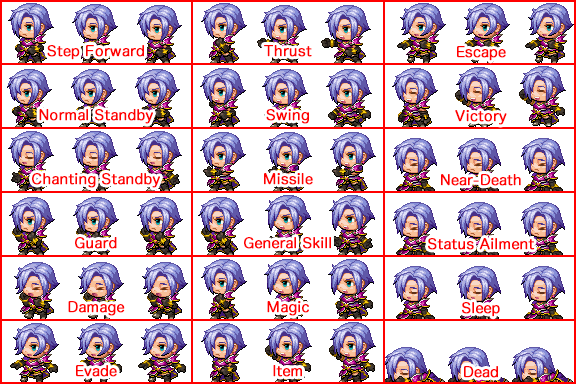
-
Its the top left 3 sprites on the battler sheet.
Well the one I have is different...what you say is walking is idle for me. Look
-
Hey guys, I have different kind of issue.
I'm trying to make self-destruct skill using action sequences. The idea for that skill is that user casting this attack will die in the process, but everyone in opposite party will get some damage. Before I switched to action sequences it was working just fine. That's the formula for that skill (I know many people were looking for that one when all requirements are fulfilled):
dmg = 100 + a.mat * 2 - b.mdf * 2; b.gainHp(a.hp * -3) ; a.gainHp(-a.hp);a.performCollapse(); dmg
After including some commands for AS everything messed up. I mean all that camera and zoom stuff, movement, all works just great, but I think something changed about formula and I can't figure it out how to fix it. My note tag:
<HP Cost: 99%>
<setup action>
display action
hide battle hud
move user: 400, 300, 30
jump user: 100, 30
wait for jump
action common event
wait: 45
</setup action>
<whole action>
animation 121: user
wait for animation
action animation
perform action
action effect
perform finish
show battle hud
</whole action>
So what is wrong with this code? First thing - there is no common event anymore (message with some "goodbye" stuff), I mean font is invisible.
The second thing - after action is finished, the first character in my party (doesn't matter who) is dying in the same time as enemy who just used that skill, after just one hit. I guess that something might be wrong with the formula itself, but as I said, I have no idea how to fix it.
I will be very grateful for any help possible.
Thank you very much and best regards to all of you :)
EDIT:
OK, so I figured it out how to fix the damage. The proper note tag looks like this:
<whole action>
hide battle hud
display action
zoom: 150%
camera focus: user, center
wait for camera
jump user: 200%, 30
move user: point, 400, 300, 30
wait for movement
common event: 2
wait: 30
animation 121: user
animation wait: 59
camera focus: targets, center, 30
wait for camera
action effect: targets
action animation: targets
collapse: user, force
show battle hud
clear battle log
reset zoom
reset camera
</whole action>
and formula:
100 + a.mat * 2 - b.mdf * 2
So at least the damage works properly now. The last thing still missing is invisible common event message window.
The common event itself looks like this:
◆Text:None, Window, Bottom
: :\n<Victim>
: :\{\{\{\c[2]See you in hell!!!\c[0]\}\}\}\|\^
During the fight I can see the first line with name of the user, but everything else is invisible. When I leave just pure text without any plugin effects then it is invisible as well. The funny thing is that when I run that Common Event from skill traits then everything is normal and works just great. The problem is that the message is showing up after the user is dead, which doesn't have much sense...
I'll be very grateful for any help. -
Is there a way to play a weapon animation with the "Chant" motion? Essentially so the sprite will chant while the weapon animation goes off.
-
Is there a way to play a weapon animation with the "Chant" motion? Essentially so the sprite will chant while the weapon animation goes off.
Weapon sprite showing, or the assigned weapons attack animation in the database? -
Weapon sprite showing, or the assigned weapons attack animation in the database?
The attack animation with the weapon showing. -
The attack animation with the weapon showing.
I thought there was a way to do this. But I confused it with motion attack: user, (no weapon) which is the exact opposite of what you want.
However.. there's a way around this. Copy the SV Actor sprite sheet and copy the 'Chant' frames into the swing, thrust, and missile frames. Then save it as a different name than your original. Make two common events. One switches to the new sprite sheet, and the other switches it back. Do this pair of common events for each actor you have doing said action sequence (or you can do multiple characters in just one pair, up to you).
Then in your action sequence, you'll use motion attack: user as a fake chant. But before you call that, make sure you call the common event to switch to the new spritesheet and then call the second near the end of the action sequence (or at least before you actually want to show a real swing/thrust/missile animation). -
Hi, So i was trying to make a skill that attacks more times everytime you use it (Think like a minigun spinning up)
tried to use the If else Statement in the Action Sequence and a Variable. But i keep getting the Error undefined is not a function.
This is an example of what it looks like atm.
Spoiler<Setup Action>
ADD STATE 70: User
</Setup Action>
<Target Action>
motion missile: user
wait: 10
action effect: target
animation 11: target
COLLAPSE: target
if ($gameVariables.Value(13) >= 2)
motion missile: user
wait: 10
action effect: target
animation 11: target
COLLAPSE: target
end
wait: 5
</Target Action>
<Finish Action>
CHANGE VARIABLE 13 += 1
</Finish Action> -
I'm still having issues executing motion attacks throughout skills. Even when I oversave a new game files weapon set for system to override my current one, and it still doesn't fix the issue. I'm out of options when it comes to this, and I doubt it's due to the load order of the plugins I have.
My example:
<Target Action>
Move user: target, front center, 2
wait for movement
motion swing: user
action animation: target
wait for animation
action effect: target
</Target Action> -
Is there a way to randomly choose from a group of motions? Say, if I want 3 randomly chosen attack animations for swings.