Pre-made (Yanfly's) Action Sequence Sharing and Discussions

● ARCHIVED · READ-ONLY
Started by Blue001 2126 posts Page 39 of 107 View original ↗
  1. dragon3025 said:
    I Edited my post, because I've found more about what's going on.
     
    I'm making a game with an evented button action command system. I want the skill to activate the common event for the button action command, then afterwards, deal damage depending on whether or not the player was successful. I'm using both the YEP_X_ActSeqPack1 and YEP_SkillCore along with their required plugins. I used this in a note tag:


    Skill #1 will be used when you select
    the Attack command.
     
    <Before Eval>
    console.log("Before Eval");
    if ($gameSwitches.value(9)) {
    console.log("Switch 9");
    if (target.isEnemy()) {
    console.log("Targeting Enemy");
    value *= 2
    } else {
    console.log("Targeting Ally");
    value /= 2
    }
    }
    </Before Eval>
     
    <whole action>
    common event: 10
    </whole action>


    I'm want the skill core to test whether the switch 9 is on and if so, change the damage value, but I seem to be doing it wrong. The common event isn't running, and if I use the debug to set switch 9 on before the battle starts, the console log shows that the switch is on and that an enemy or ally is being targeted, but the "value *= 2" and "value /= 2" parts aren't working.

    If someone has another way I can go about doing this, that would be fine too. I basically want to be able to make up different button action commands using common events (that run before the damage calculation), then have the result affect the skill.
  2. all we need are projectiles to be included.
  3. Burns said:
    all we need are projectiles to be included.

    What do you mean by projectiles?
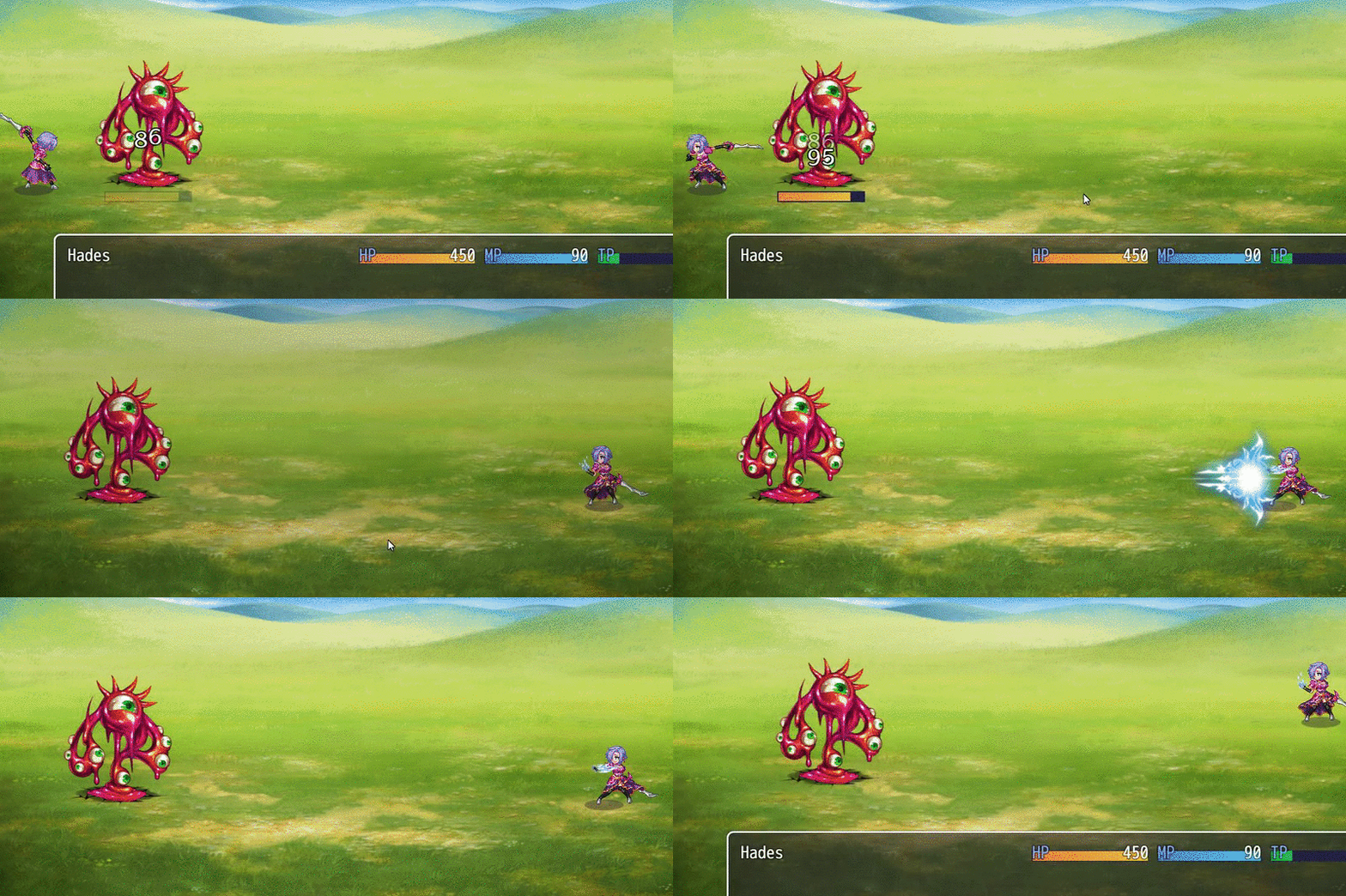
  4. I assume he meant like "Icon Throwing" feature like VE's Plugin
  5. Taemien said:
    What do you mean by projectiles?


    Something like this which I made using Victor Engine scripts.


    8c98618d9da43eabb25c4a0bf043bcc1.gif
  6. Alright, I must be doing something wrong here. So I encounter a problem based on executing animated attack methods through the skill listings. As an example, whenever I use fireslash, my guy moves and all, but doesn't execute the sword animation to make it seem like he's slashing and instead, expresses the fire slash animation with his hands. The same method that rpg maker mv default setting goes along when executing skills. This here is my script:


    <Target Action>


    Move user: target, front center, 2


    wait for movement


    motion swing: user


    perform action


    action animation: target


    wait for animation


    action effect: target


    perform finish


    </Target Action>
  7. Aurawhisperer said:
    Alright, I must be doing something wrong here. So I encounter a problem based on executing animated attack methods through the skill listings. As an example, whenever I use fireslash, my guy moves and all, but doesn't execute the sword animation to make it seem like he's slashing and instead, expresses the fire slash animation with his hands. The same method that rpg maker mv default setting goes along when executing skills. This here is my script:


    <Target Action>


    Move user: target, front center, 2


    wait for movement


    motion swing: user


    perform action


    action animation: target


    wait for animation


    action effect: target


    perform finish


    </Target Action>


    I test it, work just as intended for me, that means something.


    First, you have to  check your actor weapon type, and that it's motion is set to swing, AND that the weapon is a swinging weapon, and that the actor HAS equipped a swinging weapon, you have to check that on the database system tab, as a precaution you should remove "Perform finish" as it's done by default by the skill, and "perform action" is already been altered by using "motion swing".
  8. Still isn't working and I know it is set to swing
  9. I had this working long, long ago on my old game before I scrapped it. I know it can work, just a small piece is missing.
  10. Aurawhisperer said:
    I had this working long, long ago on my old game before I scrapped it. I know it can work, just a small piece is missing.


    Don't know what to tell you, like I said it's working fine for me, does that actor has the correct weapon equipped?, is the weapon a swinging weapon? did you alter in any way the Weapon sheet in the system folder of your project?, those are the only plausible reasons for the actor to attack with empty hands.
  11. emelian65 said:
    Don't know what to tell you, like I said it's working fine for me, does that actor has the correct weapon equipped?, is the weapon a swinging weapon? did you alter in any way the Weapon sheet in the system folder of your project?, those are the only plausible reasons for the actor to attack with empty hands.

    I have everything setup right. I haven't even overwritten the weapon sheet.


    I tried using motion attack:user, but does nothing different compare to motion swing
  12. I got the common event to work, apparently having indentation will stop the code from working, so I got rid of all indentation, so now my only question is:How do you change the damage using Yanfly's YEP_X_ActSeqPack1 plugin? I thought it was by using "value", this was the notetag that I was using:

    Code:
    Skill #1 will be used when you select
    the Attack command.
    
    <Before Eval>
    console.log("Before Eval");
    if ($gameSwitches.value(9)) {
    console.log("Switch 9");
    if (target.isEnemy()) {
    console.log("Targeting Enemy");
    value *= 2
    } else {
    console.log("Targeting Ally");
    value /= 2
    }
    }
    </Before Eval>
    
    <whole action>
    common event: 10
    </whole action>
  13. Hello! YEP.14 – Main Menu Manager I take prompt, how to restrict access to the necessary menu options in the game to a particular card? Thank you so much! 
  14. Fernyfer775 said:
    I present to you ...my newest masterpieces: COMBO SKILLS! :D


    PS: Don't mind the video quality, I messed up the settings on my video capture device...oops.


    Part 1:


    Part 2:


    Dude, I'm curious how to make combo skill!!
  15. dragon3025 said:
    I got the common event to work, apparently having indentation will stop the code from working, so I got rid of all indentation, so now my only question is:How do you change the damage using Yanfly's YEP_X_ActSeqPack1 plugin? I thought it was by using "value", this was the notetag that I was using:


    Skill #1 will be used when you select
    the Attack command.

    <Before Eval>
    console.log("Before Eval");
    if ($gameSwitches.value(9)) {
    console.log("Switch 9");
    if (target.isEnemy()) {
    console.log("Targeting Enemy");
    value *= 2
    } else {
    console.log("Targeting Ally");
    value /= 2
    }
    }
    </Before Eval>

    <whole action>
    common event: 10
    </whole action>


    You don't use Yanfly action sequence plug-in, simply as that; It doesn't work like that the "action sequence" doesn't affect the damage formula at all.


    You need to use a different Plug-In like Yanfly Damage Core that had it's own note tag for the damage formula.
  16. emelian65 said:
    You don't use Yanfly action sequence plug-in, simply as that; It doesn't work like that the "action sequence" doesn't affect the damage formula at all.


    You need to use a different Plug-In like Yanfly Damage Core that had it's own note tag for the damage formula.

    Are you sure? I read this part in the Skill Core plugin help:

    Those using the <Pre-Damage Eval> and <Post-Damage Eval> are able to make use of the damage to be dealt and the damage that has been dealt through the 'value' variable. The <Pre-Damage Eval> notetag is capable of altering the 'value' variable and return it to have damage affected by its code.

    Now that I've read it though I've realized my code needs changed:

    Spoiler
    Skill #1 will be used when you select
    the Attack command.

    <Pre-Damage Eval>
    console.log("Before Eval");
    if ($gameSwitches.value(9)) {
    console.log("Switch 9");
    if (target.isEnemy()) {
    console.log("Targeting Enemy");
    value *= 2
    } else {
    console.log("Targeting Ally");
    value /= 2
    }
    return value
    }
    </Pre-Damage Eval>

    <whole action>
    common event: 10
    </whole action>

    It didn't work though.
  17. dragon3025 said:
    Are you sure? I read this part in the Skill Core plugin help:


    Now that I've read it though I've realized my code needs changed:

    Spoiler
    Skill #1 will be used when you select
    the Attack command.

    <Pre-Damage Eval>
    console.log("Before Eval");
    if ($gameSwitches.value(9)) {
    console.log("Switch 9");
    if (target.isEnemy()) {
    console.log("Targeting Enemy");
    value *= 2
    } else {
    console.log("Targeting Ally");
    value /= 2
    }
    return value
    }
    </Pre-Damage Eval>

    <whole action>
    common event: 10
    </whole action>

    It didn't work though.


    Well first you read that in Skill Core, the Actions Sequence and Skill Sore work together as they are made by Yanfly true, but they aren't not the same thing, this thread is for questions regarding the Action Sequence series of plug-ins and for the people who is kind enough to post their samples of skills.


    While I'll suggest moving the question regarding the code to the damage formula or make your own thread, but maybe if you explain what you are trying to do, we can show you an easier way instead of using the code.
  18. emelian65 said:
    Well first you read that in Skill Core, the Actions Sequence and Skill Sore work together as they are made by Yanfly true, but they aren't not the same thing, this thread is for questions regarding the Action Sequence series of plug-ins and for the people who is kind enough to post their samples of skills.


    While I'll suggest moving the question regarding the code to the damage formula or make your own thread, but maybe if you explain what you are trying to do, we can show you an easier way instead of using the code.

    My question has evolved quite a bit, and now it no longer goes with the thread, which I didn't realize.


    What I'm doing is setting up a common event that has the player press buttons with certain timing, and if their successful the attack will do more damage when targeting enemies and less damage when enemies target the player. I might be able to use some variables in the damage formula, but it would be easier if I could just change the value with the skill core.


    I guess I'll start my own thread then, but I'd appreciate any ideas if it's related to this thread.
  19. I have been going nuts and can't seem to find and answer to this. But I have a skill where I would like to call three different common events at different points in the skill. Unfortunately no matter where I put a common event it only seems to run them at the end of the sequence and only one of them. Any ideas as to why this might be happening?


    Some further details: The common events just show a picture. I have also just tried one common event but even that one just appears at the end no matter where in the sequence I put it.


    This is what is have:


    <setup action>


    camera focus: enemies, center, 5


    COMMON EVENT: 97


    zoom: 200%, 5


    wait: 40


    </setup action>


    <target action>


    camera focus: all actors, center, 10


    COMMON EVENT: 98


    zoom: 200%, 5


    wait: 40


    reset camera: 10


    RESET ZOOM: 10


    WAIT FOR ZOOM


    </target action>


    <finish action>


    COMMON EVENT: 99


    </finish action>


    Any help would be greatly appreciated. Thanks!