PH - Sprite Reflection

● ARCHIVED · READ-ONLY
Started by PrimeHover 79 posts Page 1 of 4 View original ↗

  1. PH - Sprite Reflection


    wJraq2j.png


    Introduction

    • This plugin allows you to reflect any character on the water.

    License

    • Free for commercial and non-commercial use as long as you give the credits of this plugin.

    Configuration

    • Download the JS file and include it into the /plugins folder of your project.
    • Open the Plugin Manager, select the file PH_SpriteReflection.js, and turn it on.
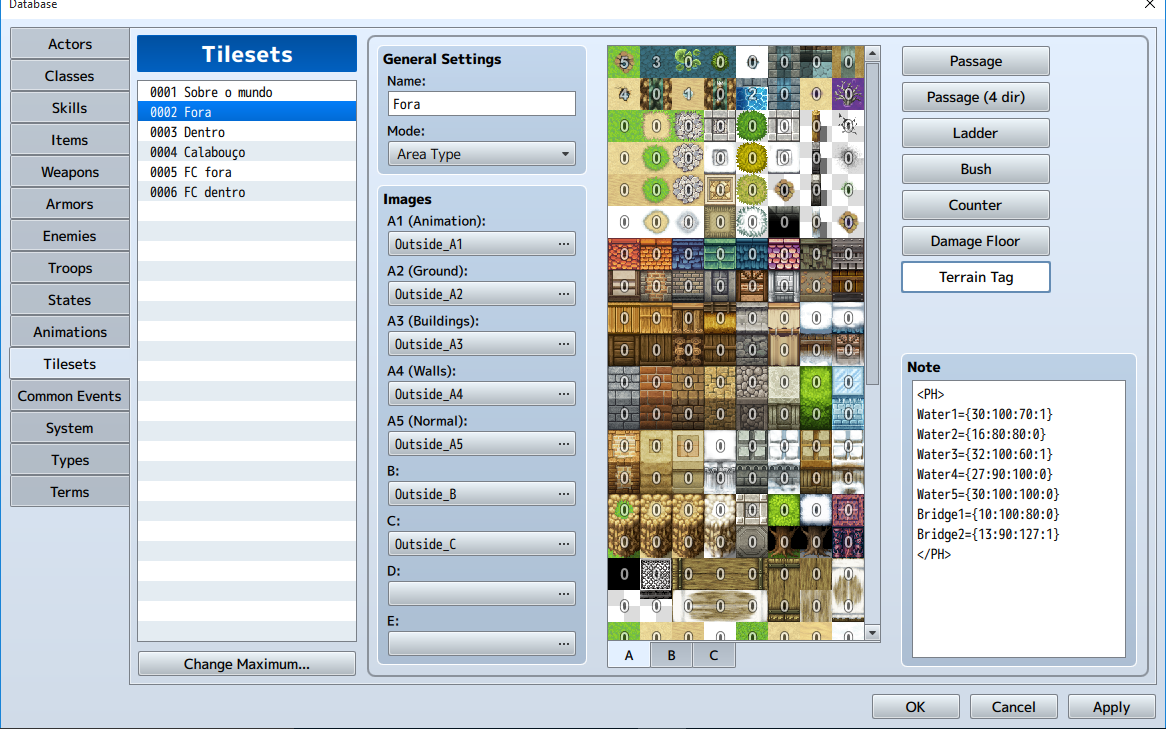
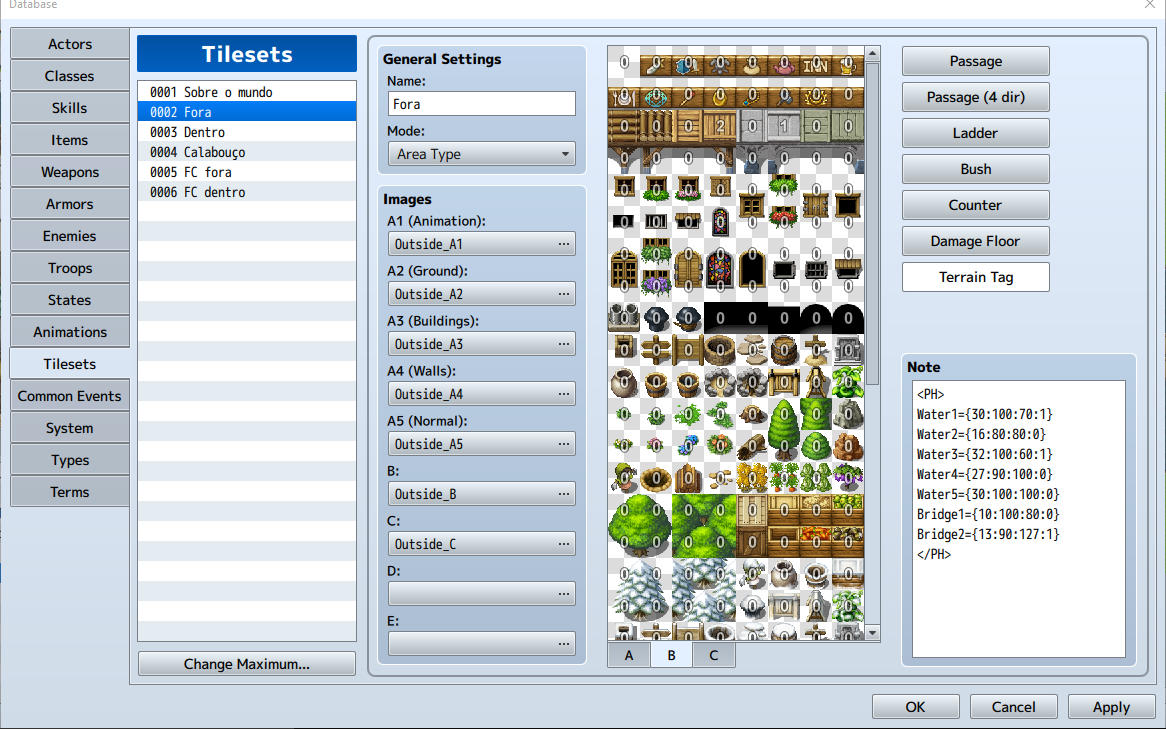
    • You may create some rules in the tilesets using the Terrain Tag to specify the properties of the reflection for each water tileset.
    • You are allowed to create some rules for bridges as well.

    Full Documentation (Examples, Rules for Tilesets, Configuration, Plugin Commands...)


    Screenshots
     

    Spoiler
    Spoiler


    Different types of reflection:
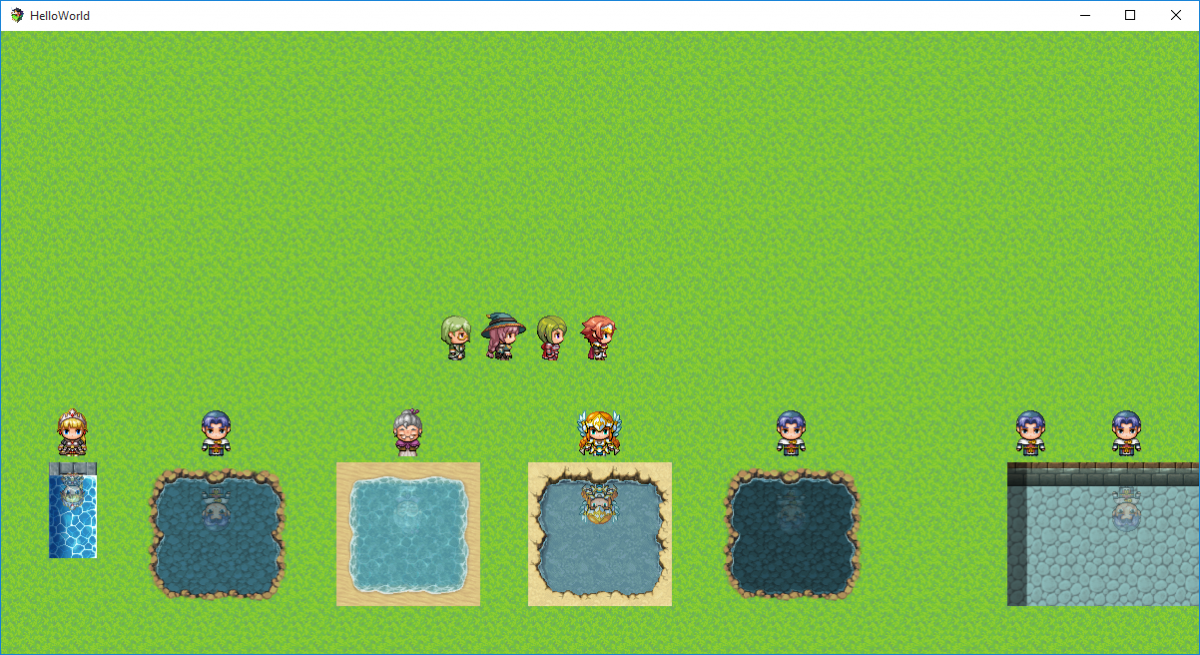
    Capturar.PNG
     
    Reflection of the Player and its followers
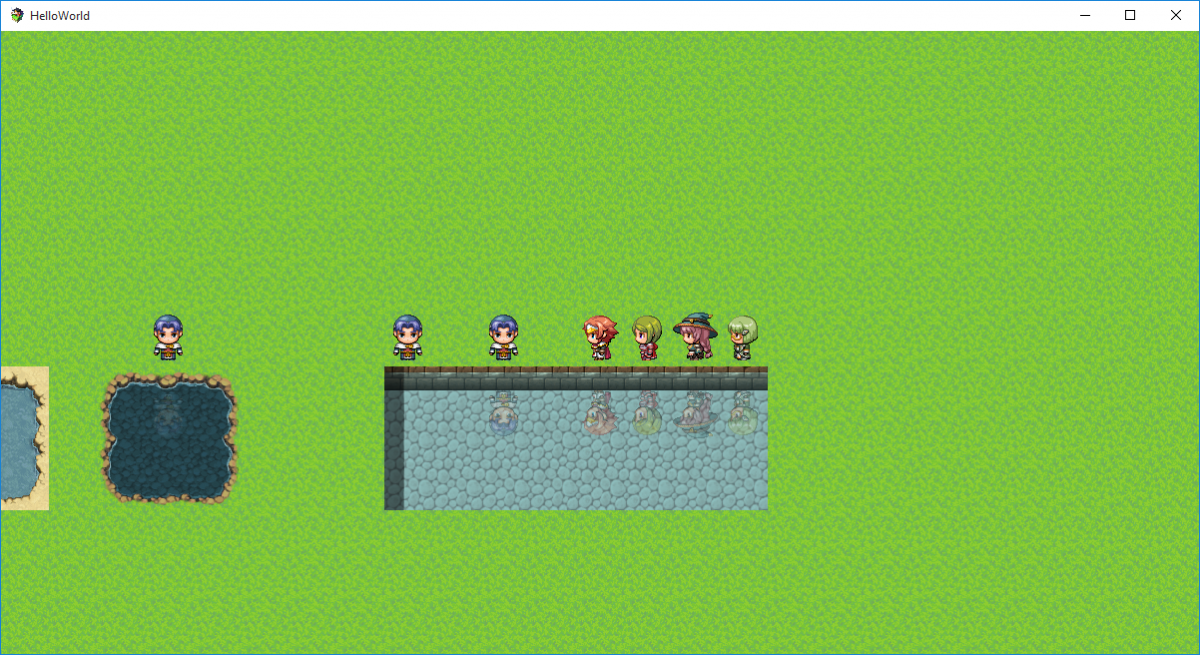
    Capturar2.PNG
     
    Configuration of Tilesets (Water)
    Capturar3.PNG
     
    Configuration of Tilesets (Bridge)
    Capturar4.PNG


    Script


    Changelog

    • 11/25/2015: Version 1.1 (Added option for the Player to turn on/off the reflections via Options Menu; Added parameter for choosing whether or not the reflections in small water tiles will appear).
    • 11/24/2015: Version 1.0

    Credits

    • PrimeHover
  2. Is this also work with event?
  3. Very nice plugin, I love little bits of eye candy, they seem to always make a game so much better.

    Now we just need one that shows shadows.
  4. Cool ! Any plan to make mirror's reflection ?
  5. @izyees

    Yes, it works! There is also some Plugin Commands to manage the reflection in each Event, if you wish.

    @Aidensmercy

    Yep, this is in my to-do list. Probably the next version may have something with shadows.

    @Luth

    Great idea. I think it can work. Do you have some examples/ideas of how the reflections in the mirror could work? 
  6. nice work

    is there any performance impact?

    and could you do add a simple command to the options menu to switch reflections on/off, so the player can shut it off when perfomance is low as example?
  7. lukiono said:
    nice work

    is there any performance impact?

    and could you do add a simple command to the options menu to switch reflections on/off, so the player can shut it off when perfomance is low as example?
    Great idea too! I'll add this in the next version!So far, there is not so much performance impact. I testes on the web version and locally, I cannot make sure about handheld devices, but I don't think they will have such a huge impact as well.
  8. PrimeHover said:
    Great idea. I think it can work. Do you have some examples/ideas of how the reflections in the mirror could work? 
    Well a simple reflection of every event passing by, i guess.

    The thing is that you got to make the reflection on the glass and not on the edge ; would be harder than making a reflection in an autotile since it wouldn't be a 48*48 tile ! 

    Maybe the mirror tile should have a particular color where the reflection would be :

    1448467725-mirror-example.png

    (credit to enterbrain ; you got to have RPG Maker XP's licence to use it)

    The red color (#ff0000 in this case) wouldn't be shown in game, as the mirror would reflect the sprites and maybe the floor..?
  9. Update Notes (Version 1.1):

    • Now, you have a new parameter called Small Water Tile. It has two options (0: No, 1: Yes). I'll explain what is the difference below.What happens is that some water tiles are bigger than others. In the older version, the plugin detected if the tile below the character is a water tile, even if it was a small one. For example, if you had a line of 1 water tile, the result would be something like this:
      Capturar.PNG

      Weird, right? However, in bigger water tiles, the result would be that:
      Capturar2.PNG

      Now, this parameter  Small Water Tile let you choose if you are going to use reflections when the height of a tile is small.
      If you choose 1 (Yes), the plugin will let the reflections stay as they are (like in those previous images).
      If you choose 0 (No), the plugin will not let the reflections appear when the height of a tile is small, resulting in something like this:
      Capturar3.PNG

      But if you have enough space, the reflections will appear normally.
      Capturar4.PNG
    [*]Also, you can add an option in your Options Menu that allows the Player to choose whether or not he/she wants the reflections appear in the whole game (for those worried about performance issues, this is an option to consider)
    Capturar5.PNG

    Thanks for everything guys! :D

    You guys rock!

    @edit

    @Luth

    Got you! Would you prefer to define the mirror in the tile or in a specific event?

    Like, you create an event and use commands to say: "OK, this is a mirror, reflect here!"
    Or would you prefer to create a rule for this in the tileset, like: MirrorN={distance:scale:opacity:blend}

    Particularly, I think both ways can work. I'll try to make some tests here and see which way costs less!  :D
  10. Ah, that's funny because the small water tile got the same problem than what I was talking about earlier :D

    Well do what seems easier to you. It's nice from you to mind listening to my "request" ! though I don't know script nor java so I'm afraid I can't help you :/
  11. Luth said:
    Ah, that's funny because the small water tile got the same problem than what I was talking about earlier :D


    Well do what seems easier to you. It's nice from you to mind listening to my "request" ! though I don't know script nor java so I'm afraid I can't help you :/
    Yep, I just "fixed" that, if that is the right word. LOL
    I like when requests like that happens! Some of the requests may not fit very well, but yours is really good though!
  12. Fantastic. It's hard to believe we're only a month into the life cycle of MV and we already have so many cool plug-ins at our disposal.
  13. Found a glitch that is quite a nuisance. 

  14. PrimeHover said:
    Or would you prefer to create a rule for this in the tileset, like: MirrorN={distance:scale:opacity:blend}
    I think this would work great because I would also like to be able to use it to create a reflective or shiny floor. Would be great in mansions and the like. I personally plan to use it for my spaceship interior. I like the idea of being able to choose which tiles to show a reflection on rather than have it evented unless the event was to disable the reflections.
  15. was waiting for this for a long while thank you !
  16. @Cirby64

    Agreed, but that's the reason why You are allowed to scale the reflection size. Some water tiles are bigger than others. So, you would use the parameters to make the reflection a little smaller.

    @Soryn

    Yes, definitely this is one of the future improvements. For while, you can put a floor tile instead of a water tile in the place A1 animation, and use it as a passable tile.

    @Nightshade

    I'm glad you liked it!

    Answering the question you've posted on the other topic, you can reflect trees and sort as long as they are placed on the map as an event, instead of a simple tile. :D
  17. PrimeHover said:
    @Cirby64

    Agreed, but that's the reason why You are allowed to scale the reflection size. Some water tiles are bigger than others. So, you would use the parameters to make the reflection a little smaller.

    @Soryn

    Yes, definitely this is one of the future improvements. For while, you can put a floor tile instead of a water tile in the place A1 animation, and use it as a passable tile.

    @Nightshade

    I'm glad you liked it!

    Answering the question you've posted on the other topic, you can reflect trees and sort as long as they are placed on the map as an event, instead of a simple tile. :D
    that is awesome! : O thank you so much : D
  18. Nice plugin and thank you for sharing it.
  19. umm for some reason nothing is working Oo not even the options are showing up
  20. Nightshade said:
    umm for some reason nothing is working Oo not even the options are showing up
    Try to download the JS file again and replace the current one.

    Maybe something happened during the download