OrangeGreenworks - Steam Integration with Achievements and Time Log

● ARCHIVED · READ-ONLY
Started by Hudell 347 posts Page 17 of 18 View original ↗
  1. Squareware said:
    Code:
    OrangeGreenworks.activateAchievement('ID');
    Where ID is the id for the archievement you want to earn.

    Altough I'm on rpg maker mv 1.5.1 and I can't get it to work either :)
    my nw version is 1.2.0? according to the console log.
    I added the steam sdk 1.20 to the lib folder in the root folder. I did tried sone other versions as wel without succes.
    the app_id text is in the root folder
    the greenworks.js is in the root folder (does that need to be another version?)
    the orangegreenworks is activated.

    console log says:
    Greenworks failed to load. Make sure you copied all files from the Steamworks SDK to the right folders;

    I have your same problem, I don't know why the message "you have get a new achievement" does not appear when I execute script call in the game. did anyone find a solution?
  2. I have a problem with the overlay.

    The achievements get activated during playthrough, but I can't open the overlay and I don't get the steam popup windows when the achievements unlock. The achievements are just unlocked within the launcher. I'm launching the game through steam, I tried both directly from the library and through the installed desktop icon. I also restarted steam.

    @masterlobo do you remember if you did anything else beside using the achievements script calls in events to get it work? (and of course having the plugin in there and copying the required files over)

    I tried both plugin versions I had access to~ which were 1.0 and 1.2.


    For those struggeling to get the achievements running:

    Get your NW version with this script call:
    console.warn(process.versions);
    (just place it within an NPC event, talk to it in playtest, check the consol and remove that event later)

    Hit F8 for the console to open and check your node-webkit (NW) version.
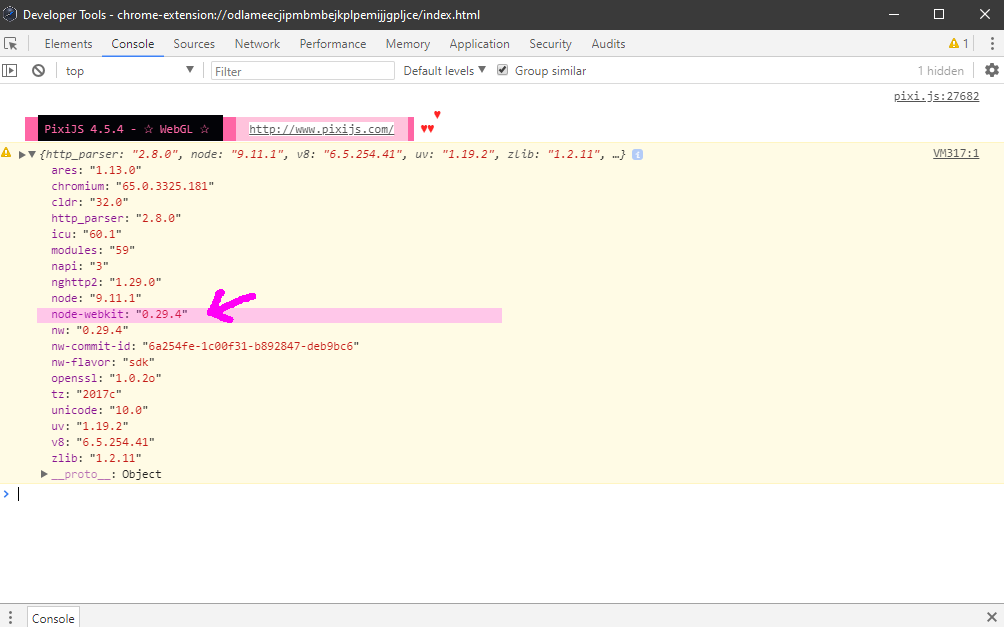
    0NWjs_b.PNG

    Take a note of that.

    go to
    https://github.com/greenheartgames/greenworks/releases
    and check for a release that matches your NW version.
    (For NW.js version 0.29.4 that would be greenworks v0.13.0 for nw 0.29.4!)
    Download the version files needed for you. (For the Systems you want to publish for: example win64)
    Check for which Steam SDK your greenworks version is.
    (In my case Steamworks SDK 1.42)

    Go to steamworks.
    https://partner.steamgames.com/downloads/list
    Download the Version you need.

    Follow Hudell's instructions for setup. Copy the files needed into your project.
    @/MelonMintGames was kind enough to post an archive.org version link of the old documentation.
    https://web.archive.org/web/20190701082834/http://hudell.com/blog/orangegreenworks/

    As you checked your NW version beforehand you can skip the last part that wants you to replace files in your deployed game folder.
    (As we did get the other files matching our nw.js version and don't need to match the nw.js version to the other files, which you could also do and skip step 1 here instead!)

    Upload to Steam. Have the achievement setup within steamworks. Launch through steam.


    For those that find that the download in the op post isn't working:

    Here's version 1.2 on Hudell's Github.
    mv-plugins/OrangeGreenworks.js at master · Hudell/mv-plugins
  3. remainderstudios said:
    I have your same problem, I don't know why the message "you have get a new achievement" does not appear when I execute script call in the game. did anyone find a solution?

    Eventually I have it working but it was a pain in my right-mouse-arm to get the right versions matched Nw/ greenworks / steam sdk, and wel to get all the trophies icons in place.

    Just a small tip:
    The steam webpage is kind of outdated if you ask me, for handeling the archievemnt icons and that kind of stuff. Make sure you have the right order (I failed to do that, though I correct it someday). But it's another hour of wasted time, to reupload and move the archievements in the right order / group.
  4. Plueschkatze said:
    I have a problem with the overlay.

    The achievements get activated during playthrough, but I can't open the overlay and I don't get the steam popup windows when the achievements unlock. The achievements are just unlocked within the launcher. I'm launching the game through steam, I tried both directly from the library and through the installed desktop icon. I also restarted steam.

    @masterlobo do you remember if you did anything else beside using the achievements script calls in events to get it work? (and of course having the plugin in there and copying the required files over)

    I tried both plugin versions I had access to~ which were 1.0 and 1.2.


    For those struggeling to get the achievements running:

    Get your NW version with this script call:
    console.warn(process.versions);
    (just place it within an NPC event, talk to it in playtest, check the consol and remove that event later)

    Hit F8 for the console to open and check your node-webkit (NW) version.

    View attachment 245035

    Take a note of that.

    go to
    https://github.com/greenheartgames/greenworks/releases
    and check for a release that matches your NW version.
    (For NW.js version 0.29.4 that would be greenworks v0.13.0 for nw 0.29.4!)
    Download the version files needed for you. (For the Systems you want to publish for: example win64)
    Check for which Steam SDK your greenworks version is.
    (In my case Steamworks SDK 1.42)

    Go to steamworks.
    https://partner.steamgames.com/downloads/list
    Download the Version you need.

    Follow Hudell's instructions for setup. Copy the files needed into your project.
    @/MelonMintGames was kind enough to post an archive.org version link of the old documentation.
    https://web.archive.org/web/20190701082834/http://hudell.com/blog/orangegreenworks/

    As you checked your NW version beforehand you can skip the last part that wants you to replace files in your deployed game folder.
    (As we did get the other files matching our nw.js version and don't need to match the nw.js version to the other files, which you could also do and skip step 1 here instead!)

    Upload to Steam. Have the achievement setup within steamworks. Launch through steam.


    For those that find that the download in the op post isn't working:

    Here's version 1.2 on Hudell's Github.
    mv-plugins/OrangeGreenworks.js at master · Hudell/mv-plugins

    I get this error when use F8 (console):

    NODE_MODULE_VERSION 64. This version of Node.js requires
    NODE_MODULE_VERSION 59. Please try re-compiling or re-installing
    the module (for instance, using `npm rebuild` or `npm install`).
    at Object.Module._extensions..node (module.js:734:18)

    how do i solve it? I already downloaded version 59 of Node but that error keeps happening
  5. remainderstudios said:
    I get this error when use F8 (console):

    NODE_MODULE_VERSION 64. This version of Node.js requires
    NODE_MODULE_VERSION 59. Please try re-compiling or re-installing
    the module (for instance, using `npm rebuild` or `npm install`).
    at Object.Module._extensions..node (module.js:734:18)

    how do i solve it? I already downloaded version 59 of Node but that error keeps happening

    Do you have a backup of your project before you did mess with anything?
    I'd revert to that and start from there again.
  6. Plueschkatze said:
    Do you have a backup of your project before you did mess with anything?
    I'd revert to that and start from there again.
    I already installed other versions of node and nw and now I get this error:

    The specified process was not found

    and it points to greenworks-win64.node it's like the plugin doesn't detect any version of greenworks.

    I'm tired of trying so many versions of nw, I'm about to throw in the towel.
  7. The link seems to be broken, it gives me an error saying the domain wasn't found. Has the whole website gone down?
  8. I have same problem, "the domain wasn't found"
  9. Hudell said:

    Orange Greenworks 1.0
    Hudell

    Introduction
    This scripts enables some features of the steamworks API:

    Features
    - Achievements.
    - Detect Player Name,
    - Detect Player Language.
    - Get Number of Steam Friends.
    - Get and Set Steam Stats.
    - Check, Install and Uninstall DLCs.
    - Log Play Time on Steam
    - Sync Saves with Steam Cloud.
    - Check if Player has other games.


    Plugin
    Download here. The download page also includes detailed instructions.

    Add-Ons:
    Steam Cloud

    License
    Free for any game.
    It apears that the given links do not work?
  10. the links dont apear to work is that just me orrrrr....?
  11. Hmm... just noticed something interesting. I'm developing on two different machines (home and work). One of them is Windows 11, the other is Linux. And even though the version of MV is the same on both, node-webkit is different. I noticed this when I checked console and saw that on the Windows 11 box OrangeGreenworks seems to be loading fine. However, it's throwing errors on the Linux one.

    The errors are due to an incompatibility I believe with the Steamworks SDK. In particular, it's complaining about libsdkencryptedappticket.so. It probably needs a different one since the node-webkit is different on this Linux system.

    Which begs the question: If I build on Windows with the working node-webkit and then deploy with that, if I install on Linux from Steam and run with Windows compatibility settings (Proton, etc) will it use the node-webkit I built it with that works and be good to go?

    More testing is required. Sorry, I think I'm just sorta brain dumping right now. But somebody might hit something like this also and it'd be useful for them to read this and my findings. Maybe.
  12. Has anyone followed these steps to deploy for Mac recently? My game opens before following the steps, but afterwards it just crashes.

    (I know these steps worked fine for me in the past, so I'm afraid it just doesn't work anymore with new OS or something.)
  13. Hello!

    I don't know if anyone is still responding here but I have a problem. Everything seems to work, although when I launch my game I get the error "Greenworks failed to initialize." (afterwards it still shows me my peuso) When I play from the editor and I call the script to activate an achievement it gives me the message that it is doing it. Only when I export my game to Steam and play it from Steam, my achievement does not activate. And yet everything seems to be working normally, so I don't understand.

    Thanks
    1702217641257.png
    1702217689009.png
  14. Squareware said:
    Eventually I have it working but it was a pain in my right-mouse-arm to get the right versions matched Nw/ greenworks / steam sdk, and wel to get all the trophies icons in place.

    Just a small tip:
    The steam webpage is kind of outdated if you ask me, for handeling the archievemnt icons and that kind of stuff. Make sure you have the right order (I failed to do that, though I correct it someday). But it's another hour of wasted time, to reupload and move the archievements in the right order / group.
    What versions did you end up using?
  15. Ecko said:
    Hello!

    I don't know if anyone is still responding here but I have a problem. Everything seems to work, although when I launch my game I get the error "Greenworks failed to initialize." (afterwards it still shows me my peuso) When I play from the editor and I call the script to activate an achievement it gives me the message that it is doing it. Only when I export my game to Steam and play it from Steam, my achievement does not activate. And yet everything seems to be working normally, so I don't understand.

    Thanks
    View attachment 287350
    View attachment 287351
    Did you ever get it to work?

    Plueschkatze said:
    I have a problem with the overlay.

    The achievements get activated during playthrough, but I can't open the overlay and I don't get the steam popup windows when the achievements unlock. The achievements are just unlocked within the launcher. I'm launching the game through steam, I tried both directly from the library and through the installed desktop icon. I also restarted steam.

    @masterlobo do you remember if you did anything else beside using the achievements script calls in events to get it work? (and of course having the plugin in there and copying the required files over)

    I tried both plugin versions I had access to~ which were 1.0 and 1.2.


    For those struggeling to get the achievements running:

    Get your NW version with this script call:
    console.warn(process.versions);
    (just place it within an NPC event, talk to it in playtest, check the consol and remove that event later)

    Hit F8 for the console to open and check your node-webkit (NW) version.

    View attachment 245035

    Take a note of that.

    go to
    https://github.com/greenheartgames/greenworks/releases
    and check for a release that matches your NW version.
    (For NW.js version 0.29.4 that would be greenworks v0.13.0 for nw 0.29.4!)
    Download the version files needed for you. (For the Systems you want to publish for: example win64)
    Check for which Steam SDK your greenworks version is.
    (In my case Steamworks SDK 1.42)

    Go to steamworks.
    https://partner.steamgames.com/downloads/list
    Download the Version you need.

    Follow Hudell's instructions for setup. Copy the files needed into your project.
    @/MelonMintGames was kind enough to post an archive.org version link of the old documentation.
    https://web.archive.org/web/20190701082834/http://hudell.com/blog/orangegreenworks/

    As you checked your NW version beforehand you can skip the last part that wants you to replace files in your deployed game folder.
    (As we did get the other files matching our nw.js version and don't need to match the nw.js version to the other files, which you could also do and skip step 1 here instead!)

    Upload to Steam. Have the achievement setup within steamworks. Launch through steam.


    For those that find that the download in the op post isn't working:

    Here's version 1.2 on Hudell's Github.
    mv-plugins/OrangeGreenworks.js at master · Hudell/mv-plugins
    Trying this with the latest versions, the best I got was "Greenworks failed to initialize". What could possibly be missing at that point? Is it that I didn't have the steam app ID connected?

    Also, when I DID try to do the 0.49.2 version, I couldn't find the greenworks for that nw.js version
  16. emma_watson said:
    What versions did you end up using?
    I'm not sure it got realy messy. And it also depends on the nw.js version your game is using.
  17. idk if I posted this here already, bc I'm pretty sure i did and now I cant see it anymore, but here is a 2025 tutorial:
  18. The Link is busted, anyone know of way to still get this plugin? D;
  19. Anatis said:
    The Link is busted, anyone know of way to still get this plugin? D;