Orange Overlay v1.1.4 + Animated Parallax Add-On (Updated 7Jul17)

● ARCHIVED · READ-ONLY
Started by Tsukitsune 144 posts Page 5 of 8 View original ↗
  1. l8rose said:
    It's different for each piece that you want to change but you're going to look for something that says img/whateverlayer/
    As it's been a while since I posted that fix (and I'm not actively using this plugin) I can't remember if you can get by with just removing the last / or the whole point of img/ and that last /.

    img_thing.png

    You'll need to find the others like that if you're going to change those like I did.
    They'll be img/pars/, img/shadows, etc.

    And again, use this at your own risk.
    It´s working thank you!
  2. You're quite welcome. =]
  3. edit i got it working, but the appears over everything, is their a way to make it appear underneath everything.
  4. I found a bug in this plugin when you open the menu and then close it, extra fog layers will show above everything else (including pictures) ignoring the Z value given initially? Is it just me?
  5. Hey, i can use the light by calling it in the "map notetags" -> and it works.
    But i want to call the light layer by the plugin command. I started an event and set the plugin command to: Overlay light lights4
    The lightning wont show up :(

    can someone explain me how to set the light overlay by calling the plugin command?

    sry for my english its a lil rusty
  6. Hello!
    I was wondering if there was a way to control the fade out speed of the parallax when toggling it off by it's switch?
    There seems to be an Overlay Fadeout plugin command for the fog, but not the parallax
  7. Hey, this plugin was working great but now all of a sudden the par layer of the map is not displaying. Its still required as I can't load the map without "par1" but its not actually displaying in game. Can anyone help?
    edit: all other layers seem to display just fine.
  8. Hello,
    I am trying to do an animated parallax and i somehow managed to work through some errors. Now the only problem is, that the animation does not begin until after a few seconds of being on the map. Is there any way I can fix this?

    I hope someone still deals with troubleshooting, because I really would like to make this work.

    Thanks in advance! :)
  9. Edited:

    I'm an idiot. My issue was caused by having switches tied to the OrangeOverlay default slots of 3 and 4.
  10. When using Tsukitsune_animatedOverlayAddon.js
    I get the error
    Cannot Read Property Visible of Undefined. Can anyone help??

    at Spriteset_Map.updateShadowLayer (Tsukitsune_animatedOverlayAddon.js:489)
  11. I don't know anything about javascript, but I want to use this, could some one explain how to use it?
  12. what plugin command specifically puts an overlay in the background?
    all i know is "Overlay fog par3_0 255 0 0 0 0" places an image in front of the character.
    "Overlay ground par3_0 255 0 0 0 0" does nothing, "Overlay par par3_0 255 0 0 0 0" does nothing.

    edit - "Overlay ground ground3_0" doesn't do anything either, even though a near identical command was shown in a screenshot earlier on in this thread??
    edit 2 - apparently the thing i was trying to do is already possible with "Change Parallax" so nevermind!
  13. lonewolph said:
    When using Tsukitsune_animatedOverlayAddon.js
    I get the error
    Cannot Read Property Visible of Undefined. Can anyone help??

    at Spriteset_Map.updateShadowLayer (Tsukitsune_animatedOverlayAddon.js:489)

    First, I think it's something to do with the YEP_Core engine plugin the not compatible with Tsukitsune_animatedOverlayAddon.js.

    Now, I'm not export with this plugin specific, but do the following will help to check the problem:

    1. Sometimes it's all about where you put them on the list, try to play around with these two plugins...
    - both on top of all other plugins (in your list)
    - both under all other plugins
    - In the two options above, try to put the 'orange' plugin above the 'Tsukitsune' one and then the other way.

    If the above method didn't help, try the following:

    2.
    Turn all other plugins you have to 'off' and see if it's working now. If it's working, that's mean one of your other plugins in the list the are not compatible with these two plugins.

    To check which one it's you can do the following:
    1. Open a 'test game' + Open the control and take a clear screenshot (click F8 or F12), that's should show which plugins may or may not cause the problem.

    2. If there are too many plugins show up you will have to turn them all to 'off' and check one by one (turn 'on' one plugin and playtest it).
  14. When I enter the main menu and then exit the main menu the layers get screwed up
  15. Is it possible to use this plugin with RPG maker MZ? I can get the animations to play using the map note tag but can't figure out how to start and stop them using the plugin commands because the plugin itself doesn't show up as a choice. I tried typing the plugin command as "Script : Plugin Command : animate_layer ground12 14 5" but it doesn't work. Thanks :)
  16. Hey! Sorry if this has already been fixed or whatever :D
    I'm noticing on a map of mine that has scrolling, the front par layer sort of jitters when moving, making it look kinda like screen tearing around those areas. Wondering if anyone knows why that might be?
  17. Update:
    Ok, I figured it out. It turns out that I got confused by GIMP's layer mode. The picture that I claimed "when I place them one on top of the other in any image editor, it looks perfect" is using "default" layer mode. If I change to "legacy", it's the same with what it looks like when in game.

    I don't have too much understanding of the two modes GIMP offers, but note to myself that I should probably always use "legacy" when work on maps in the future.

    I feel bad if someone actually spent time trying to look into this... Sorry about that!

    -------------
    Original post:

    Hi all, glad I've found this great plugin for my mapping, thanks for creating it!
    However I just have one problem that I cannot seem to find a solution to: When I add ground and parallax layers, the semi-transparent shadow in the parallax layer doesn't get displayed correctly.

    To reproduce this issue, use "demo_ground" as the ground layer, and "demo_par" as the parallax layer.
    demo_ground:
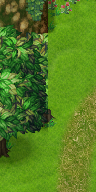
    demo_ground.png
    demo_par (it's the shadow in this image doesn't work right with the plugin):
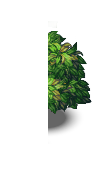
    demo_par.png
    When I place them one on top of the other in any image editor, it looks perfect:
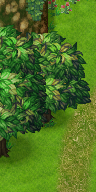
    demo_full.png
    However when I put them in a map with the plugin and run the test:
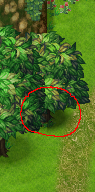
    plugin_result.png
    Somehow the shadow of the tree is off. It should be pretty clear that the color of the shadow changes abruptly on the tile edge. It seems like the shadow in the parallax layer is more opaque than it should be.

    All I did was I put the two images in their organized folders and added "<par>\n<ground>" to the map note. That's it, I'm not using any plugin commands. (Should I?)

    I have been searching for a solution or an alternative for a while and have failed. I spent months on the map and really sad that I can't get it to work... Could you help me out please? Thanks for your time!
  18. Aerianr said:
    Edited:

    I'm an idiot. My issue was caused by having switches tied to the OrangeOverlay default slots of 3 and 4.
    You just saved me stupid life. I was wondering why the hell the parallax wasnt showing when I pressed new game and why the first 4 switches were auto on!
  19. is there a way to scroll par ground light, all layers?
  20. Very happy to use this plugin
    But I have an effect that has never been achieved
    What should I do?
    The following is what I simulated with Photoshop
    [MEDIA = youtube] a-1hUEn7Y1k [/ MEDIA]
    This is the material I want to use
    unknown_LI.jpg
    This is the result of my test未知(1).png
    1607424865474.png
    It can display but not move