OcRam MZ -plugins

● ARCHIVED · READ-ONLY
Started by OcRam 404 posts Page 5 of 21 View original ↗
  1. MasterTenchi said:
    Hmm... now it is no longer compatible with:

    +++ MOG - Char Shatter Effect (v1.0) +++

    By Moghunter

    Atelier Rgss
    Causes a

    TypeError
    Cannot read property 'clamp' of undefined

    I the shatter effect goes off while OcRam_Passages is on as well...
    Strange.
    Just a heads up.
    Thank you for the message,

    It took a look at this and I think it's OcRam_Core that conflicts with MOG_CharShatterEffect...

    Needs further investigation - I'll keep you informed about this.

    Edit: ...aaaand it might be related to Passages indeed ....really confused here since I actually got described error also with out Passages -plugin (never happened again though) o_O
  2. Thanks for your great plugin! One question, though - is there a way to get a Night Phase Common Event similar to the Day Phase CE? I'd like my parallax sky background image to change from a cloudy day picture to a starlit sky night picture as soon as night falls.
  3. OcRam said:
    Thank you for the message,

    It took a look at this and I think it's OcRam_Core that conflicts with MOG_CharShatterEffect...

    Needs further investigation - I'll keep you informed about this.

    Edit: ...aaaand it might be related to Passages indeed ....really confused here since I actually got described error also with out Passages -plugin (never happened again though) o_O

    o_O

    Crazy - but none of the ones I have cause it to die unless I try Passages, but as soon as I turn that one on: POOF!
  4. Hi, first off wanted to say I enjoy your plugins. Namely Passages and Movements.

    And now, secondly. I was wondering if you're working on adjusting follower distance with OcRam_Movements. I noticed in the plugin file itself it says "Todo". Obviously if I had the know how I'd have just messaged you a code snippet with a 'solution' so to speak. But sadly I'm dumb xD.

    Was just wondering, since the followers being mushed together is the only downside to the plugin I can see. Other than that, keep up the good work. Your plugin's are very well done.
  5. MasterTenchi said:
    o_O

    Crazy - but none of the ones I have cause it to die unless I try Passages, but as soon as I turn that one on: POOF!
    Hello,

    I have now updated OcRam_Passages to v1.07 which is compatible with MOG_CharShatterEffect!
  6. Wow! You Are DA MAN! I had great faith in you the entire time *orders the hit squad down*
  7. Drat:
    TypeError: Cannot read property 'clamp' of undefined
    at Sprite.set (js/rmmz_core.js:1929)
    at Sprite_Character_OC.Sprite_Character.loadShatterData (js/plugins/MOG_CharShatterEffect.js:280)
    at Sprite_Character_OC.Sprite_Character.createShatterSprites (js/plugins/MOG_CharShatterEffect.js:205)
    at Sprite_Character_OC.Sprite_Character.updateShatterEffect (js/plugins/MOG_CharShatterEffect.js:147)
    at Sprite_Character_OC.Sprite_Character.update (js/plugins/MOG_CharShatterEffect.js:133)
    at Sprite_Character_OC.update (js/plugins/OcRam_Passages.js:209)
    at Sprite.update (js/rmmz_core.js:1971)
    at Sprite.<computed>.<computed> [as update] (js/plugins/VisuMZ_2_HorrorEffects.js:2298)
    at Tilemap.update (js/rmmz_core.js:2304)
    at Sprite.update (js/rmmz_core.js:1971)
    Same Error - If you STAND Still while the Shatter Effect happens, no error.
    But if you are moving while it is in effect with passages turned on you'll get the error.
  8. MasterTenchi said:
    Drat:
    TypeError: Cannot read property 'clamp' of undefined
    at Sprite.set (js/rmmz_core.js:1929)
    at Sprite_Character_OC.Sprite_Character.loadShatterData (js/plugins/MOG_CharShatterEffect.js:280)
    at Sprite_Character_OC.Sprite_Character.createShatterSprites (js/plugins/MOG_CharShatterEffect.js:205)
    at Sprite_Character_OC.Sprite_Character.updateShatterEffect (js/plugins/MOG_CharShatterEffect.js:147)
    at Sprite_Character_OC.Sprite_Character.update (js/plugins/MOG_CharShatterEffect.js:133)
    at Sprite_Character_OC.update (js/plugins/OcRam_Passages.js:209)
    at Sprite.update (js/rmmz_core.js:1971)
    at Sprite.<computed>.<computed> [as update] (js/plugins/VisuMZ_2_HorrorEffects.js:2298)
    at Tilemap.update (js/rmmz_core.js:2304)
    at Sprite.update (js/rmmz_core.js:1971)
    Same Error - If you STAND Still while the Shatter Effect happens, no error.
    But if you are moving while it is in effect with passages turned on you'll get the error.
    Thank you for the message,

    Make sure MOG plugin is imported BEFORE Passages
  9. I'll give her a whirl that way
  10. Ah - yep, that fixed it... layer order of plugins is such a pain sometimes.
  11. Hello world!

    When creating the new NPC Scheduler -plugin a lot of other OcRam -plugins had to be developed with it. This has been the most time consuming RPG Maker project for me and most certainly has been worth of that time (IMO)! Additionally OcRam_Parallels -plugin has evolved to OcRam_Events which gives you also possibility to copy/spawn and AUTOMATIZE some of your eventing!

    And on top of all that - I had possiblity to test OcRam -plugins on slower computer ...and got squeezed up to ~12 MORE FPS (from ~38 to ~50 - that's ~31% smoother experience!) with ALL OcRam -plugins enabled. It was a big map with a lot of stuff (> 1000 light sources, shifting rgb, pulse, flicker, terrains etc...) / passages / dynamic sounds / events and weather effects! After disabling OcRam_Lights FPS was ~58 (no noticeable changes to that if any other OcRam -plugin was disabled). Smaller maps were steady 60 FPS after optimization (before optimization sometimes got 60).

    Important notes for UPDATING plugins!
    If you are about to UPDATE plugins - remember to always BACKUP your project! Plugin parameters can be re-validated (if needed) by opening the parameter and clicking "OK" -button.
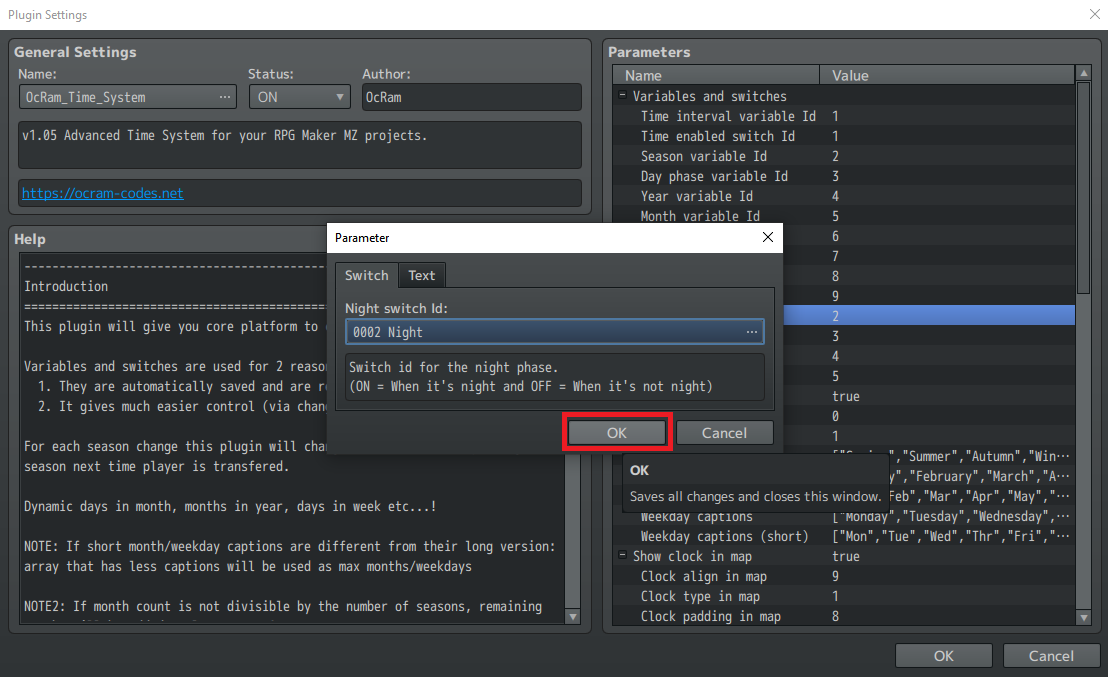
    revalidate_parameter.png
    This may not seem important, but all new parameters will be NULL (and MAY cause unwanted behaviour) if this is not done. This also forces RPG Maker to validate parameter input to expected format.

    Another option is to RE-INSTALL whole plugin, if you don't want to "hunt" new/changed parameters (WARNING: All values will be set to default!).

    If ANY OcRam -plugin is updated - Update ALL OcRam -plugins that are in use (incompatibilities may occur with older versions)!

    I'm sorry for any typos here! It's been a long week and this is a big update...

    But I'll try to avoid HUGE "wall of text" - so without further blaablaas - release notes are behind spoilers dear sirs and madams!

    Core v1.07
    • Some fail safing when other OcRam -plugins are turned off
    • OcRam.emptyMoveRoute(); // Returns empty moveroute
    • OcRam.isUrlAvailable(url, suc_cb, err_cb)
    • OcRam.getDirectionToCharacterFromXY(c, x, y)
    • OcRam.isInScreen(x, y) // Check if given x/y is in screen (4 tile margin) returns always true if small map (no culling).
    • Game_Actor.getCharacter() // Get character based on actor
    • $gameMap.isTilePassable(x, y) // By ANY dir
    • <no_ladders> to disable flying birds strafe on ladders + All vehicles now ignore ladders...
    • NEW region passability feature (block/allow passages)!
    • Culling is now done in core to avoid overlapped cull! Checks if map needs to be culled horz, vert or both
    • Some flags to check if events has occured in past 200ms
      • OcRam._justTransfered // Transfered to new area?
      • OcRam._justTransferedAny // Transfered to any area?
      • OcRam._justLoaded // is game just loaded
    • A LOT OF NEW CHARACTER CORE FUNCTIONS:
      • moveToXY(x, y) // Move towards given point
      • showBalloon(6, true); // "Sweat" balloon with "wait"
      • isXY(x, y); // Shortcut to check character pos
      • rangeTo(character) // Range to given character
      • eventsInRangeOf(radius) // Event array
      • frontXY/behindXY/leftXY/rightXY() // [x,y] array
      • lineOfSight(chr, dist, fos, xray) // true/false
      • eventsInLineOfSight(dist, fos, xray) // Event array
      • jumpRandomly/Towards/Away/To methods!
      • getActor() // Gets actor object from this character! Example: $gamePlayer.getActor() returns actor object controlled by player. (Events will return undefined)
      • flee(character) // Opposite to "Approach" move type...
      • isNearCharacter(character) // Is near this character?

    Events - NEW!
    This plugin allows you to streamline your eventing by creating event bases! Only 1 place to make changes globally! Or need to spawn events (like loot chests, projectiles etc...)? Autofill speaker name and face with emotions? And much more!

    Time_System v1.05
    • Day phase variable is also updated while player is indoors!
    • Fixed bug where night tint didn't occur w/o OcRam_Lights
    • Night/dawn/day/dusk switch ids for easier eventing!
    • Indoors tint parameters 4x (used with indoors auto tint) (Credits to @Moon_Haven )
    • Execute custom JS on new day phase with OcRam.Time_System.onDayPhase()!
      Code:
      const ALIAS_onDayPhase = OcRam.Time_System.onDayPhase;OcRam.Time_System.onDayPhase = function() {
          // Your code here before
          ALIAS_onDayPhase.call(this, arguments);
          // Your code here after
      };

    Weather_System v1.02
    • Optimized weather update function!
    • Execute custom JS on new weather with OcRam.Weather_System.onNewWeather()!
      Code:
      const ALIAS_onNewWeather = OcRam.Weather_System.onNewWeather;OcRam.Weather_System.onNewWeather = function() {
          // Your code here before
          ALIAS_onNewWeather.call(this, arguments);
          // Your code here after
      };

    Movement v1.02
    • Fixed event move type "Approach" to work properly if "direction fix" was "on".
    • Fixed a rare "stack overflow" bug! (caused by recursive moveStraight()) + Optimization (CPU is now happier)
    • New plugin parameter: Block non-passable goal (to block player click from non-passable areas)

    Followers v1.02
    • Game_Interpreter.applyTo now resets target character properly!
    • If followers follow is disabled so is "Gather" command!
    • Max battle members UBOUND lowered to 12 from 99
    • Uses internal "actor autofill speaker data" feature ONLY if OcRam_Events -plugin is not found.
    • Game_Party is now properly saved and loaded!

    Audio v1.00 - No changes made

    Lights v1.06
    • WARNING: This patch may NOT be 100% backward compatible! (if JS has been used to edit light layer directly etc...)
    • playerInLightRadius is now aware of passability and it's parameter 'region_id_array' replaced by 'xray' mode!
    • Added new JS OcRam.Lights.forceDayPhase() to force dayphase autotint (Credits to @OpenTangent )
    • Optimized light refreshing methods!
      • Compositing done directly to light layer without removing/adding child + sprite on each frame!
      • Optimized lights culling + events are now culled (specially BIG maps will run MUCH smoother!)
      • Optimized terrain lights (light-ex params are stripped-off + has dedicated update method)!
    • New feature: Terrain light update type: Shared, Individual (randomized)
    • Now favors < 181 degree lights more than 181-359 degree lights (360 degrees is still default)
    • Multiple colors now accepts more than 3 colors.
    • NEW JS to ADD lights to EVENT: ev.addLight(...)
    • Indoors tint parameters 4x (used with indoors auto tint) (Credits to @Moon_Haven )

    Layers v1.01 - No changes made

    Labels v1.02
    • Won't show labels for transparent events.

    Passages v1.08
    • Fixed a bug where there was a slight chance for "_flags" to be null (_flags can be "empty" but NOT null)
    • <higher> and <lower> notetags are now checked for EACH page individually and will override any floor level + auto-assign will ne performed IF tag not found!
    • Balloons/Animations are now shown ABOVE cover tiles!
    • "Higher level" sprites are now only created when needed and will be purged when changed to "lower level".
    • Optimized isMapPassable/checkPassage (Credits to @clitvin )
    • character.autoAssign() -method added (Credits to @clitvin )
    • All known character "flickering" issues has been fixed.
    • Optimized mapCulling method!

    NPC_Scheduler - NEW
    Ever wanted to create a town where townsfolk lives their life like going to market, pub and their job-/hangout places? But probably don't want to go out if there's storm or blizzard going on?
    Also possible to do weather specific schedules -or- even RANDOM schedules!

    OcRam demo -project V2 video here:


    Happy RPG Making!
  12. hey Oc. Love the new updates.
    Found a really really strange behavior.

    When using VisuStella Core engine (which is one of the free ones), if you use the "Quality of Life" setting to "New Game on Boot" set to TRUE (see pic). Then your view of the map is offset such that you're looking at down and to the right by quite a bit from where your character is.
    You can Reid at the top left of the second picture...

    Easy way to get around it: turn off new game on boot.
    But you know, that's real handy for play testing:)

    Pic
    1615252560733.png
    1615252762849.png
  13. poorrabbit said:
    hey Oc. Love the new updates.
    Found a really really strange behavior.

    When using VisuStella Core engine (which is one of the free ones), if you use the "Quality of Life" setting to "New Game on Boot" set to TRUE (see pic). Then your view of the map is offset such that you're looking at down and to the right by quite a bit from where your character is.
    You can Reid at the top left of the second picture...

    Easy way to get around it: turn off new game on boot.
    But you know, that's real handy for play testing:)

    Pic
    View attachment 182286
    View attachment 182287
    Thank you for the report,

    I'll check this before releasing next updates.
  14. poorrabbit said:
    hey Oc. Love the new updates.
    Found a really really strange behavior.

    When using VisuStella Core engine (which is one of the free ones), if you use the "Quality of Life" setting to "New Game on Boot" set to TRUE (see pic). Then your view of the map is offset such that you're looking at down and to the right by quite a bit from where your character is.
    You can Reid at the top left of the second picture...

    Easy way to get around it: turn off new game on boot.
    But you know, that's real handy for play testing:)

    Pic
    View attachment 182286
    View attachment 182287
    Thank you so much for this solution poorrabbit! I spent over an hour trying to figure out the camera issue and didn't think to try that.

    Also, Vizu updated their Core plugin to version 1.30 on March 19th and the issue still exists, if anyone else was wondering.

    (Edit) After messing around a bit, looks like the VizuMZ_1_MainMenuCore custom menu will break if the "show in menu' option in either OcRam_Time or OcRam_Weather is on. This is with v1.09 of MainMenuCore, v1.05 of Time, and v1.02 of Weather.

    With "show in menu" turn OFF
    Screenshot (28).png

    With "show in menu" turned ON
    Screenshot (29).png
  15. Hey Oc. Your New Update is amazing!
    I search for this feature for a long time :)
    I have a question to NPC Scheduler:
    How should I prevent the NPC from penetrating when moving?


    2021-03-21_171500.jpg
    2021-03-21_171503.jpg
  16. SpicyBlizzard said:
    Thank you so much for this solution poorrabbit! I spent over an hour trying to figure out the camera issue and didn't think to try that.

    Also, Vizu updated their Core plugin to version 1.30 on March 19th and the issue still exists, if anyone else was wondering.

    (Edit) After messing around a bit, looks like the VizuMZ_1_MainMenuCore custom menu will break if the "show in menu' option in either OcRam_Time or OcRam_Weather is on. This is with v1.09 of MainMenuCore, v1.05 of Time, and v1.02 of Weather.

    With "show in menu" turn OFF
    View attachment 183518

    With "show in menu" turned ON
    View attachment 183519
    Thank you for the message,

    I try to support all free (not paywalled) VisuMZ -plugins and currently in my demo -project everything seems to work as supposed (including that "new game" QoL setting which I have already fixed in next update).

    Are you sure that no other plugins are used? How did you get those bust images shown there btw?

    visu_menu.png
  17. OcRam said:
    Thank you for the message,

    I try to support all free (not paywalled) VisuMZ -plugins and currently in my demo -project everything seems to work as supposed (including that "new game" QoL setting which I have already fixed in next update).

    Are you sure that no other plugins are used? How did you get those bust images shown there btw?

    View attachment 183552
    Thank you for the update on the QOL bug!

    The bust images are a notetag from the VizuMZ_1_MainMenuCore. (scroll down a little in the help file)

    Spoiler
    Screenshot (30).png

    My actor's note box looks like this for reference.

    Spoiler
    Screenshot (31).png
  18. The setting to put PORTRAIT in menus is this:
    Untitled-1.png
    It makes your menus like this:
    (Minus the changes to things I did to mine)
    Untitled-2.png

    :yswt:
    Looks like Spicy beat me to the actor settings... I use:

    <stand_picture: all/Actor2_7>
    <Menu Image: all/Actor2_7_m>
    <Menu Portrait Offset Y: +75>

    To perfectly center them.
  19. MasterTenchi said:
    The setting to put PORTRAIT in menus is this:
    View attachment 183594
    It makes your menus like this:
    (Minus the changes to things I did to mine)
    View attachment 183595

    :yswt:
    Looks like Spicy beat me to the actor settings... I use:

    <stand_picture: all/Actor2_7>
    <Menu Image: all/Actor2_7_m>
    <Menu Portrait Offset Y: +75>

    To perfectly center them.
    I believe OcRam does have the plugin set to portrait style, just with no utilized notetags. Or else his screenshot would be the ugly side menu style xD.

    (Nice portraits btw! The MZ full character art is so all over the board in terms of width, that I had to whack them all down to a standard width manually with an image editor...)
  20. SpicyBlizzard said:
    Thank you for the update on the QOL bug!

    The bust images are a notetag from the VizuMZ_1_MainMenuCore. (scroll down a little in the help file)

    Spoiler
    View attachment 183592

    My actor's note box looks like this for reference.

    Spoiler
    View attachment 183593

    MasterTenchi said:
    The setting to put PORTRAIT in menus is this:
    View attachment 183594
    It makes your menus like this:
    (Minus the changes to things I did to mine)
    View attachment 183595

    :yswt:
    Looks like Spicy beat me to the actor settings... I use:

    <stand_picture: all/Actor2_7>
    <Menu Image: all/Actor2_7_m>
    <Menu Portrait Offset Y: +75>

    To perfectly center them.

    SpicyBlizzard said:
    I believe OcRam does have the plugin set to portrait style, just with no utilized notetags. Or else his screenshot would be the ugly side menu style xD.

    (Nice portraits btw! The MZ full character art is so all over the board in terms of width, that I had to whack them all down to a standard width manually with an image editor...)
    Thank you for the replies,

    Got it :)