My trees are 4x4 tiles big in my game. I place this through an event with a shape(wall). But this makes for a LOT of events in forest maps and slows the game down a lot. is there a way to play a 4x4 tree with shape(wall) form straight from a tileset? Because I tried, but can't find a way since B-E tiles overwrite each other etc. Any help is very welcome! :)
MV3D - 3D rendering for RMMV with Babylon.js
● ARCHIVED · READ-ONLY
-
-
@maliyana @Dread_Nyanak I may be weird, but I think that, while those graphics on the ground would be hard to do on mv3d itself, it can be simulated.
Some in-game event instantiator, as in make copies of pre-made events mid-game (I remember out of my head one by woodpenguin in japanese, one by yanfly and I think one by galv), can be made to be a transparent image over the ground.
@gRaViJa now on 0.6 there is. There is a test map all with 2x2 trees made with a single tree tile there. -
@YoraeRasante Oh awesome! I'll test it asap! Should also work for 4x4 then?
-
@Dread_Nyanak Glad to see you added my suggestions I made back in page 6 or so :) Very nice to see
I saw how you made the obj, with a 3d model program and its nice to see it can be implented now :)
I no longer need to convert my models to sprites, but I actually may keep 2d character sprites and just use 3d objects like beds, furniture etc.
Really nice update, i hope all bugs that came with this will be fixed.
And good job and thx for all the effort doing this. -
@YoraeRasante @Dread_Nyanak Woohoow! Update 0.6 did indeed fix my issue, i can now make 4x4 trees straight from the tileset without having to make events!
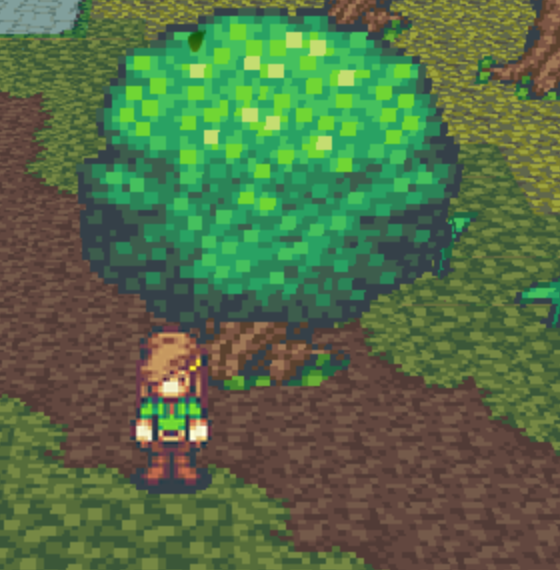
-
The modals i try to import don't load and there obj. Is there something I'm missing?
-
@gRaViJa
I'm not sure what you mean about moving tiles. You mean like offsetting it like how you can with events? This isn't currently possible.
@Benku
The model failed to load. If you open up the console with F12 or F8 it should give more information about what went wrong.
Update 0.6.1
- modify shaders to properly display models using diffuseColor without textures.
- change ambient color individually for each model or tile.
- move "Enabled by Default" to "Map Defaults"
- throttle "processMapTouch" function to improve performance.
- fix "Walk off edges" setting allowing player to walk up walls.
- fix using configure command on airship messing up its elevation.
- fix "Allow Glide" feature.
-
@Dread_Nyanak from what gravija told me, was asking to be able to change a tile's x/y offset so you could, for example, make a two tile wide tree just by putting the two tiles with the offsets, without needing events.
But since now you can just set one of them to use both... -
That was exactly the reason, but a solution was added with 0.6, so thanks :)@Dread_Nyanak from what gravija told me, was asking to be able to change a tile's x/y offset so you could, for example, make a two tile wide tree just by putting the two tiles with the offsets, without needing events.
But since now you can just set one of them to use both... -
load model as tile
Dread-chan committed 2 days ago
Commits on Jun 3, 2020
- update version string
Dread-chan committed 16 hours ago
same setup ...
I don't know why ... - update version string
-
Mt problem has been solved tho people using 3ds max need to know the exporter for it for obj files is kinda broken, Just as a warning.
-
A 3D RPG Maker MV game. Not something I've considered. Well, time to play around with this! Thanks for making such an awesome plugin!
-
The new update runs smoooth, you really did all in the to do list !, thanks for all that hard work, this is one of the most awesome plugins released on the whole mv..... and you manage to work on it even specially while on stressfull moments on the quarintine , thanks a lot !
and just to ask, do you still have future plans about the plugin ^^? , at this point unless for posible bugfixes, it is quite solid and complete now , unless you still have between plans to add 3d support on the battle scene, but that thing even sounds almost like a separate plugin , what do u have on mind ^^? -
LAST VERSION BUG REPORT.
MAP : Cave level 2
-
Yep, as k333 said, I think the only thing missing in the todo list is the VR and mouse/touch control.
Bugfixes compatibility and performance will probably never stop until you leave it aside because perfection is impossible but otherwise just additions, and non-tile based already exists, and is a very different thing that better dealt as compatibility - and you already did some work on the two big ones, QMovement and Altimit.
Only things I can think of is more options in skyboxes like layers with alpha and scrolling (something that can be also made externaly), and letting models in events turn with the event and play the model's animations (if the last one is not there already, didn't try much with models yet), and someone mentioned some time ago about 3d battles but I think that is more of making the battles be playable on a map, better made separately.
@seaotter that is because tile notetags for pixel selection was changed a bit. just change them in the tileset settings for the new setting and it should work again. -
how do one go about using the different textures for n,s,e,w?
is this event only as of previous versions, or could i use this new feature for tiles as well?
edit: also a point of note in v0.6.1, fog seems to be missing or alot less obvious. -
@seaotter It is my turn to help. Go to tileset with problem in the database. Look at note.
Go down to where you see // waterfall.
Look for this:
A1,0,0:top(A1,24,72,48,48),side(A1,1,1),inside(A1,31,54,31,14),depth(0.3),float(0.1)
Replace it with this:
A1,0,0:top(A1,.5,1.5),side(A1,1,1),inside(A1,31px,54px,31px,14px),depth(0.3),float(0.1)
I hope this helps because I had the same problem and this fixed it. -
Normal in front
But on the side, the icon will be cut in half
-
@seaotter
is it an event?
Is it set to the right setting? sprite rotates with the camera and so on, in the demo project the doors and store signs are set to turn with the camera, pretty sure that is the setting you want -
Hello, I have a small issue!
I have this problem where after I use the mv3d lockCamera <true> command, then the <false> won't work. Basically, leaving me stuck with the camera locked.
Help is much appreciated!
Thanks!!!
