MV3D - 3D rendering for RMMV with Babylon.js

● ARCHIVED · READ-ONLY
Started by Cutievirus 1560 posts Page 52 of 78 View original ↗
  1. Update 0.5.4
    • interact diagonally
    • change backface culling for ceiling separate from everything else. Also affects camera collision.
    • resolution scale plugin command
    • plugin command to change camera collision
    • more camera collision options
    • can now change names of option menu options
    • fix animation offset with resolution scale
    • fix animation scaling when using camera collision
    • fix tileset settings not being loaded sometimes when loading game
    • fix camera angles etc not being preserved when loading game
    • fixed error when transferring player during map load
    • (premium) fix changes to skybox from plugin command when loading game
    There are now two types of camera collision. I couldn't think of a concise way to describe them, so they're called Type1 and Type2.
    Type1 - Camera collides with any object between the player and the camera.
    Type2 - Camera only collides with objects between player and camera if it would be inside a wall at normal distance.

    The animation and loading bugs should be fixed now.

    @Yevn125
    I don't currently have plans to add diagonal slopes, but it's something I might add in the future.
    Slopes have complicated collision rules, and diagonal slopes would be even more complicated. If I find a way to simplify the logic I might add them. If I add corner slopes though I'd want to add both inner corners and outer corners.

    You can use fringe(2) in the tileset configuration to make a tile float above the one below it, giving the player room to walk under it.

    @palatkorn
    Instead of using a move route to set the event's position couldn't you use <mv3d: pos(8,3)>?
  2. Hi there,
    at first I wanna say that this plugin seems really impressive. Great job with that. =)
    I am trying to use it for my world map right now. Since I am not too experienced I don't wanna do anything too fency with it and yet I still struggle with something wich is probably not too hard to fix. my problem occures when I try to make an event wich is higher than 1 tile 'stand up'. The bottom part looks fine but I can't find the right parameters to adjust to have the top part right on top of it. It is either too high, slightly behind it or somewhere else where it shouldn't be.

    Hope I could explain what I am talking about so that is understandable...help would be really appreciated.


    Edit: Nevermind. I managed to make it work. For some reason the pos-command didn't work for me when put into an event's comments but when I tried the notes of it instead it worked.
  3. Dread_Nyanak said:
    Update 0.5.4
    • interact diagonally
    • change backface culling for ceiling separate from everything else. Also affects camera collision.
    • resolution scale plugin command
    • plugin command to change camera collision
    • more camera collision options
    • can now change names of option menu options
    • fix animation offset with resolution scale
    • fix animation scaling when using camera collision
    • fix tileset settings not being loaded sometimes when loading game
    • fix camera angles etc not being preserved when loading game
    • fixed error when transferring player during map load
    • (premium) fix changes to skybox from plugin command when loading game
    There are now two types of camera collision. I couldn't think of a concise way to describe them, so they're called Type1 and Type2.
    Type1 - Camera collides with any object between the player and the camera.
    Type2 - Camera only collides with objects between player and camera if it would be inside a wall at normal distance.

    The animation and loading bugs should be fixed now.

    @Yevn125
    I don't currently have plans to add diagonal slopes, but it's something I might add in the future.
    Slopes have complicated collision rules, and diagonal slopes would be even more complicated. If I find a way to simplify the logic I might add them. If I add corner slopes though I'd want to add both inner corners and outer corners.

    You can use fringe(2) in the tileset configuration to make a tile float above the one below it, giving the player room to walk under it.

    @palatkorn
    Instead of using a move route to set the event's position couldn't you use <mv3d: pos(8,3)>?

    It works better, but I'm used to this being normal.
    Yes but that's One move
    As soon as there is a change, I will use this section again to move and can check. I am setting it to move back and forth.
    For example, through the door 1 When passing, I will let it move to Gate 2
    Which this event still works in itself
  4. Dread_Nyanak said:
    Update 0.5.4
    • interact diagonally
    • change backface culling for ceiling separate from everything else. Also affects camera collision.
    • resolution scale plugin command
    • plugin command to change camera collision
    • more camera collision options
    • can now change names of option menu options
    • fix animation offset with resolution scale
    • fix animation scaling when using camera collision
    • fix tileset settings not being loaded sometimes when loading game
    • fix camera angles etc not being preserved when loading game
    • fixed error when transferring player during map load
    • (premium) fix changes to skybox from plugin command when loading game
    There are now two types of camera collision. I couldn't think of a concise way to describe them, so they're called Type1 and Type2.
    Type1 - Camera collides with any object between the player and the camera.
    Type2 - Camera only collides with objects between player and camera if it would be inside a wall at normal distance.

    The animation and loading bugs should be fixed now.

    @Yevn125
    I don't currently have plans to add diagonal slopes, but it's something I might add in the future.
    Slopes have complicated collision rules, and diagonal slopes would be even more complicated. If I find a way to simplify the logic I might add them. If I add corner slopes though I'd want to add both inner corners and outer corners.

    You can use fringe(2) in the tileset configuration to make a tile float above the one below it, giving the player room to walk under it.

    @palatkorn
    Instead of using a move route to set the event's position couldn't you use <mv3d: pos(8,3)>?

    I tested the new version and, this time, everything seems to be working correctly.
    There are two things in particular that I want to thank you for:
    The first is to include the ideas that I gave you before.
    The second is to have unminified the code, so it is easier to fix some bugs on my own.
    So thank you so much!

    I found a crash, but I already fixed it.
    So I'm going to share it here for you to include in the next patch and help others.

    The Crash:
    If you are using mv3d-patr3on.js 0.5.4 and try to change the resolution scale via plugin command and you have not defined any skybox, then the game will crash.
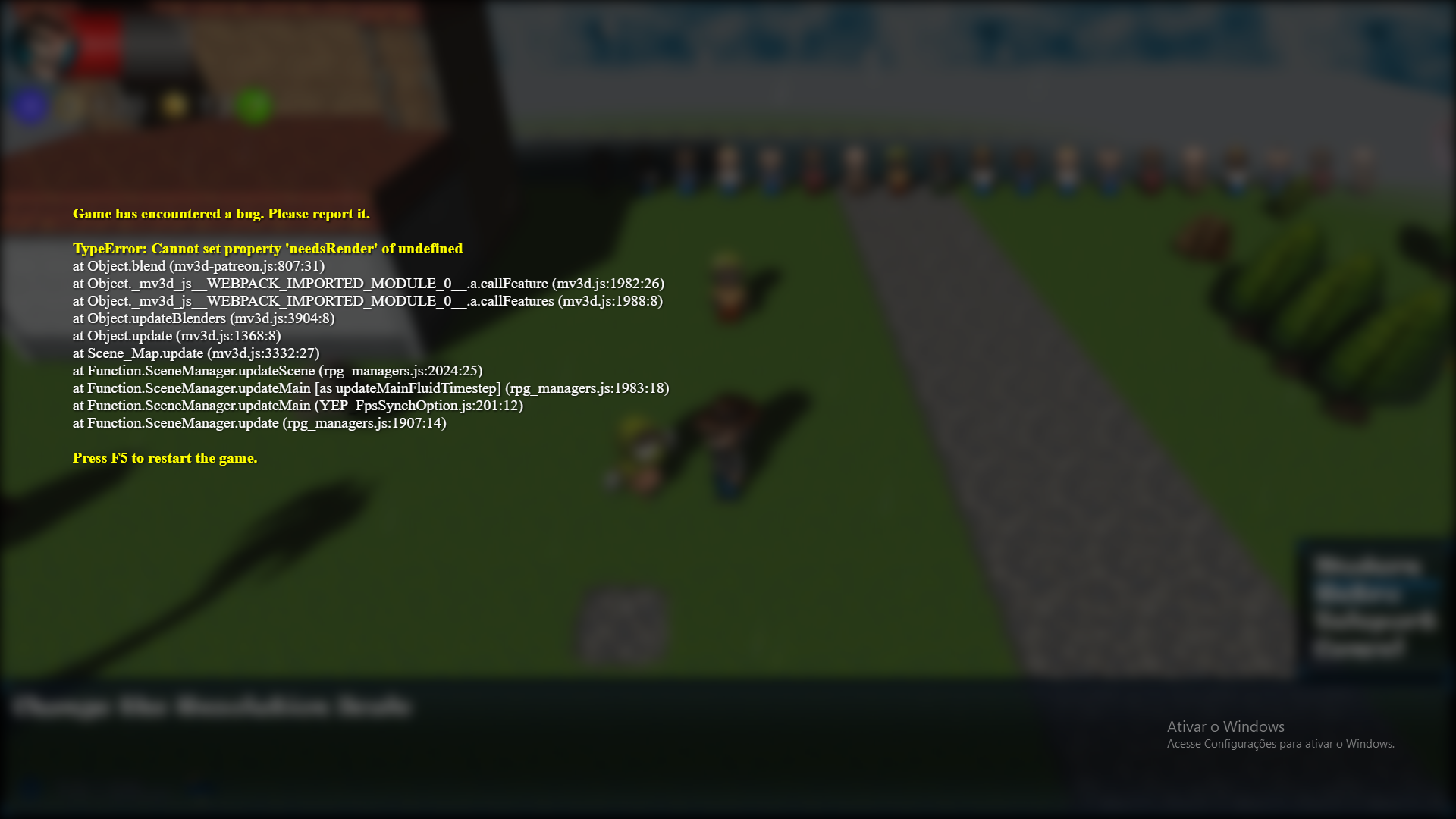
    Resolution Scale crash when using mv3d-******* 0.5.4.png

    The Fix:
    Include this condition below (line 807) in the mv3d-patr3on.js file, so then it will not return as undefined skybox, it will ignore it in this case.
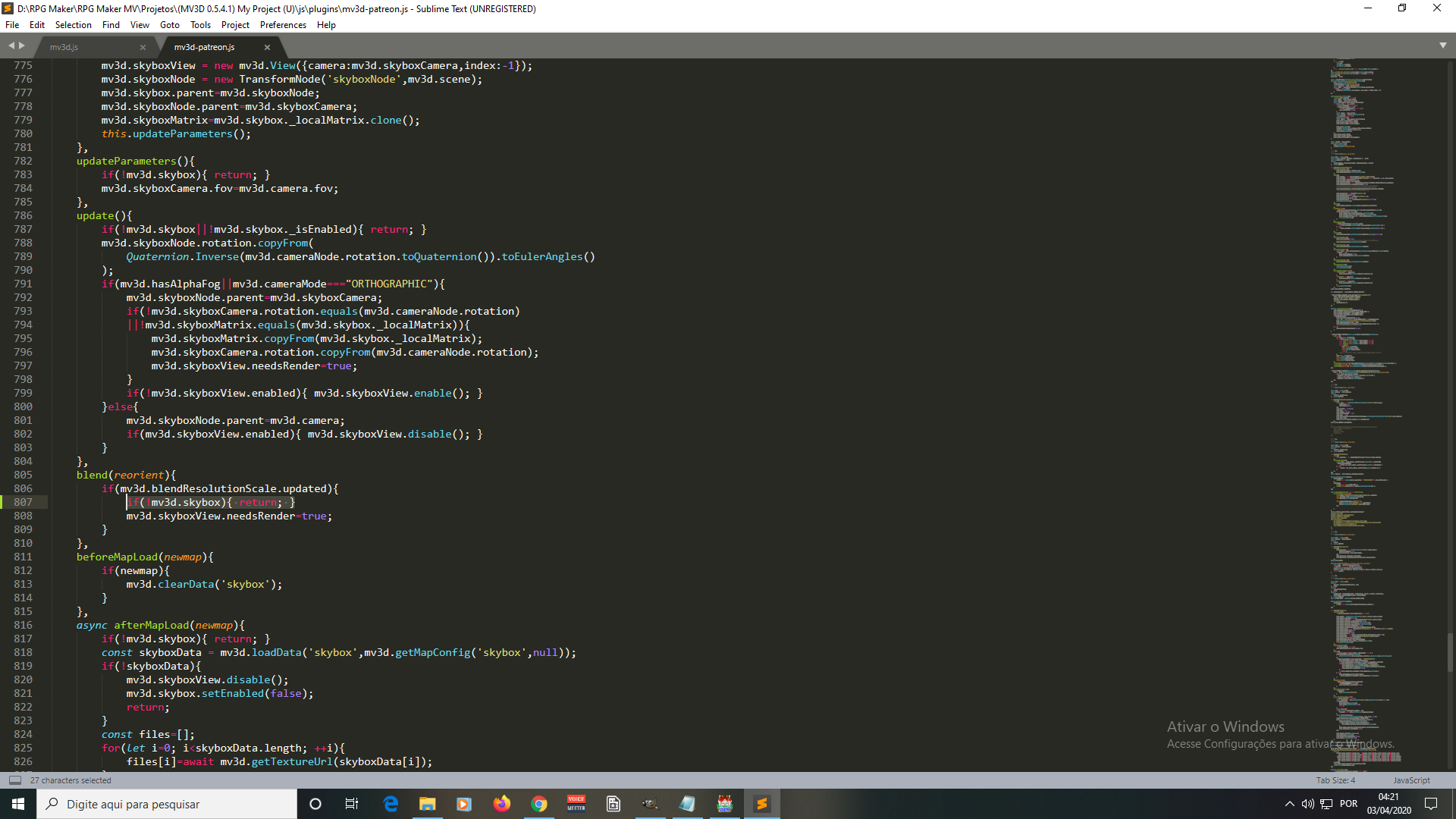
    Resolution Scale crash fix.png

    With that, we can say that all the new features are working perfectly.

    I have a suggestion:
    Could you make possible to use a variable as a target?
    Here goes the screenshot as an example.
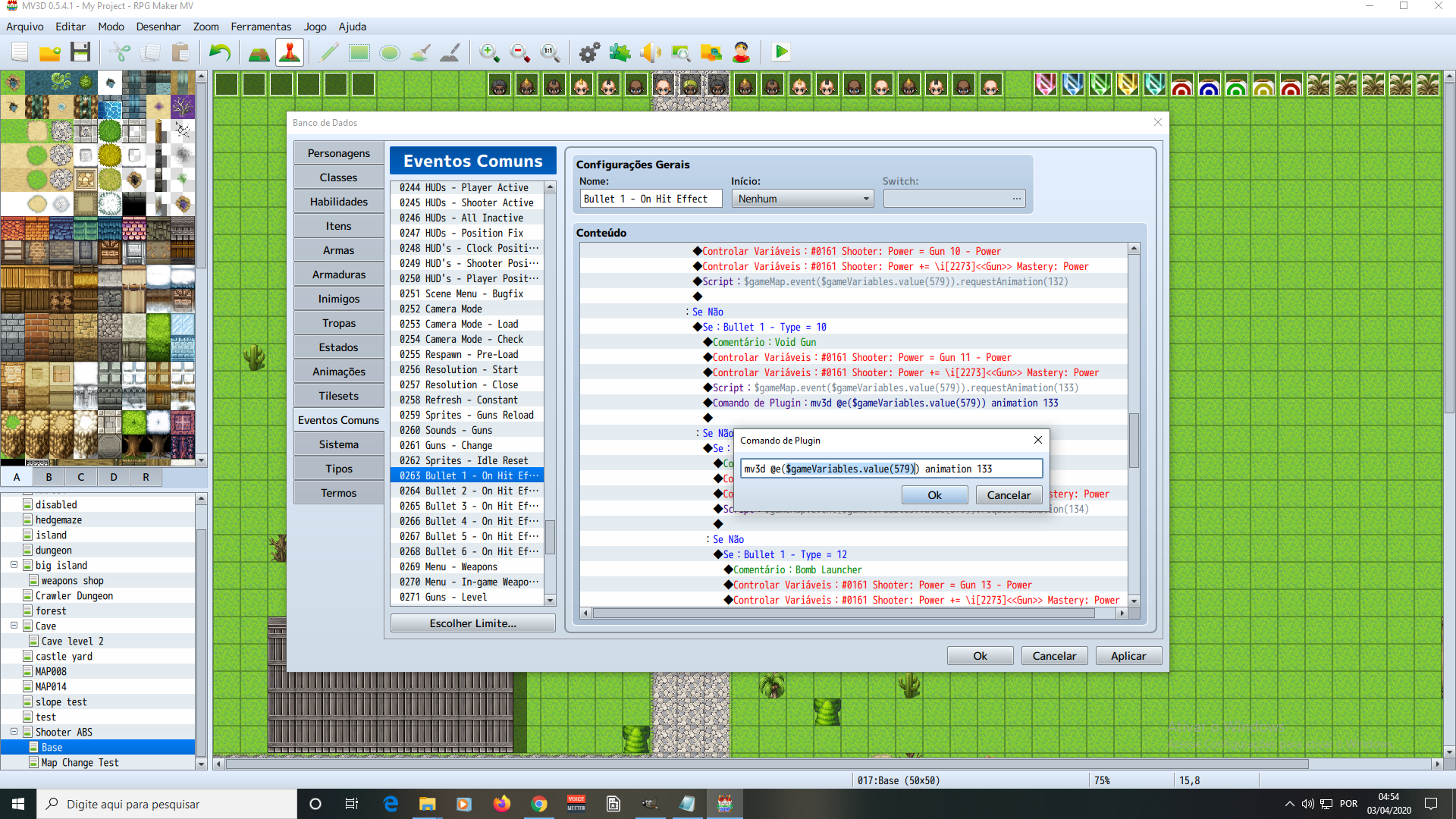
    Variable as a Target.png

    I use the following script to get the target of a variable and apply the animation to the correct event. (In this case, the enemy affected by the shot in the ABS)
    Ex.: $gameMap.event($gameVariables.value(579)).requestAnimation(133)
    But when trying to adapt to mv3d animation, I realized that I can't use a variable as a target, just fixed targets.
    I would like to do this to apply depth to these animations, as you programmed into the animations of mv3d itself.

    Thank you for all the help!
    Keep the good work! :awink:


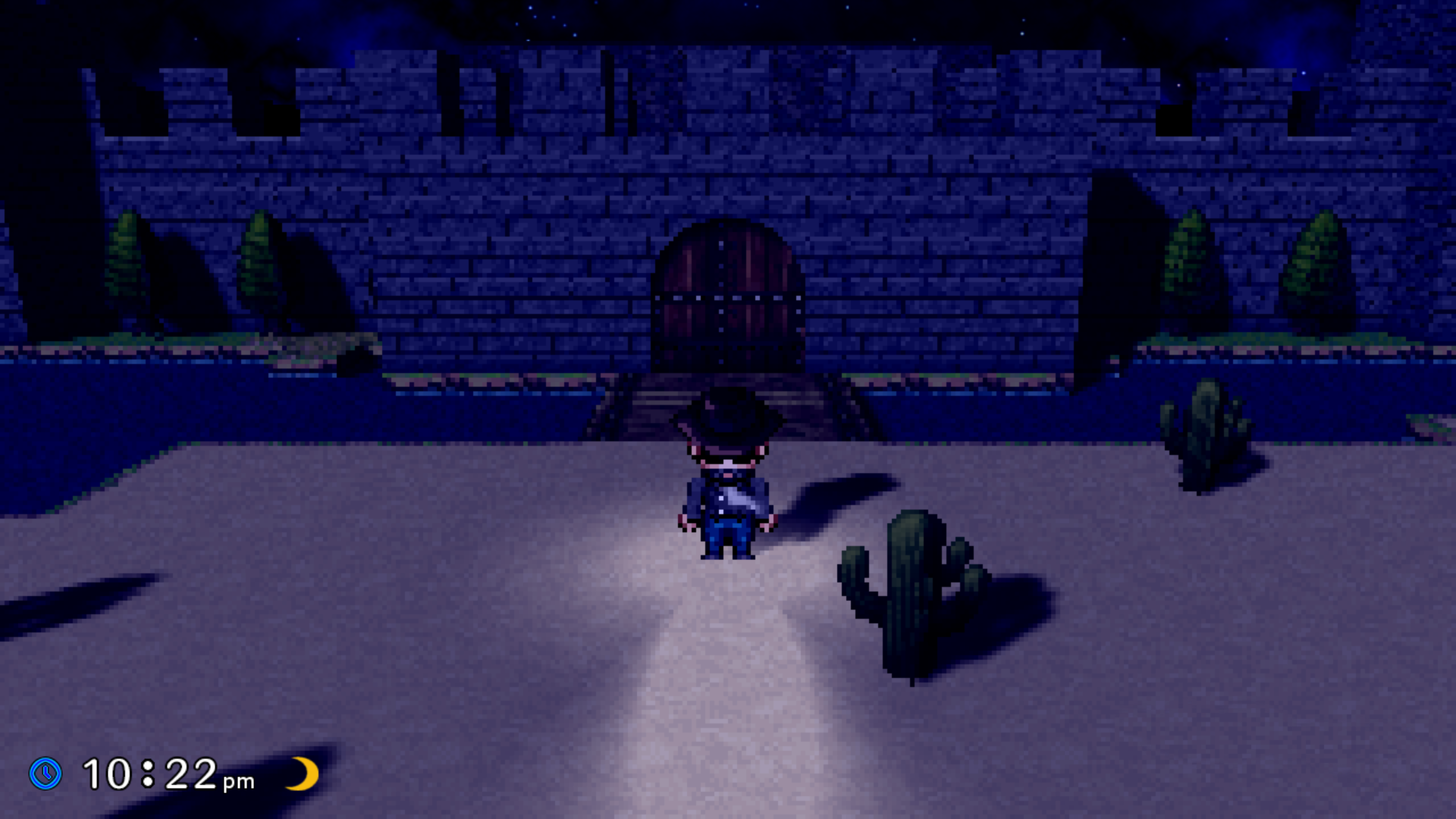
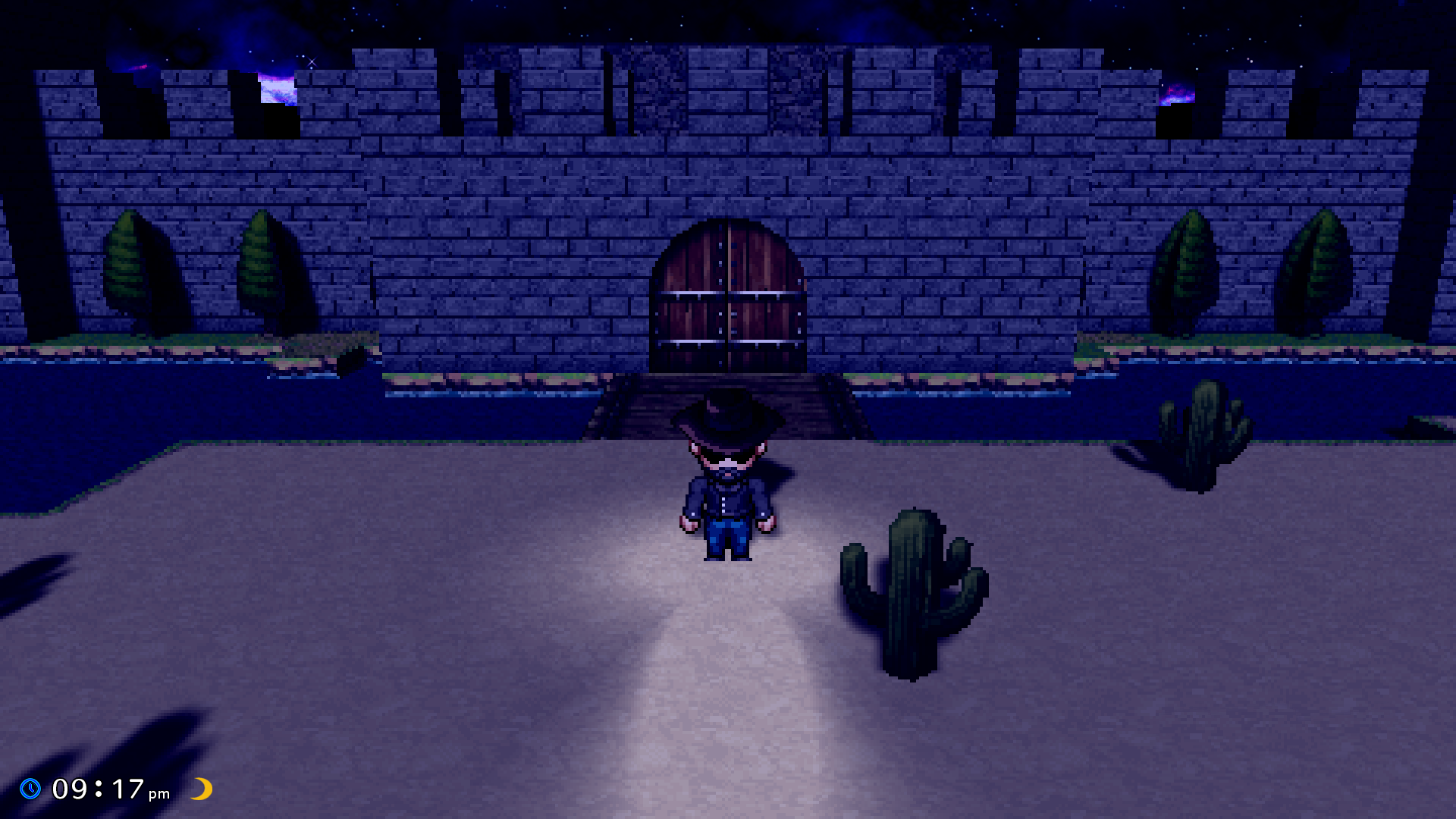
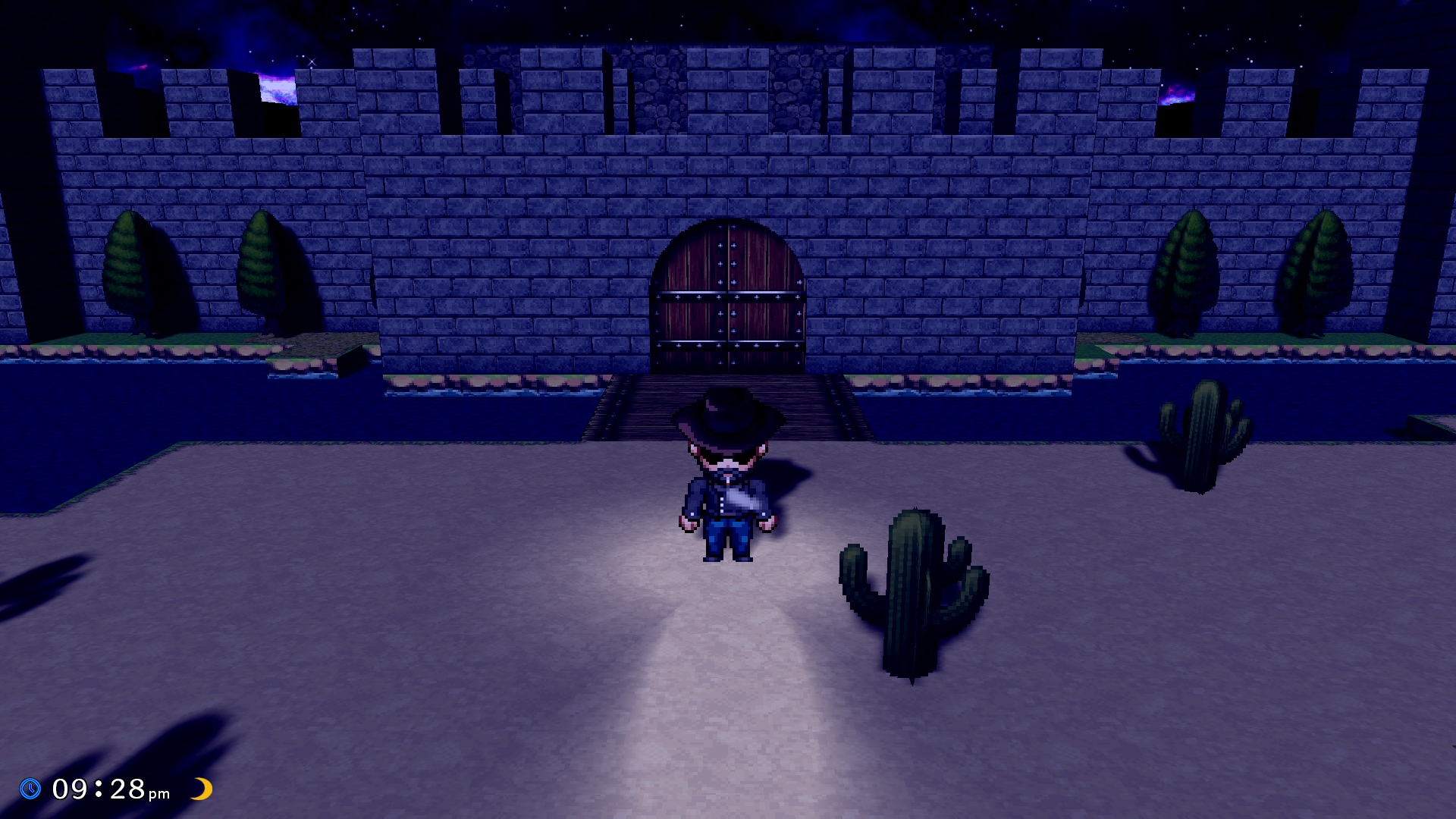
    Let me show a cool thing that i did with these new features

    Graphics Style Option
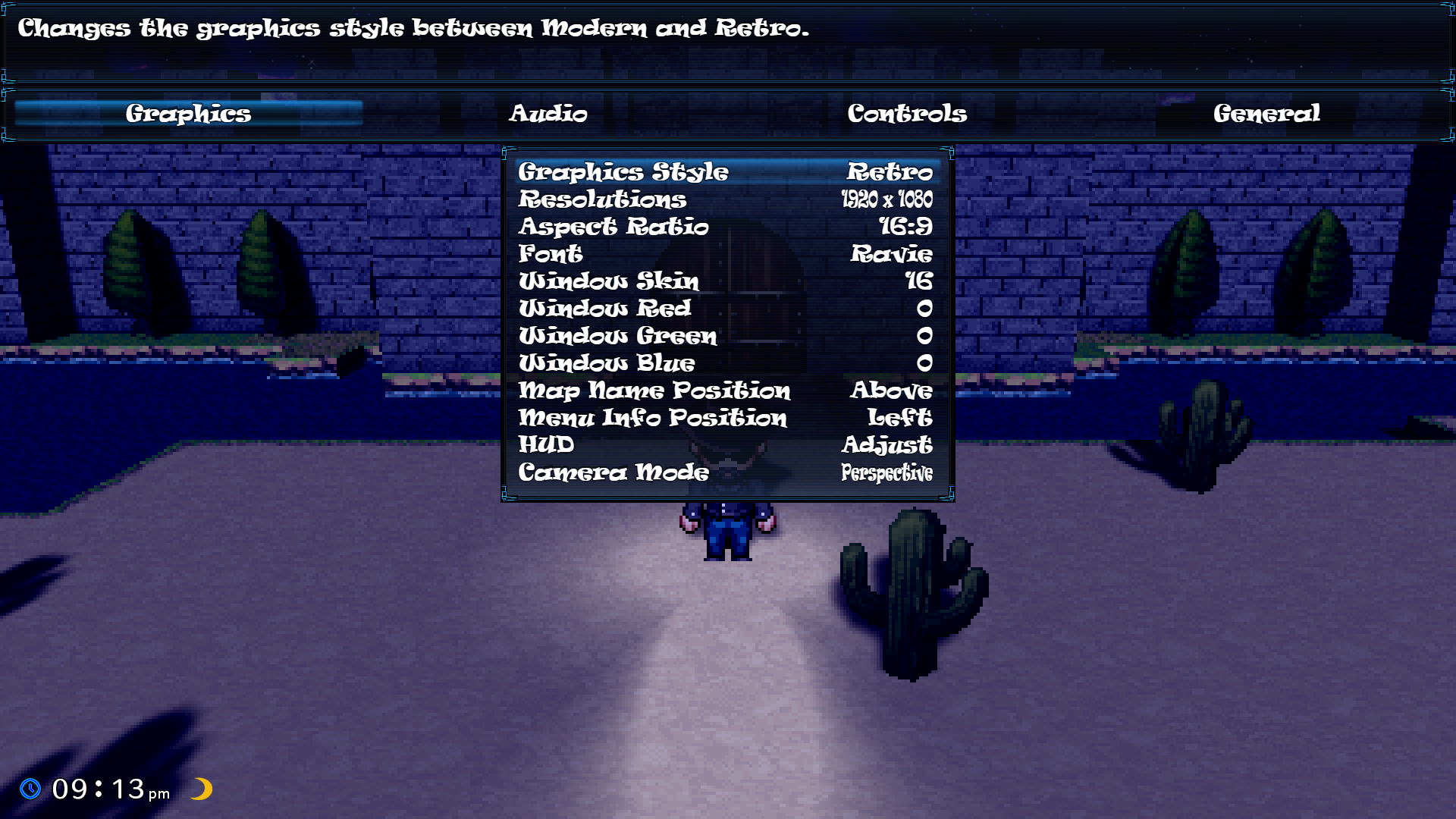
    Graphics Style Options.png


    Nyana's Castle Retro Style 720p
    Nyana Castle Retro Style 720p.png


    Nyana's Castle Retro Style 1080p
    Nyana Castle Retro Style.png

    Nyana's Castle Modern Style 1080p
    Nyana Castle Modern Style.png
  5. ...resolution?
    as in, change resolution mid-game?
    I didn't try it yet, is itin the new version or an external plugin?
  6. YoraeRasante said:
    ...resolution?
    as in, change resolution mid-game?
    I didn't try it yet, is itin the new version or an external plugin?

    Resolutions from my Options Menu is a external plugin.
    This can change screen resolution mid-game, as you may have imagined.

    Resolution Scale is a feature from MV3D that Dread added in 0.5.3.
    This can make that retro game graphic style, as i showed above.
    These are 2 different things.
  7. Reduced resolution, increased FPS?

    CoopNinjask said:
    I tested the new version and, this time, everything seems to be working correctly.
    There are two things in particular that I want to thank you for:
    The first is to include the ideas that I gave you before.
    The second is to have unminified the code, so it is easier to fix some bugs on my own.
    So thank you so much!

    I found a crash, but I already fixed it.
    So I'm going to share it here for you to include in the next patch and help others.

    The Crash:
    If you are using mv3d-patr3on.js 0.5.4 and try to change the resolution scale via plugin command and you have not defined any skybox, then the game will crash.

    View attachment 138688

    The Fix:
    Include this condition below (line 807) in the mv3d-patr3on.js file, so then it will not return as undefined skybox, it will ignore it in this case.
    View attachment 138689

    With that, we can say that all the new features are working perfectly.

    I have a suggestion:
    Could you make possible to use a variable as a target?
    Here goes the screenshot as an example.

    View attachment 138690

    I use the following script to get the target of a variable and apply the animation to the correct event. (In this case, the enemy affected by the shot in the ABS)
    Ex.: $gameMap.event($gameVariables.value(579)).requestAnimation(133)
    But when trying to adapt to mv3d animation, I realized that I can't use a variable as a target, just fixed targets.
    I would like to do this to apply depth to these animations, as you programmed into the animations of mv3d itself.

    Thank you for all the help!
    Keep the good work! :awink:


    Let me show a cool thing that i did with these new features

    Graphics Style Option
    View attachment 138693


    Nyana's Castle Retro Style 720p
    View attachment 138697


    Nyana's Castle Retro Style 1080p
    View attachment 138694

    Nyana's Castle Modern Style 1080p
    View attachment 138695
  8. palatkorn said:
    Reduced resolution, increased FPS?

    There is no impact in FPS, just change the visuals.
    I put this so people can play on big televisions. It goes from 720p to 1440p.
  9. No, I mean, will make the game faster too or not while selecting the 720p thumbnail option
  10. palatkorn said:
    No, I mean, will make the game faster too or not while selecting the 720p thumbnail option

    No, it doesn't affect game performance.
  11. interesting.
    would need more work on the menus and the like so they change size properly, but with dread adding resolution scale the maps themselves wouldn't suffer so much impact. default 2d maps suffer a bit becausein big resolutions the characters are much tinier than the map.
    what plugin are you using that changes it mid-game?
    do you think this is an actual but or just compatibility? I'll be honest, chances of the later are high in this case
  12. YoraeRasante said:
    interesting.
    would need more work on the menus and the like so they change size properly, but with dread adding resolution scale the maps themselves wouldn't suffer so much impact. default 2d maps suffer a bit becausein big resolutions the characters are much tinier than the map.
    what plugin are you using that changes it mid-game?
    do you think this is an actual but or just compatibility? I'll be honest, chances of the later are high in this case

    I send you a PM.
  13. Oh didn't even realize new version isn't minified, I had just learned how to build it with minimize false webpack from source files 2 days ago, I also learned how to unminify with sourcemap a few days before that, then literally 2 minutes later I saw the source files already unpacked files in webpack folder.

    EDIT: Also @CoopNinjask it's not hard to make a function that calls a plugin command with variable access, Yanfly also has 1 for a dollar.
    Code:
    Game_Interpreter.prototype.pluginAnimation = function() {
        this.pluginCommand('mv3d', ['@e' + $gameVariables.value(579), 'animation', '133']);
    };
    this.pluginAnimation(); inside script call would call it.
  14. glaphen said:
    Oh didn't even realize new version isn't minified, I had just learned how to build it with minimize false webpack from source files 2 days ago, I also learned how to unminify with sourcemap a few days before that, then literally 2 minutes later I saw the source files already unpacked files in webpack folder.

    EDIT: Also @CoopNinjask it's not hard to make a function that calls a plugin command with variable access, Yanfly also has 1 for a dollar.
    Code:
    Game_Interpreter.prototype.pluginAnimation = function() {
        this.pluginCommand('mv3d', ['@e' + $gameVariables.value(579), 'animation', '133']);
    };
    this.pluginAnimation(); inside script call would call it.

    I'll test and see if it will work.
    I'll give feedback soon. Thanks! ^^
  15. SRD has one for free. But from what I remember his uses code instead of the switch/variable codes yanfly's do
  16. glaphen said:
    Oh didn't even realize new version isn't minified, I had just learned how to build it with minimize false webpack from source files 2 days ago, I also learned how to unminify with sourcemap a few days before that, then literally 2 minutes later I saw the source files already unpacked files in webpack folder.

    EDIT: Also @CoopNinjask it's not hard to make a function that calls a plugin command with variable access, Yanfly also has 1 for a dollar.
    Code:
    Game_Interpreter.prototype.pluginAnimation = function() {
        this.pluginCommand('mv3d', ['@e' + $gameVariables.value(579), 'animation', '133']);
    };
    this.pluginAnimation(); inside script call would call it.

    Hey, man! I did it!
    Yanfly's plugin did the job.
  17. Here are a few tips that everyone can do.
    If really wanting to do two systems, it may be necessary to create a parallel map.
    Actually, just make the same map to 3D and use the same map only.
    You may have to specify the map number in order to return to the current map.

  18. palatkorn said:
    Here are a few tips that everyone can do.
    If really wanting to do two systems, it may be necessary to create a parallel map.
    Actually, just make the same map to 3D and use the same map only.
    You may have to specify the map number in order to return to the current map.


    I can't see the video, you put it as private.
  19. Sorry i posted wrong
  20. CoopNinjask said:
    I can't see the video, you put it as private.
    You may encounter errors such as looping back into the same situation. Therefore need to have parallel switches as well This would be great if it had to be chosen in the scene to start game But if you switch on and off it is a bit tiring to do it
    But this idea really allows you to switch back and forth
    But if using it with the Event Copier (YEP) plug-in That problem will go away.