MV3D - 3D rendering for RMMV with Babylon.js

● ARCHIVED · READ-ONLY
Started by Cutievirus 1560 posts Page 36 of 78 View original ↗
  1. Unounicorn said:
    I have downloaded the demo project and the game does not render in 3D. it is stuck in 2d and i cant change camera at all. I am wondering if this plugin is uncompatiable with older versions of RPG Maker MV, as I have RPG maker version 1.5.1. If there is any advice you could give me i would very much appreciate it.
    If i remember correctly, MV 1.6 is needed because that version allows the usage of babylon.js. If there is no specific reason, you could just update to 1.6.1?
  2. Yeah, 1.6.x is needed because it lets you use ES6.
    While some people say they use 1.5.x for compatibility reasons... every plugin they tild me did not work for them in 1.6 but did in 1.5 worked fine in 1.6 for me. Save one by SRD that he already fixed soon after 1.6.1 was released.
  3. Thank you guys for the feedback. I wasn't aware of any huge changes for 1.5 to 1.6 that would make a decent amount of of new plugins incompatible to older versions so i was hesitant to update, especially when I was still trying to sort out my plugins list, but it seems like most old plugins are updated fine. I'll update to 1.6, thank you guys for informing me.
  4. i recently grabbed this to tinker with and i must say it is vey impressive. i decided to run it along side MOG_Hunters Chrono ABS and started making an FPS However i have run into a problem. I re arranged the buttons to Chrono ABS buttons dont interfere with the movement however the 2 plugs conflict on movement in FPS mode. i still have the Q&E Strafing and forward and backward movements. but turning left and right don't work in the slightest.
  5. @Chainer07
    It looks like ChronoEngine remaps the a s d keys.
    Load this code as a plugin after Chrono and MV3D. I'm not sure what Chrono Engine's new keys do, but you might need to remap them to new keys as well.
    Code:
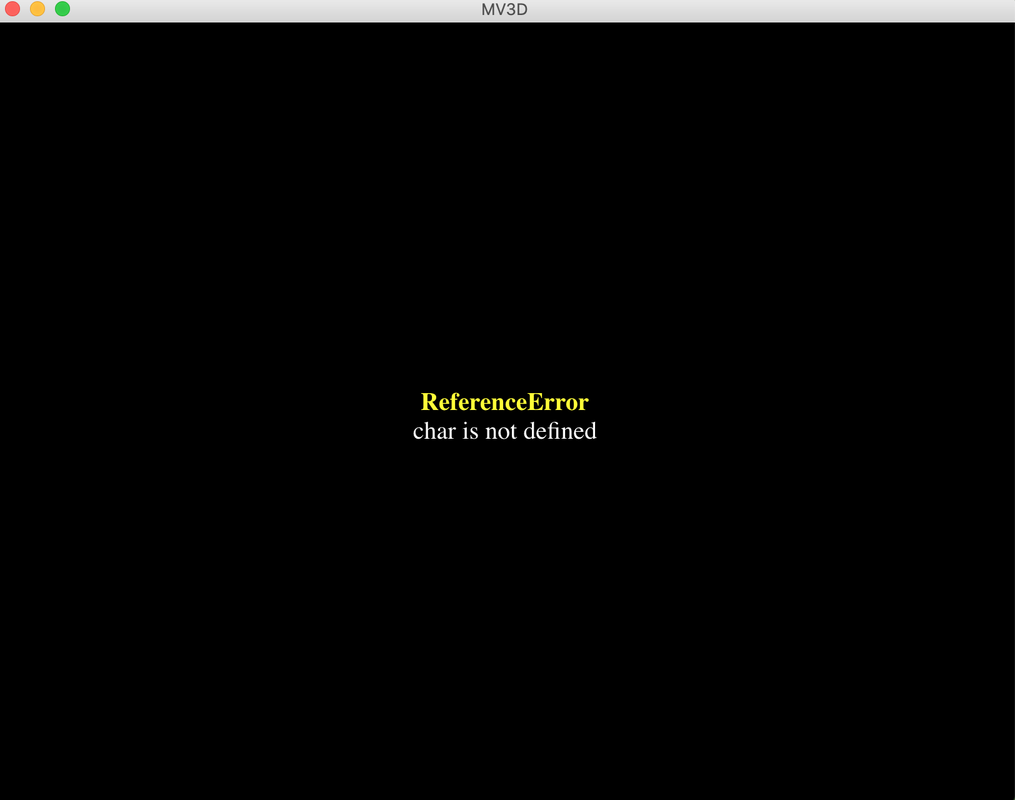
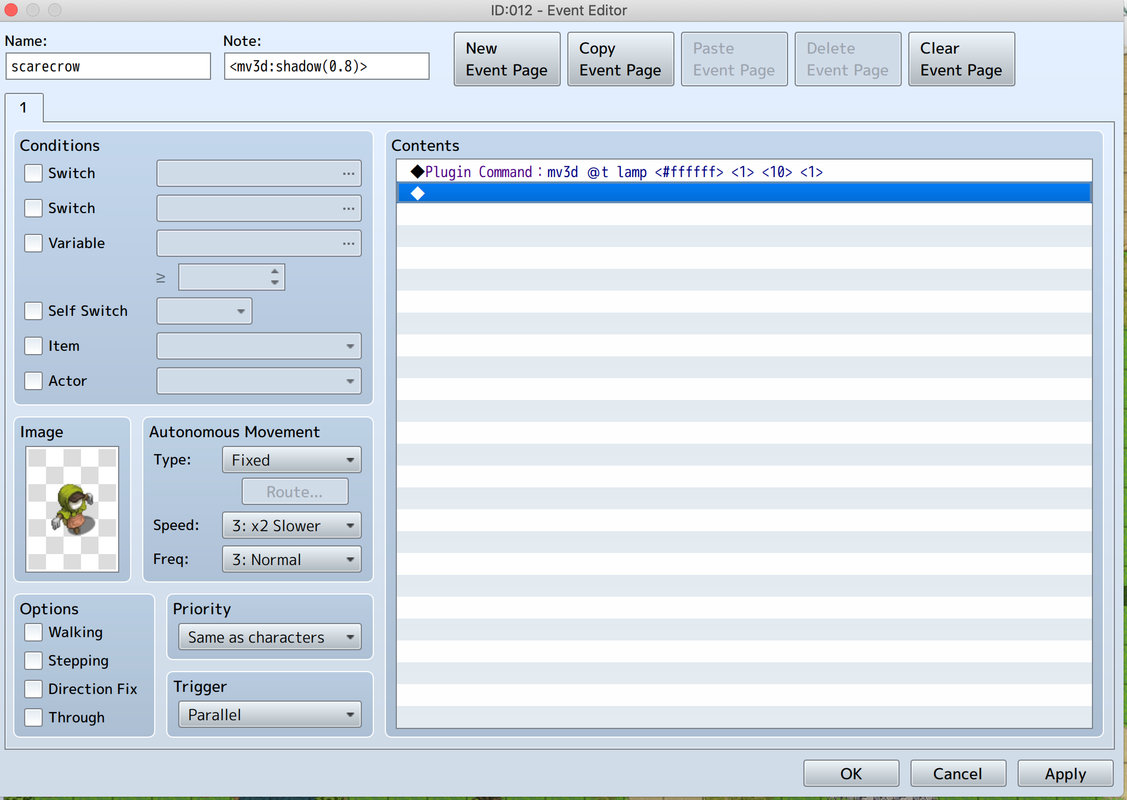
    (function(){
    var _temp_initialize = Game_Temp.prototype.initialize;
    Game_Temp.prototype.initialize = function() {
        _temp_initialize.apply(this,arguments);
        mv3d.setupInput();
        Input.keyMapper[83]='down';
    };
    })();
    setupInput will automatically swap the strafing and rotation controls depending on if you're in 1st person or not. If you don't want that, or want to map some other keys to rotation, the keys are named 'rotleft' and 'rotright'.
  6. Dread_Nyanak said:
    @Chainer07
    It looks like ChronoEngine remaps the a s d keys.
    Load this code as a plugin after Chrono and MV3D. I'm not sure what Chrono Engine's new keys do, but you might need to remap them to new keys as well.
    Code:
    (function(){
    var _temp_initialize = Game_Temp.prototype.initialize;
    Game_Temp.prototype.initialize = function() {
        _temp_initialize.apply(this,arguments);
        mv3d.setupInput();
        Input.keyMapper[83]='down';
    };
    })();
    setupInput will automatically swap the strafing and rotation controls depending on if you're in 1st person or not. If you don't want that, or want to map some other keys to rotation, the keys are named 'rotleft' and 'rotright'.
    well now A&D and left and right arrows both strafe but not 90 degree turns. T_T
  7. Chainer07 said:
    i recently grabbed this to tinker with and i must say it is vey impressive. i decided to run it along side MOG_Hunters Chrono ABS and started making an FPS However i have run into a problem. I re arranged the buttons to Chrono ABS buttons dont interfere with the movement however the 2 plugs conflict on movement in FPS mode. i still have the Q&E Strafing and forward and backward movements. but turning left and right don't work in the slightest.
    MOG_Hunters Chrono ABS is a Great PLUGIN, I very like that and use it do many games

    But Very regrettable MV3D with MOG_Hunters Chrono ABS There are many conflicts and problems ...

    The author of MOG_Hunters Chrono ABS is no longer developed
    I can only look forward to the author of MV3D
  8. seaotter said:
    MOG_Hunters Chrono ABS is a Great PLUGIN, I very like that and use it do many games

    But Very regrettable MV3D with MOG_Hunters Chrono ABS There are many conflicts and problems ...

    The author of MOG_Hunters Chrono ABS is no longer developed
    I can only look forward to the author of MV3D
    funny enough people used to say the samething about Yanfly's Item Core and Mog_hunter's chrono abs. however it is possible. It just takes time and lots of code reading x.x
  9. @Chainer07
    That's strange. A&D should strafe in 3rd person and rotate in 1st person. Is your camera distance set to zero? You can check mv3d.is1stPerson().
    If nothing else works, you could try this.
    Code:
    (function(){
    var _temp_initialize = Game_Temp.prototype.initialize;
    Game_Temp.prototype.initialize = function() {
        _temp_initialize.apply(this,arguments);
        Object.assign(Input.keyMapper,{
            81:'left',  // Q
            69:'right', // E
            87:'up',       // W
            65:'rotleft',  // A
            83:'down',     // S
            68:'rotright', // D
        });
    };
    })();
  10. Dread_Nyanak said:
    @Chainer07
    That's strange. A&D should strafe in 3rd person and rotate in 1st person. Is your camera distance set to zero? You can check mv3d.is1stPerson().
    If nothing else works, you could try this.
    Code:
    (function(){
    var _temp_initialize = Game_Temp.prototype.initialize;
    Game_Temp.prototype.initialize = function() {
        _temp_initialize.apply(this,arguments);
        Object.assign(Input.keyMapper,{
            81:'left',  // Q
            69:'right', // E
            87:'up',       // W
            65:'rotleft',  // A
            83:'down',     // S
            68:'rotright', // D
        });
    };
    })();
    somehow made it worse. W&S no longer work and Q,E,A,D Left and right arrows do no 90 Degree turns. i must be dumb when implementing code.
  11. @Unounicorn actually, save for one SRD plugin he already fixed soon after the release of 1.6.1, I never found a plugin that worked on 1.5.x that doesn't on the newer updates. Some people mention them, but when I do test it worked fine for me.
  12. Just a quick question, but are the light effects available in the paid-only version of the plugin?
  13. Lights are available in the free version. Dynamic shadows are premium.
  14. @Dread_Nyanak I still can't get a simple lamp or flashlight to work in the demo. Here is my simple plugin command and the error i get:
    Screenshot-2020-02-06-at-21-19-46.png

    Screenshot-2020-02-06-at-21-20-07.png

    Also tried it as a comment and notetag. I feel like i'm missing something very obvious or there's a bug on my end or something.
  15. gRaViJa said:
    @Dread_Nyanak I still can't get a simple lamp or flashlight to work in the demo. Here is my simple plugin command and the error i get:
    Screenshot-2020-02-06-at-21-19-46.png

    Screenshot-2020-02-06-at-21-20-07.png

    Also tried it as a comment and notetag. I feel like i'm missing something very obvious or there's a bug on my end or something.

    I don't think @t is a valid target,
    Valid targets:


    • @p or @player: Targets $gamePlayer.
    • @e0, @e1, @e2, @e25 etc: Targets event with specified id.
    • @f0, @f1, @f2, etc: Targets first, second, third follower, etc.
    • @v0, @v1, @v2: Boat, Ship, Airship.
    Unlisted is @s which targets self, you also need to remove the <> from each thing, you are also running it as a parallel without erasing after so it is running that command constantly.
  16. @gRaViJa you are doing it wrong.
    @t is to be exchanged with the actual value for t. @p is player @e12 is event 12, and so on.
    and the values are not supposed to be surrounded by <>. those are just to show where you are going to substitute something.
    for example, your plugin command there would be more like mv3d @p lamp #ffffff 1 10 1
  17. There we go, so obvious. I read through pretty much all of the help file, but didn't come across that. Thx for the info guys.

    I think this is my last dumb question and that I fully understand the plugin and all it's functions now :rswt
  18. @Dread_Nyanak,

    I found a small glitch that happens every time the character's sprite changes (and events).
    It seems that when there is a sprite change, the character blinks for a few frames before upgrading to the new sprite, changing the character's sprite to none. This is not so apparent without dynamic shadows, but when dynamic shadows are turned on, this is too apparent, since the shadows create a black square, which would be the shadows for none sprite.
    Could you fix this little bug?


  19. CoopNinjask said:
    @Dread_Nyanak,

    I found a small glitch that happens every time the character's sprite changes (and events).
    It seems that when there is a sprite change, the character blinks for a few frames before upgrading to the new sprite, changing the character's sprite to none. This is not so apparent without dynamic shadows, but when dynamic shadows are turned on, this is too apparent, since the shadows create a black square, which would be the shadows for none sprite.
    Could you fix this little bug?


    Actually I don't think it has anything to do with setting to none, yesterday I upgraded my script to change event images to instead of changing image it only changes index.
    Code:
                        case '2':
            for (i = 901, l = $gameVariables.value(8), eeId = 10; i < l;) {
            var rand = Math.randomInt(100);
            if (rand <= 25) {$gameVariables.setValue([i], 0);}
                else if (rand <= 50) {$gameVariables.setValue([i], 1);}
                else if (rand <= 75) {$gameVariables.setValue([i], 2);}
                else if (rand <= 80) {$gameVariables.setValue([i], 3);}
                else if (rand <= 85) {$gameVariables.setValue([i], 4);}
                else if (rand <= 90) {$gameVariables.setValue([i], 5);}
                else if (rand <= 95) {$gameVariables.setValue([i], 6);}
                else {$gameVariables.setValue([i], 7);};
                $gameMap.event([eeId])._characterIndex = $gameVariables.value([i]); eeId++; i++;};
                break;
    Even though it only changes the index it was still doing the blinks.
  20. @CoopNinjask, Yeah, also noticed that, and no reason it changes from the same sheet or separate, it always blinks. It looks bad. Hope it'll be fixed.