MBS - Map Zoom

● ARCHIVED · READ-ONLY
Started by  Masked  196 posts Page 2 of 10 View original ↗
  1. Yeah it's enabled (although there aren't any parameters , nor is there a help section so i have to read it through notepad not sure if maybe something got messed up when I saved the plugin or not)

    I turned off all my plugins as well except for this to see if there were any conflicts but hrm, still nothing :x

    EDIT: I got it to work haha! So I ended up saving it the wrong way and none of it was working because of the wrong formatting style. BUT I do have another question now, is it supposed to be jerky when you move? Like, moving per tile?

    EDIT 2: Oh my gosh I had the plugin command put in twice on accident, this is embarassing XD
  2. Yeah, I'm pretty sure something got really messed up xD

    Try downloading it from here.

    Oh, I knew it xD
  3. I got it to work flawleslly now :) thank you so much. This is DEFINITELY one of the neater plugins i've ever seen :D
  4. This script makes me game look so beautiful when it's slightly zoomed in, I just wanted to come back and say thank you for this. 

    My cut-scenes look wonderful because of this plug-in!
  5. Firgof said:
    The script doesn't seem to be playing nice with TDDP_BindPictureToMap.  Will there be compatibility for this at some point?

    Also the default zooming behavior doesn't appear to center on the player character and the boxes drawn for showing the destination point are not offset relative to the amount we have zoomed in.
    I've tried using the updated plug-in as suggested in the earlier post, but the bug still persists. For me, it looks like the box flashes for the destination points remain in the old zoom and doesn't follow the current zoom. I hope that made some sense. However, the movement is still accurate to where you click. Only the destination box flashes are not accurate on size and location.
  6. Masked said:
    Updated it.

    I didn't get what's wrong with the destination sprite, it looks normal here, try getting the updated version, maybe it had something to do with the scroll or the screen centering.
    Centering appears to be fixed now - but the BG still isn't scaling properly.

    In my own script I can get the BG to scale properly with this JS statement, if it helps:

    $gameScreen.setZoom((SceneManager._screenWidth)/2,(SceneManager._screenHeight)/2,2.5);

    Here's a visual comparison.  Your script:

    Spoiler
    QZk3HyL.png
    My script (my view is not properly centered on the character, like yours is)

    Spoiler
    2xzst7R.png
  7. Plugin updated:

    The script doesn't seem to be playing nice with TDDP_BindPictureToMap. Will there be compatibility for this at some point?
    Now it's working, you just have to add "[Zoom]" to the images you want to zoom with the screen (you need this with BindPictureToMap).

    I've tried using the updated plug-in as suggested in the earlier post, but the bug still persists. For me, it looks like the box flashes for the destination points remain in the old zoom and doesn't follow the current zoom. I hope that made some sense. However, the movement is still accurate to where you click. Only the destination box flashes are not accurate on size and location.
    Fixed that, it also had some problems scaling weather effects, the shadow sprite and the parallax, fixed them too.

    Centering appears to be fixed now - but the BG still isn't scaling properly.
    Same thing as above, the problem was I were scaling just the tilemap when I should have scaled the spriteset itself xP
  8. plugin works wonderful now.  if it's not too much of trouble, could you make ZOOM OUT work well with background?

    I wanted to have the zoomout effect and when I put the  command 'MapZoom set 0.5 0.5 duration 20'

    the character zooms out in half well, but the background gets cut wierdly..

    if you could make the back zoom out well with the command, thanks a million and hope it's not too much of trouble!
  9. could I use this to make the screen closer 100% of the time? it seems zoomed out too far by default
  10. yongilcool said:
    plugin works wonderful now.  if it's not too much of trouble, could you make ZOOM OUT work well with background?


    I wanted to have the zoomout effect and when I put the  command 'MapZoom set 0.5 0.5 duration 20'


    the character zooms out in half well, but the background gets cut wierdly..


    if you could make the back zoom out well with the command, thanks a million and hope it's not too much of trouble!
    Fixed it /o/


    Edit: Ooops, some weird glitch started happening with the tilemap, fixed it. NOW it's working xP

    lonewolph said:
    could I use this to make the screen closer 100% of the time? it seems zoomed out too far by default
    Yes, you can, just set "Reset on map change" to false.
  11. sorry but somehow it's still not working ...

    still background gets cut  and alignment is mixed up..  T - T

    ITS WORKING THNX :)
  12. Hey Masked! Thank you for sharing your cool plugin with us!

    After messing around a bit, I seem to have found an interesting glitch that I'd like to walk you through (I included pictures to better document / explain the situation on my end).

    First off, I created a new project with just your script present and activated (version 1.1.5). I then whipped up a map (sized 40 x 40) and populated it with events that call your plugin commands... First I trigger an event to alter the MapZoom function... 
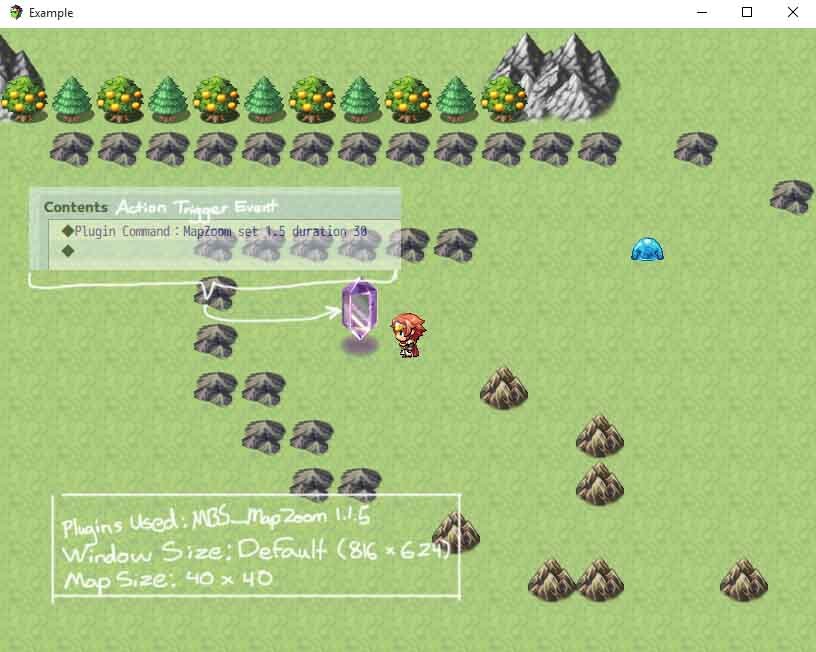
    1.jpg

    The Command scales both the background image / map as well as all of the event sprites as expected, but the alignment seems off...
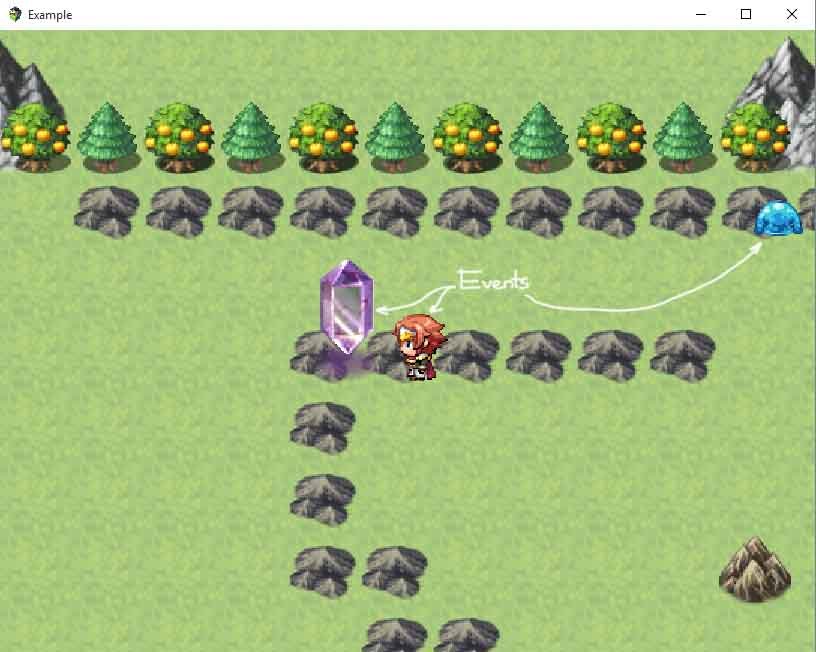
    2.jpg

    I move over to the next event to trigger the MapZoom center reset function to try and fix the misalignment and noticed that the background image is static and only the events move... NOTE: the collision map still seems to be present but the image of the mountains and trees etc. no longer moves...
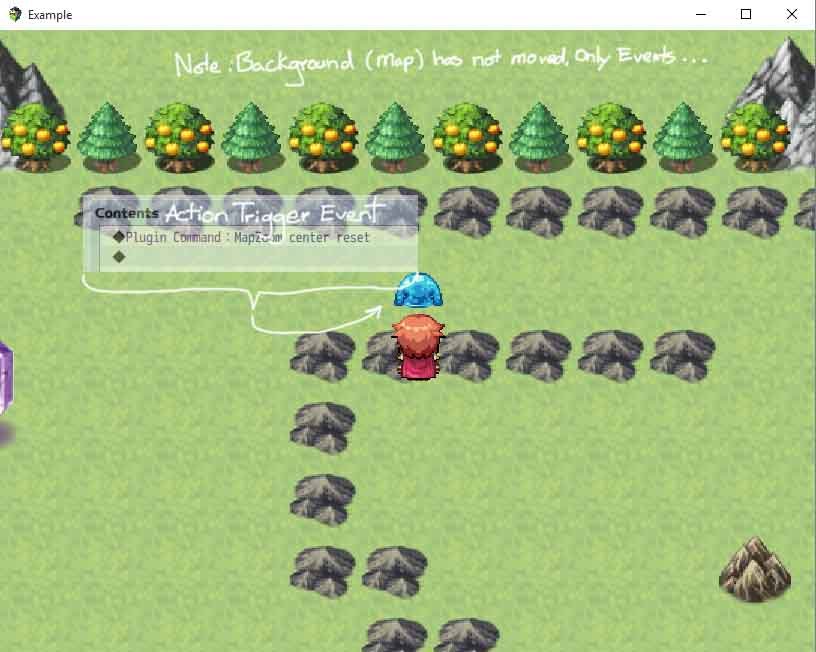
    3.jpg 

    That command function doesn't seem to fix the misalignment or static map issue, so I move to the last event to trigger the MapZoom reset command...
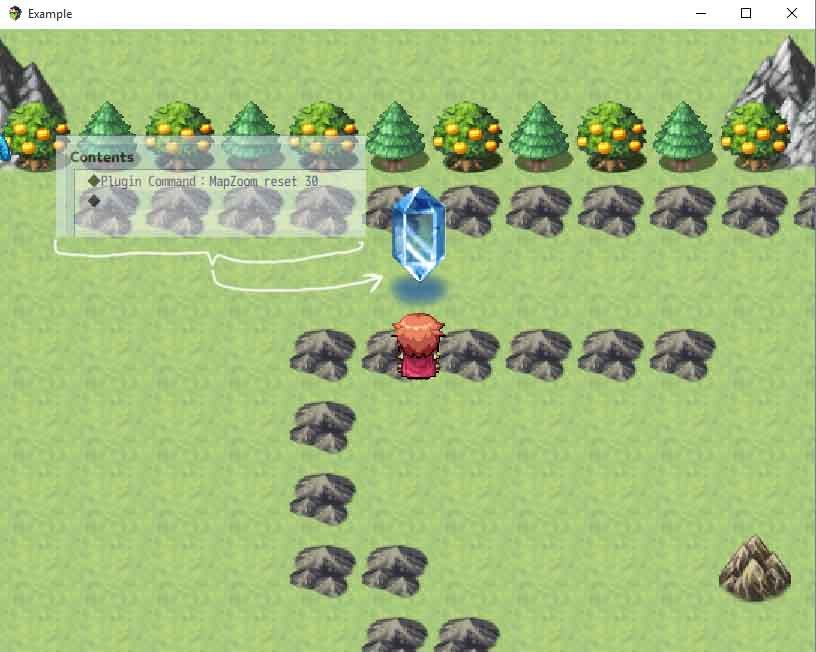
    4.jpg

    The command returned the original scale of both the background map as well as all of the event sprites... 
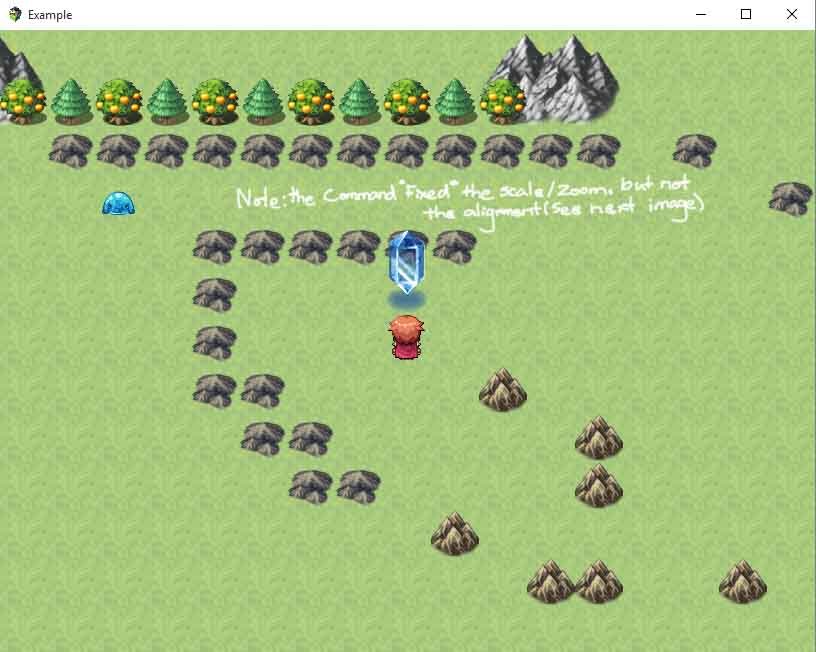
    5.jpg

    But the background map remains static...
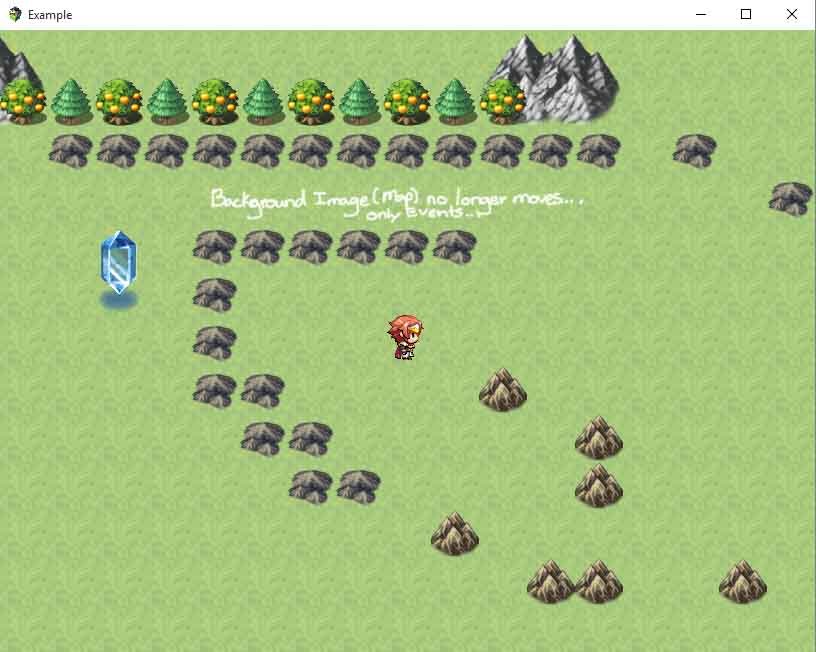
    6.jpg

    Any thoughts?? Hope this explains the glitch sufficiently...
  13. Hi!

    I have some problems but I REALLY NEED THIS! :D

    First of all, thank you for doing this!!!

    When I use the zoom function its zooms in but the i cant walk arround with the map.

    The events follow/move fine but the map stays still.

    Help! :(
  14. OMFG, finally fixed it )o)


    Maybe it's a little laggy, this will be fixed in the future, but now it's working at least x)
  15. Is it possible to use the MapZoom center command without first having to reset the zoom, and then re-zoom?  Meaning, when the "camera" is already zoomed in, just to re-direct it to center somewhere else?  Like a camera pan? SO far I fade out, reset the zoom re-zoom to the same settings I had before but center it elsewhere, then fade back in...  I'd like to skip the fading, resetting the zoom, and re-zooming if I could.. it'd certainly be much more convenient for cutscenes,,,
  16. I am new to RPGMaker. if I want a permanent Zoom on the Map always, how do I make this work?
  17. There's a parameter for the plugin "Reset on Map Change"... set it to False
  18. The zooming features are all working great, but it is causing some gnarly lag.

    Going to about 4-20 FPS from 60 when this plugin is active. D:
  19. Plugin updated:

    wizaerd said:
    Is it possible to use the MapZoom center command without first having to reset the zoom, and then re-zoom?  Meaning, when the "camera" is already zoomed in, just to re-direct it to center somewhere else?  Like a camera pan? SO far I fade out, reset the zoom re-zoom to the same settings I had before but center it elsewhere, then fade back in...  I'd like to skip the fading, resetting the zoom, and re-zooming if I could.. it'd certainly be much more convenient for cutscenes,,,
    Fixed this, the effect is still not smooth, the screen "teleports" to the new center, but this can be fixed later.

    Fernyfer775 said:
    The zooming features are all working great, but it is causing some gnarly lag.


    Going to about 4-20 FPS from 60 when this plugin is active. D:
    Oh, god, that looks hard to fix. I've made some changes and now it's working at about 35 fps here, but 60 fps seems to be very hard to reach. I'll work on it...
  20. Masked said:
    Plugin updated:

    Fixed this, the effect is still not smooth, the screen "teleports" to the new center, but this can be fixed later.

    Oh, god, that looks hard to fix. I've made some changes and now it's working at about 35 fps here, but 60 fps seems to be very hard to reach. I'll work on it...
    Thanx... I'll check out the new re-centering tonight when I get home...