Updates are now uploaded. I'll have an official post sometime this week about the changes, the fixes, and my month long absence.
Plugins updated: LTN Core, Time Engine, Day And Night, Quest Journal and Layers
LTN Games' Plugins | Megathread
● ARCHIVED · READ-ONLY
-
-
Hello. I've downloaded the quest journal, core and editor. Editor looks sweet. I can't find the screenshot you had on the last page though to import from the Gameus editor. Am I missing a step?
-
The screenshot you seen in this post is of a newer update which is not yet released. Very soon though, I halted progress on the editor to do important bug fixes. I'll let you know when the latest version of the editor is uploaded.
I've uploaded the most recent Quest Journal documentation (may still need revising), I hope it helps. -
I've been manually importing my quests across and most things are working ok.
I get this error though when i'm bring up the Journal.
TypeError: Cannot read property 'id' of null 1756
at QuestManager.isStepActive (LTN_QuestJournal.js:560)
at Window_QuestInfo.drawSteps (LTN_QuestJournal.js:1648)
at Window_QuestInfo.drawDescription (LTN_QuestJournal.js:1616)
at Window_QuestInfo.refresh (LTN_QuestJournal.js:1568)
at Window_QuestInfo.setItem (LTN_QuestJournal.js:1817)
at Window_QuestLog.callUpdateHelp (LTN_QuestJournal.js:1444)
at Window_QuestLog.Window_Selectable.select (rpg_windows.js:791)
at Window_QuestLog.Window_Selectable.cursorDown (rpg_windows.js:914)
at Window_QuestLog.Window_Selectable.processCursorMove (rpg_windows.js:995)
at Window_QuestLog.Window_Selectable.update (rpg_windows.js:977)
Any ideas? I've tried filling in all the areas of the editor as well (even quests that don't count something for example) and still get this.
Not sure if you get this from your end either but you can't open the journal using the mouse. Keyboard okay, mouse you can click on the menu but nothing happens.
Ta!
*Edit: Also happens if you try to get to the next quest step (if it does happen to open the next part of the quest). It might be something to do with quest steps that don't rely on a variable, e.g. go and talk to George type thing.
**Edit2: Figured out the mouse. You need to pick the Active / All / Completed bit then you can go down. Wonder if there might be a way to show this clearer? -
I can't reproduce the error you're getting, I've tested it in the demo and my plugin project and both seem to work fine. The error is telling me there is an issue reading the quest's current objective id. Maybe you could send me a packaged data and js folder from your project so I can test things out on my end and find the bug.
As for the menu and mouse thing, the Journal scene acts like any other menu. The item menu for example, you must first select an item category before selecting an item. The Journal scene you must first select the type of quests to chose from before selecting a quest, does the cursor not show up for you in the quest journal?
-
PM sent.
The cursor does show. I just didn't expect it to act that way. Was bad on my behalf furiously clicking away blindly :smile::wink: -
Alright, thanks for letting me know and helping me out with the bug. I fixed it and uploaded it so it's ready for download.
Here is the changelog for the last version of the Quest Journal.
Here is the bug fix reported today1.1.1 - Fixed bug with quests not changing status(start to complete) when completing or failing any quest
- Fixed bugs associated with disabling the Quest Tracker window
- Fixed to-title and new game bug where all quests kept state from previous game
- Fixed bug that prevented quests from saving with save file and loading previous game resulted in an empty quest journal.
- Fixed misbehavior of window tracker, consistently refreshing and causing bugs and FPS decrease.
- Increased mobile/desktop browser support and increased performance for both.
- optimizations and code cleanup
1.1.2 - Fixed bug caused by not having an active quest before entering the journal scene. -
Works really well and it's really easy to use. Thanks again!
-
Glad you've fixed that bug LTN. There's another one related to the ID bug that you missed: you can't load a saved game if you don't have an active quest because it's calling setActiveQuest with a null quest argument and when it tries to reference quest.step it crashes. You need to wrap line 2310 in an if statement to make sure QUEST._active isn't null.
-
Thanks for the report. The patch for the save bug is more like a hotfix, "bandage" and my attempts to do it quickly is clearly showing ;)
The save bug is dreadful, I have been trying to do things all from my core plugin so I don't have to alias the extractSaveContents and makeSaveContents methods for every plugin that needs data saved. My attempt was months and months ago, I thought it was working the whole time. Now with my increase knowledge in JS and MV's engine I see it was totally wrong, the idea and logic is right but my understanding of how it all worked was wrong lol. Anyways, I have a much better solution and this month I plan on updating and optimizing my most popular plugins, starting with my core plugin. Thanks again! -
Hi, I'm using your Item Categories plugin. When I try to sell my item in shop, the item does not appear in there.
-
Good catch, never thought about the shop scene. I'll work on a fix straight away. I'll let you know when it's uploaded and ready for download.
Update: Item categories has now been fixed. Let me know, if it works.
v 1.0.2 - Fixed shop scene bug where items did not show up correctly. -
Hello I've LTN core and LTN layers so that I can put pictures below character.
I put my picture "belowcharacter.png" into the folder: img/layers/
So, in a command, I write:
Layer Add 1 belowcharacter 0 0 0 255 0
Nothing happen.
Other commands doesn't work too.
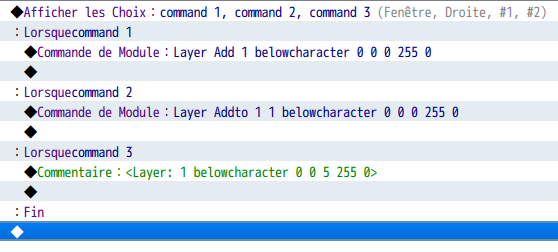
I tried create multiples folders and put the picture inside like "layers/parallax", "layers/static", or "layers/tiling" but it doesn't work.
How can I simply put pictures below characters ?
Thanks for the help. :) -
Hello @microck, I have a feeling it has to do with refreshing the map. I will take a look into this issue further soon.
But as a temporary solution have you tried the map notetags option instead of the plugin commands. I know the map notetags work well because it's always working in my project and they're loaded as the map is loaded.
This should work for you.
<layer: 1 belowcharacter 0 0 0 255 0>
<layer: 2 abovecharacter 0 0 5 255 1>
For the plugin commands, I believe the map needs to be refreshed after using it so if you still want to use the plugin commands. Remember that exiting the map and re-entering will activate them.
Which is another reason I added the "AddTo" plugin command which gives you the option of adding all your layers in a common event and running that common event upon new game or where you see fit. -
I use this "<Layer: 1 belowcharacter 0 0 0 255 0>" and works perfectly, thanks !
Do you know if it's possible to animate this picture ?
For example, I have "belowcharacter1", "belowcharacter2" and "belowcharacter3"
I want the game play this as a cycle (1-2-3-1-2-3-.....):
1)show belowcharacter 1 (belowcharacter 3 is erased)
Wait 10 frames
2)show belowcharacter 2 (belowcharacter 1 is erased)
Wait 10 frames
3)show belowcharacter 3 (belowcharacter 2 is erased)
Wait 10 frames
(repeat this action)
And it is possible to move a picture like the RM features "move picture" ?
1) belowcharacter move to x:500 y:300 -
You can't animate these layers. I'm sure I could add this feature but you will most likely get a huge performance impact especially if you will be loading 100kb every 10 frames.
You can't move them the way you ask but this is a feature that should not have a large impact on performance. I will add this feature to my todo list (Rather large list) and I'll update accordingly. -
I appreciate you picking up where Gameus left off, so to speak, with your quest system. There are a couple of gripes I have with it, though.
Is there not a way to hide the active quest window while still keeping the quest active? I'd ideally like to map the command to show/hide this window to a button via Yanfly's Button Common Events, but... the functionality to show/hide it doesn't seem to exist without outright changing or removing the active quest, which leads me to my next gripe.
Why is it that a quest won't progress when it isn't set to active? I have a basic quest set up where you just talk to the quest giver, talk to the person he asks you to talk to, and report back to him to complete the quest. The plugin command "QUEST Advance [id] Next" only seems to update the quest log when that given quest is active.
Okay, talk to the girl, seems easy enough.
That was easy. Now to just- ... Oh, the quest didn't progress.
And yes, I have tested this with tracking on. It does work.
I'm trying to think of a world where this would be problematic. I can always auto-track story quests, but I'd rather not do that with sidequests since it's possible that a possible player would only be interested in the main questline. What about the player who neglects to set the sidequest to active, yet completes one of its steps? Or worse, the player who completes a sidequest after tracking it, yet doesn't remember to re-track the story quest? Their quest log now lags behind a step, right behind the active step. I shouldn't have to explain why that's an issue.
Overall, I do enjoy the plugin, and the editor is user-friendly. Whether the gripes I have are intended features or not, options would definitely be nice. -
Haha, I knew there was something missing, TBH the tracker window is not exactly what I have envisioned when programming it and I do plan on giving it a good makeover.Is there not a way to hide the active quest window while still keeping the quest active?
I also had planned to allow for the tracking of multiple quests at once, but again I need to rework the logic of the tracker window before proceeding with that.
I will add the hide/unhide the tracker in the next update, which will be at the end of the week.
This sounds to me like a bug, all quests should continue tracking their own steps, active or not. I will check over this in more depth soon. I have a feeling I broke it with one of the hotfixes I made at the beginning of the month.Why is it that a quest won't progress when it isn't set to active?
Anyways, thanks for bringing this to my attention and I will be sure to keep you updated. Stay tuned for the latest plugin updates. -
@Leysos I looked further into the issue with quests not progressing without being active and I can't seem to reproduce it. I am able to progress quests with the plugin command QUEST Advance even if it's not an active quest. Maybe you're doing something extra or missing a step prior to advancing the quest?
-
Hey LTN, did the latest version of the quest plugin fix the issue with loading a game crashing if there was no active quest set?