Lighting and Time Editor - Continued!

● ARCHIVED · READ-ONLY
Started by Feelzor 262 posts Page 9 of 14 View original ↗
  1. Feelzor said:
    Well, we'll try something.
    When you're in the game, in the map where you have the light problem, open the console (F8), and type in $gameLighting.list[5].turnOn(); then press enter. It should turn the light on. If it doesn't, that means you have something else, somewhere in the map, set to parallel, that turns it off. If it does, I have no idea what could be the problem.
    Also, you can check the plugin command. I often write LIGHT ON 5 instead of Light ON 5, and I've spent a few minutes on such problems to figure out why it doesn't work ^^'

    ...

    Forget everything I said please, I found out what caused the problem and it's quite embarassing. My event has 11 pages and I set the light to on on the wrong page which wasn't called in this particular test case. I have 3 similar pages that should all turn on the light (depending on user choices) and I forgot the plugin command in one of the conditional branches that needed it (I thought another page was called, which had the Light ON 5 in it, so that's why I thought it had to work..)

    Wow.. Sorry for wasting your time on this one! Keep up the good work! Looking forward to what you have planned with this plugin going forward :)
  2. Ripple said:
    Forget everything I said please, I found out what caused the problem and it's quite embarassing. My event has 11 pages and I set the light to on on the wrong page which wasn't called in this particular test case. I have 3 similar pages that should all turn on the light (depending on user choices) and I forgot the plugin command in one of the conditional branches that needed it (I thought another page was called, which had the Light ON 5 in it, so that's why I thought it had to work..)

    Wow.. Sorry for wasting your time on this one! Keep up the good work! Looking forward to what you have planned with this plugin going forward :)
    Don't worry for "wasting time", it's not even a problem :D
    I'm glad you found a solution, and good luck on making the rest of the game ^^
  3. Feelzor said:
    Don't worry for "wasting time", it's not even a problem :D
    I'm glad you found a solution, and good luck on making the rest of the game ^^

    Hello friend again I am going to bother you, I wanted to know if you can fix a problem, buebo I explain to you, when I'm going to export the game and I just export the sprite that is being used, because the publisher's files do not export them, and besides it does not encrypt them so when I add them these are not recognized by the exported game. In the same way tomorrow I will upload a video of the problem. regards
  4. Feelzor said:
    Don't worry for "wasting time", it's not even a problem :D
    I'm glad you found a solution, and good luck on making the rest of the game ^^
    Hello, it's me again - finally! :D

    Could you possibly do a test for me and deploy a test project? When I deploy the game (Windows) and run the .exe on your latest plugin versions - all lights in the game are off. When I do normal tests it works, after deploying the game they all don't.

    Any ideas what could cause this?

    I deployed using ALL assets to be sure (Also: Is there any way to make the .json lighting files requiredAssets or are data objects copied by default?) but it didn't work.

    EDIT: When deploying a Web-Project it works, using the Game.exe it doesn't. Are there different renderers being used? I don't think that's the problem though, since the lights are basically overlay-images..

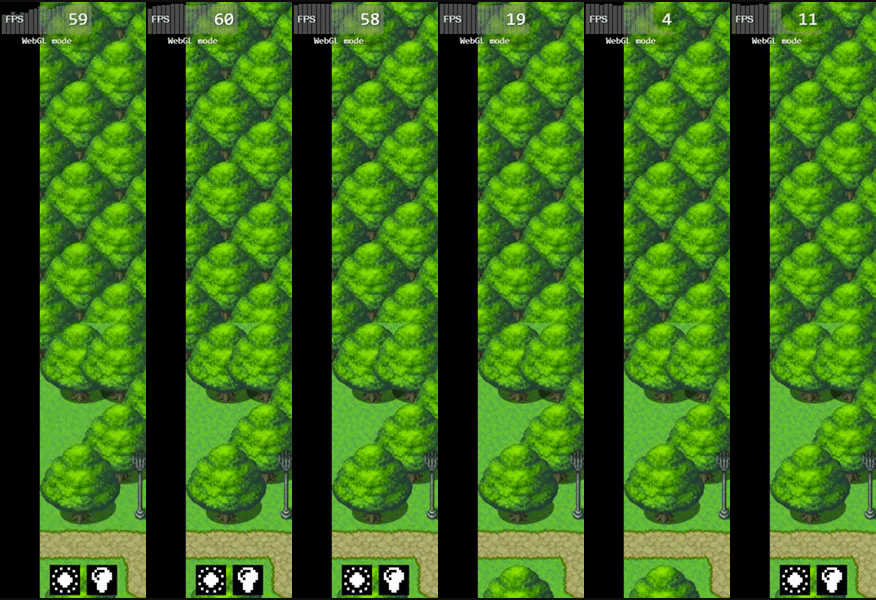
    Here's a comparison screenshot (left deployed as web-project, with lighting displayed correctly / right, Game.exe with no lighting enabled)

  5. Nacura said:
    Hello friend again I am going to bother you, I wanted to know if you can fix a problem, buebo I explain to you, when I'm going to export the game and I just export the sprite that is being used, because the publisher's files do not export them, and besides it does not encrypt them so when I add them these are not recognized by the exported game. In the same way tomorrow I will upload a video of the problem. regards
    If you want to add a file to requiredAssets, just add to the plugin @requiredAssets path/to/the/file without writing the .png extension, for example.

    Ripple said:
    Hello, it's me again - finally! :D

    Could you possibly do a test for me and deploy a test project? When I deploy the game (Windows) and run the .exe on your latest plugin versions - all lights in the game are off. When I do normal tests it works, after deploying the game they all don't.

    Any ideas what could cause this?

    I deployed using ALL assets to be sure (Also: Is there any way to make the .json lighting files requiredAssets or are data objects copied by default?) but it didn't work.

    EDIT: When deploying a Web-Project it works, using the Game.exe it doesn't. Are there different renderers being used? I don't think that's the problem though, since the lights are basically overlay-images..

    Here's a comparison screenshot (left deployed as web-project, with lighting displayed correctly / right, Game.exe with no lighting enabled)
    Indeed, lights aren't loaded properly when starting the deployed game. I'll investigate that and try to correct it as soon as possible! Please just be patient and look at this post to see if there is a new update correcting it! ^^

    EDIT: And for files in the data folder, they are automatically included in the game, even with the exclude unused files checked ^^

    -----
    LightingTool v1.7.4 is out!
    It corrects the bug where the lights cannot be loaded on a deployed game.
  6. Feelzor said:
    If you want to add a file to requiredAssets, just add to the plugin @requiredAssets path/to/the/file without writing the .png extension, for example.


    Indeed, lights aren't loaded properly when starting the deployed game. I'll investigate that and try to correct it as soon as possible! Please just be patient and look at this post to see if there is a new update correcting it! ^^

    EDIT: And for files in the data folder, they are automatically included in the game, even with the exclude unused files checked ^^

    -----
    LightingTool v1.7.4 is out!
    It corrects the bug where the lights cannot be loaded on a deployed game.

    Hello friend, I mean this, when I'm going to export the game here is where I'm going to encrypt the image and exclude the files that are not being used, but it leaves me out the light editor files
  7. Nacura said:
    Hello friend, I mean this, when I'm going to export the game here is where I'm going to encrypt the image and exclude the files that are not being used, but it leaves me out the light editor files
    Can you please tell me the version of every plugin (LightingTool, GameTime and GameEditor have different versions) and the name of the files which aren't included please?

    Right now, the only workaround I'm thinking of is to deploy a game without excluding unused files, copying encrypted files into another deployed game with, this time, unused files excluded.
  8. Feelzor said:
    Can you please tell me the version of every plugin (LightingTool, GameTime and GameEditor have different versions) and the name of the files which aren't included please?

    Right now, the only workaround I'm thinking of is to deploy a game without excluding unused files, copying encrypted files into another deployed game with, this time, unused files excluded.

    Hello friend, look at the files that are not encrypted are the files that are in the light and editor folders, because after encrypting I open the game and ask me for the files that you mention. I'll send you a photo anyway.
  9. Hello friend so long without bothering you jajaaj, query you could add that one can edit the LightSourceID, so one put the number you want and that foama edits the lights and adds the ID that one needs, because when I delete 1 and paste the ID changes, example the first one is LightSourceID: 0 and if the copy and paste I get LightSourceID: 1, but if I erase it and paste it again it says LightSourceID: 3, it's an error I think, that's why one adds its Own ID in the LightSourceID would be better, same thanks: D
  10. Amigo, cuando pongo más de 10 interruptores paralelos, cuando llega en el momento en que debería estar, se enciende con la ID de la luz, pero el problema de que los FPS se reducen poco a poco hasta que llegas a 2 FPS, si pudiera ayudarme con saludos

    The FPS are downloaded, I realized that happened after the 1.6.1 update, even the error it has is that when you enter a dark place and you leave, it is also in the dark, you tell me thank you.

    I attached this gif, where pressing the button to open the editor works fine, but then it gets slow
    118e8eb773e252b04169ae8a97c013cd.gif
  11. Is there a way to have the current time from LMN_GameTime available in a variable or some other way? That way you could use this data to for example lock doors or use it in a custom hud.

    If it's not possible, it would be a nice feature to implement at some point.
  12. Hey @Feelzor .
    This plugin is very good and easy to use. Keep up the good work!
    But I noticed that in your DEMO I had a feature that I can not use in the latest version of the plugin.
    I can not use the shortcut to turn the player's flashlight on and off. I do not know if I forgot any settings or if I did something wrong.

    I am using these versions:
    Game Editor Core: v1.2.2
    GameTime: v1.5.1
    LightningTool: v1.7.4
  13. Can you say how you exactly put the files in the project folders? I followed the introductions step by step and can activate the plugins in my settings but the plugin don't work.
  14. I am having the same problem as Nacura, if I understand them correctly. I enter a room which has a dark tint set in the tags. When I exit the room, I find that same tint applied to the "outside" maps, even though the outside maps are supposed to be tinted depending on time of day. What am I doing wrong? I feel there must be something simple I'm missing.

    Edited to add: There was something simple I was missing, namely adding "Tint REMOVE" to every door in and out of the darkened area. Bit of a pain if your area has multiple exits, but it works. Nacura, if you're still reading this, you need to add Plugin Command: Tint REMOVE to the exit to your cave map. That seems to take care of the problem.

    Teach me to post a question without rereading the documentation and fiddling with things.
  15. Can someone help me, please?
    After making a light in the editor and setting a parallel event with the plugin command 'Light LIMIT 19:00 23:59 0' so the light only turns on at night, everytime the character changes maps an error occurs. What am I doing wrong?
  16. RnBCxb7.png 6YQJqei.png
    Edit: fixed it by copying from an existing project.
  17. This plugin is awesome! Thank you so much for doing this :)
  18. I found this awesome! It solves many problems of lights for who doenst know make it in image editors!
    Found a error. (using latest version of mv)
    13ZuVi3.png
  19. Really good plugin but I have a slight issue. Whenever i type "Time SET [time]" in the notes section of an event, it doesn't actually set the time when I arrive to the area. Anyone know what I could be doing wrong?
  20. Oy! This plugin is really awesome. Great job!

    @Eliaquim
    That error usually happens when your plugins are out of order. Make sure LNM_LightingTool is below LNM_GameTime in your plugin list.

    @Feelzor
    Found one possible bug and have two suggestions.
    Bug: The command 'Light HUE RESET' doesn't work with event lights

    And my suggestions, though I don't know how easy or hard they'd be to implement:
    Suggestion 1: A way to use a custom image for lights placed in the editor would be nice.

    Suggestion 2: It would be nice to have a plugin command that can change the settings of the player torch in-game. Such a command could, for example, be used to make a flashlight with limited power that gets darker over time as the batteries run out. I'm currently doing exactly that using script calls to change the data so this one shouldn't be too hard to do...