How to Update NW.js to Dramatically improve Game Performance!

● ARCHIVED · READ-ONLY
Started by KillerGin 273 posts Page 5 of 14 View original ↗
  1. Ace of Spades said:
    Hey, thanks for the suggestion. I tried replacing SceneManager.exit(); with SceneManager.terminate(); but unfortunately it's providing the same result... everything fades to black, window goes from fullscreen to windowed, but never closes the actual game window.

    Ah, well, I actually use "SceneManager.terminate();" in a small plugin I wrote that is tied to the menus and it works, even though I am using 49.2 I think it would work for you as well.

    Here is a small part of it:

    "Scene_GameEnd.prototype.exitCommand = function(){
    SceneManager.terminate();
    }; "
  2. KillerGin said:
    Ah, well, I actually use "SceneManager.terminate();" in a small plugin I wrote that is tied to the menus and it works, even though I am using 49.2 I think it would work for you as well.

    Here is a small part of it:

    "Scene_GameEnd.prototype.exitCommand = function(){
    SceneManager.terminate();
    }; "
    Yeah, that's pretty much the same function I'm using. I even tried to revert back to 49.2 to see if it'd work and it was still giving me the same issue.

    After thinking it through, I tried to deploy the project to see if that would work. Turns out this bug only occurs when test-playing from RMMV. I was able to revert back to v 0.51.0 and the bug did not occur after I tried to deploy the project, which was a huge relief. As long as the bug doesn't occur in the final build of the game, I'm perfectly okay with manually closing the game window during test play.

    Thanks so much for your time and efforts, it's greatly appreciated!
  3. Code:
      if (Utils.isNwjs()) {
        require('nw.gui').Window.get().close();
      } else {
        SceneManager.terminate();
      }
  4. Ace of Spades said:
    Yeah, that's pretty much the same function I'm using. I even tried to revert back to 49.2 to see if it'd work and it was still giving me the same issue.

    After thinking it through, I tried to deploy the project to see if that would work. Turns out this bug only occurs when test-playing from RMMV. I was able to revert back to v 0.51.0 and the bug did not occur after I tried to deploy the project, which was a huge relief. As long as the bug doesn't occur in the final build of the game, I'm perfectly okay with manually closing the game window during test play.

    Thanks so much for your time and efforts, it's greatly appreciated!

    Hey, as long as it works for the deployed version, thats what matters, yay!
  5. Does it improve performance better when manufactured to mobile?
  6. TenTranVN said:
    Does it improve performance better when manufactured to mobile?
    mobile doesn't use nwjs
  7. I guess I only need to update PC windows folders and deploying to mac/linux it'll use windows new nw.js?

    P.S With the most recent version nw.js v0.51.2 I get multiple bugs/errors. One-time parallax map was all black throughout the saves (parallax failed to load for all saves).
    My custom save/load menu was stuck had to close the game and overall doesn't look stable (a couple of errors etc.)
    +issue with not closing properly for "test" build (delayed closes properly).
    +in game's/project folder file "package.json" don't forget to add
    "position":"center"
    just before fullscreen to properly position your game.

    Will try v0.49.2, I hope it's more stable.

    P.S.S and unfortunately getting this randomly. I think this happens when showing pictures.
    I have Pixi updated to 4.8.9 in my project. First time seeing this error, probably 99,9% caused by new nw.js.
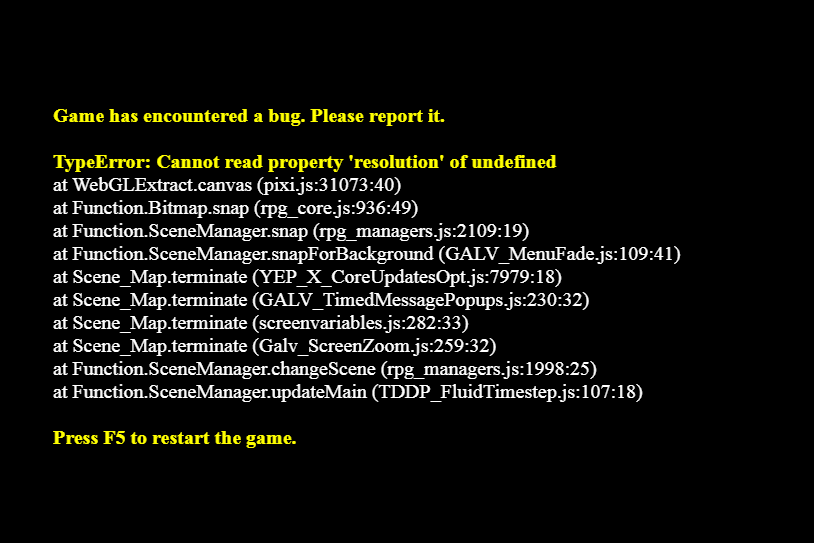
    Screenshot_8.png

    P.S.S.S
    Upon further testing, I found updating nw.js to be very unstable. I get many black screens. Sometimes battles start with a black screen while audio still playing, sometimes opening F8 will make the game screen black. This could happen only in the editor as I haven't tested deployed projects and this can be caused by many plugins I use (it's a complex project with over 250 plugins+compatibility fixes).
    I'd love some extra performance, but this seems very unreliable.

    P.S.S.S.S
    Using nwjs-sdk-v0.44.6-win-x32 (because I want to support even old x32 platforms and the difference between x32 vs x64 seems non-existent) seems to be stable, but needs more testing. So far no black screens or errors. And the Editor test game window closes properly now.
    I Will update about stability within a week and further testing, but it seems working fine.
  8. villko05 said:
    I guess I only need to update PC windows folders and deploying to mac/linux it'll use windows new nw.js?

    P.S With the most recent version nw.js v0.51.2 I get multiple bugs/errors. One-time parallax map was all black throughout the saves (parallax failed to load for all saves).
    My custom save/load menu was stuck had to close the game and overall doesn't look stable (a couple of errors etc.)
    +issue with not closing properly for "test" build (delayed closes properly).
    +in game's/project folder file "package.json" don't forget to add
    "position":"center"
    just before fullscreen to properly position your game.

    Will try v0.49.2, I hope it's more stable.

    P.S.S and unfortunately getting this randomly. I think this happens when showing pictures.
    I have Pixi updated to 4.8.9 in my project. First time seeing this error, probably 99,9% caused by new nw.js.

    View attachment 180791

    P.S.S.S
    Upon further testing, I found updating nw.js to be very unstable. I get many black screens. Sometimes battles start with a black screen while audio still playing, sometimes opening F8 will make the game screen black. This could happen only in the editor as I haven't tested deployed projects and this can be caused by many plugins I use (it's a complex project with over 250 plugins+compatibility fixes).
    I'd love some extra performance, but this seems very unreliable.

    P.S.S.S.S
    Using nwjs-sdk-v0.44.6-win-x32 (because I want to support even old x32 platforms and the difference between x32 vs x64 seems non-existent) seems to be stable, but needs more testing. So far no black screens or errors. And the Editor test game window closes properly now.
    I Will update about stability within a week and further testing, but it seems working fine.

    Lol, Well, im glad its slowly coming together. Depending on your plugins etc, there may be a conflict somewhere.

    Anyways, awesome.
  9. Quick question, ever since I went through these steps to upgrade my project (Windows, to 49.2), when I playtest my game, the playtest window always opens at the top-left corner of my screen, instead of the center like it had before. Is there any way to fix this?
  10. Vis_Mage said:
    Quick question, ever since I went through these steps to upgrade my project (Windows, to 49.2), when I playtest my game, the playtest window always opens at the top-left corner of my screen, instead of the center like it had before. Is there any way to fix this?
    How to Update NW.js to Dramatically improve Game Performance!
    It's mentioned in this post in the thread.
  11. Thank you so much for this guide. It's helped a lot.

    For my Mac deployment, though... it appears as if NWJS is not updated there? When playtesting, it does not crash, and I don't see the "Your profile can not be used because it is from a newer version of NW.js" error. After I deploy, I see that annoying error, and the game crashes a whole bunch again (because the old version of NWJS is useless on MacOS).

    I've updated the nwjs-osx-test folder with version 0.49.2 NWJS. I didn't touch nwjs-osx-unsigned.zip. What could I be missing? Does Mac deployment work perfectly for everyone else? (I am deploying from a Mac, fwiw).
  12. I'm using MV on PC. I updated NW to 54.1 (only the win and win-test folders) and Pixi to 4.8.9. I haven't noticed any improvement in performance and suddenly my game has no sound... Maybe I need an older version for MV?
  13. Hey, hey, I use a mac, and it works perfectly.

    Since I posted this, I only use the versions (RPG MAKER MV and NWJS) of what I demonstrated in the video. It works beautifully for most people and me.

    I'm sorry to hear it is not working so well for some people. It can come down to many things..... including a few incompatible plugins. I use a f* ton of plugins, and my game works flawlessly. And in general, MOST plugins work perfectly. You can find some people isolating problems and fixing them throughout the posts, which is great to hear.
  14. Mano_InputConfig(Gamepad&keyboard config+WASD move/ButtonCommonEvent)
    In the thread above, I received a report that I'm having problems running my plugin on top of the updated nw.js.
    It turns out that the cause is that the JavaScript arrow function causes a compile error.
    It's about a function written as () => {}.
    It is a countermeasure, but it is known that it can be corrected by writing the following in package.json.
    "js-flags": "--harmony_arrow_functions"
    However, I just saw the article that there is such a method, but I have not actually tried it.
    I don't understand much about replacing nw.js.
    Sorry to trouble you, but would you please give it a try?
  15. sirnameless said:
    Thank you so much for this guide. It's helped a lot.

    For my Mac deployment, though... it appears as if NWJS is not updated there? When playtesting, it does not crash, and I don't see the "Your profile can not be used because it is from a newer version of NW.js" error. After I deploy, I see that annoying error, and the game crashes a whole bunch again (because the old version of NWJS is useless on MacOS).

    I've updated the nwjs-osx-test folder with version 0.49.2 NWJS. I didn't touch nwjs-osx-unsigned.zip. What could I be missing? Does Mac deployment work perfectly for everyone else? (I am deploying from a Mac, fwiw).

    Okay I've figured out what I missed. In case anyone else gets stuck. Once I exported a Mac build, I needed to do the following:

    Go into the RPG Maker MV app (local files from Steam), just like the initial steps mentioned, and find...

    The "MacOS" folder - > Copy this and replace the MacOS folder in your exported Game.app (the MacOS folder only has "nwjs" inside)

    The "Frameworks" folder - Copy-paste this whole thing into your exported Game.app. (The new nwjs depends on it. It should sit in your Contents folder next to MacOS.)

    That's it! Now it runs famously. :D (This is for 0.49.2 NWJS.)
  16. sirnameless said:
    Okay I've figured out what I missed. In case anyone else gets stuck. Once I exported a Mac build, I needed to do the following:

    Go into the RPG Maker MV app (local files from Steam), just like the initial steps mentioned, and find...

    The "MacOS" folder - > Copy this and replace the MacOS folder in your exported Game.app (the MacOS folder only has "nwjs" inside)

    The "Frameworks" folder - Copy-paste this whole thing into your exported Game.app. (The new nwjs depends on it. It should sit in your Contents folder next to MacOS.)

    That's it! Now it runs famously. :D (This is for 0.49.2 NWJS.)

    Thanks! Great work!

    I love when people share to help others.

    Awesome!
  17. Can I ask - has anyone found that after they upgrade to a later nwjs, their auto-fullscreen option no longer works?

    I have two plugins. First one is...

    FSInitStart = SceneManager.initialize;
    SceneManager.initialize = function(){
    FSInitStart.call(this);
    Graphics._requestFullScreen();
    };

    Second one is simpler...

    Graphics._requestFullScreen();

    But neither of these work. They work in the normal version of nwjs, but not later ones; one of them seems to do nothing, while the other, when you boot the game it goes fullscreen for an instant, then returns to a window.

    In both cases you can still press F4 to fullscreen the game but I'd really like this to work on-boot.
  18. Hi people. I upgraded and seem to bumped into a plugin incompatibility issue between the upgrade and YEP Core Plugin... If I have YEP Core on, the window for test play is turned black. I can't see anything.

    If I deploy/export the game, everything works fine, but the testplay is a clack screen with YEP Core turned on.
  19. plugins probably need updated versions
  20. Tiamat-86 said:
    plugins probably need updated versions

    I understand they might, but to my knowledge I have the newest YEP Core, so the way I see it, turning it off is the only option. :/