Thinking back to older games like Final Fantasy 1, rooms in dungeons were pitch black until you were actually in the room, in which everything but the room became black. When you left the room, the dungeon returned to light, and the room went back to being blackness.
Is there a way to achieve this in RPG Maker VX Ace?
How to make a section of the map black until you enter it?
● ARCHIVED · READ-ONLY
-
-
-
It's not really tiles though - it's more a map overlay that shows the inside or the outside.
However, people have asked for this sort of thing before, so if you can choose a few good keywords you might be able to search and find some suggestions. -
True, I was also thinking of using a map overlay, but that would mean having to create one or more separate black overlays and adjusting them to appear appropriately on the map. Also, the overlays would require a script to fix them to the map so that they will not scroll, in which case I'd suggest using the Fixed Pictures script :
http://www.rpgmakervxace.net/topic/3076-fixed-pictures-for-rmvx-ace-for-parralax-mapping/ -
I actually did and couldn't find much. Tried things like "room reveal", "dark room", "black room"... found mostly people wanting help on horror games involving torch lights and illumination in dark passageways.It's not really tiles though - it's more a map overlay that shows the inside or the outside.
However, people have asked for this sort of thing before, so if you can choose a few good keywords you might be able to search and find some suggestions. -
Maybe a 'hidden' map transfer?
Map #1 The entrance hall of the castle with blank areas where the rooms would be - so they show up black.
Transfer event at the 'door' into Room #1 - set fade to 'None', no transfer SE, transfer to Map #2 which has the room and everything else (to the correct dimension) blank, so shows up black.
Reverse the process when you want to go back to the entrance.
Simple in execution, but a lot of maps. -
The problem with such a "fog-of-war" (as it would be called in strategy games) is that it isn't as easy to solve - I once had a longer discussion with Tsukihime about that when I considered commissioning it as a script.
If you want the rooms to turn black again after you leave them, this is rather difficult. If you're satisfied with only hiding them until visited and then letting them remain visible for the rest of the game, there are a few ways how to make this.
Tileswap is NOT an option, because it will not hide the events in that room - it might be usable if you don't have events in the room, but then why would you hide an empty room?
Here is what you can do:
1) Any appearing of the room needs to be triggered by an event - and a parallel check can cause a lot of lag.
It's a lot easier if you make the dungeon layout in a way that limits the trigger coordinates for making a specific room visible.
2) You have to decide how to make that room invisible or visible
The easiest version would be to use show pictures (with a room-sized picture completely black), but because pictures are screen-positioned that only works if either your map is limited to screensize or if a parallel process moves the pictures when the player moves.
If you use sprites, then you can place a black, room-sized sprite somewhere on the bottom of the room and switch it off based on switches on the map. That is map-positioned, but a sprite for this is twelve times as large as a picture for the same (but you could add animation to black areas that way instead of having them pure black)
There is a script for copying map parts - instead of hiding part of the map, you could transfer the room to the current map that was black before. Sorry, I thought I had the link (because I'll need that script sometime in the future), but it looks like I lost it - it's somewhere on the forum here, I'll have to hunt it again later (it's neither Fomar's nor Tsukihime's) -
Is this what you want? Just write the script a moments ago, and it was fun :)
Spoiler


-
I found the script I mentioned above:
http://forums.rpgmakerweb.com/index.php?/topic/18173-copypaste-map-data/
With that script, you should be able to start on a black map and copy parts of a master map to that map when they should become visible. Haven't worked with it yet, but that should be possible. -
Incredible, Theo! That looks awesome.
-
No offense, Andar, but I do not believe that tile swap is completely out of the question.
The player has to touch a certain part of the map before the 'hidden' part of the map appears.
The events in the 'hidden' areas can have empty graphics, until the player touches those tiles.
The events can then be changed to the appropriate graphics via use of set move route commands.
The other options posted here by kjsp17, Theo and Andar are all applicable. -
That, my friend, is quite nice.Is this what you want? Just write the script a moments ago, and it was fun :)
Spoiler
Where would I be able to find this script? It's exactly what I want, it really is. -
Released the script this morning
http://www.theolized.com/2014/11/theo-invisible-regions.html
I will translate to English tomorrow, I have some tasks to do -
I was originally going to suggest Region Fog since that was the main motivation behind it, but then the problem here is that you're forced to use regions, which IMO is unfeasible for something like this because this is primarily visual thing, and I'd rather not spend precious region tiles on it.
-
How did I miss that script? Well, if it not for visual purposes, then for purpose did you have in mind for that script?
Theo's script also utilizes region for achieving the same effect. -
It was written when I was exploring fog of war and thought "hey let's use regions".
But now that I look at it, it's not a very good solution. -
I aimed to be a simple to use script. And region is the simple way to do it. Local Indonesian people were happy since I released the script. If they have problem using the region with another thing, then it's their problem. If they need it to be fixed, they have to provide the solution as well. If the solution is not simple which required much settings, like prepare the image, many configurations, and such, then I will consider it as commision.
There is an alternative anyway, but it's more complex, here
http://littledrago.blogspot.com/2013/07/rgss23-fade-room-effect.html -
Here's my solution.
First, get picture anchors - http://forums.rpgmakerweb.com/index.php?/topic/34249-picture-anchors
Second, you want to take a picture of your map
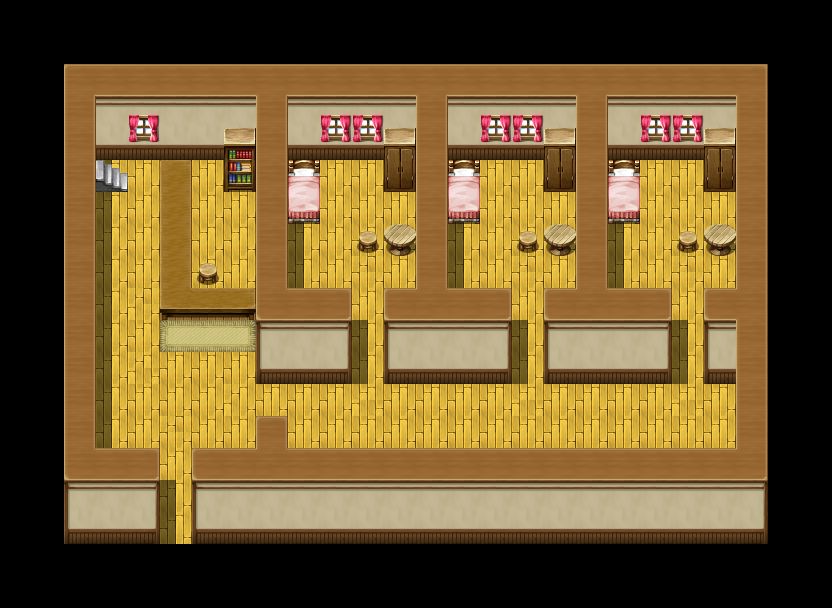
Then figure out where your covers should be and draw some rectangles in an Paint or something.
Now you should have your cover as a separate picture saved in the Graphics/Picture folder.
Next, you will start by creating the pictures in-game. Using anchors, you will specify where the pictures should be positioned on the map.
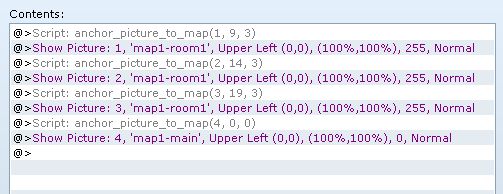
Then you'll set up some player touch events in two places
1. One inside the room
2. One outside the room
The one inside the room will erase the cover for that room, and show the cover for the outside if necessary.
The one outside the room will show the cover for that roomm, and erase the cover for the outside.
When done successfully, you should see something like this (I didn't bother covering up the outside when I entered the room)
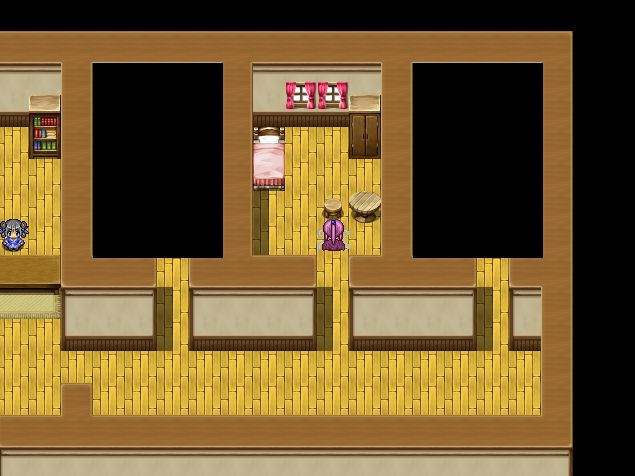
The advantage to using this approach is that you can overlay multiple covers on top of each other.
Does your room have another room? No problem, just create a large picture for the bigger room, and then a smaller picture for the room inside, and erase/show the pictures as necessary.
If you need to have a cute kitty pic on your cover, then you can just open your image in your favourite image editor and add a kitty pic.
This is multi-layered mapping with full control over each layer. -
And on Tsuks you can adjust the opacity for two effects 1) so it isnt jet black and looking all weird like in those pics, above and 2) you can create a "fade away" effect if you want by setting the opacity to adjust in grades until its fades to completely transparent.