Picture Anchors

● ARCHIVED · READ-ONLY
Started by Tsukihime 11 posts View original ↗


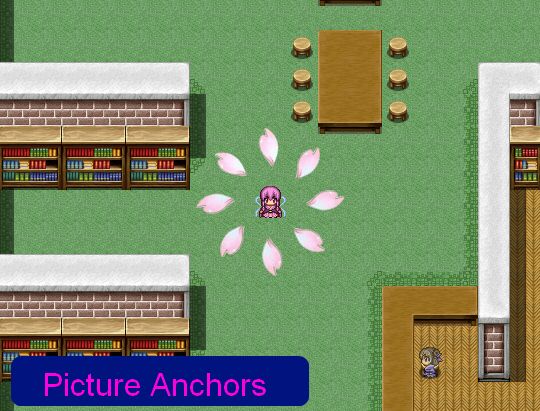
  1. This script introduces the concept of "picture anchors". An anchor is a tool that fixes an object to a certain position. A picture anchor functions the same way: it fixes the picture to a certain position.


    By default, pictures are anchored to the screen. This is why no matter where you move, the picture always follows you.


    This script allows you to change the picture's anchor. You can anchor a picture to a character on the map so that the picture follows that character instead of the screen.


    You can also anchor the picture to a position on the map, so that the picture will never move from that position as long as it is anchored there. By anchoring a picture to the map, you can use these pictures for additional visual effects that you normally could not obtain using the tile editor.


    In order to achieve multi-layered maps using overlay mapping, having absolute control over where your pictures are positioned is essential.


    Get it at HimeWorks!
  2. Tested and found that it works very well, even with the collision script!

    Excellent work!
  3. Good to hear that it works with the collision script.


    After doing a couple examples, one problem I found was that having to turn on and off pictures is really tedious and possibly error-prone. There are also many cases to consider for developers depending on the kind of mechanics they have in their games.


    For example, if walking into a room should show or hide a pic, what happens if you just teleport out of the room?


    Or what if you save and reload the game? Are the pictures still there? Actually I just checked and they are (for some reason...)
  4. Nice to hear that you are considering the end-users' possible concerns.

    I personally feel that using the Show and Hide Pictures are pretty much like any eventing. Anything can be tedious and error-prone if we are not careful.

    A lot of games I played did not allow teleportation from indoors, but I think the issue with the picture maintaining on screen can be resolved by using a prolonged transition time to erase the picture from the old map, and create the pictures for the new map.

    Ideally, a limited amount of pictures should be shown at a time, so the picture count would not usually go above, say, 10 maximum?

    The picture number can be reused to create new pictures every time for each map.

    Consider it like setting a permanent map tint for each separate map.

    Also, when you save and load a game, any picture that is 'on' will remain on, and any picture that is 'off' will remain off.

    That is the default even without your script.

    Your script also allows the same picture to be move dynamically which can imitate a looping effect.
  5. Ideally, a limited amount of pictures should be shown at a time, so the picture count would not usually go above, say, 10 maximum?


    The picture number can be reused to create new pictures every time for each map.
    The main feature that my script adds on top of regular parallax mapping (and therefore, most scripts that I'm aware of that provides this functionality) is that you have control over each layer, and you have control over the pictures.


    A picture may be used for more than just setting up the atmosphere. Suppose you wanted to create a hidden path where the player would walk into the path and disappear from view. This can be done with a picture. Of course, you just need one picture for all the paths, so that isn't really a problem. It's basically just a ceiling layer.


    But let's say you wanted to create roofs for every house, and whenever you enter a house, the roof goes transparent, revealing the insides of the house. And better yet, the roof fades out instead of just disappearing immediately. This can be done with pictures and changing its opacity over a period of time. This is a pretty common feature and makes your maps look better. If you had 10 houses, that's 10 pictures right there (you don't want every house to become visible just because you entered one).


    So perhaps a way to control whether a picture is "local" or "global" would be necessary, as right now, all pictures are global.


    Similar to saving and loading, when you leave a map, all of the local pictures will be saved and then removed so they don't appear in the new map. Once you re-enter the map, all of the pictures will be restored the way you left it.

    Consider it like setting a permanent map tint for each separate map.
    Some existing overlay scripts I have seen use fixed layers.


    For example, Yami's script provides 4 layers (light, shadow, parallax, ground), each controlled by a switch. Variables are then used to allow you to change images if you need to.


    Each map has their own overlay image settings, so they are automatically handled on map change.


    An add-on could be written to allow you to reserve certain pictures for overlay purpose (and for automatic handling), but I haven't thought about how that might be used.


    For my tunnel effect example, you have an additional set of challenges.


    First, the picture should be shown if you're in a specific set of maps, since the dungeon might be broken up into multiple maps. The picture can be resized or have various properties changed, so you may want to preserve that across maps.


    Second, the picture should be removed once you exit the dungeon. There are two ways to do this


    1: Erase the picture when you leave the dungeon


    2: Erase the picture when you enter a map that is not the dungeon


    Not something my script would handle, but there definitely would need to be some add-ons to make things easier to manage the pictures.
  6. Looks like you have your work cut out for you.

    Good luck! And thanks for the great script!
  7. It would probably be faster if I had devs try to build something or integrate it with their own project and provide feedback on usage.


    As you say, this is just like any other eventing (because it is), but like eventing, there are ways to add some extra mark-up for scripts to make things a bit easier.
  8. Awesome idea. Cool script. 
  9. @Jonforum You have linked to a MV JavaScript plugin. This is an Ace Ruby script. They are not comparable and not interchangeable. You have to pick the one for the engine you are using.
  10. Kes said:
    @Jonforum You have linked to a MV JavaScript plugin. This is an Ace Ruby script. They are not comparable and not interchangeable. You have to pick the one for the engine you are using.
    @Kes
    Yes it was a backlink on another site, I had not seen this not for mv.
    Sorry for this mistake :blush: