Yeah, different coat colors/patterns and manes/tails would be pretty cool.
hiddenone's MV Resource Warehouse
● ARCHIVED · READ-ONLY
-
-
love them ♥
-
So i put the folders and pictures in but nothing shows up on the charaters
-
@Juliann The information under your avatar says that you are using VX Ace. These resources are for MV, so they are unlikely to work smoothly in Ace due to different sizing etc.
-
I want to modify the soldier's face to fit my character, okay?
Thank you for allowing me to edit it. If it's different from the caveat you said, tell me. -
How do I install it properly?
-
How do I install it properly?
You need to ensure that the sprite images are placed in the "characters" folder of your project (project>img>characters).
For the Hine villagers you don't need to do anything else, as the entire sheet is sized so you can just use them directly. For a single character sheet like the riding guard or one of the spear-wielding guards on his own, make sure you rename the file so that it has a "$" sign in front of it (ie. "$GuardRiding") - the "$" symbol tells the program to divide the total size of the image into 4 equal rows and 3 equal columns. It is typically used for single characters. In your characters folder you will notice the big monster sprite has that same $ in front of its name. That sheet is also divided into 4 rows of 3 columns, despite being different in size than your standard sprite sheet.
Understanding how "$" and "!" works in regards to sprite sheets allows you to do some interesting things. Like making unit sized formations of soldiers to add a bit more oompfh to your armies:
This image I named "$Army1", and it moves like a regular characters sprite sheet. Plop a few of those down next to one another and you've got yourself an actual force of soldiers on the march.
Hope that helps. If not, feel free to hit me up in pm or ask here again. -
You need to ensure that the sprite images are placed in the "characters" folder of your project (project>img>characters).
For the Hine villagers you don't need to do anything else, as the entire sheet is sized so you can just use them directly. For a single character sheet like the riding guard or one of the spear-wielding guards on his own, make sure you rename the file so that it has a "$" sign in front of it (ie. "$GuardRiding") - the "$" symbol tells the program to divide the total size of the image into 4 equal rows and 3 equal columns. It is typically used for single characters. In your characters folder you will notice the big monster sprite has that same $ in front of its name. That sheet is also divided into 4 rows of 3 columns, despite being different in size than your standard sprite sheet.
Understanding how "$" and "!" works in regards to sprite sheets allows you to do some interesting things. Like making unit sized formations of soldiers to add a bit more oompfh to your armies:
View attachment 116882
This image I named "$Army1", and it moves like a regular characters sprite sheet. Plop a few of those down next to one another and you've got yourself an actual force of soldiers on the march.
View attachment 116883 View attachment 116883 View attachment 116883
Hope that helps. If not, feel free to hit me up in pm or ask here again.
Aaah, Okay, thank you very much. And I may take you up on pm thing -
Any chance the side view sprite sheets can be done at a bigger size? The "save as" download method results in them being ridiculously small and out of sync with everything else. (Not so concerned about the slime, but everything else is so teeny tiny weenie for most situations and the ghost and snake sheets are particularly annoying.) Still a minor complaint, but otherwise it's good work that you've done.
-
@yooncq Yes, you can edit the soldier face to fit your game's character.
@BreakerZero I'm not sure why you're having that problem, as when I try it they're the right size. Maybe try opening the images in a new tab to make sure they're full size and then save them? -
@hiddenone I was referring to the size of the sprite sheets themselves. Scaling the snake sprites to 200% is not ideal for my intentions, and compared to the current mummy design I am using the ghost model is ridiculously small.
-
@BreakerZero Ah, then unfortunately you're out of luck. I made them at that size because I thought they worked well with the default player battlers and because making them larger would've been way too much work, so I'm not planning on making larger versions of them.
-
No worries about that @hiddenone. If it works for you then I guess that's that. (Wasn't trying to force you anyway.) As a compromise I'm willing to look into battler sprite sheets for some of my other enemy types and see if I can at least find a middle ground with that in terms of size matching. (Or a PSD variant of some sort with what may already be available, though such may well be pushing it with regard to this.) As it is I already have an open recruitment file in this respect I can direct you to (or we can discuss by PM for ideas).
-
@hiddenone Your graphics are some of the best out there! I love them all to bits. Especially the new Hine Sprite set you have going on! I am eating that up like crazy! Can we expect a Hine SV in the future? Or is the Tall sprites under the Sprite Template suppose to be it? I noticed the artistic style was different but could pass as such.
-
Many of the Picture Links dont seem to work anymore, any chance you are renewing them?
Edit: Ah forget what i said, it was my slow internet, after waiting a minute,the Links showed up as pictures.
This is looking nice. Thank you for sharing. -
@Guardinthena At some point I'd like to make SV battlers for my Hine sprites, but since I don't have too much free time at the moment I don't have any plan on making them soon.
Today we've got another addition to the Hine series, thanks to @Silenity : running templates for adults!
Sometimes it's important for a sprite to get somewhere in a hurry, and how you can have them do more than just powerwalk to their destination!

Currently I've only finished the adult templates, but would y'all find it useful to have a running template for everybody?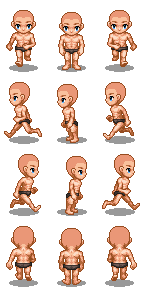
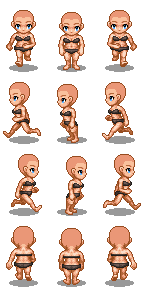
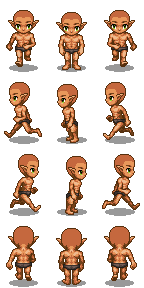
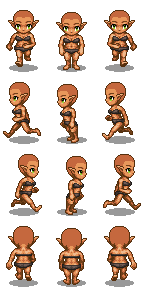
Happy game making! :rwink: -
Oh! Love it! Those will be great for fleshing out dynamic movement graphics!
-
You are the best ! I beggin with this generator. How can i replace the human body by the beasts bodys ?
-
@shneskelecta If you downloaded my kitchen sink pack, the beast bodies can be found under 'Facial Marks'. The generator isn't all that user-friendly when it comes to changing the body, so it's easiest if you just go through all the options in the generator and see where everything is.
-
I finaly found by add manualy the body's part !