Game & Map Screenshots 12

● ARCHIVED · READ-ONLY
Started by slimmmeiske2 1772 posts Page 17 of 89 View original ↗
  1. What I learnt today, smaller maps cause it might look small while making but suddenly a lot of unneccesary walking. Get better at lightning and remember to remove objects shadows if they are gonna be in the way of a light source. And place the blocks to block movement beforehand preferably, and dont just merge everything, some things you will want to be able to pass behind.
    Tiny steps indeed, but better than no steps : D

    <spoiler>
    map.png</spoiler>

    <spoiler>

    map 2.png
    </spoiler>
  2. @Beewo Smaller maps are indeed better.
    If I could make one suggestion it would be the lighting for your fire which doesn't actually look like a fire because there are no flames as part of the graphic. I suggest you have something a bit more transparent and a little less bright. If that fireplace doesn't already have an animated fire in it, edit one in from somewhere else.
  3. @Beewo I think you've done quite a nice job with this room! :kaohi: It feels appropriately spacious given amount of wealth the owner seems to possess, yet not so large as to make objects feel lonely.

    I'm not sure if I've ever posted a map here before, but something I worked on this summer:

    Eda7zIj.png

    Full Image
    6f3fdFT.png

    The colorization is in flux, as I'm still playing around with the palette. Admittedly, I spent the most time on the lounge areas!! :kaoblush:The dorm rooms are just kind of... there, for now, until I come up with more inventive ideas. This is a personal VX Ace "just for learning" project because I'm always nostalgic and prefer working on tinier things. :kaopride:The tiles used are a combination of my original work and edits I made with VX Ace, XP, and MV tiles. So far, the doors swing open and closed upon entering/exiting a room, I managed to get the pendulum on the clock to sway (so satisfying), and the television switches through a few different screens to give a little 'life' to the scene — a huge feat for me, as I'm basically useless when it comes to anything remotely technical. :kaoangry:
  4. @aqua , That map is amazing!! :kaoluv:
    I love how much character each of the tiny dorm rooms has. You really get a feel for the owner of each room just by looking at each room!

    And ooof, I feel you when it comes to technical stuff... :kaodes: Simply figuring out how to do things already takes up so much time and effort...
  5. Do you recognize this location?
    I wanted to see how an iconic town from a game I used to play as a child would look like, if said game was made in RMMZ ;3
    Alabastia.png

    Spoiler
    Pallet Town from Pokemon Gold/Silver/Crystal
  6. @Avery , immediately recognized it. Good old times... :kaoluv: Played it many, many times~
    Such a cool idea to update the map to RMMZ look!
  7. Map045.png

    Made another forest-looking map for one of my dungeons the other day.
  8. That's an impressively large map ... must be fun to get lost in. I've also had a go at doing a forest map for my new project's first dungeon, but mine ended up much smaller, and it feels like if I made it larger then it would get too repetitive. I might just make separate maps that join onto this one.

    2022-10-25 (1).png
  9. Some maps from my free VX Ace Game.
    Fell-Sull.jpeg
    Thanks everyone that did that Hobbit assets, couldn't find the exact name to credit.
    Hi-Hills.jpeg
  10. Arkhanis said:
    Fell-Sull.jpeg
    These three straight lines drew my attention. The map might look smoother by changing them a bit, but it's just my personal thoughts though.
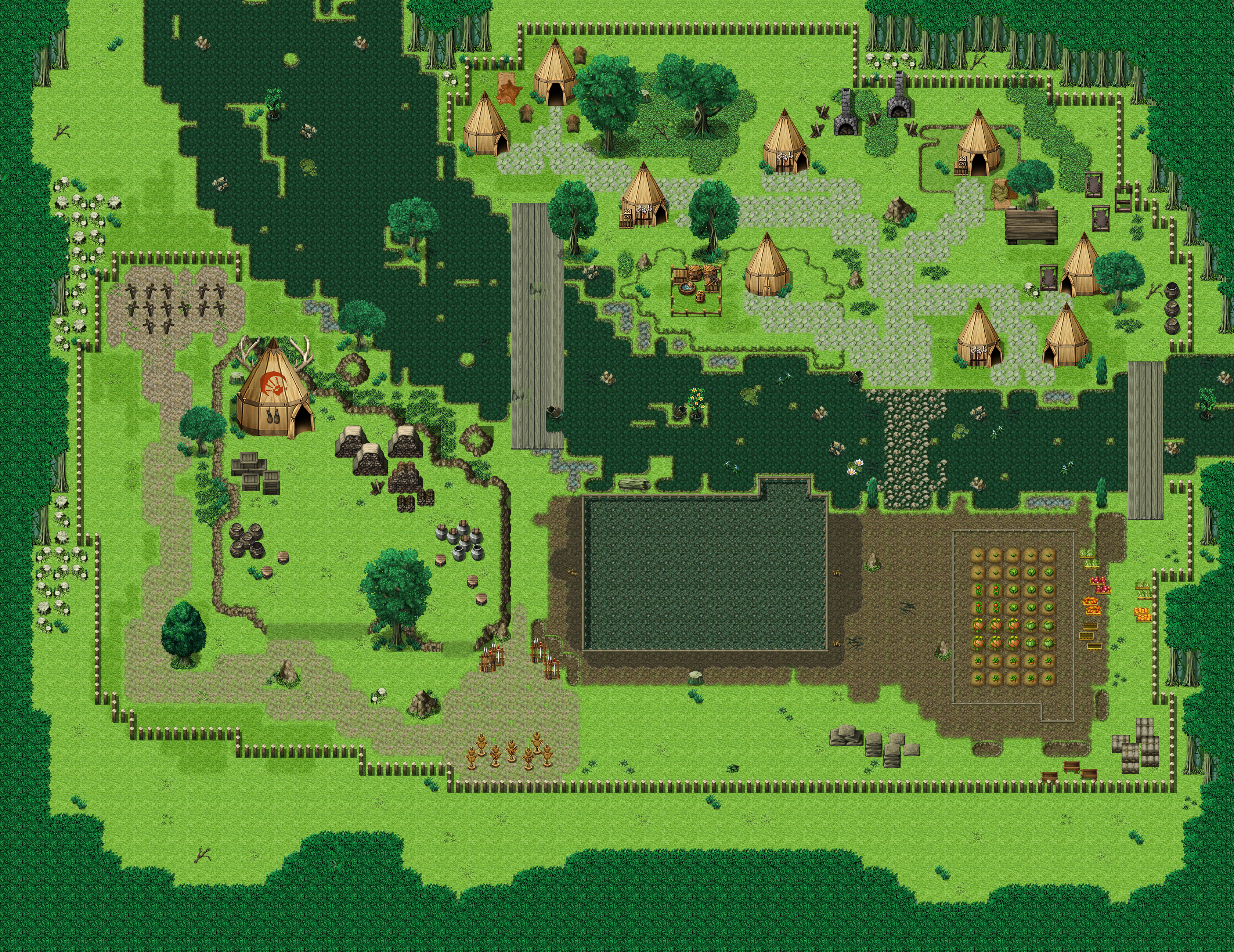
  11. My very first map, A Goblin Village.
    Just trying to get some practice. Would love some feedback


    Edit: I just realized I made a noob mistake and forgot to add an entrance to the village :guffaw:
  12. Roxus said:
    I just realized I made a noob mistake and forgot to add an entrance to the village :guffaw:
    That was going to be my first observation, no break in the fence :biggrin:

    What is the large rectangle to the left of the planted crops? Some kind of field? It seems like it's larger than it needs to be, especially given there's nothing inside.

    The stone path on the northern side of the river doesn't actually lead to the bridges, which is where I'd presume the villagers walk more frequently than balancing over the rocks in the river.

    There also looks like there's a mapping error on the right side of the right bridge, where a strip of grass appears to be placed over a rock in the river. It's a little hard to tell for sure with the small picture.

    In the bottom center of the island, there's one hut that's surrounded by what looks like a lip for elevation change. You have the stone path crossing it and a large rock on the north-west that seems to start on the ground level and overlap the elevation change, so I'm not sure it works for me.

    Nice work, otherwise.
  13. @Roxus I'm wondering about what appear to be 2 furnaces at the top. At the moment there is no fire in them, but I assume they must be lit fairly regularly if the village needs two. However, the grass around them is perfect, not a singe mark, not a scrap of grass worn away by feet, sparks, whatever. You even have long grass growing around one of them. It all looks odd.

    A lot of supplies have been brought to the large tent with the red hand(?). However, again no path has been worn in the grass. Picking up ATT_Turan's point about the path and the bridge, I would like to suggest that you replan all your paths, allowing, of course, for what path you will need to the village entrance. Also reconsider if your paths would be stone. If the stone were that close to the surface it would be immensely difficult for them to have dug out that crop field. My own feeling is that the paths here would be dirt paths.
  14. ATT_Turan said:
    What is the large rectangle to the left of the planted crops? Some kind of field? It seems like it's larger than it needs to be, especially given there's nothing inside.
    I assume you are talking about the bottom central rectangle?
    I wanted to make it like a storage for clean water, for the village as well as for the fields. That's why I tried to give a wet effect around it.
    And later I would have expanded the bottom and added a smithy.
    But now that you mention it, it does look a bit too large for something so empty.

    The stone path on the northern side of the river doesn't actually lead to the bridges, which is where I'd presume the villagers walk more frequently than balancing over the rocks in the river.
    You are right, I should decrease the size of the water storage and join the path, that will look much better and have an overall good flow from villagers to the Chief and the graveyard.

    There also looks like there's a mapping error on the right side of the right bridge, where a strip of grass appears to be placed over a rock in the river.
    That was supposed to be look like a piece of land on which rocks are stuck/formed.
    It does look wierd due to it being a straight line, will have to fix that.

    In the bottom center of the island, there's one hut that's surrounded by what looks like a lip for elevation change. You have the stone path crossing it and a large rock on the north-west that seems to start on the ground level and overlap the elevation change, so I'm not sure it works for me.
    Yeah... it doesn't work for me either but I didn't know how to make it look like it went up the elevation.
    If I break the path and have elevation and then continue it looks bad.

    I will try to fix the things you pointed out. It should make the map look a whole lot better.
    Thanks a lot.


    Kes said:
    I'm wondering about what appear to be 2 furnaces at the top. At the moment there is no fire in them, but I assume they must be lit fairly regularly if the village needs two. However, the grass around them is perfect, not a singe mark, not a scrap of grass worn away by feet, sparks, whatever. You even have long grass growing around one of them. It all looks odd.
    To be honest, I have to admit I didn't really pay attention to that. It looked a bit empty so I tried to add something for variety thinking it would be like a fireplace where the villagers can gather but furnaces for that would be the most stupid thing. I will have to add a campfire or something, as for giving the burned look around the fires... hmm... might need to think on how to do it.

    A lot of supplies have been brought to the large tent with the red hand(?). However, again no path has been worn in the grass.
    A very valid criticism, it is supposed to be the Chief's tent (Hence the bigger size and the mark) but as you pointed out, there should be a path.
    The biggest problem for me is the path doesn't go upside and breaking the path for green slope looks bad. Might need to make a new tile for elevation path.

    Also reconsider if your paths would be stone. If the stone were that close to the surface it would be immensely difficult for them to have dug out that crop field. My own feeling is that the paths here would be dirt paths.
    Do they look like stone? I thought its a dirt path but with some grass.
    See the terrain at the graveyard? Its the same but some grasses all over it.
    I tried to make it so that the village on the upper side of the river has stone paths and the land below the river has dirt paths.

    I will see what I can do to fix it.
    Thanks for the tips. I really appreciate it.

    Edit: I made the mistake of double posting, is there any way to delete the comment below?
  15. Roxus said:
    That was supposed to be look like a piece of land on which rocks are stuck/formed.
    It does look wierd due to it being a straight line, will have to fix that.
    It's also in a straight horizontal line with the two little bits of grass to the left of that bridge.

    Roxus said:
    Yeah... it doesn't work for me either but I didn't know how to make it look like it went up the elevation.
    If I break the path and have elevation and then continue it looks bad.
    I'm not sure what tileset you're using, but there are typically stairs for different terrain in the middle of A5. You could make the path curve to approach from the south then use the dirt or grass stairs.

    Roxus said:
    Do they look like stone? I thought its a dirt path but with some grass.
    Absolutely, I called it a stone path, too.

    Roxus said:
    See the terrain at the graveyard? Its the same but some grasses all over it.
    Roxus said:
    I tried to make it so that the village on the upper side of the river has stone paths and the land below the river has dirt paths.
    I think that's what @Kes was talking about. It doesn't seem immediately reasonable that the northern bank of the river (which appears to have the same terrain for the most part) would have all that stone close to the surface when the southern bank doesn't. Not to mention the deep-rooted trees 50 feet away.

    But if your intent is that the goblins constructed those paths by placing stones, that's okay...but it then lends the question of why? It doesn't look comfortable to walk on :stickytongue: And typically people construct paths to make it easier to walk/drive in a given place, not to hurt their feet worse than the dirt ground would.

    Which is all a bit nitpicky if that's just how you want them to be, but I do agree the dirt paths throughout would probably look better.
  16. @ATT_Turan and @Kes
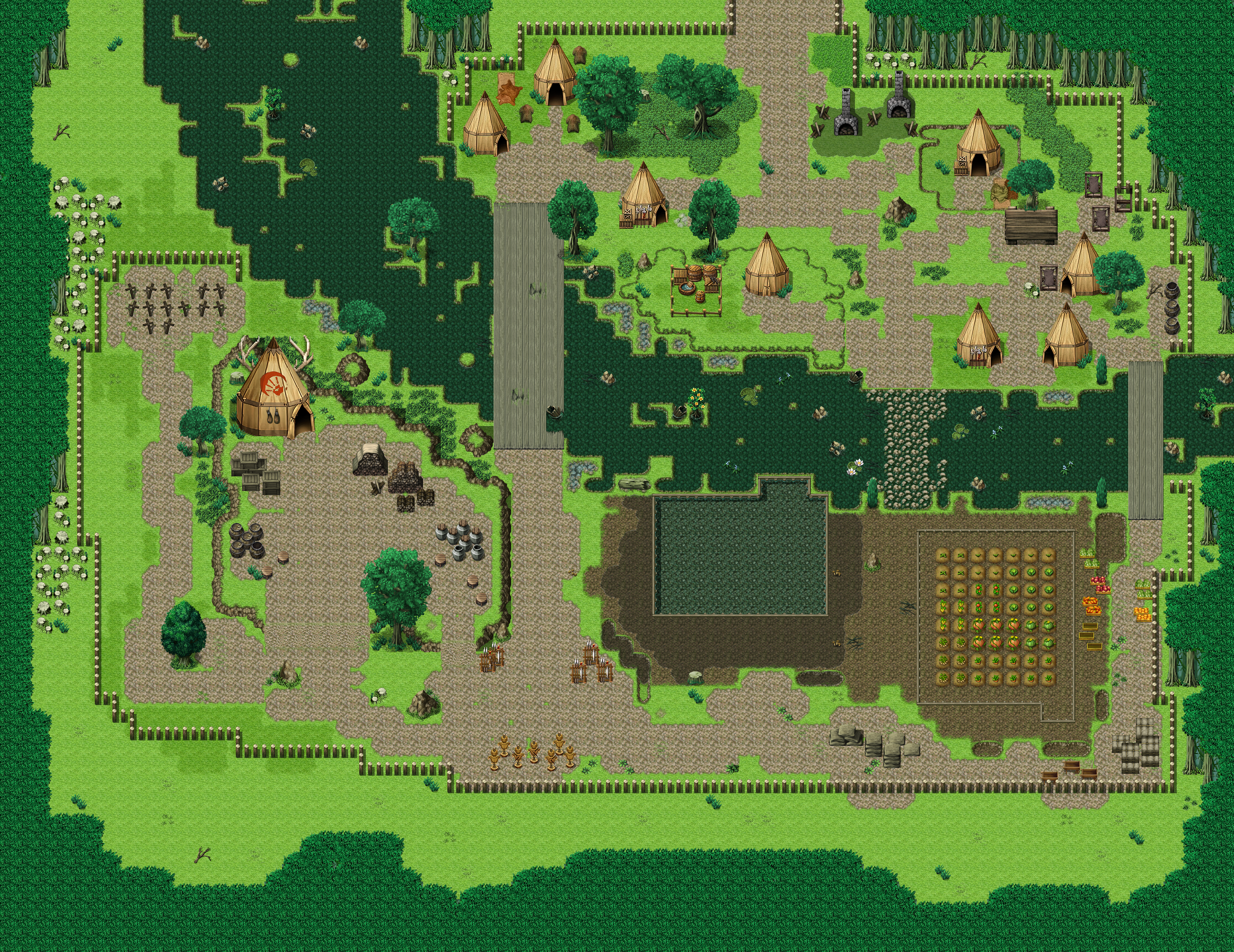
    Does this look better?

    I will try and find a campfire tile and replace the furnaces later.
    As for the slopes... this is the best I can do right now, I will try to make better dirt slopes and overall touch up the map at a later time.

    Though a lot of Greenery of the map is lost, it does seem way more functional now.
    Thanks for the help, both of you.
    Have a good day.
  17. Roxus said:
    Does this look better?
    In my opinion, yes. I'm still not sure about that rock going across the elevation, but overall I think it's better.
  18. @Roxus Much better. For your ramp problem, could you use your image program (GIMP/Photoshop/whatever) and work on your ramp there? Add a path to the ramp graphic on a new layer so that you can fiddle around with it. Blur the edges of the path, merge down the layer and there you will have it. Is that the FSM tileset?
  19. Kes said:
    Add a path to the ramp graphic on a new layer so that you can fiddle around with it. Blur the edges of the path, merge down the layer and there you will have it. Is that the FSM tileset?
    I did something similar and the result was the ramp you see.
    And yes, it is FSM tileset.