Game & Map Screenshots 10

● ARCHIVED · READ-ONLY
Started by Celianna 1970 posts Page 48 of 99 View original ↗
  1. Spent the night making cave/abandoned mine map... There are 10 30x30 maps. { Only showing the first 4 though :D) and still 4/5 to go...
    I'm using TerraxLighting so in game it's nice and dark :cutesmile:
    dRqX9sH.png
    FBFeZ5M.png
    uERPnwE.png
    Nf8hs9M.png

    Let me know what you guys think :cutesmile:
  2. Finnuval said:
    ....

    Looks good, and surely better with lighting. The only thing that bothers me are the rail at every entrance... should they stop there or go through?
    In case of going through i would rather do this:

    Aep4x8d.png
  3. @Finnuval looks awesome! man, i keep forgetting how amazing the FSM tiles are. soooo much better than the RTP cave tiles

  4. A work in progress video on a new game I'm working on.
    Currently under the codename "Project Genesis".
    Hope you all like it! :)

    *P.s. There is a lot of test content in here.
    If something looks out of place, it's because it's not even close to being finished yet.
    P.s.s. Pm me if you'd like to make some battle sprites ^_^;
  5. This is why I started doing parallax mapping.
  6. For the railings, you'd need to find a railing tile/s that sits at the edge instead of using the default fence autotile. Afaik, some of the included tilesheets for B-E actually have railing tiles in them.
  7. @HyeVltg3 I've merged your topic with this one, the best place to get mapping advice.

    Mapping multilayers and balconies in the editor is tricky. I'll post some samples in a bit, but I highly recommend searching for how to do shift-click mapping, it really helps a lot.
  8. Engr. Adiktuzmiko said:
    For the railings, you'd need to find a railing tile/s that sits at the edge instead of using the default fence autotile. Afaik, some of the included tilesheets for B-E actually have railing tiles in them.

    I wish I had your eyes because, I cannot for the life of me see anything that resembles railings in B-E, just took a look at the the other Inside and Outside tiles, not seeing something that looks like railings.

  9. Can anyone help me. I'm not sure if I should continue to add buildings around the walls. Ii haven't added litle details yet, likea market stall or stuff like that (and I need to do some editing to fix the little walls). I just wish to know about the buildings. all the player can access is the from bottom to the castle, outside the walls to either side will not be accessable.
  10. @Paladin-Cleric of Awesome I have a lot of trouble making sense of the height and buildings placements. The walls seem to be of different height, but maybe it's just me. With all these elevations, it's hard to be sure. The shadows could help, but they are inconsistent too (and a bit is missing in the top-right).
    But why is there a wall when you have buildings outside and, even more, a complete opening on the right? And even if it were closed by a wall, some buildings on the side have stairs leading to outside, so an army just has to climb the stairs to invade the city.
    The buildings don't look like they have been built with a purpose or meaning. The layout is strange.
  11. The reason there's a wall is simply because old cities started as a castle, and then branched out, so the rest of the building outside it is where the peasents started building. again haphazzard because that's how I've seen old cities in maps.

    but maybe I'll go back and figure something else out.
  12. @Paladin-Cleric of Awesome City expansion was often too fast and many buildings were built outside of the protection of wall IRL, but there was still a wall, closed. And sometimes many walls, if it was an old city expanding over time. But not a hole, as it would defeat the very purpose of having a wall.
  13. Hmm, maybe I haven't made it clear enough, the city goes upin three sort of teirs, with the sprawl of the city itself outside the walls. each level has its own gates (which will be added ater) to add to overal defense of the city. none of the houses outside are connected to those within. Maybe I can try to make that clearer somehow, that there is no openings to get to the castle except going up all he steps. The king of this particular city is concerned only wth his own defence, so he is in the most defensable location, followed by his knights and soldiers and other rice people, then of course it drops into the punishment zone which is how he keeps order, and then the first line of defense towers, then the masses.

    I'll have a play and see what I can do to make it clearer.
  14. Finnuval said:
    Spent the night making cave/abandoned mine map... There are 10 30x30 maps. { Only showing the first 4 though :D) and still 4/5 to go...
    I'm using TerraxLighting so in game it's nice and dark :cutesmile:
    dRqX9sH.png
    FBFeZ5M.png
    uERPnwE.png
    Nf8hs9M.png

    Let me know what you guys think :cutesmile:
    Plain and solid tile mapping, the kind I like best. Great job!
    I would personally make the "walls" thinner so there will be more black space, but it's just a personal preference.
    Can you show some in-game screens?
  15. @Dankovsky no in-game footage (yet) but thank you for the compliment :cutesmile: I usually do the walls thinner for buildings. Caves I keep a bit thicker and because I'm using terraxlighting this works better somehow IMO anyways


  16. I've taken a lot of houses away to show the actual structure of the inner part of the 'city'. I still need some advice about adding houses outside the walls. I hope the in game pick shows what I mean about defences even though there is a large opening at the front.
  17. @Paladin-Cleric of Awesome

    That looks awesome! Reminds me a lot of those old-fashioned towns that has a castle-like town but with some buildings outside of it too. Looks like some kind of dark, medieval kind of appearance too, adds to the style~

    ----------------​

    I finally managed to get around to designing a castle, but once I "finished" the first floor, something was just telling me it doesn't quite feel like a castle. Could anyone perhaps provide some feedback on it? As far as map design is concerned, I'm still learning what looks good but also functional and aesthetically pleasing.

    Image
    MXeSCYN.png
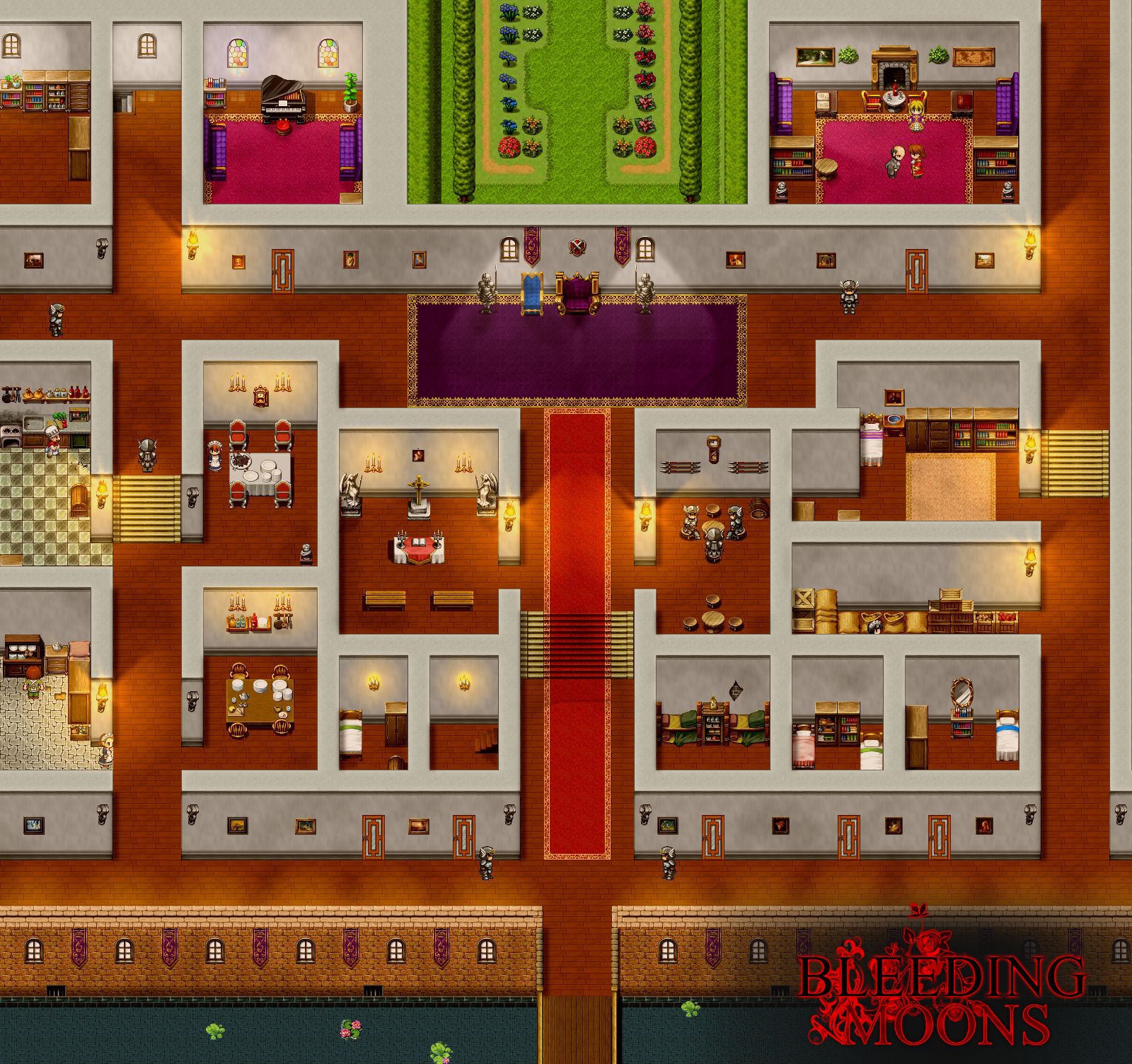
  18. @Raynar : I'm not entirely sure how to explain how to make a castle look like a castle, so I'm going to post some images I've made of castle interiors in hope it makes some more sense.
    The main thing I think is to plan out what a room is for and to then make it look as royal as possible, while still keeping the room interesting.

    Also, always use two tile high walls or bigger. castles are big, tall and imposing, yours looks rather squat and uncomfortable, like people would have to bend over to walk around... (sorry, that sounds really bad, sorry!)


    [embedded media]
    [embedded media]

  19. @Paladin-Cleric of Awesome Woah... So much detailing... I had always thought that most of the interior as far as I saw was mostly tight-spaces, since I kept following the size of the Castle Sprite itself. (Well, one of them anyways that was built into the default tile-sets of RPG Maker VX.) That's definitely opened up many more ideas for possible designs. Thank you! ^_^
  20. @Raynar You can find and make many castle's layouts, depending on the style, era, etc.
    In a different style, here is how I made mine if it can give you some new ideas.
    Large picture, so I've put it in spoiler
    ss_Chateau%20duc.jpg