I have run in to 2 different issues, both related to Galv's Layer Graphics
Alignment still technically continues to be a problem, however I have found a solution that...works........So, I have spoiler tagged "Problem 1" since I guess it's "solved"....
Spoiler
Problem 1: Alignment
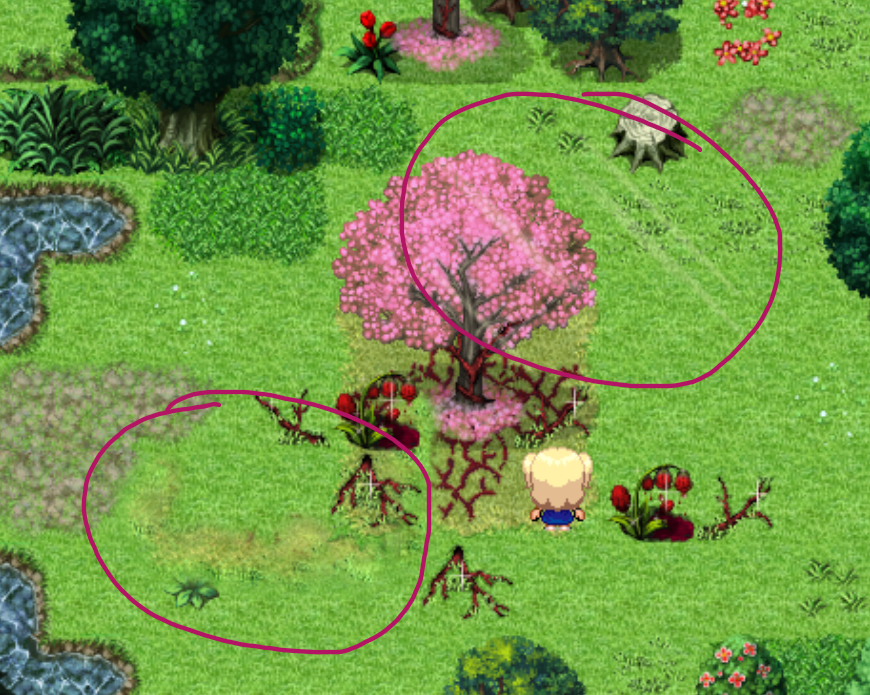
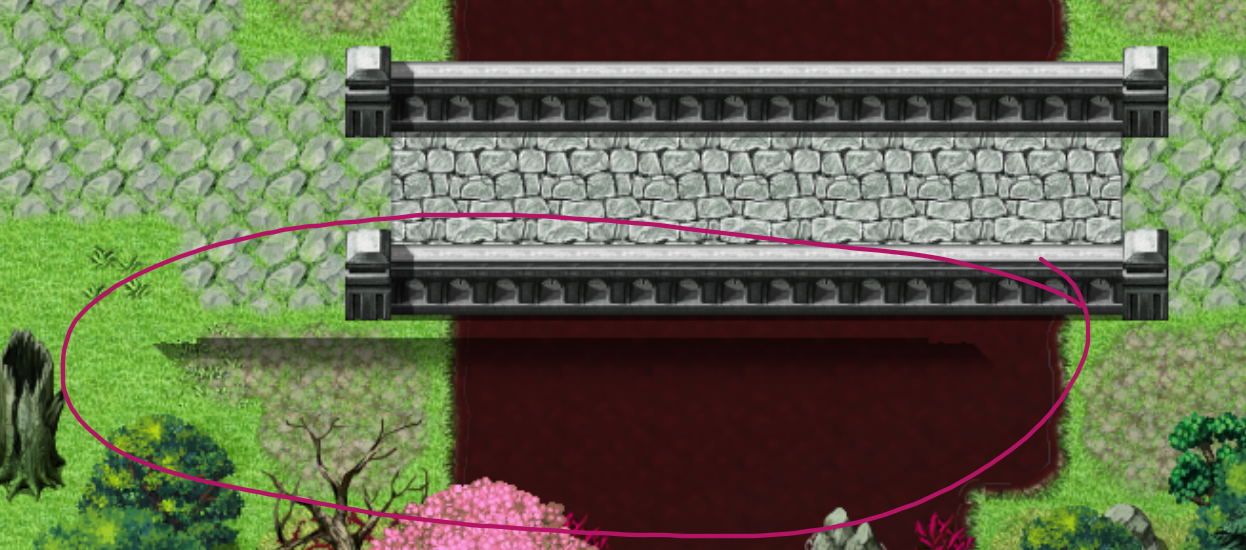
This one may potentially be on me just misunderstanding something, but I seem to have a lot of trouble getting the image to align itself properly to the map. Often it seems off by half-tiles, so obviously moving the event the image is bound to up or down or left or right doesn't fix it. I tried the image X and Y values (in the plugin command) but they don't seem to do anything? The help documentation is a little bit vague on what specifically those X/Y values do and what the X/Y values are. Is it Pixels? Is it the grid? Who knows. Either way, nothing happens anyways.
I haven't tried binding it to the map via a map notetag, however the reason is that I have an option in my options menu to control the level of detail by enabling/disabling layers from the layer graphics. I don't think you can set up conditionals in the notetag right?
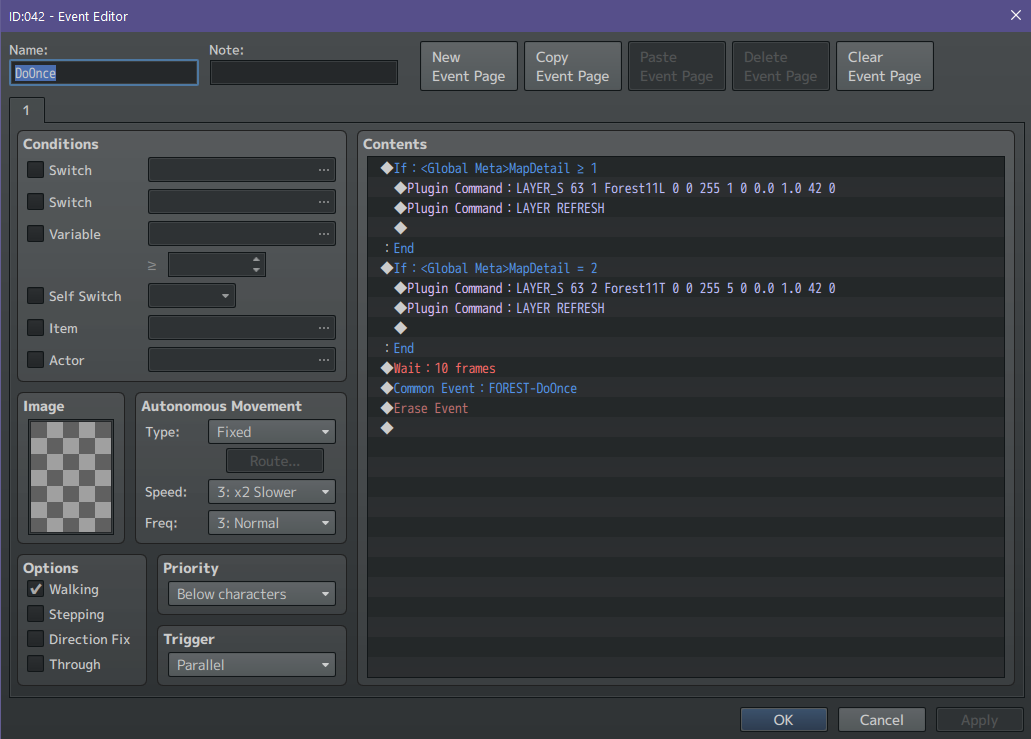
Here are some screen shots to show the error specifically (misaligned objects have been circled if they aren't obvious), additionally the event with the plugin commands.
To provide some details specifically about the parallax images themselves:
The maps is 51x51 tiles. The image is 2448x2448.
The parallax is made up of 2 layers, a lower layer (below the player) and a top layer (above the player)
This one may potentially be on me just misunderstanding something, but I seem to have a lot of trouble getting the image to align itself properly to the map. Often it seems off by half-tiles, so obviously moving the event the image is bound to up or down or left or right doesn't fix it. I tried the image X and Y values (in the plugin command) but they don't seem to do anything? The help documentation is a little bit vague on what specifically those X/Y values do and what the X/Y values are. Is it Pixels? Is it the grid? Who knows. Either way, nothing happens anyways.
I haven't tried binding it to the map via a map notetag, however the reason is that I have an option in my options menu to control the level of detail by enabling/disabling layers from the layer graphics. I don't think you can set up conditionals in the notetag right?
Here are some screen shots to show the error specifically (misaligned objects have been circled if they aren't obvious), additionally the event with the plugin commands.
To provide some details specifically about the parallax images themselves:
The maps is 51x51 tiles. The image is 2448x2448.
The parallax is made up of 2 layers, a lower layer (below the player) and a top layer (above the player)
Problem 2: The parallax is being unnecessarily culled.
Please reference this gif. If you are having trouble seeing the problem, look at the pink tree on the left side of the video.
Spoiler
A lower layer, a "canopy" layer, and a top layer.
The lower layer and canopy layer are not being culled. Only the top layer gets culled.
The other strangeness about this behavior is that it only culls when the player is a certain distance below the event.
First of all, when entering the map, the player is 24 tiles above the event the image is bound to. When the player enters the map, the image loads properly without problems. However, when the player moves 9 spaces below the event, it culls it as seen in the gif above. Secondly, I tried anchoring the image to the bottom left corner of the image and moving the event to the bottom corner of the map. In this case, the image was never culled! However, now I had an alignment problem with the image mentioned in problem 1 in this thread.
Below are some pictures of the map and event.
Spoiler
I suppose it's worth noting that I tried using one event to call the images and assign those images to a different event on the map. I don't know why I thought that make a difference, but anyways it didn't. It culls the image based on the event the image is bound to, doesn't matter what event called the image.
Any help with this would be greatly appreciated.
THE SOLUTION!
See this post in this topic for the answer:MV - Galv's Layer graphics problem, and graphics being removed
Thank you Galv and Ziorke for your input.