I'm so happy you post examples, as I'm not good at math at all and I can't really grasp my head around solid uses of these kinds of tools. Thank you.
I just wanted to make sure it was asked, will we be able to change the position of where the state buff/debuff icons show in the window with your plugin as we can change the HP/MP/TP/ATB gauge locations, too?
Ellye's ATB (also includes CTB option)
● ARCHIVED · READ-ONLY
-
-
Another update today:
* 2015-11-02-1350: Turn Prediction interface now reacts to the player hovering over skills that interact with the ATB system (as long as they do it via Notes). (Work in Progress)

Oh, I had forgotten about that. Sure, it's possible, I'll see to it!I just wanted to make sure it was asked, will we be able to change the position of where the state buff/debuff icons show in the window with your plugin as we can change the HP/MP/TP/ATB gauge locations, too? -
By the way, I'd like to share this with you all. It's a fully custom ATB ready sound effect in the style of the old SNES Final Fantasy games. It's just inspired and not taken directly from them as that would be a rip and that's not allowed here. It was made using FamiTracker with the NES Namco additional sound chips found in Japanese Namco games. I opted for that chip since it gave me a wider range of wave patterns to choose from. I have an FDS (Famicom Disk System) FM version as well, but it's modeled directly from Final Fantasy 5/6 and it's not very loud. Anyway, I hope you all enjoy! Think of it as a thank you gift not only to the people in this thread for encouraging Mellye to continue their work, but also as a thanks to Mellye as well for the wonderful plugin! :)
ATB Ready Sound (Famicom Namco Chip)
Will leave this up for others I will probably make. :] -
I have maked a way to escape in battle, but this engine only works with all party members and having the 3 Action Sequences pack (and battle engine core so) of Yanfly.
1.- Make two common events, we will name it [Escape base] and [successful escape].
2.- Put in [successful escape] the "Stop battle" command.
3.- Put in [Escape] a conditional branch and put the switch what you want to disable the escape function. ex: "Boss battle".
4.- In ON condition, put a skill, we will name it [Can't escape]
5.- In OFF condition, put another skill, we will name it [successful escape] too.
6.- Create the skill you want to use for escape, the visible one for the player. Put the name, the icon, cost, the skill type, and the other settings of you want, but the target only can be "all allies" or "nothing"/"any" (I'm sorry, i have the spanish version.)
7.- In the notebox, put this string:8.- In the [Can't escape] Skill, put this notebox:<Target action>
common event: id of the common event [Escape]
</Target action>
Leave the other settings as you will, but i recommend no icon, because the idea is to the player only view this as "Message".<Target action>
perform finish
wait for movement
clear battle log
</Target action>
9.- Next, in the [successful escape] skill, i reccommend again, put the settings with no icon, but is your will. Then put this in notebox:10- Finally, in the [Escape base] common event, put in the conditional branch "ON" a "Force action" command and then select the actor that have the escape skill, and then select the [Can't escape] Skill. Leave the target as default.<Target action>
motion escape: actors
move actors: backwards, 400, 20
wait for motion: actors
wait for movement
opacity actors: 0, 1
SE: Run, 80, 100, 0
common event: 4
</Target action>
11- Do the same with the "OFF" branch, but this time put the [successful escape] skill.
And this will make your characters run from battle almost like the normal escape command.
Images:
Spoiler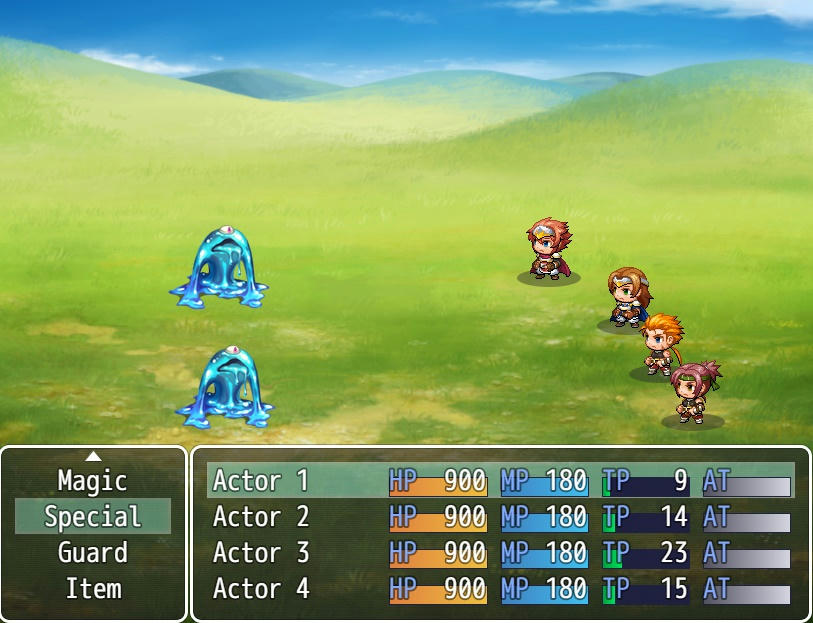

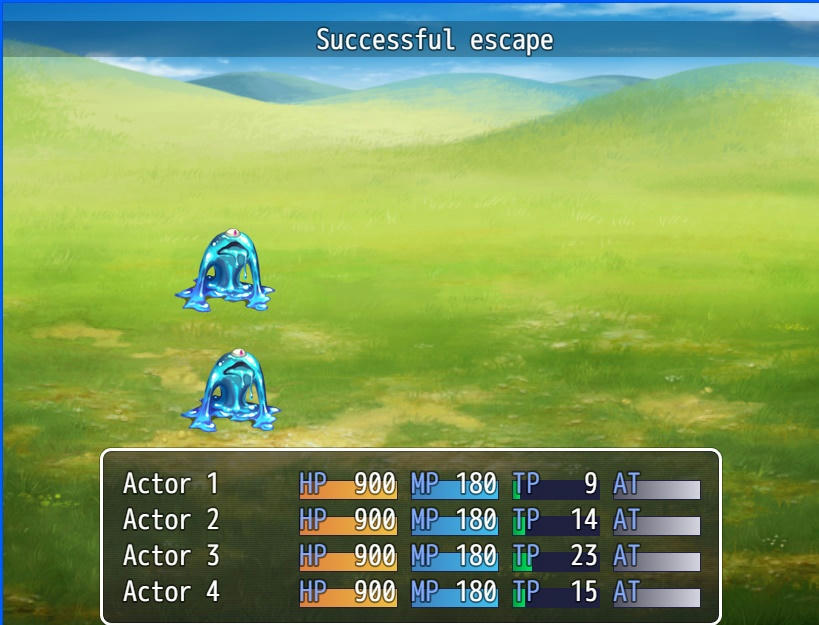

Example Demo. -
After the most recent update, it now crashes my game when using your states damage script.
-
@Mxmsoft....
Excuse my stupidity ... but in a little demo ???
@Mellye
Beautiful Your last uptade plugin .
Now finally there is the waiting time for the skills ...
but you can do that ATB gauge marks than it does upon the skill casting ???
What numbers can I set the max and min time casting ??? -
Thanks! I've uploaded a new version, the crash should be fixed now, let me know if any issue persists. I've also updated the States Plugin - the same thing that was causing a crash here could potentially cause crashes with other plugins too.After the most recent update, it now crashes my game when using your states damage script.
Yes, there will be visual signs in the ATB gauge and such - for now it's just a rough early release indeed.@Mellyebut you can do that ATB gauge marks than it does upon the skill casting ???
What numbers can I set the max and min time casting ???
As for the numbers, by default 50000 would be equivalent to a full gauge; so 25000 for a half gauge, 10000 for one fifth, etc. -
Ok! I have edited my post with images and the demo, here is:@Mxmsoft....
Excuse my stupidity ... but in a little demo ???
Images:Spoiler
Demo. -
Ok! I have edited my post with images and the demo, here is:
Images:Spoiler
Spoiler
Thank you!!!! Beautiful demo !!! really great your system !!! It works great !!! Thanks again for your demo !!!
@Mellye
Ok. ... Thanks for your guide on the numbers ... ; D wait for the plugin with the system waiting for the ATB bar !!! -
Hello. I don't think I saw anyone having the same issue while skimming through the thread.
But I seem to be unable to have this ATB work with Yanfly's BattleAICore.
It works normally if the enemy has no battle AI in the notetags. However, once I put the AI in then the AI doesn't do anything except for what's in the attack patterns.
The AI works once I turn off your ATB. I tried placing the plugin above and under every single one Yanfly's battle related plugins(BattleCore, ActSeqPacks, BattleAI, VictoryAftermath). Yet it doesn't fix the issue.
I wasn't sure whether to come here about the issue or to go to Yanfly, but I had this open already so...yeah. If I missed anything, feel free to tell me. -
During casting times, the actors stay in their "forward step" spot. They also don't use their "prepared" or "magic charging" poses as if you gave them commands in the normal default turn based system: this part is very important to me. If another member performs their action before their charge time is complete, both actors go back to their normal positions.
Can't wait to see the second ATB gauge that fills up for charge times <3 -
During casting times, the actors stay in their "forward step" spot. They also don't use their "prepared" or "magic charging" poses as if you gave them commands in the normal default turn based system: this part is very important to me. If another member performs their action before their charge time is complete, both actors go back to their normal positions.
Can't wait to see the second ATB gauge that fills up for charge times <3
Also I have noticed what you say you hope that you can solve !!!
And also I can't wait to see the second ATB gauge that fills up for charge times!!!! BD -
Yeah, the visual aspect of casting is still under work. I plan on giving some options selectable per skill (and a default one).During casting times, the actors stay in their "forward step" spot. They also don't use their "prepared" or "magic charging" poses as if you gave them commands in the normal default turn based system: this part is very important to me. If another member performs their action before their charge time is complete, both actors go back to their normal positions.
Can't wait to see the second ATB gauge that fills up for charge times <3
The next feature update should be the visual part of turn prediction (something to differentiate when an actor is getting an early or late turn due to skill modifiers or such). -
your going to want to always put this below yanflyHello. I don't think I saw anyone having the same issue while skimming through the thread.
But I seem to be unable to have this ATB work with Yanfly's BattleAICore.
It works normally if the enemy has no battle AI in the notetags. However, once I put the AI in then the AI doesn't do anything except for what's in the attack patterns.
The AI works once I turn off your ATB. I tried placing the plugin above and under every single one Yanfly's battle related plugins(BattleCore, ActSeqPacks, BattleAI, VictoryAftermath). Yet it doesn't fix the issue.
I wasn't sure whether to come here about the issue or to go to Yanfly, but I had this open already so...yeah. If I missed anything, feel free to tell me. -
hard at work i see :) best of luckYeah, the visual aspect of casting is still under work. I plan on giving some options selectable per skill (and a default one).
-
That's a bit too vague. Under Yanfly's what? EngineCore... BattleCore.. battleai... All of Yanfly's? I already mentioned I tried it all around the battle plugs. And I'm not currently home to try elsewhere atm. So I'd appreciate a more detailed answer.your going to want to always put this below yanfly
-
No one knows for sure. I just put mine below Save Event Locations, but above the rest of my "other" plugins that I keep below Yanfly stuff.That's a bit too vague. Under Yanfly's what? EngineCore... BattleCore.. battleai... All of Yanfly's? I already mentioned I tried it all around the battle plugs. And I'm not currently home to try elsewhere atm. So I'd appreciate a more detailed answer.
-
Ok ... well ... I can not wait ' now !!! I'm sure it will be a job well done ... you are very good !!! ;) ;) ;)Yeah, the visual aspect of casting is still under work. I plan on giving some options selectable per skill (and a default one).
The next feature update should be the visual part of turn prediction (something to differentiate when an actor is getting an early or late turn due to skill modifiers or such). -
That's a bit more helpful, thanks. I will try placing it in the same spot when I get home.No one knows for sure. I just put mine below Save Event Locations, but above the rest of my "other" plugins that I keep below Yanfly stuff.
-
While turn prediction isn't my thing, I still can't wait for your updates! So excited!Yeah, the visual aspect of casting is still under work. I plan on giving some options selectable per skill (and a default one).
The next feature update should be the visual part of turn prediction (something to differentiate when an actor is getting an early or late turn due to skill modifiers or such).