DM Shop Core - [MZ]

● ARCHIVED · READ-ONLY
Started by Dungeonmind 53 posts Page 1 of 3 View original ↗

  1. Introduction

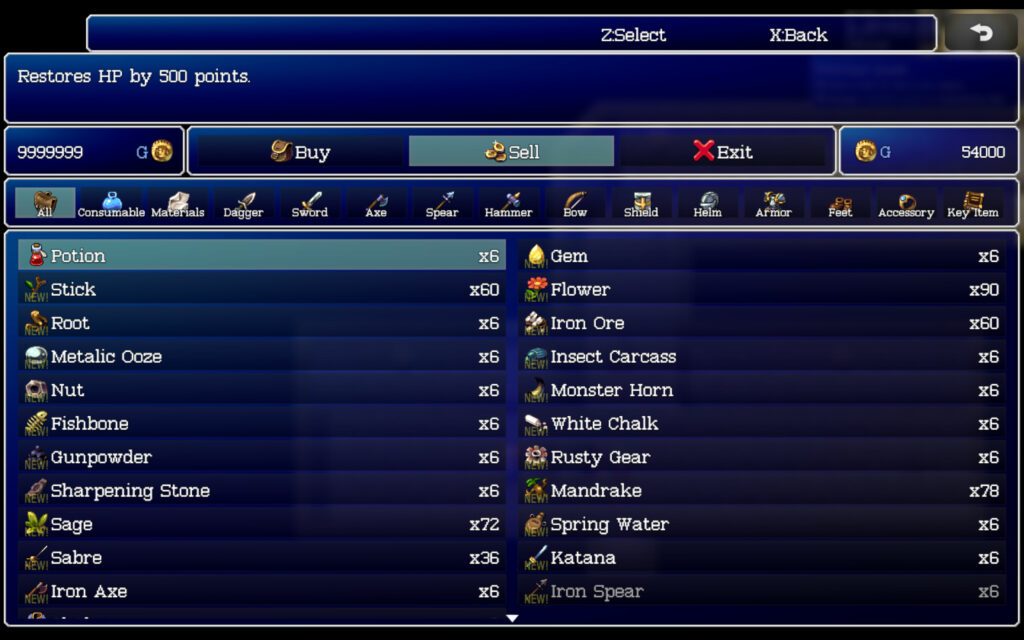
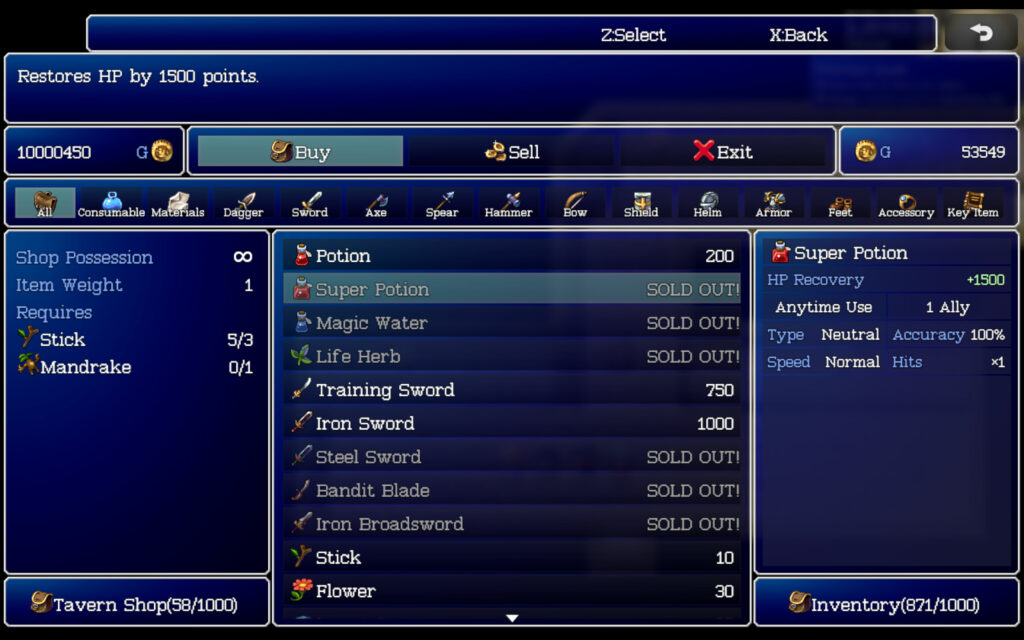
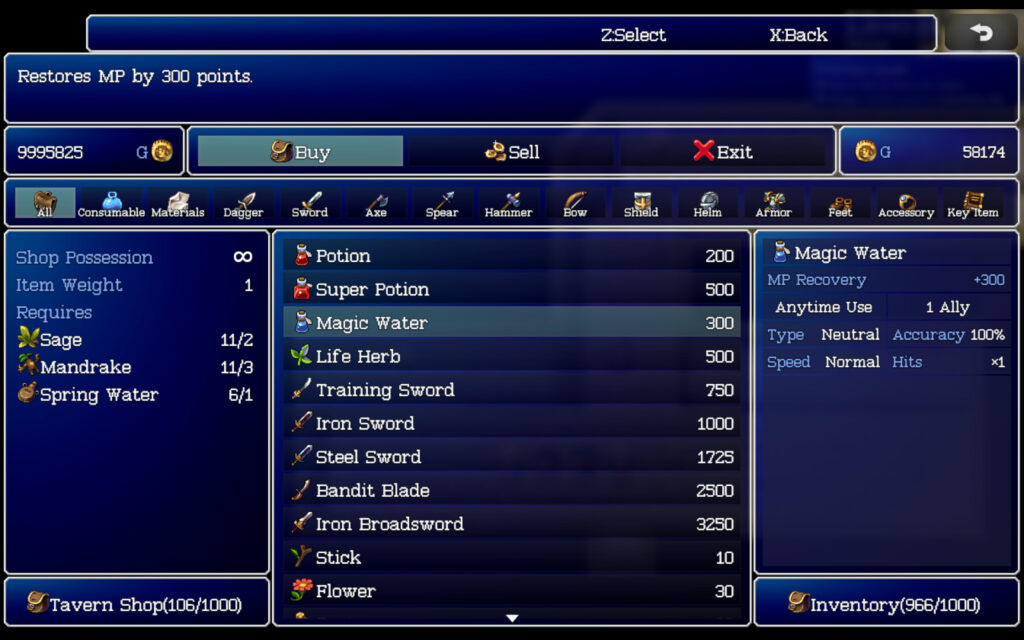
    Create unique shopping experiences for your game with Shop Core’s advanced customization features. Set customizable stock limits, shop owner weight capacity, and gold limits to fit your game’s specific needs. Most features are optional, allowing you to tailor the shop to your exact requirements. The plugin’s intuitive Shop Manager section allows you to easily define custom shops and integrate them seamlessly into your game using script calls or plugin commands.

    You can define your custom shops within the “Shop Manager” section of the plugin parameters. You can then call your custom shop from within the game using script calls or plugin commands.

    Screenshots

    Screenshots
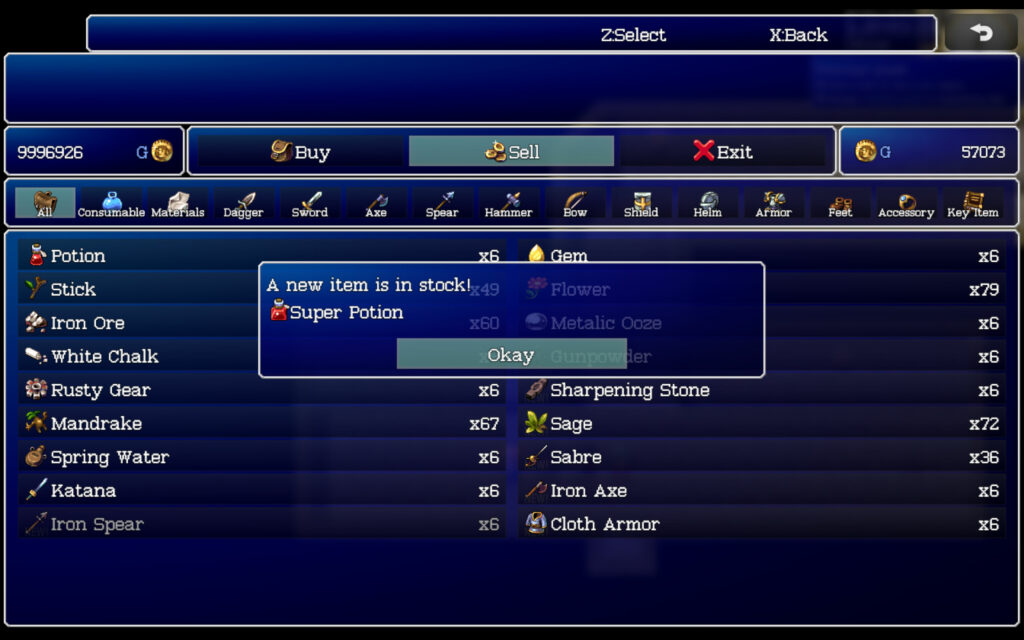
    Dm Shop CoreDM Shop CoreDM Shop CoreDM Shop Core

    Features

    • Complete compatibility with my other DM series plugins.
    • Define multiple custom shops right in the “Shop Manager” plugin parameters section.
    • Set the shop’s maximum weight limit. (optional)
    • Set the shop’s maximum gold limit. (optional)
    • You can set the shop to retain/remember items that are sold to it. (optional)
    • Set certain items, weapons, and armour to require specific materials to be sold to the shop first before they become available. The item, weapon, or armour will then require those items to be sold to the shop every time you want to purchase it again. This game mechanic is meant to mimic Etrian Odyssey games on the 3DS. (optional)
    • Display a “new item is unlocked” window when the player has sold the required items for an item, weapon or armour.
    • Set the shop to have all its items, weapons, and armor with requirements to automatically be unlocked. (optional)
    • Supports using text codes for changing the colour in the shop and inventory name windows.
    • Use script calls or plugin commands to change shop item prices individually or by percentage as a whole.

    Compatibility

    Bug Reports

    This is a fairly large script, so for any bugs you may find, please report them in the comments with the following format:

    Description: (Here, you will tell me what you were doing when the bug or crash occurred.)
    Javascript Error: Here, you can tell me the exact error you got. Including a screenshot with the crash error is recommended and will get you faster results. Also, finding out the exact line number that caused the crash will make it more possible for me to find out what the core root of the problem is and provide you with any necessary plugin updates in a timely manner.

    Terms of Use

    1. Licence Terms:
      • By purchasing or downloading the plugin, you acknowledge that you have received or been provided access to a licence agreement, and you agree to the terms and conditions outlined in that licence agreement. Failure to comply with these terms may result in licence revocation.
    2. Ownership and Redistribution:
      • The plugin and its code are the exclusive property of Dungeonmind. You may use the plugin in your RPG Maker projects, but you may not resell, redistribute, or claim ownership of the plugin/code itself, except as specifically permitted in the licence agreement.
    3. Code Usage:
      • The plugin/code is licensed for use in RPG Maker MV/MZ projects as specified in the licence agreement. You may not extract or reuse code in other plugins or non-RPG Maker projects without express permission.
    4. Usage Restrictions:
      • If the plugin is downloaded without purchasing a commercial licence, it is for non-commercial use only. Commercial use requires a licence purchase from the official website or any officially supported platform like itch.io.
    5. Confidentiality:
      • The plugin/code is confidential and should not be shared with anyone without express permission from Dungeonmind.
    6. Modification:
      • You are permitted to edit the plugin/code for the purposes of your personal projects, as specified in the licence agreement. Any other modifications, including redistribution or reuse of modified code, require express permission from Dungeonmind.
    7. Attribution Requirements:
      • As specified in the plugin's licence agreement, providing credit is required. Please refer to the licence for specific credit requirements.
    8. Precedence:
      • In the event of any conflict or inconsistency between the terms outlined here and the licence agreement, the terms of the licence agreement shall take precedence.
    Download

    Link to plugin page

    Happy Rpg Making!
  2. I made a minor bug fix, and anyone using my new shop core plugin should download the latest build. Thank you!
  3. I made some pretty important bug fixes. You can find the actual changelog at the bottom of the plugin page on the website, thanks.

    bug-fixes-04-10-23.png
  4. My apologies for posting it here late, but I updated this plugin again 3 times in the last few days. The most recent update (yesterday) did add a couple of small features though.

    dm_shop_core_106.png
  5. Hi,

    I'm getting an error when trying to run this plug-in. You can find the error code below:


    Screenshot
    1683748451287.png

    I tried in a fresh project as well, and got the same error.

    Here's the fresh project plugin setup:
    setup
    1683748745705.png

    Let me know if you need any other information!
  6. Hello folks. I made an update to this plugin with some bug fixes.

    shopCore_update_107.png
    Lonewulf123 said:
    Hi,

    I'm getting an error when trying to run this plug-in. You can find the error code below:

    Hi there. This happens only when you don't define any shops in the Shop Manager section of the plugin. I've added a default shop in the latest build so that this doesn't happen anymore to new users. Please re-download the plugin from the website here.

    You helped me find a bug when I created a blank project to match yours since you're the first person not using limited inventory. The bug is now fixed. So thank you.
  7. Dungeonmind said:
    Hello folks. I made an update to this plugin with some bug fixes.

    View attachment 262110


    Hi there. This happens only when you don't define any shops in the Shop Manager section of the plugin. I've added a default shop in the latest build so that this doesn't happen anymore to new users. Please re-download the plugin from the website here.

    You helped me find a bug when I created a blank project to match yours since you're the first person not using limited inventory. The bug is now fixed. So thank you.
    Thanks for taking the time to look at this and fix!

    Really appreciate the commitment to fixing and improving your plugins.
  8. This plugin looks great, is it possible to make what the shop sells random?
  9. Is it normal or just be. I have like 50 Gold and I buy an item costing 50 gold and then tries to buy 11 quanity where the game shouldn't allow you buy unless you have enough gold.
  10. Hello,

    This plugin looks wonderful! The only snag I've encountered is that for some reason when I try to leave the shop stock for an item blank (as instructed in order to result in an infinite stock), the field auto-populates the last number that was in it, making it impossible to actually leave blank. Any ideas on how to fix this?

    EDIT: I was able to make it work by leaving the space blank in the Text field rather than the Structure List. A little slower but it works!
  11. Ok separate question:

    In your screenshots, the right side of the screen that tells you details about the item highlighted is nice and concise. When I look at my project using the plugin, that section has a lot of extra info that I don't necessarily want to show up (shown in attached screenshot). Is there a way to edit what is shown on that part of the menu?
  12. @djroberts1 , please avoid double posting, as it is against the forum rules. You can use the "Edit" function on your posts to add additional information you've forgotten or respond to multiple people. You can review our forum rules here. Thank you.
  13. Dungeonmind said:
    Hello folks. I made an update to this plugin with some bug fixes.

    View attachment 262110


    Hi there. This happens only when you don't define any shops in the Shop Manager section of the plugin. I've added a default shop in the latest build so that this doesn't happen anymore to new users. Please re-download the plugin from the website here.

    You helped me find a bug when I created a blank project to match yours since you're the first person not using limited inventory. The bug is now fixed. So thank you.

    Where's this compatibility patch? I checked everywhere and I can't find it. Using Items and Equip Core with the latest updated Shop Core and Item Core shows no information.
  14. shopCore_update_108.png

    Hello fellow RPG Makers! I am back with an important update for my shop core plugin. There was a bug that allowed the player to purchase goods with insufficient funds. So make sure to download the latest build over here.

    A lot of these comments I didn't even get a notification for because I had 'watch' set to off by mistake. Sorry about that folks.

    Zer0Morph said:
    This plugin looks great, is it possible to make what the shop sells random?

    Thank you! At the present time, this would be kind of difficult considering the time it took to implement the Etrian Odyssey-esque shop system features.

    Jrrkein said:
    Is it normal or just be. I have like 50 Gold and I buy an item costing 50 gold and then tries to buy 11 quanity where the game shouldn't allow you buy unless you have enough gold.

    Hello, and thank you for reporting this. This was a bug and has now been fixed in the latest build, which you can download over here. I even added a message that appears in the top help window that tells the player, "The party has insufficient gold." With gold being whatever you have it set to in the database.

    djroberts1 said:
    Ok separate question:

    In your screenshots, the right side of the screen that tells you details about the item highlighted is nice and concise. When I look at my project using the plugin, that section has a lot of extra info that I don't necessarily want to show up (shown in attached screenshot). Is there a way to edit what is shown on that part of the menu?

    Hello @djroberts1,

    If I am understanding you correctly, this would be a question better suited for VisuStella because that is their plugin that shows this information. My plugin is just made compatible with the VisuStella item core plugin.

    Tuomo L said:
    Where's this compatibility patch? I checked everywhere and I can't find it. Using Items and Equip Core with the latest updated Shop Core and Item Core shows no information.

    You have to add the plugin again to the plugin manager to see these changes. All this does is define a default vanilla shop so the plugin doesn't throw an error if people just start the game without even defining any shops for their game.
  15. shop_v109.png

    Hello, I am back with another small bug fix but an important one nonetheless.
  16. shopCore_110.png

    Hi, I'm back with a bug fix.

    You can download the latest build over here.
  17. shopCore_update_111.png

    Hi,

    I'm back with another update for this plugin. You can download the latest build over here.

    Happy RPG Making!
  18. Hey DM, I am trying to use this along with your ItemCategories , however it doesn't seem that the Item Categories pull over the way they do in the screenshot you have for Shop. So i want to clarify,

    Do Item Categories or this plugin have any impact on normal shops? Or will they only affect Shops i used the

    $gameShop.openCoreShop(shopId);

    script call to open?
  19. Puppet Knight said:
    Hey DM, I am trying to use this along with your ItemCategories , however it doesn't seem that the Item Categories pull over the way they do in the screenshot you have for Shop. So i want to clarify,

    Do Item Categories or this plugin have any impact on normal shops? Or will they only affect Shops i used the

    $gameShop.openCoreShop(shopId);

    Hey @Puppet Knight ,

    It does work with normal shops when selling items but since the default shops do not show categories when buying items like my shop core plugin does, it won't show them while buying items either.
  20. Hi, I caught some bug or something. For some reason, when you have enough gold to buy an item and it is available, it is not bought. Or it doesn't buy a lot, but only a certain small amount. You can see in the video what I mean. Its a new created project, only 2 plugins installed (itemcategories and shop core). Versions of plugins latest and rpg maker also, tier of lugin in right way. So something is wrong with the gold count or the number of items. I thought maybe there was a problem with the items I created and added categories to, but there is also a problem with the standard potion(Зелье) 100 gold item