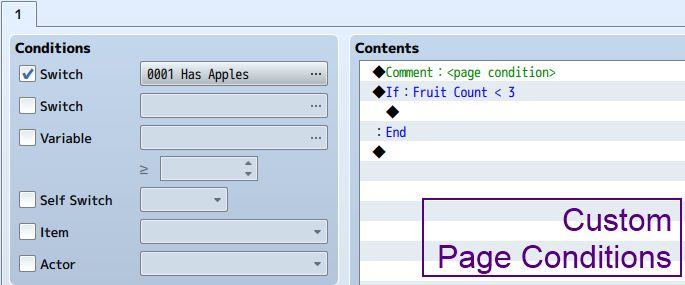
Custom Page Conditions

● ARCHIVED · READ-ONLY
Started by Tsukihime 22 posts Page 1 of 2 View original ↗
  1.  
    Events are a collection of pages. Depending on which page is active, the event will appear and behave differently. To determine which page is active, a set of page conditions are used. If all page conditions are met, then that page can be activated.

    By default, RPG Maker provides 5 different page conditions:
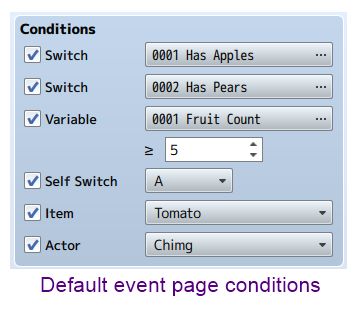
     
     
    But if you wanted to have a different condition, you would need to find a way to accomplish that using only these 5 conditions. This may involve using parallel processes to check whether conditions are met, in order to turn on a switch or change a variable.

    This plugin provides you with an easy way to define your own page conditions without having to come up with workarounds. If you want to check whether you have a certain weapon or armor, or whether a given combination of actors is in the party, you can directly specify this in your event.

    By using custom page conditions, it improves productivity and makes it easier to manage your project. Need some more page conditions? Download the plugin and try it out!
     
    More information and downloads are available at HimeWorks
  2. Always minimizing the need for workarounds, in typical Hime fashion. Great work!
  3. hmmm ... nice.

    In your example, what is Fruit Count and where is it set?  Wouldn't a variable need to be set prior to the condition?
  4. Shaz said:
    hmmm ... nice.


    In your example, what is Fruit Count and where is it set?  Wouldn't a variable need to be set prior to the condition?
    It's just using the variable option for conditional branches, rather than a formula.


    MV just decided to display it like that, which is kind of confusing now that I look at it.


    Any other condition would have been better...
  5. Yeah, I get that.  But where is the variable set?  It's working on the assumption that the variable is set in another event?

    The reason is that I'm wondering what if you had several conditions - needed to set a variable to an amount of something in inventory, and then check if it's > a certain value?  Or if you wanted to see if an actor had one weapon equipped or another weapon equipped (an OR statement, which would require 2 non-nested conditional branches)?  

    Can you set a custom condition that requires more than one event command?  Or would you have to resort to using the Script option in the Conditional Branch?
  6. Shaz said:
    Yeah, I get that.  But where is the variable set?  It's working on the assumption that the variable is set in another event?


    The reason is that I'm wondering what if you had several conditions - needed to set a variable to an amount of something in inventory, and then check if it's > a certain value?  Or if you wanted to see if an actor had one weapon equipped or another weapon equipped (an OR statement, which would require 2 non-nested conditional branches)?  


    Can you set a custom condition that requires more than one event command?  Or would you have to resort to using the Script option in the Conditional Branch?
    Game variables are initialized to 0.


    So in this case the condition assumes you are going to set it elsewhere.


    You might pick up some fruits and then suddenly an event pops up and tells you to hand them over.


    The way I have written it assumes that each page condition is a separate condition.


    So if you created two of them (whether they are nested or not), then both conditions must be met.


    For logical OR, you would have to use a script call in the conditional branch.


    Though I guess it may be possible to make it so that if they are nested, then you mean logical AND, and if they are not nested, then it's logical OR.
  7. So I can list multiples? Something like this for example?

    Comment: <page condition>Conditional Branch: Fruit Count < 3Branch EndConditional Branch: Have Fruit Basket = ONBranch EndHow does it determine where to end the page conditions and where to start the actual event commands?You know I'm only doing the 20 questions thing so I can see whether I should use your plugin instead of rewriting my own custom conditions script, right? ;)
  8. The script goes through all of the commands and checks for comment-condition pairs.


    Every page condition must come with a comment that designates it as a page condition.


    So in the example provided, the fruit count < 3 would be a page condition, but having a fruit basket would not.
  9. Haven't tried the MV version yet but just wanted to note that the Ace version of this script was probably the single most useful script ever released.  Looking forward to using this plug-in!
  10. [FRUITS INTENSIFY]

    Glad to see this script make it to MV!
  11. A new version of the plugin is available.

    I have decided to change the way the page condition is set up.

    Take a look at this image:

    customPageConditionsMV3.jpg

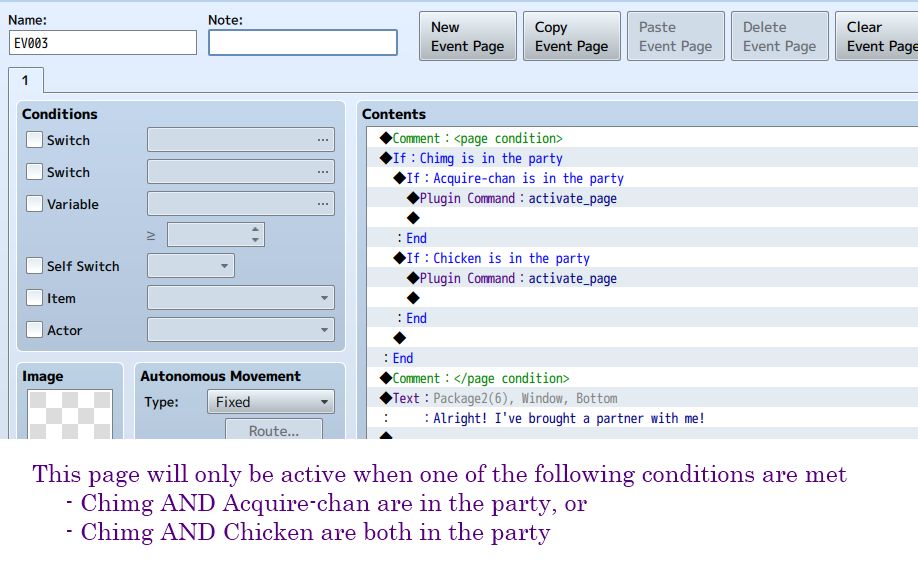
    The new page condition processing takes entire sections of the event page and treats it as the page condition.

    It starts with a comment that tells it where the page condition begins, and another comment for where the page conditions ends.

    In the page condition, you can have any commands that you want. What's important is the key plugin command

    activate_pageOnly when you execute this, does the page actually get activated.This allows you to basically event your own page conditions!

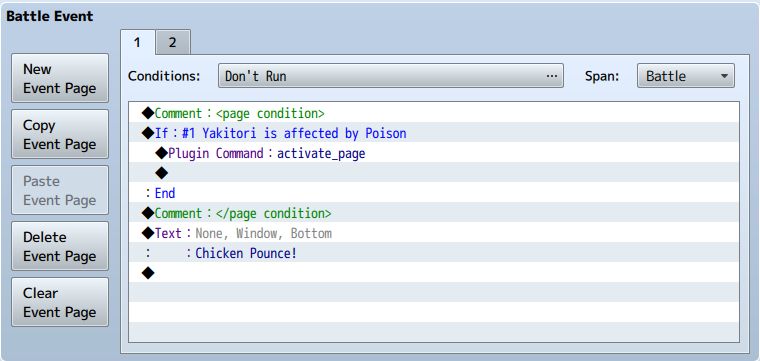
    It also works for troop events

    customPageConditionsMV4.jpg
  12. Hime, would you be up to converting your Bit Switches from VXAce? We talked earlier and I am thinking something like it might make a really useful combination with this plugin, to add a lot more utility to extremely complex events. And use a LOT LESS Game Switches.
  13. Ok.


    Btw, I've also just added support for troop page conditions since it wasn't as bad as I thought it might be.


    Some people might be wondering why they need to use this plugin when there are already conditional branches.


    Take a look at this example:


    customPageConditionsMV4.jpg


    Here's a troop page that runs when the poison state is applied to enemy #1, Yakitori.


    It will only run once in the entire battle, and will run when the state has been applied.


    What kind of solutions would you have to use in order to implement this kind of page condition with the default available tools?
  14. Updated plugin.


    There was an issue where self-switch and Self-Variable conditions weren't working.
  15. I'd really love to utilize this but there seems to be a bug with script if conditions inside the page condition notetags?
    Outside of the notetags "($gameVariables.value(22) === $gameMap.event(this._eventId).x) && ($gameVariables.value(23) === $gameMap.event(this._eventId).y)" works perfectly fine, however when inside the notetags it errors upon loading and says "x is undefined". Is this just a limitation of the page conditions/are you unable to use script if conditions, or is this a bug?
  16. SwiftIllusion said:
    I'd really love to utilize this but there seems to be a bug with script if conditions inside the page condition notetags?
    Outside of the notetags "($gameVariables.value(22) === $gameMap.event(this._eventId).x) && ($gameVariables.value(23) === $gameMap.event(this._eventId).y)" works perfectly fine, however when inside the notetags it errors upon loading and says "x is undefined". Is this just a limitation of the page conditions/are you unable to use script if conditions, or is this a bug?


    The problem here was the page conditions were being evaluated before the map was properly set up.


    I have updated the plugin so that it it will perform a check to see if the map has loaded the event yet before attempting to check for conditions.


    Now that condition should work.
  17. Tsukihime said:
    The problem here was the page conditions were being evaluated before the map was properly set up.


    I have updated the plugin so that it it will perform a check to see if the map has loaded the event yet before attempting to check for conditions.


    Now that condition should work.

    Thank you so much for your fast response and update, really appreciate :D!
    Regrettably though I think you may have missed something in the update-now even without the "activate_page" the page is activating,


    and even if I put it in the else branch it's activating.
    Sorry I tried comparing the 2 versions but couldn't identify from the perspective of a non-scripter what broke it.
  18. @SwiftIllusion


    It looks like the map doesn't actually refresh itself after you transfer.


    Try creating an auto-run event that will turn on and off a switch to force the game to refresh the map, and see if that makes a difference.


    I think it will be problematic if I assume that the event must be fully loaded before it can check page condition, since that is not the case.


    I've updated the plugin to perform another round of page checks AFTER the events have been set up.

    I'm not sure how good this solution is though.
  19. @Tsukihime


    Thank you so much for your efforts! The last update totally fixed it :D!


    The only alternative I had was having more events on a parallel process checking the condition constantly so this solution feels much better, really appreciate it :)!!
  20. I've updated the plugin to fix a subtle bug.


    I had an issue where one of my "Don't Run" events was always running at the beginning of battle, and wasn't sure what was going on.


    Then I realized it originally HAD conditions, but then I unchecked them afterwards since I didn't want it to run.


    However, the condition seems to still be there, so my code would pick up the condition and proceed to perform custom checks.


    Latest fix addresses that issue.


    You wouldn't run into it if you never unchecked page conditions after setting them up.