Caethyril's Plugins

● ARCHIVED · READ-ONLY
Started by caethyril 191 posts Page 9 of 10 View original ↗
  1. caethyril said:
    @Fleas @Alkaline - ah, OK! Looks like it just needed a similar patch. I've updated my plugin to v1.3~

    Just to note: Himeworks plugins are generally high-quality and good for cross-compatibility. I get that you may prefer Aloe's plugin, though, since it lets you write the conditions directly in the choices.
    Glad to hear! Just tested it out and now it works just as intended! Thanks a lot :kaothx:
  2. realz012 said:
    i change parameter from Cae_BattleStepY, it works. i put your plugins below Yanfly Battle Engine Core.

    i changed to this value
    JavaScript:
    Graphics.boxWidth / 2 + 96 * (index + 2 - $gameParty.battleMembers().length / 2) + 50

    i try and i get what position i want.
    main character on center and another char position go next right to him.
    try to mimic combat rear-view golden sun.

    thx :ptea:

    View attachment 193654

    ---
    golden sun combat view

    View attachment 193919

    latest position ^^

    View attachment 193951
    Bro sorry to bother you, just going to ask, how did you manage to make this.
  3. I tried out the slope move plugin and it worked really well… until I tried moving with the mouse instead of the keyboard.. Moving up a slope with the mouse seems to be mostly fine, but when moving down a slope with the mouse, the characters move in a zig-zag instead of diagonally.

    Just in case it's not a bug and I'm doing something wrong, here's the region setup for the slopes in question:

    temp3.png temp4.png
  4. @Solar_Flare - Cae_SlopeMove does not (currently, v1.5) change the pathfinding algorithm used by touch movement, so it will not account for a left/right move causing a diagonal motion. The setup in your screenshots looks good for 2-tile wide stairs, i.e. 2 characters could walk up/down those stairs side-by-side.
    how the plugin works
    When a character tries to move left or right, my plugin first checks to see if they're standing on a "slope up" or "slope down" region. If so, it looks at the tile where they would move if they go diagonally (i.e. up- or down-slope). If that destination tile is marked with a region of the same type (slope up or down) as the current tile, then an appropriate diagonal move occurs.

    This diagonal "slope move" obeys most of the usual rules for passability. By default the plugin's Move Through parameter is enabled, which skips the map passability check, allowing for narrow stairs that would otherwise not permit diagonal movement.
    The findDirectionTo method, used for core touch-move pathfinding, could be replaced with something that checks for slope moves. I haven't tested, but you could try this:
    plugin code
    JavaScript:
    /*:
     * @target MV MZ
     * @plugindesc Experimental touch move compatibility for Cae_SlopeMove.
     * @author Caethyril
     * @base Cae_SlopeMove
     * @orderAfter Cae_SlopeMove
     * @url https://forums.rpgmakerweb.com/posts/1528521/
     * @help Free to use and/or modify for any project, no credit required.
     */
    Game_Character.prototype.findDirectionTo = function(goalX, goalY) {
        // Override - touch move pathfinding for Cae_SlopeMove.
        var searchLimit = this.searchLimit();
        var mapWidth = $gameMap.width();
        var nodeList = [];
        var openList = [];
        var closedList = [];
        var start = {};
        var best = start;
    
        if (this.x === goalX && this.y === goalY) {
            return 0;
        }
    
        start.parent = null;
        start.x = this.x;
        start.y = this.y;
        start.g = 0;
        start.f = $gameMap.distance(start.x, start.y, goalX, goalY);
        nodeList.push(start);
        openList.push(start.y * mapWidth + start.x);
    
        while (nodeList.length > 0) {
            var bestIndex = 0;
            for (var i = 0; i < nodeList.length; i++) {
                if (nodeList[i].f < nodeList[bestIndex].f) {
                    bestIndex = i;
                }
            }
    
            var current = nodeList[bestIndex];
            var x1 = current.x;
            var y1 = current.y;
            var pos1 = y1 * mapWidth + x1;
            var g1 = current.g;
    
            nodeList.splice(bestIndex, 1);
            openList.splice(openList.indexOf(pos1), 1);
            closedList.push(pos1);
    
            if (current.x === goalX && current.y === goalY) {
                best = current;
                break;
            }
    
            if (g1 >= searchLimit) {
                continue;
            }
    
            for (var j = 0; j < 4; j++) {
                var direction = 2 + j * 2;
                var x2 = $gameMap.roundXWithDirection(x1, direction);
                var y2 = $gameMap.roundYWithDirection(y1, direction);
                // - added - //
                var slope = this.slopeCheck(direction);
                if (CAE.SlopeMove.isSlopeMove(direction, slope)) {
                    var dest = this.getSlopeNext(direction, slope);
                    x2 = dest.x;
                    y2 = dest.y;
                }
                // --------- //
                var pos2 = y2 * mapWidth + x2;
    
                if (closedList.contains(pos2)) {
                    continue;
                }
                if (!this.canPass(x1, y1, direction)) {
                    continue;
                }
    
                var g2 = g1 + 1;
                var index2 = openList.indexOf(pos2);
    
                if (index2 < 0 || g2 < nodeList[index2].g) {
                    var neighbor;
                    if (index2 >= 0) {
                        neighbor = nodeList[index2];
                    } else {
                        neighbor = {};
                        nodeList.push(neighbor);
                        openList.push(pos2);
                    }
                    neighbor.parent = current;
                    neighbor.x = x2;
                    neighbor.y = y2;
                    neighbor.g = g2;
                    neighbor.f = g2 + $gameMap.distance(x2, y2, goalX, goalY);
                    if (!best || neighbor.f - neighbor.g < best.f - best.g) {
                        best = neighbor;
                    }
                }
            }
        }
    
        var node = best;
        while (node.parent && node.parent !== start) {
            node = node.parent;
        }
    
        var deltaX1 = $gameMap.deltaX(node.x, start.x);
        var deltaY1 = $gameMap.deltaY(node.y, start.y);
        if (deltaY1 > 0) {
            return 2;
        } else if (deltaX1 < 0) {
            return 4;
        } else if (deltaX1 > 0) {
            return 6;
        } else if (deltaY1 < 0) {
            return 8;
        }
    
        var deltaX2 = this.deltaXFrom(goalX);
        var deltaY2 = this.deltaYFrom(goalY);
        if (Math.abs(deltaX2) > Math.abs(deltaY2)) {
            return deltaX2 > 0 ? 4 : 6;
        } else if (deltaY2 !== 0) {
            return deltaY2 > 0 ? 8 : 2;
        }
    
        return 0;
    };
    Note: this will likely conflict with any other plugin you're using that modifies pathfinding in any way.

    (I think at one point I did consider simply patching the roundXWithDirection and roundYWithDirection methods of Game_Map, but decided against it because those aren't necessarily specified only for character movements.)
  5. That doesn't appear to work, unfortunately. After enabling the plugin, the characters still zigzagged down the stairs. Sometimes they also got stuck halfway down. Not sure if that's new.
  6. Isn't it funny that it work upwards, though? I can explain why that is, I think. Although it wouldn't help you. (But it might lead to a solution...)

    When you walk using your mouse, the pathfinder prioritizes down over left or right when moving diagonal. But it prioritizes left and right over up.

    So because it choses to move right or left instead of up, it works, but when down, it moves down first, not left or right.

    So an easy fix could be to trigger the slopen when moving horizontal, but also when moving down.

    I haven't seen the plugin yet, but that should be double, I think. Unless something else prevent it
  7. Solar_Flare said:
    That doesn't appear to work, unfortunately. After enabling the plugin, the characters still zigzagged down the stairs.
    What the pathfinding does is check all 4 directions in ascending order, i.e. 2 (down), 4 (left), 6 (right), 8 (up). So yes, like @JohnDoeGames says: when you're going down-slope on stairs that are wide enough to allow it, you can (when applicable) still expect to see a "down" move because that's checked first.

    As a workaround you could change the order of direction checks in my override, e.g. replace this line:
    JavaScript:
                var direction = 2 + j * 2;
    ...with this:
    JavaScript:
                var direction = j === 3 ? 2 : 4 + j * 2;
    j takes the values 0, 1, 2, 3; this should make direction be 4, 6, 8, 2 (left, right, up, down). Note that this change would affect all pathfinding via findDirectionTo, not only stuff on a slope.

    In case the // - added - // stuff in my plugin is causing a problem, you could also comment that out (or, equivalently, remove it) to see if that helps.

    Solar_Flare said:
    Sometimes they also got stuck halfway down.
    I'm not sure why that might happen, though. Are you testing this with other plugins enabled?
  8. caethyril said:
    I'm not sure why that might happen, though. Are you testing this with other plugins enabled?
    It happened once or twice but I couldn't reliably reproduce it. I do have a bunch of other plugins enabled.

    From what the two of you have said, it sounds like it would also work to ensure that "down" is impassable… but I guess that would only help for the bottom row of the stairs. I'll try a few things and see. Maybe I'll add your patch to prefer left over down, maybe I won't.
  9. I just noticed that, using Cae_SlopeMove, I seem to be unable to interact with events diagonally via player touch, but action button works. This could perhaps be an interaction with Shaz's elevation fix, which is enabled on the event in question – it prevents interaction if you wouldn't be able to move onto the tile the event is on.
  10. Solar_Flare said:
    I just noticed that, using Cae_SlopeMove, I seem to be unable to interact with events diagonally via player touch, but action button works. This could perhaps be an interaction with Shaz's elevation fix, which is enabled on the event in question – it prevents interaction if you wouldn't be able to move onto the tile the event is on.
    Yanfly's hitbox resize plugin would probably help out here as well. It makes the event spread out over multiple tiles. So you can touch a tile one lower or higher than it is shown on the map. Should solve your problem.
  11. That doesn't strike me as a correct solution. Sure, I may want that to happen when on a slope, but if on flat ground, I should be able to walk under the monster without triggering a battle.

    …I suppose if I'd been speaking of a static event that doesn't move, your solution might work. But that's not the case. Sorry if I was confusing.
  12. Solar_Flare said:
    I just noticed that, using Cae_SlopeMove, I seem to be unable to interact with events diagonally via player touch, but action button works. This could perhaps be an interaction with Shaz's elevation fix,
    I looked up the thread for Shaz's Elevation Fix (please provide links in future):
    Yes, as-is it will conflict. Shaz's plugin checks the next tile using isMapPassable: the way I've designed Cae_SlopeMove means that will not account for the slope offset.

    [Edit: never mind, Shaz's plugin does something different.]
    never mind
    My plugin is written to account for an event's _higherLevel property (as used in the OverpassTile plugin, but I don't think this suggestion will require OverpassTile to work). That seems to be the same sort of idea as Shaz's plugin? If so, you could try flagging relevant events using a Script command, e.g.
    JavaScript:
    $gameMap.event(123)._higherLevel = true;  // elevate event 123
    You can put this kind of thing in a self-erasing Parallel map event, so it runs once per map visit.
    Or you could write/request a compatibility patch/edit for my plugin vs Shaz's.
  13. caethyril said:
    please provide links in future
    Ah, sorry. I'll keep that in mind.

    caethyril said:
    Yes, as-is it will conflict. Shaz's plugin checks the next tile using isMapPassable: the way I've designed Cae_SlopeMove means that will not account for the slope offset.
    I think that makes sense, but… if isMapPassable were passed the diagonal direction, would it not work? Or… does diagonal passability just not function?
  14. No worries!

    Solar_Flare said:
    , but… if isMapPassable were passed the diagonal direction, would it not work?
    In the core scripts isMapPassable simply checks the tileset passability settings, so it's limited to up/down/left/right. Diagonal passability typically checks the 2 applicable cardinal directions, e.g. diagonal up/left requires passability either up then left, or left then up.
  15. Oooh, I didn't know you had a slope movement plugin! :wub Soooo goood!
  16. Amazing plugins!

    Cae_MultiPartEnemyFX was just what I was after! I can see it allows damage to be received by a group, does it also apply a state to a group? Such as if a party member poisoned an enemy in the group, I would like the whole group to be poisoned as a result.
  17. @Harken_W - as mentioned in the help description for Cae_MultiPartEnemyFX, it only impacts these visual effects: Select (highlight), Action (white/step), and/or Damage (flash/flinch). It does not change anything regarding mechanical effects like states.

    You might want to look for a plugin that lets you run code immediately before/after a state is applied? E.g. the <Custom Apply Effect> notetag from YEP Buffs & States Core. That way you can make that state also apply to battlers related to the target. For example (untested!):

    <Custom Apply Effect> if (target instanceof Game_Enemy) { var f = CAE.MultiPartEnemyFX.getGrpName; var g = f(target); // original target's group name if (g) for (var nme of target.friendsUnit().aliveMembers()) if (f(nme) === g) // living ally with matching group name nme.addState(stateId); } </Custom Apply Effect>
  18. caethyril said:
    @Harken_W - as mentioned in the help description for Cae_MultiPartEnemyFX, it only impacts these visual effects: Select (highlight), Action (white/step), and/or Damage (flash/flinch). It does not change anything regarding mechanical effects like states.

    You might want to look for a plugin that lets you run code immediately before/after a state is applied? E.g. the <Custom Apply Effect> notetag from YEP Buffs & States Core. That way you can make that state also apply to battlers related to the target. For example (untested!):

    <Custom Apply Effect>
    if (target instanceof Game_Enemy) {
    var f = CAE.MultiPartEnemyFX.getGrpName;
    var g = f(target); // original target's group name
    if (g)
    for (var nme of target.friendsUnit().aliveMembers())
    if (f(nme) === g) // living ally with matching group name
    nme.addState(stateId);
    }
    </Custom Apply Effect>

    Ah very clever! Thank you, I can test and play around with that. Thanks!
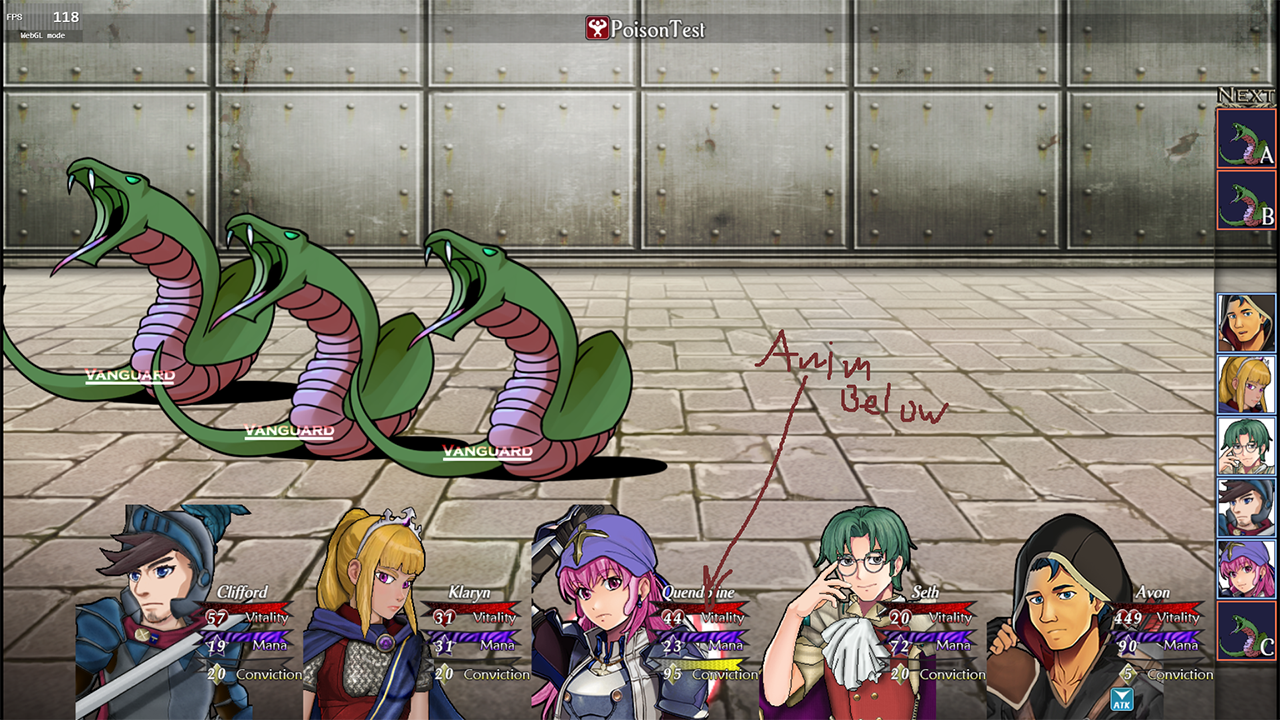
  19. When using your BattleStep Y plugin; is there any way to force the Z level of the battlers to actually be way on top (Z Level-wise)?

    I'm basically using this with MOG BattleHud, hiding the battlers beneath the character images from that, but then the animations from enemies play below the characters. It's been driving me nuts trying to fix it for hours (it gets fixed by one of the YEP features (YEP_BattleStatusWindow) that fixes Front-View animations normally)

    Example Screenshot:
    1763912469156.png

    EDIT: I've also tried this as an extra plugin at the end of my load order and then never having an animation with this in it, setting the else condition to wildly high numbers like 2150, but that doesn't seem to have any effect, so it's almost like the windows are just on a seperate plane.
    Code:
    var animation_position = Sprite_Animation.prototype.updatePosition;
    Sprite_Animation.prototype.updatePosition = function() {
        animation_position.call(this)
        if (this._animation.name.contains("XTPZH")) {
            this.z = -1;
        } else {
            this.z = 9;
        }
    };

    EDIT2: Also tried flipping the flags of whatever YEP_BattleStatusWindow and Battlecore do to see if I could trick it into doing whatever it does for Frontview on Sideview, but no success with that.

    Also tried your script from here but that seems to position everything up to out of bounds (occasionally I see a status effect string fall down from top left). Dunno if faffing around with the home co-ordinates in that may help, so might try that blindly (lol).

    EDIT3: Nope, no good. Whilst changing your little plugins code to something like
    var x = 190 + (i * 300) and var y = 900 does put the positions of battlers roughly correct on the gamespaces; not only do the animations no longer play at all, but the damage numbers are still popping behind the portraits even now, so the Z is clearly still wrong, I'm guessing.;_;

    ----
    Whilst I'm here, any way to shift the enemies back into their frontview positions that you're aware of (I'm literally using this method because I want full access to YEP Battle Sequences, but otherwise it's front view).

    Thanks in advance.
  20. Social_Knight said:
    When using your BattleStep Y plugin; is there any way to force the Z level of the battlers to actually be way on top (Z Level-wise)?
    :kaohi: No, Cae_BattleStepY only changes 2 aspects:
    • Battler home position (within current parent, i.e. the battle field); and
    • Battler step direction (vertical rather than horizontal).
    I.e. it changes nothing regarding how battlers are layered or when/where their animations play. You'd need a different plugin for that.

    Social_Knight said:
    Also tried your script from here
    As I implied in that post, that will probably not work as-is if you're using any plugins that change the battle status display...such as Mog's BattleHud, perhaps.

    Social_Knight said:
    Whilst changing your little plugins code to something like
    var x = 190 + (i * 300) and var y = 900
    If you're using YEP_BattleEngineCore then I strongly recommend you leave all plugin parameters for Cae_BattleStepY blank, and set home position (and step/flinch distance) in Yanfly's plugin instead. That might help to fix some compatibility problems?

    (My plugin should ignore its Home Position params when Yanfly's is present, but it seems that due to a typo those 2 params only get ignored if one or both of them are blank.)