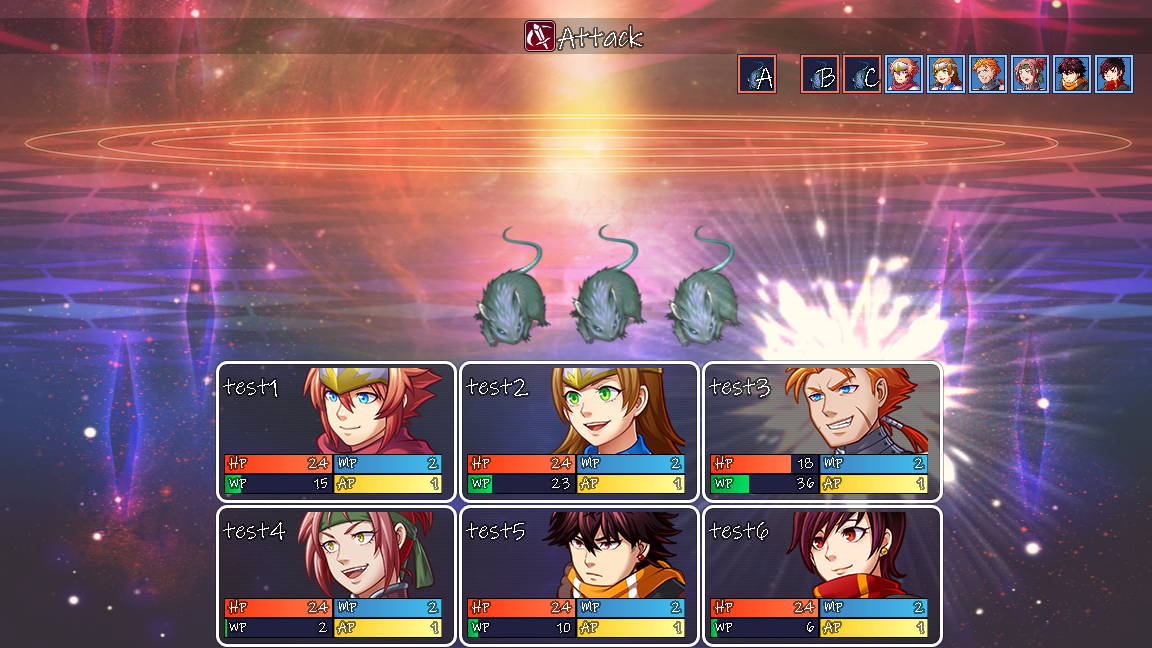
In case the suggested plugin(s) don't help, here's some technical info~
code structure
MV handles both animations and damage popups as child sprites. This gives an inherent grouping, since the only thing that can display between a child and its parent is another child of that same parent. By default the battlers are shown on the "battlefield" layer, but the windows are on a layer above.
One way around that is to change it so that the actor sprites are added to the window layer (or the window itself) instead. The window layer is created after the spriteset, so you'd also need to delay createActorSprites.
In case it helps, here's a rough edit (untested) from something I wrote for MZ (
Tweaks Q02):
plugin code
JavaScript:/*:
* @target MV
* @plugindesc Animations/popups on status window.
* @author Caethyril
* @url https://forums.rpgmakerweb.com/threads/161059/
* @help Free to use and/or modify for any project, no credit required.
*/
Spriteset_Battle.prototype.createActors = function() {
var w = SceneManager._scene._statusWindow;
this._actorSprites = [];
if (w) // not until status window is created
for (var n = $gameParty.maxBattleMembers(); --n >= 0;)
w.addChild(this._actorSprites[n] = new Sprite_Actor());
};
void (function(alias) {
Scene_Battle.prototype.createStatusWindow = function() {
alias.apply(this, arguments);
// now create the actor sprites
this._spriteset.createActors();
};
})(Scene_Battle.prototype.createStatusWindow);
// New home coordinates~
void (function(alias) {
Sprite_Actor.prototype.setHome = function() {
var w = SceneManager._scene._statusWindow;
var i = this._actor.index();
var r = w.itemRect(i);
var x = r.x + r.width / 2;
var y = r.y + r.height / 2;
alias.call(this, x, y);
};
})(Sprite_Actor.prototype.setHome);
// Stay put.
Sprite_Actor.prototype.updateMove = function() {
this._offsetX = 0;
this._offsetY = 0;
if (this._movementDuration > 0) {
this._movementDuration = 0;
this.onMoveEnd();
}
};
// Animations don't show on invisible sprites - assign SV battler (None).
Game_Actor.prototype.isSpriteVisible = function() { return true; };
// Fake sprite, hide the shadow.
Sprite_Actor.prototype.updateShadow = function() {
this._shadowSprite.visible = false;
};
Save your project to apply Plugin Manager changes before testing. If it doesn't work with your plugins, try turning them all off (except this one), save the project, then test again to see if it's a compatibility problem.
I imagine it won't work as-is, since it looks like you've got something that gives every actor their own status window - in that case you'd need to add each actor sprite to the correct window, and adjust the
setHome coordinates appropriately.