Avy's Icon Workshop

● ARCHIVED · READ-ONLY
Started by Avery 1711 posts Page 66 of 86 View original ↗
  1. Sharm said:
    I get it, but an upscaling algorithm is a filter (the direct resize is too). The important part was the first sentence, the second one was just there for clarification of what upscaling is I think, because she's fine with people using them in MV but doesn't want the size changed to do it. I think if someone were to by hand upscale it to be clean pixels she'd be okay with it (Don't do this and quote me as giving permission, it's a guess and you need permission from her first!), but I know that she can't stand the fuzzy look of the waifu resize and everyone agrees that the direct resize is terrible. Either way if you don't know for certain it's always best to assume no until it's been proven otherwise.

    Avery's been gone a lot lately, because she was sick and/or super busy, I'm not surprised she didn't reply yet. A little clarification wouldn't hurt though. BTW, you should give her a little slack if her wording isn't exact or what you expect, English is not her first language.

    So, wait, we're allowed to use the VX Ace icons in MV as long as they aren't upscaled? o_O This is just getting confusing.

    Well, the message I sent her was back in April of last year, so I hope she hasn't been sick for that long. (Because that would suck.) Also, I saw that her first language was German from the side-profile-thing, so I already knew that her first language wasn't English. As for her Terms, I would be fine with just a list in brackets with examples. Example: (dogs, cats, etc.). It doesn't have to be much.
  2. Yes, that is correct. So if you space them out so that they fit into a 32x32 space it will work.
  3. Only manually upscaling or double/triple/etc without any filters for a retro look is allowed.
    Anything else is not what i want to be done with my work.
    Spacing out is totally fine though, you can also put a fancy border around them.
    (On my phone atm, not constantly online and no time for long posts D; )
  4. ...Thank you for your time, but I'm going to find icons elsewhere, then.
  5. Since the release of MV many people have complained that the VX Icons looked much better but where not compatible with MV - and to be honest, to me upscaling is absolutly no solution ever. But I weren't me if I had no tweak for this problem. This had been on my to do for quite a while, but was never turnt into reality.

    Here is a random example of how they look like if used like this:
    2o7h885i.png
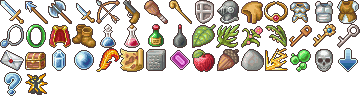
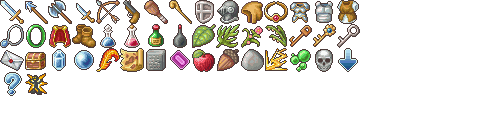
    Much better than those white silouettes or nasty upscaled stuff, huh? And the best - all you have to do is copy &paste! (okay... a lot maybe, but maybe I can convince someone to write a plugin for easier put together of those if there is enough interest?)

    76dqyqdz.png

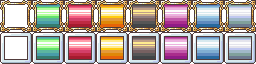
    You can choose between a more modern and a more fantasy one (could also be used for steampunk) and if you want a background or not. I also added some handy recolors!
    Of course they work with all VX/Ace styled icons (RTP, other artists, Yings with a little recolor and so on)!
  6. What a simple yet elegant solution! Brilliant!!
  7. Hey Avery,
    that sounds like a great solution. I give it a try right now :)
  8. Avery said:
    Is there interest for me to pick up the work here and continue?

    +1 for more MV Icons :) I love your own mv style
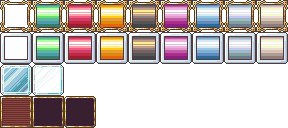
  9. I added an alternate white coloring and some more options for the MV tweaks:
    ybqaiej8.png

    And, because I think this is necessary I made a handy little tutorial for using the tweaks:

    Let's take for example this little piece of my icons:
    yj55jew7.png

    At first we need to enlage the canvas by 133,33% in both directions:
    njgpz4ry.png

    Then we add an 8x8 grid, best a magnetic one:
    w4m4zxtz.png

    And now we cut the rows and move them down - the first by 8, the other by 16 pixels. We do the same for the colums, first row is moved by 8, rest by 16 pixels. Now every icon is placed like this in the grid:
    2eszqyoc.png

    Now just change the grid to 32*32 magnetic grid and choose your favourite tweak. Add a layer behind the icons and fill in the tweaks you like where you want them by simple choose and fill. For the glassy ones add the second part of the tweak on a layer above the icons:
    5zownfna.png
  10. Oh those look nice!
  11. It's a very bright idea. It totally works, plus, it still looks very good...in fact, it arguably looks even better/less "plain" with frames!

    Impressive! Avery amazes like always ;)
  12. (^_^) I always liked your frames better, on other icons, so when I finally purchased RPG Maker MV and I thought I couldn't use your icons... I was sad, but now, I'm rather happy... I, now, have an opportunity to use your icons again, only with a little bit of work, but it's decreased it from LOTS of work to a little bit of work.
  13. While I am still stressed and stuff, I am carefully reopening this:

    You can now request 1-2 icons (VX Ace or my own MV style or 1 Big Icon or 2 Big Icon upscales) each!
    Have in mind that I have a lot of stress, I love fulfilling the requests, but time is rare. Please read the terms and stuff and be careful to add references! (if you can't find a perfect one, use a close one and describe what shall be different)

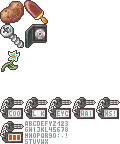
    Yesterday was a... *argh* day and my hads were shivering and I needed something to calm down and so I came back to my all time favourite pixel stuff.
    pp4mpoax.png
    So, here we have potato, ice cream, screw, dvd, random sparkle flower and semo-modular keychain.
    The key is my favourite - how about some riddles? Write 4! on it and let the user find out that you mean Room 4! = 1*2*3*4=24. Or write some letters on it or write 909 and let the player find out they need to turn it and read it as 606! So many options! Only the N sucks, I am sorry, such tiny letters are hard >_<
  14. Ah, yeah, 3 pixels wide just isn't enough. H, M and N always look identical. What I've done in the past is put the cross bit higher for the M, higher and longer for the N, then short and middle for the H. It's not really great, you still can't be sure which is which, but at least they don't look exactly the same.
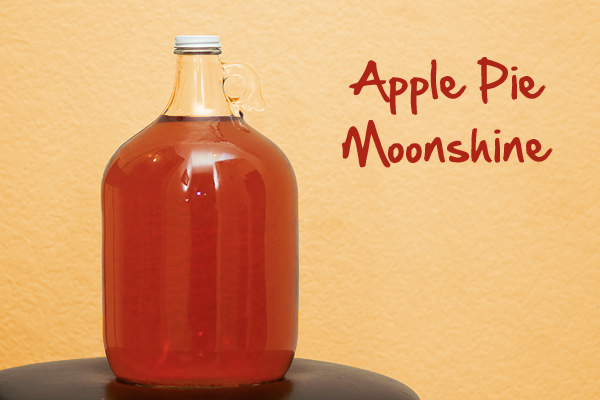
  15. I hope this is where I request things. Actually I have just one I can't seem to find anywhere. Please if you have the time I would like one of these
    jugs :) and yes with the brownish liquid in it. ALSO, Love the icons! You do amazing work. I would like it for MV if possible, if not thank you anyway. :)

    apple-pie-moonshine-recipe.jpg
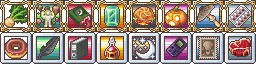
  16. Here you go :)
    I also added two more icons to fill the basic set a little more:
    cyxeo74i.png
  17. Avery said:
    Here you go :)
    I also added two more icons to fill the basic set a little more:
    cyxeo74i.png
    OH WOW! You are awesome. Just what I hoped it would look like and the other two are great! Thank you so much.. :)
  18. Hello Avy,

    If you're not too busy I'd like to request a shopping cart icon (24x24). I would be happy with either a handheld one or the big metal one on wheels. I think it's pretty self explanatory but I still added pics as a reference. Like I said either one would do, I'm aware it could be complex so go with what's less trouble for you :

    Shopping cart
    Handheld basket

    Also, not a request but a suggestion, more seeds would be nice. Farming games seems very popular these days! (I'm talking small bunch of seeds for corn, carrots, whatever...you know the deal) ;)

    I totally understand about stress too, so don't worry about requests if you're not in the mood...you're doing this out of the kindness of your heart (and because you like pixel art I guess) but it's not like you owe anyone anything...we are actually the ones owing you! :)

    Btw I had a question about editing your icons...am I allowed to use certain icons as a tile or other element than an actual icon? For exemple, can I animate a gear icon to rotate and use it as an element on a map or a hud? The size would remain the same and I would make sure rotations don't deform your work in any way...just wondering...

    Edit:
    Another question regarding using your icons for a hud...if allowed, I wondered if I could use the frames you made for using your icons in MV even if I don't own MV and would be using it for a hud in Ace. Sorry, I have a lot of questions...
  19. @Avery , still need canteen....please? T__T
    And the idea with VX icons and borders is just brilliant!

  20. Designing Icons takes time, especially since the MV Icons are that much larger than the Ace ones. So I decided to do an important change to my style and invented the
    Unbenannt2.png
    Color Book Icons

    I am outsourcing the coloring work to you and give you much more freedom in your icon designs!

    Here is the starting set:

    color.png

    The best thing: you can use any color technique you like! Prefer pencils? Just print them and add you color that way!

    Anywhere, anytime, just how you like it!
    tutorial.png