Avy's Icon Workshop

● ARCHIVED · READ-ONLY
Started by Avery 1711 posts Page 45 of 86 View original ↗
  1. That awkward moment when you are heading for fulfilling a request and the user has been banned...

    Here is the modular plant set I made for a challenge:


    k846s9dq.png
     ​
    ppz3rbfi.png
     ​

    Do you have an favourite modular set? What are your favourite icons you made with one of the sets?

    I think modular plants are one of the most useful sets I have made.There are so many "collect" and "legendary plant" quests and it is quite hard to find the right icons for everything, here are hundred combination possibilities for plants (if we don't count the color variations.I don't want to calculate the excactly number at the moment D; )  so there is a lot of variation for every collecting/crafting/whatever you need it - system x3

  2. Another superb modular set.  This should satisfy even the most demanding list of quest items.

    Well done, and thank you.
  3. I'm imagining an evil quest giver that just describes in detail the particular plant he is looking for and punishes the player with annoyed eye-rolls for every wrong plant he brings back. :D

    They look beautiful!
  4. Great job! Your modular icons are the best! It lets us craft some rather unique items for our games.
  5. Your modular plants seem fantastic.

    Off topic:

    @Avery check out Horizon Zero Dawn. It is a game with robot dinosaurs and new primitive tribes (post apocalyptic in a different way) I believe you might love it.

    I was watching E3 and thought of you, while I was looking at the trailer and gameplay.
  6. Avery said:
    So, I was in the mood today and had some spare time, so here is another bunch of new icons:


    44l42bmu.png


    @Deb:


    Well... now I have one? xD I had a clay tilley lamp under light sources, but I just had to try to make a magic lamp with dshinni x3


    @ksjp:


    Jep, that's a radish x3 I hope you can recognize the new icons, too?^^


    @MelowBee:


    Eh, I prefer the smaller ones because they are faster and much more used, that's the only advatages. I like doing the large ones, too, they just need a lot more time because they are four times the size of the smaller ones... and there are not many people using them. I keep the collection growing, so maybe there is one day more use for them (Playm has made an Ace Menu System using those and an XP Achievment System where you can use them, too, but there are not much more scripts supporting them).
     

    Avery said:
    First part of "Fruit, Vegetables, Nuts, whatever" x3


    I collected some ideas and made a list, those are the ones I have finshed. There will be a second part, but I think I won't have the time to finish all suggestions today so I'm going to split this topic^^'


    4mkhkt6k.png


    I: pineapple slice, orange I, orange II, apricot I, apricot II, star fruit I, star fruit II, mangoI, mango II, cherry


    II: peanut I, peanut II, chashew, almond


    III: aspargus I, aspargus II, artichoke, zucchini


    IV: manioc


    Thanks to Pine, Sharm, Kovos_Datch, Celianna, Deb and Touchfuzzy for the suggestions x3


    The start post has been updated, you can now find all 2147 icons in the sheet there^^
    just wanted you to know that these are going in my project today! =]


    <3


    (I have room for a pomegranate!) =]
  7. Great job again ^^ 
    Um... Can I suggest you to make cupcakes? Why not one with banana flavor, one rainbow flavor and one red fruits flavor? 
  8. @Avery dear, may I ask you about something on your iconset?

    How do you manage resizing - editing it so perfectly? Do you use a grid or something?

    I mean you edit it all the time, but once when I had to put some icons I asked into it (before you did, just to test them in game) I was surprised on how precise you must be on moving assets in that sheet.

    Thanks in advance if you spare a few seconds to put some light in this mystery. :p
  9. Dreadshadow said:
    @Avery dear, may I ask you about something on your iconset?

    How do you manage resizing - editing it so perfectly? Do you use a grid or something?

    I mean you edit it all the time, but once when I had to put some icons I asked into it (before you did, just to test them in game) I was surprised on how precise you must be on moving assets in that sheet.

    Thanks in advance if you spare a few seconds to put some light in this mystery. :p
    For moving icons around, I use GIMP and set up a grid with the sizes of the icons, then tick 'Snap to grid' and they all fit perfectly to the grid, so I just move them  about into diffefrent places :p
  10. My favorite modular set has to be the potions set. i really like the ornaments/effects you can add on to them like the mist or wings.

    Thank you once again for making so many awesome icons, modular or not =]
  11. Hi Avery,

    I must say that I am quite impressed with your icons. ^^ They really look wonderful. <3

    I suppose I have a little request here, if the shop is still open and you're taking requests of course. ^^

    I was hoping that you make an icon of the following weapon,

    u1XGJ60.png It's supposed to be a water and ice magic staff and all, steampunk styled. ^^

    Thanks a lot in advance. :)
  12. I am very sorry, I am currently quite busy >_<

    I arrange my icons with Graphicsgale, you can lock your grid there but there's also somewhere an program for editing iconsheets.

    ag6wmfth.png
     ​
    ucckzlo3.png
     ​
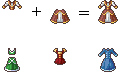
    Here are the modular dresses. I might expand the set, maybe. But here are the first 10x10 parts. There are no premade palettes this time, because every color consists only of 3 shades and there would be too many options. Just go to the RTP iconsheet and pick the three shades you like :3

    Here are two skill icons and Miss Nile's request:

    k4dvitew.png

    I'll try to update the start post this evening. There you can find all my icons and the other modular sets there.
  13. Wonderful, as always.
  14. Avery said:
    I am very sorry, I am currently quite busy >_<

    I arrange my icons with Graphicsgale, you can lock your grid there but there's also somewhere an program for editing iconsheets.

    ag6wmfth.png
     ​
    ucckzlo3.png
     ​
    Here are the modular dresses. I might expand the set, maybe. But here are the first 10x10 parts. There are no premade palettes this time, because every color consists only of 3 shades and there would be too many options. Just go to the RTP iconsheet and pick the three shades you like :3

    Here are two skill icons and Miss Nile's request:

    k4dvitew.png

    I'll try to update the start post this evening. There you can find all my icons and the other modular sets there.

    My my... take a look at this people.

    You can make Victorian (thus steampunk too), modern, royal, villager's dresses, just by doing a jigsaw game and a recoloring.

    @Avery they are fantastic!
  15. Avery, you're wonderful. ^^ I love the staff and the dresses truly look amazing. Thank you very much! ^^
  16. Wow!  Looking good!  I want to incorporate your equipment and clothing designs into a graphics pack project, if that's okay with you.  I think it'd be pretty cool to have sprites and busts that match the icons.
  17. Is there a possibility for you to ever make a Tutorial how you make so awesome icons?

    Like what program do you use, how you get so crispy and clean looking icons etc. :)
  18. By the way, has anybody tested the dresses? Everything working fine? No weird issues or impossible combinations?

    And as always, I'd love to see your favourite combinations^^ Since I am thinking about a part II, you can also throw me random references and I'll see what I can do^^ (Just mark that it is a suggestion, no request. Requests have to follow the rules ;>)

    @ksjp17

    Thank you very much!

    @Dreadshadow

    Excatly that^^ I have 3 leftover parts, so I thing when I have enough motivation I'll make a second part so there are even more possibilities^^

    @MissNile

    You are welcome^^ I'm glad you like it, I had a little trouble with the details on the upper part^^

    @Sharm

    Sure, go ahead^^ It's always great when there's matching stuff; that makes both resources even more useful :3

    @Strawberry
     There actually is already one:
    Have a look at this

    I use Graphicsgale, nearly never layers and stick with the RTP palette :3
  19. I feel the same way. Thanks!