Altimit Pixel Movement [0.50β]

● ARCHIVED · READ-ONLY
Started by xilefian 545 posts Page 25 of 28 View original ↗
  1. AquaEcho said:
    Putting the script in the event's move route is making it choppy and less responsive in my testing right now so I have to look into what's causing it. For now you can put this version of the script in an event page instead and it's pretty smooth. I updated the instructions in the thread.
    1682723502443.png
    i get this error when i start the game, can you help me to fix it
  2. abdo97z said:
    View attachment 260307
    i get this error when i start the game, can you help me to fix it
    My plugin doesn't have the word "right" anywhere in it. If it's breaking some other plugin, you'll need to say which one. Or do you just want my help with Altimit in general? In that case, can you post the console log? Press F8 or Fn then F8 to bring it up.
  3. Yes, I am asking for help with Altimit plugin please, here is the console

    screenshot
    1682728930663.png
  4. abdo97z said:
    Yes, I am asking for help with Altimit plugin please, here is the console

    screenshot
    View attachment 260314
    Did you change the name of the file? It needs to be AltimitMovement.js
    Any plugin that has parameters (like this one) requires the file name to be intact so the RPG Maker engine knows where to look for the data.
  5. AquaEcho said:
    Did you change the name of the file? It needs to be AltimitMovement.js
    Any plugin that has parameters (like this one) requires the file name to be intact so the RPG Maker engine knows where to look for the data.
    ohh i didn't know that, now it is working, thanks a lot!
    but i have another issues if it doesn't disturb you.
    - the first is xhile moving left the movement is very weird and the character and the followers like shaking.
    - the second is that when i enter a house from the door and it transport player to ^the psition of the entrance of the house, when i move the touch player event in the entrance( for the exit) works even i am on it
  6. - the first is xhile moving left the movement is very weird and the character and the followers like shaking.
    This may be a lag issue from parallel or autorun events or a plugin conflict issue. Could you post your plugin list?

    - the second is that when i enter a house from the door and it transport player to ^the psition of the entrance of the house, when i move the touch player event in the entrance( for the exit) works even i am on it
    Altimit is triggering the touch event as soon as you touch the border of the event's collision box. There are two ways to solve this: delete the transfer event and get a region events plugin and set it so your player transfers to another map if they touch a tile marked with a certain ID. Or, keep the event but change it to a parallel event from touch and have it check every 10 frames if your player is on it. See below

    AquaEcho said:
    You can do Conditional Branch>Script
    Code:
    Math.sqrt(($gamePlayer.x - this.character(0).x) ** 2 + ($gamePlayer.y - this.character(0).y) ** 2)<0.2
    That will check if your player is on the event. Put whatever you want to happen inside the conditional/if statement.

    Then set it to Options>Through and Trigger>Parallel. At the end of the event box outside the if statement, you can put wait 10 frames since this needs to be parallel but doesn't need to check that often.
  7. AquaEcho said:
    This may be a lag issue from parallel or autorun events or a plugin conflict issue. Could you post your plugin list?


    Altimit is triggering the touch event as soon as you touch the border of the event's collision box. There are two ways to solve this: delete the transfer event and get a region events plugin and set it so your player transfers to another map if they touch a tile marked with a certain ID. Or, keep the event but change it to a parallel event from touch and have it check every 10 frames if your player is on it. See below
    Thanks for fast reply, for the first problem, i don't have autorun or parallel issues and i have only this plugin in my plugins list.
    for the second problem i tried the second solution but now the event work just the same time i am transferd to the house even if i don't move
  8. abdo97z said:
    Thanks for fast reply, for the first problem, i don't have autorun or parallel issues and i have only this plugin in my plugins list.
    for the second problem i tried the second solution but now the event work just the same time i am transferd to the house even if i don't move
    Could you post your inside and outside transfer event pages?
  9. this is the outside transfer event:
    outside event
    1682732288346.png

    and this is the inside transfer event:
    inside event
    1682732416706.png

    EDIT: i guess that i found a solution for the second problem by adding a conditional branch to the exit event that check if the player is facing down, this is working but i hope if there is a better solution by editing the plugin code itself, for example there is a similar plugin: https://raw.githubusercontent.com/rev2nym/SAN_AnalogMove/master/js/plugins/SAN_AnalogMove.js
    that is perfect for entring houses but it has just the issue of directions
  10. Are the 8,12 and 10,16 coordinates where each event is located? You either need to pick a tile one square away as the landing point or use event pages and self switches so they only reactivate as tranfer tiles once you leave them and come back on.
  11. sorry but i haven't understood the second point, how can i use self switchs to make that act
  12. To be clear, you're setting the destination of both transfers to each other? So you're landing on top of a transfer event both ways?

    Edit: Looks like your outside door event is an action trigger so the issue is just the inside.

    I can tell you how to deactivate an event when you enter a map then reactivate it when you step outside the tile but it's going to be more complicated than just checking if the player is facing down.
    i guess that i found a solution for the second problem by adding a conditional branch to the exit event that check if the player is facing down, this is working but i hope if there is a better solution by editing the plugin code itself,
  13. AquaEcho said:
    I can tell you how to deactivate an event when you enter a map then reactivate it when you step outside the tile but it's going to be more complicated than just checking if the player is facing down.
    yes that is what i want, please tell me how to do that
  14. abdo97z said:
    yes that is what i want, please tell me how to do that
    In your outside door event put before the transfer command
    $gameSelfSwitches.setValue([mapNumberOfInsideDoor, insideDoorEventNumber, 'A'], true);

    For example: $gameSelfSwitches.setValue([36, 1, 'A'], true);

    That will turn off the inside event when you open the door, or rather make it so it runs the commands on the second page instead of the first.

    On your inside door create a second event page that looks like the picture below
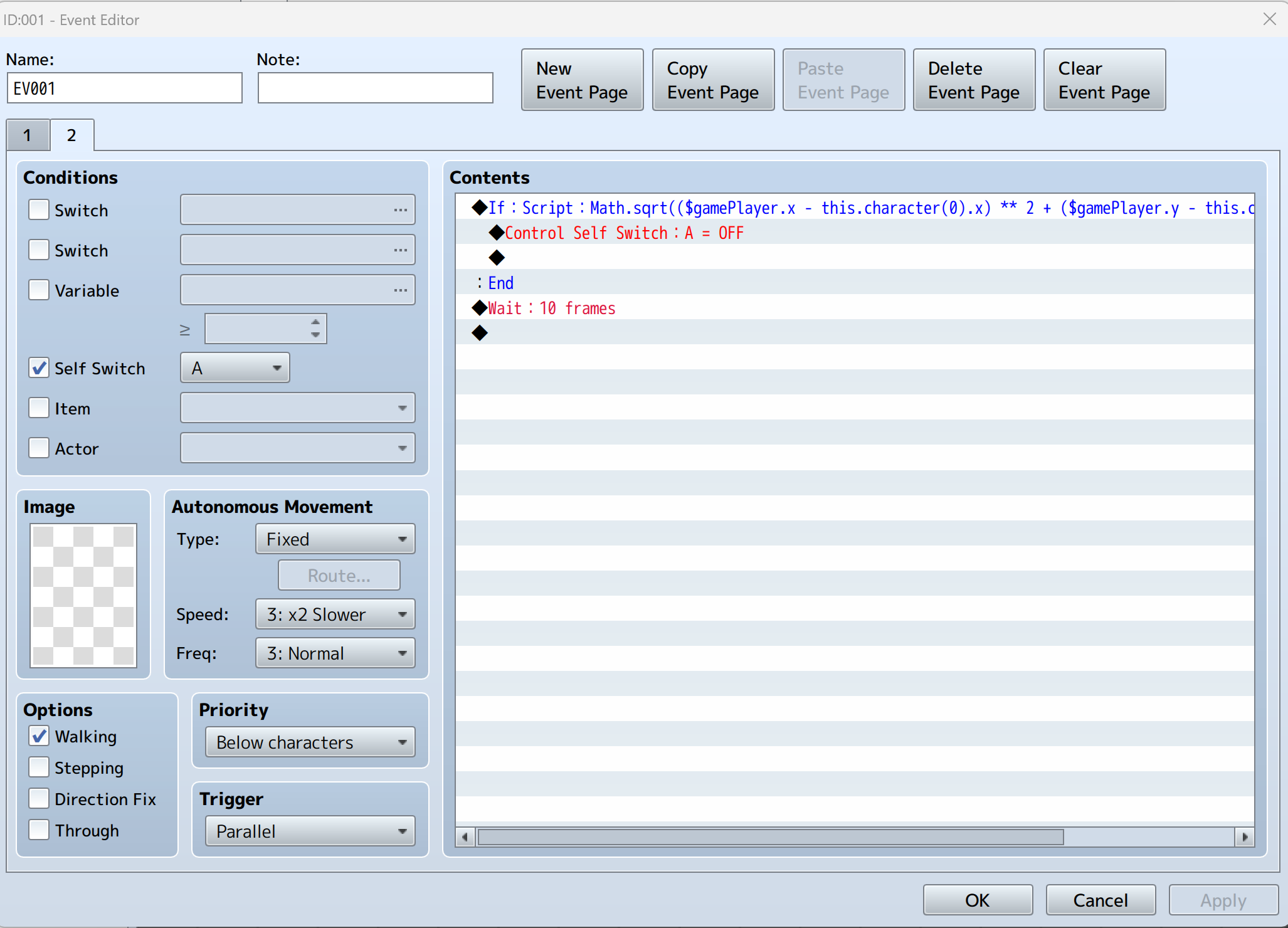
    Screenshot 2023-04-29 081140.png
    The full if statement being: Math.sqrt(($gamePlayer.x - this.character(0).x) ** 2 + ($gamePlayer.y - this.character(0).y) ** 2)>=0.2

    That will check if your player has moved away from the door tile a certain distance, in which case it will turn off the second page and go back to the first event page's commands.
  15. AquaEcho said:
    hat will turn off the inside event whe
    AquaEcho said:
    In your outside door event put before the transfer command
    $gameSelfSwitches.setValue([mapNumberOfInsideDoor, insideDoorEventNumber, 'A'], true);

    For example: $gameSelfSwitches.setValue([36, 1, 'A'], true);

    That will turn off the inside event when you open the door, or rather make it so it runs the commands on the second page instead of the first.

    On your inside door create a second event page that looks like the picture below
    The full if statement being: Math.sqrt(($gamePlayer.x - this.character(0).x) ** 2 + ($gamePlayer.y - this.character(0).y) ** 2)>=0.2

    That will check if your player has moved away from the door tile a certain distance, in which case it will turn off the second page and go back to the first event page's commands.
    Thanks a lot, this is working perfectly now. I have just one question more if there is a way to chang the quick event of the door to this so i don't have to change every time
  16. abdo97z said:
    Thanks a lot, this is working perfectly now. I have just one question more if there is a way to chang the quick event of the door to this so i don't have to change every time
    No, but you can copy and paste your door events and just change the location references in each one.
  17. AquaEcho said:
    No, but you can copy and paste your door events and just change the location references in each one.
    Ohh ok, thank you very much, and I apologize for the disturbance
  18. I just wanted to know if there is any light plugin that is compatible with this one, because every time there is a bug, for example this bug happens with KhasUltraLighting

    1684886738660.png1684886764843.png
  19. When you post an error log it needs to be the console tab, not the elements tab.
  20. SushiAssado said:
    AquaEcho said:
    When you post an error log it needs to be the console tab, not the elements tab.
    sorry, i was fixing that now 1684887246958.png

    observation, in this Khas plugin there is a way to deactivate the "Custom Blending" option, deactivating it, the game runs but when you move it to the right or left, it gives another error


    1684887347988.png

    1684887385426.png