Great script, but i would prefer to have it this way then with friend level's.
Friendship Value between -100 (equaly to hate) and +100 (equaly to best friends).
Maybe i will have to create this script on my own :)
Actors Friendship System
● ARCHIVED · READ-ONLY
-
-
I'm probably being stupid, but is it normal that even though I've set my main character to the leader, no friendships show up even when I have someone in my party?
-
So no solution to remove the "back" button? Maybe commenting a string in the plugin or something?
-
I think this is a great plugin that will work well with what I'm trying to make, but I'm really confused about using it. The instructions say to use plugin commands, but I don't know where to use them. Also, if I want to set it to a single leader, do I leave it at 0 or switch it to 1?
I'm new to MV and am rusty with RPG maker as a whole, so I really need some assistance with the program. -
@MasonXY
Basically, you use the Plugin Command during your eventing. Just enter an event page and search "Plugin Command" under tab number 3.
About Single Leader...Spoiler
If you want to go with Single Leader approach, you simply put 1 inside "Use Single Leader Scene" plugin parameter.
What it does is simply change how the Friendship Scene will look like. The Leader list window will be gone. Only the Friend list window remains (which now show the friend list of first available Leader).Spoiler
Aside from visual change, it does NOT change anything else. You can still make 2 or more Actors have <AFS Leader> notetag. You just cannot view their friend list because of Single Leader Scene. -
I seem to be getting errors when I try to use them. It's probably because I'm doing it incorrectly. (Sorry, I'm a dunce). I set a test event to try and figure it out. On the event, I use the Plugin codes listed in the help section:
AFS Show Leader x
AFS Show Friend x Leader y
I assumed that I would replace x & y with names of generated Actors, and I tried putting them with quotations and without quotations. And I made sure to add <AFS Leader>
to my leader's note box.
Sorry, I'm completely lost at the moment. :( -
Perhaps, it's part of my fault for not giving direct example in the help file. :)
Anyway, x and y is actually a number, not names or text. You are supposed to replace x, y, z, etc with the Actor's ID number in your database.
This is example screenshot. :D
Please feel free to ask if anything is still confusing/not clear/not enough info/etc.Spoiler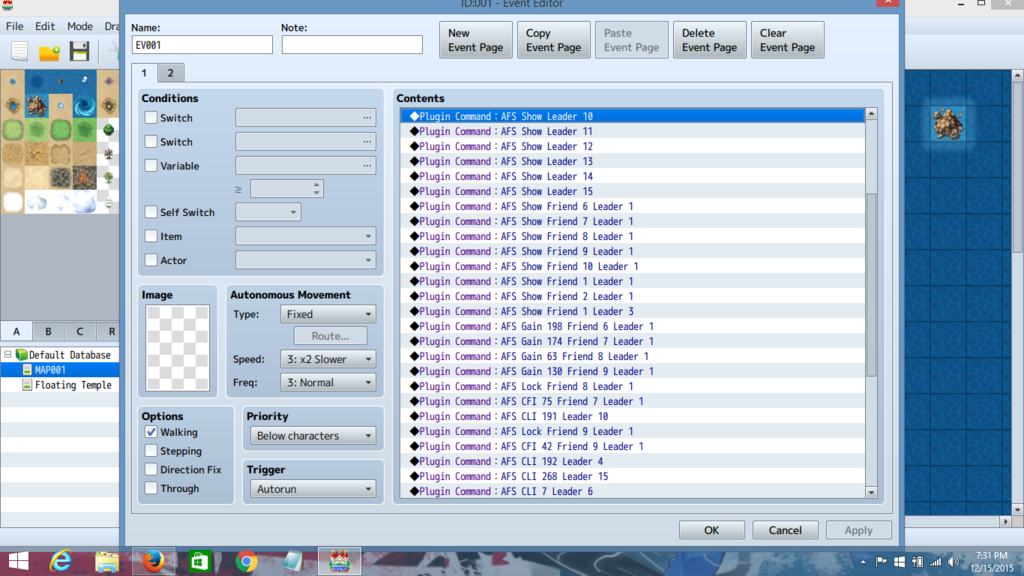
I'll make sure to banish every single doubt in your heart with clarity! ;) -
Aha! I got it to work! Thank you for your help :D !
-
Really great script that I'm sure I will use in my project!
But I have a question : How can I set up a event (common event) when a Actor Meet a Certain Level ? Because I want to Pop Up a Text Box and Give a certain Gift when the player reach this level of friend ship
Can someone help me on how I can achieve that with this script?
thx! -
@Val
I can help you set it up with custom code snippet (mini add-on).
But, I need way MORE detailed information about what you try to accomplished.
Example:
1. Single common event for everybody? Each actor has their own common event?
2. Are you using Single Leader approach? Multiple Leaders?
3. Give me as much info as possible that leave zero trace of doubt.
EDIT:
I just updated the plugin to version 2.05.
You can now set up any common event to be run at specific Friendship Level for each actors. :D
Simply insert this notetag inside Actor's notebox.
<AFS Event Level x Leader y: n>
Replace x with Friendship Level, y with Leader ID, n with the common event ID that you want to run. -
Wow that really great!! I will try this out!
Normally it should do exactly what I want.
A different event for each actor when he reach certain friendship level to have something great happening. -
The Commont event work great Thank you ! :D@Val
I can help you set it up with custom code snippet (mini add-on).
But, I need way MORE detailed information about what you try to accomplished.
Example:
1. Single common event for everybody? Each actor has their own common event?
2. Are you using Single Leader approach? Multiple Leaders?
3. Give me as much info as possible that leave zero trace of doubt.
EDIT:
I just updated the plugin to version 2.05.
You can now set up any common event to be run at specific Friendship Level for each actors. :D
Simply insert this notetag inside Actor's notebox.
<AFS Event Level x Leader y: n>
Replace x with Friendship Level, y with Leader ID, n with the common event ID that you want to run.
But I want to know if it's possible to add the friendship menu in the battle report? Because it's kind of hard to know where you are at your friendship level when the only way is to go in the main menu and check you friendship level.
I want to find a way to show to the player that "Hey you Actor 1 friendship level up" Yippies!! you got this skills. - I could use the common event outside of battle for that humm I going to think about a way to make it clear to the player.
If you have any other improvement let me know because it already a great pluging :D -
Moggle_X is it possible for you to make the change so it's only when you WIN a battle that you gain the point for the friendship? Because Right now if I lose, I continue to get some point. It could be an additional option in your pluging if people when too gain point friend ship when you lose a battle.@Val
I can help you set it up with custom code snippet (mini add-on).
But, I need way MORE detailed information about what you try to accomplished.
Example:
1. Single common event for everybody? Each actor has their own common event?
2. Are you using Single Leader approach? Multiple Leaders?
3. Give me as much info as possible that leave zero trace of doubt.
EDIT:
I just updated the plugin to version 2.05.
You can now set up any common event to be run at specific Friendship Level for each actors. :D
Simply insert this notetag inside Actor's notebox.
<AFS Event Level x Leader y: n>
Replace x with Friendship Level, y with Leader ID, n with the common event ID that you want to run.
What do you think of?
thx! -
Google Translate:
It is possible to make a compatibility patch for Prettier Gauges of Rocketmancer?? -
@Georg
Yes, I can. But only with one condition. :)
Contact Rocketmancer to add his own "Imported" variable inside his script so I can update my plugin to be compatible with Prettier Gauges plugin.
If he refuse, than ask him to make his script to be compatible to mine by adding this code snippet:
Spoilerif (Imported.Moogle_X_AFS) {
Window_ActorsFriendship.prototype.drawGauge = function(x, y, width, rate, color1, color2) {
Window_Base.prototype.drawGauge.call(this, x, y, width, rate, color1, color2);
};
} -
I updated the plugin to new version (v2.06).
The FP gain after battle now only occur during victory.
There is also an option to activate Pretty Gauge compatibility patch.
Keep in mind that there is a minor downside if you turn on the above option.Spoiler
Basically the "Gauge Height" option will become unusable. Friendship gauge's height value cannot be customized anymore. -
thank you for updating
I love your plugin -
I updated the plugin to new version (v2.06).
The FP gain after battle now only occur during victory.
There is also an option to activate Pretty Gauge compatibility patch.
SpoilerThank again for your great plugins !! Continue your incredible work Moogle_X !! ^_^ Can't wait to see what you could do next with your plugins :DSpoilerKeep in mind that there is a minor downside if you turn on the above option.
Basically the "Gauge Height" option will become unusable. Friendship gauge's height value cannot be customized anymore. -
Humm the only bug that need to be fix right now is when 2 people level up at the same time the FriendShip system dont queue the 2 common events :(
It's only play the one from the last common event.
Moogle_X can you fix that problem please so all event can be play in a queue when a lot of player level up in your friendship system?
thank you :D -
@Val
I updated the plugin again to v2.07.
Now, the multiple common events bug should be fixed now. :D